


 本文介绍了如何使用SQL Server的BCP工具进行数据的导入和导出操作,包括启用xp_cmdshell组件,以及不同方式的命令行示例。在面对数据杂乱的情况下,建议指定列分隔符来避免导入错误。
1.首先需要启用xp_cmdshell组件:
sp_configure 'show advanced options',1
reconfigure
go
sp_configure 'xp_cmdshell',1
reconfigure
go
2.测试导出:

结果: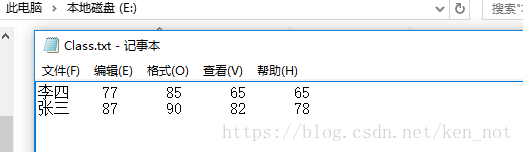
多种写法:
exec master..xp_cmdshell 'bcp "select * From Test.dbo.Class" queryout E:\Class.txt -T -c'3、导入:
exec master..xp_cmdshell 'bcp Test.dbo.Class in E:\Class.txt -T -c总结:如果表数据比较杂乱,导入可能会有一些报错,建议制定 列分隔符 -t 指令。
详细bcp 命令解析:
bcp {dbtable | query
 最低0.47元/天 解锁文章






 扫一扫
扫一扫


 1550
1550


 到【灌水乐园】发言



