


 基于C#的编译原理教学系统展示了词法分析器设计、NFA-DFA-MFA转换等核心功能,通过实例演示了如何解析和转换源代码。
目录
一.系统介绍
本系统是基于C#开发的一个编译原理实验辅助教学系统,包含了词法分析器设计、自动机系统、NFA_DFA_MFA转换、LL(1)分析、LR(0)分析、SLR(1)分析等主要功能的实现。
二.运行结果展示
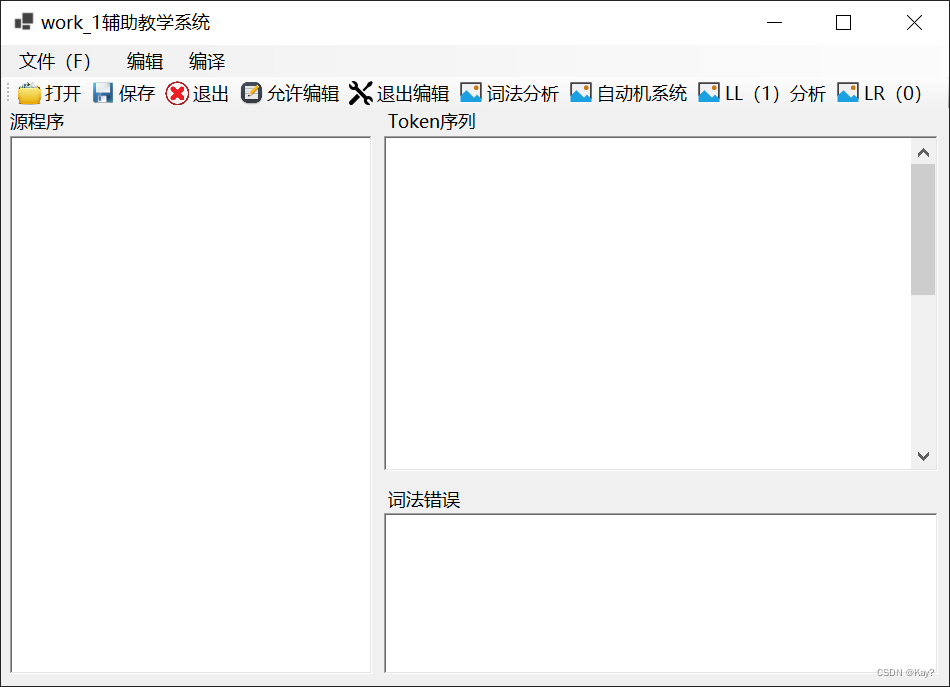
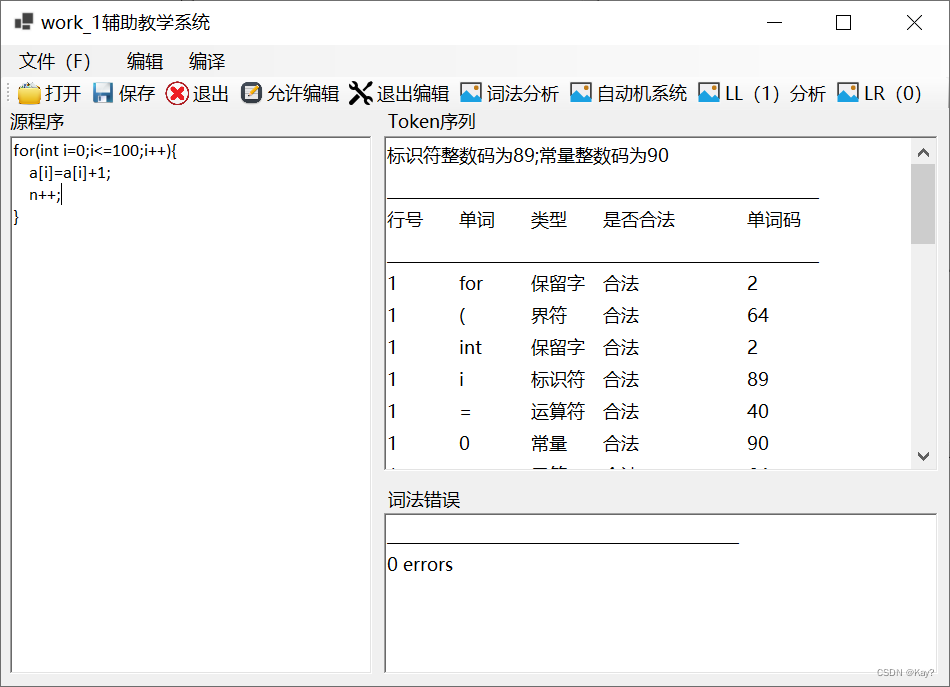
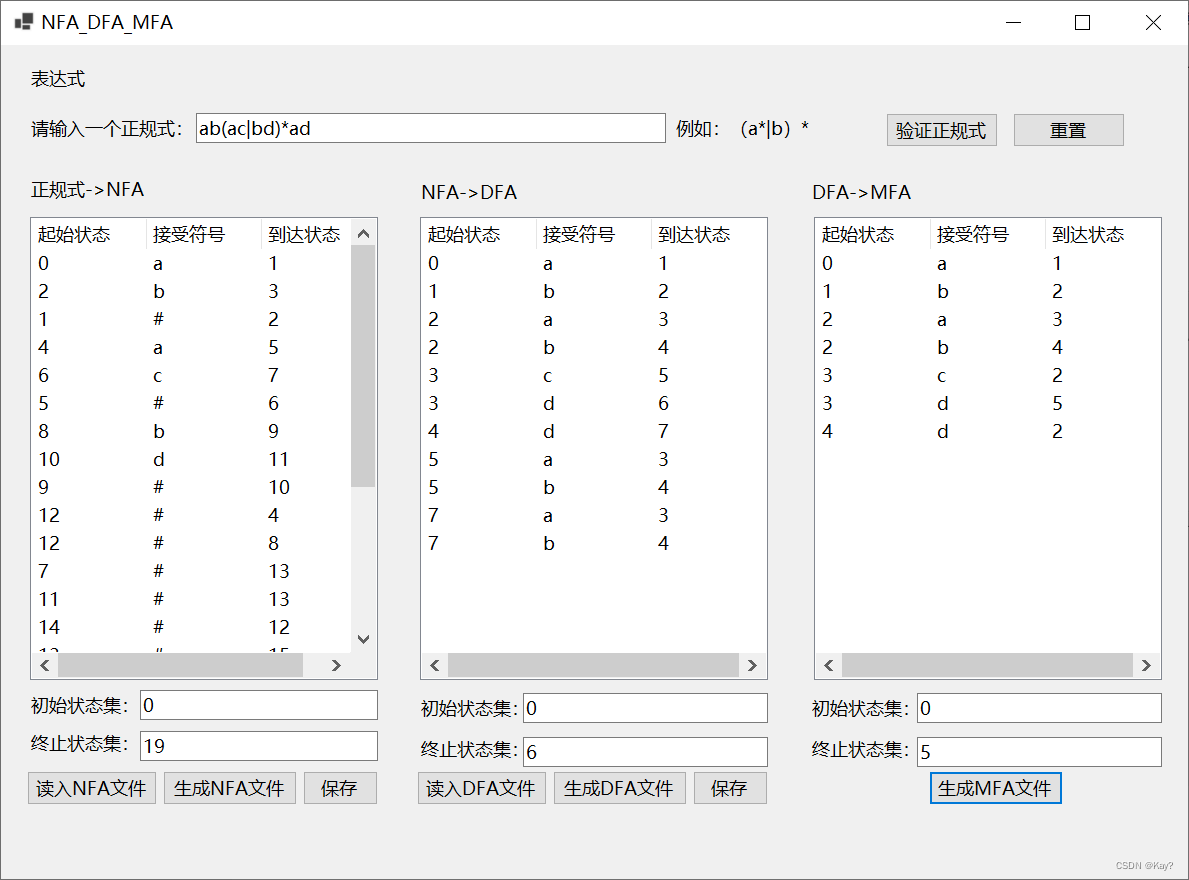
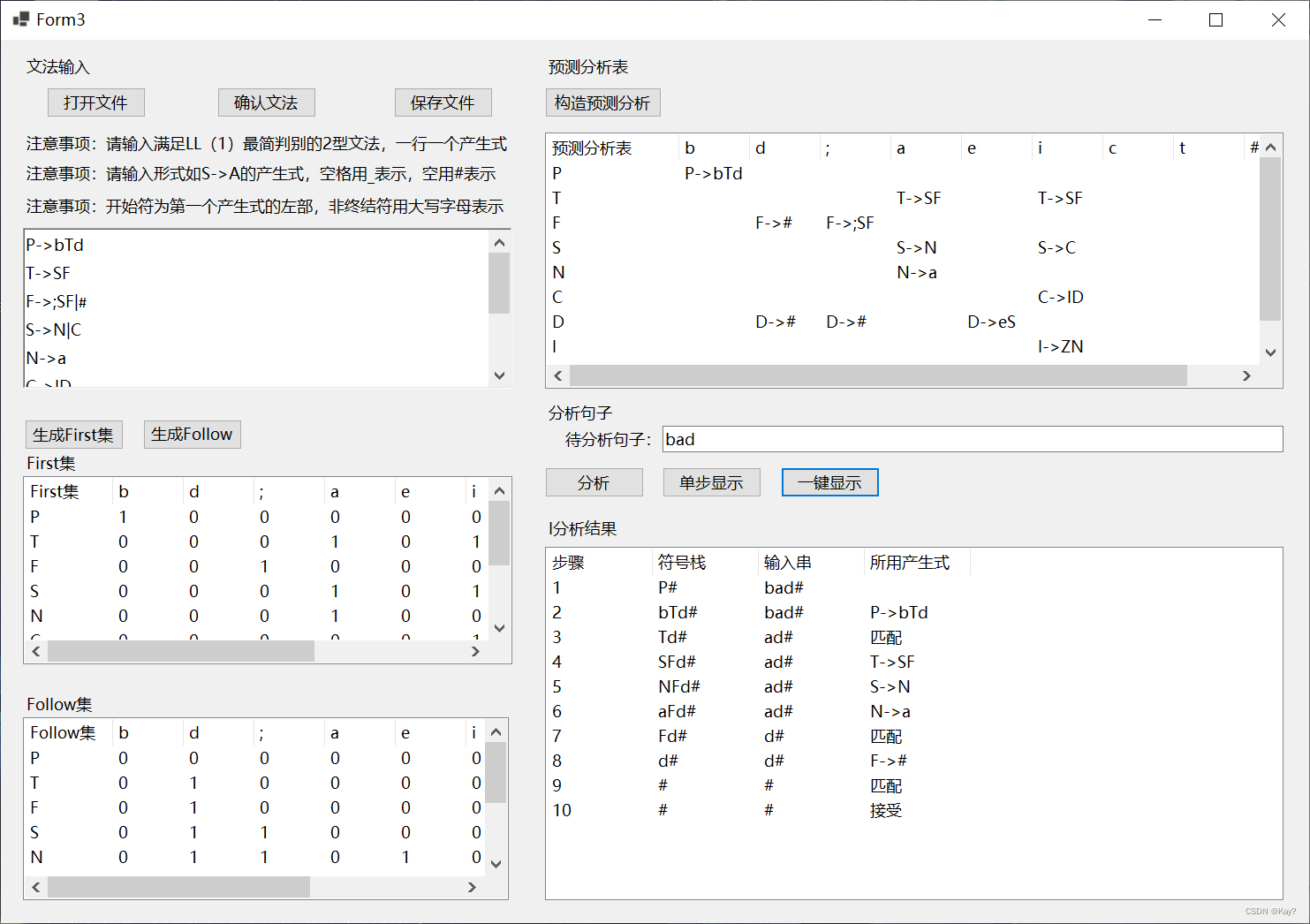
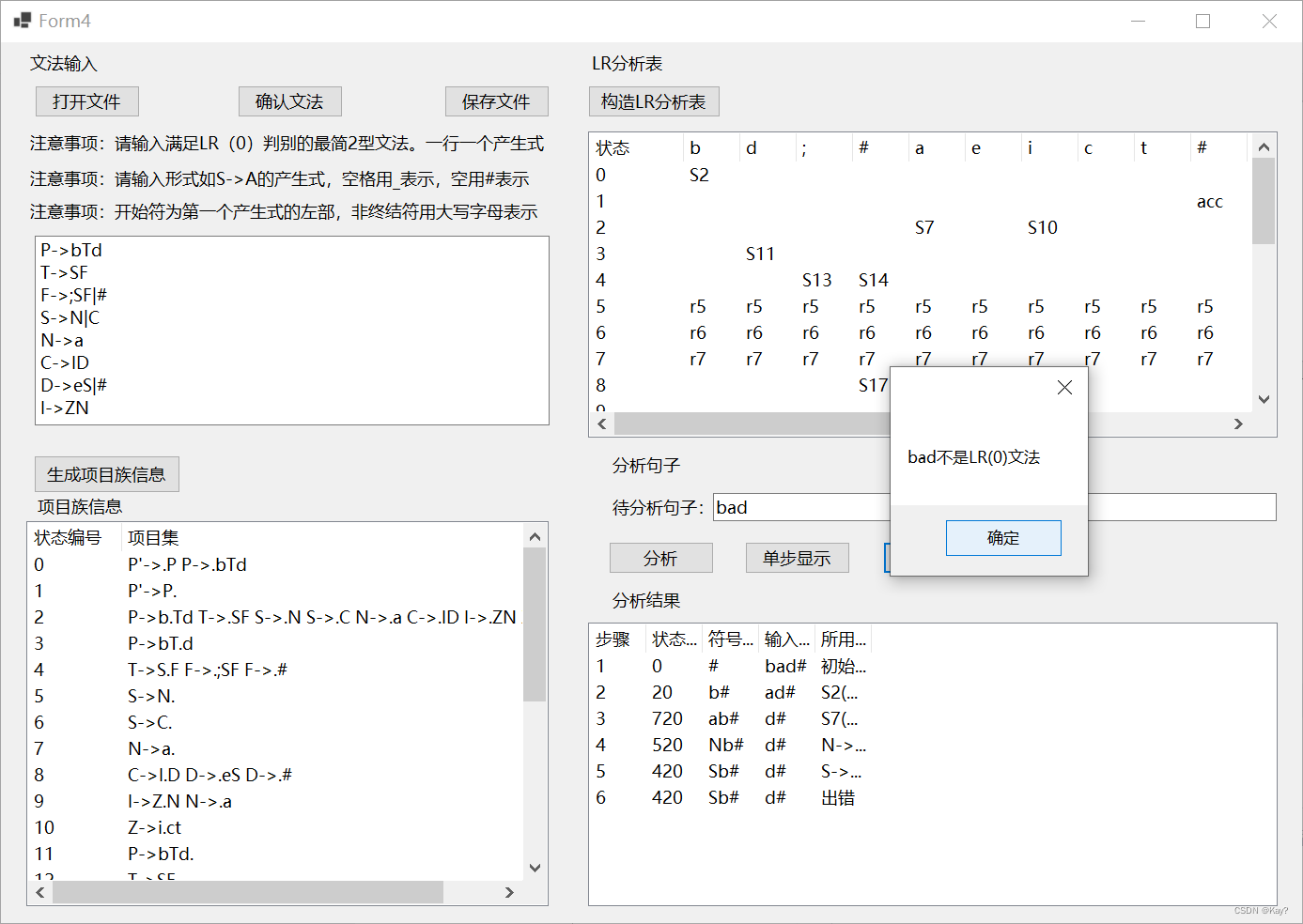
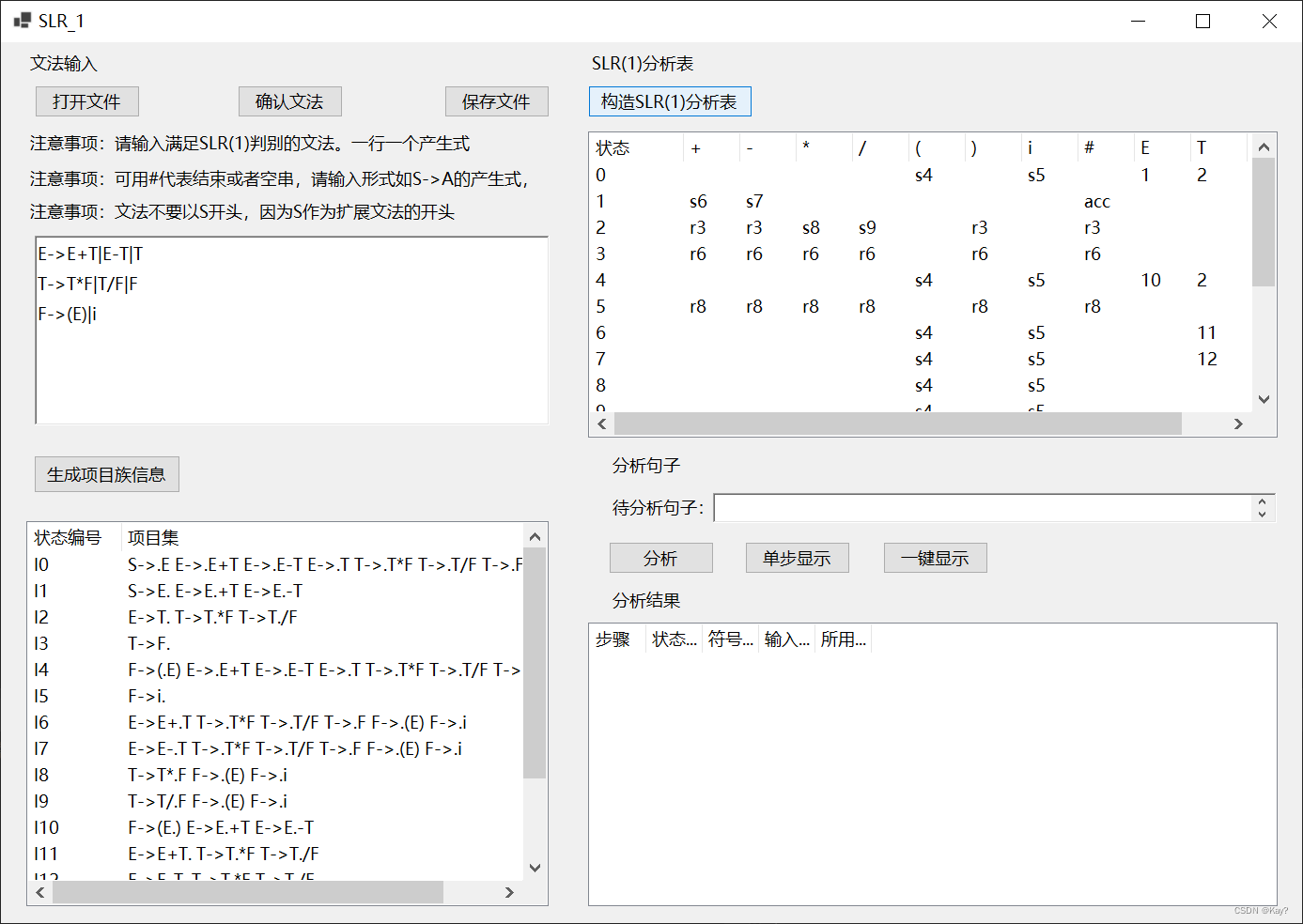
三.源代码
namespace work_1
{
public partial class Form1 : Form
{
static List<string> keys = new List<string>() { "int","float","double","char","struct","if","else","for","while","do","return",
"break","continue","auto","short","long","union","enum","typedef","const","unsigned",
"signed","extern","register","static","void","switch","case","goto","continue","break",
"sizeof","default"};
static List<string> arithmetics = new List<string>() { "+","-","*","/","++","+="};
static List<string> relations = new List<string>() { "<", "<=", "=", "==", ">", ">=", "!=","&","|","&&","||" };
static List<char> borders = new List<char>() { ',',';','{','}','(',')','[',']' };
//static List<string> labels = new List<string>();
static List<string> consts = new List<string>();
public Form1()
{
InitializeComponent();
}
private void toolStripMenuItem1_Click(object sender, EventArgs e)
{
}
private void panel1_Paint(object sender, PaintEventArgs e)
{
}
private void menuStrip2_ItemClicked(object sender, ToolStripItemClickedEventArgs e)
{
}
private void richTextBox2_TextChanged(object sender, EventArgs e)
{
richTextBox2.ReadOnly = true;
}
//打开按钮响应
private void toolStripButton1_Click(object sender, EventArgs e)
{
OpenFileDialog openFileDialog1 = new OpenFileDialog();
DialogResult dr = openFileDialog1.ShowDialog();
//获取所打开文件的文件名
string filename = openFileDialog1.FileName;
if (dr == System.Windows.Forms.DialogResult.OK && !string.IsNullOrEmpty(filename))
{
StreamReader sr = new StreamReader(filename);
richTextBox1.Text = sr.ReadToEnd();
sr.Close();
}
}
private void richTextBox1_TextChanged(object sender, EventArgs e)
{
}
//打开菜单响应
private void 打开ToolStripMenuItem_Click(object sender, EventArgs e)
{
OpenFileDialog openFileDialog1 = new OpenFileDialog();
DialogResult dr = openFileDialog1.ShowDialog();
//获取所打开文件的文件名
string filename = openFileDialog1.FileName;
if (dr == System.Windows.Forms.DialogResult.OK && !string.IsNullOrEmpty(filename))
{
StreamReader sr = new StreamReader(filename);
richTextBox1.Text = sr.ReadToEnd();
sr.Close();
}
}
////保存按钮响应
private void toolStripButton2_Click(object sender, EventArgs e)
{
SaveFileDialog saveFileDialog1 = new SaveFileDialog();
DialogResult dr = saveFileDialog1.ShowDialog();
string filename = saveFileDialog1.FileName;
if (dr == System.Windows.Forms.DialogResult.OK && !string.IsNullOrEmpty(filename))
{
StreamWriter sw = new StreamWriter(filename, true, System.Text.Encoding.UTF8);
sw.Write(richTextBox1.Text);
sw.Close();
}
}
private void 保存ToolStripMenuItem_Click(object sender, EventArgs e)
{
SaveFileDialog saveFileDialog1 = new SaveFileDialog();
DialogResult dr = saveFileDialog1.ShowDialog();
string filename = saveFileDialog1.FileName;
if (dr == System.Windows.Forms.DialogResult.OK && !string.IsNullOrEmpty(filename))
{
StreamWriter sw = new StreamWriter(filename, true, System.Text.Encoding.UTF8);
sw.Write(richTextBox1.Text);
sw.Close();
}
}
//退出按钮响应
private void toolStripButton3_Click(object sender, EventArgs e)
{
System.Environment.Exit(0);
}
//退出菜单响应
private void 退出ToolStripMenuItem_Click(object sender, EventArgs e)
{
System.Environment.Exit(0);
}
//允许编辑
private void toolStripButton4_Click(object sender, EventArgs e)
{
//richTextBox1.ReadOnly=false;
richTextBox1.Enabled = true;
richTextBox2.Enabled = true;
richTextBox3.Enabled = true;
}
//退出编辑(只读)
private void toolStripButton5_Click(object sender, EventArgs e)
{
richTextBox1.Enabled=false;
richTextBox2.Enabled = false;
richTextBox3.Enabled = false;
}
private void toolStripButton6_Click(object sender, EventArgs e)
{
richTextBox3.Text = null;
int a = 89;
int b = 90;
int num = 0;
richTextBox2.Text = string.Format("标识符整数码为{0};常量整数码为{1}\n", a,b);
richTextBox2.AppendText("______________________________________________________\n");
richTextBox2.AppendText("行号\t单词\t类型\t是否合法\t单词码\n");
richTextBox2.AppendText("______________________________________________________\n");
string[] str = richTextBox1.Text.Split('\n');
//richTextBox2.AppendText(#"{Word}\t关键字\t合法\n");
//逐行分析
for (int i = 0; i < str.Length; i++)
{
char[] chars = str[i].ToCharArray();
List<char> word = new List<char>();//临时保存分解出来的变量,关键字,字符等
for (int j = 0; j < chars.Length; )
{
char ch = chars[j]; //ch=i
while (ch <= 32 && ch > 0)//跳过不可见字符(空格)
{
if (j < chars.Length - 1)
{
ch = chars[++j];
}
else
{
break;
}
}
if (ch >= 'a' && ch <= 'z' || ch >= 'A' && ch <= 'Z')//若以字母开头,判断是关键字还是变量
{
while (true)
{
word.Add(ch);//保存下来
if (j < chars.Length - 1)//是否达到字符数组末尾
{
ch = chars[++j];
}
else
{
string Word = new string(word.ToArray());
//判断是关键字还是变量
if (keys.Contains(Word))//关键字
{
//richTextBox2.Text = string.Format("标识符整数码为{0};常量整数码为{1}\n", a,b);
richTextBox2.AppendText(String.Format("{0}\t", i + 1));
richTextBox2.AppendText($"{Word}\t保留字\t合法\t\t2\n");
}
else
{
/*
if (!labels.Contains(Word))
{
labels.Add(Word);
}*/
richTextBox2.AppendText(String.Format("{0}\t", i + 1));
richTextBox2.AppendText($"{Word}\t标识符\t合法\t\t89\n");
}
word.Clear();
j++;
break;
}
if (!(ch >= 'a' && ch <= 'z' || ch >= 'A' && ch <= 'Z' || ch >= '0' && ch <= '9'))//当出现非字母或数字的字符,即到达变量或关键字的结尾
{
string Word = new string(word.ToArray());
if (keys.Contains(Word))
{
richTextBox2.AppendText(String.Format("{0}\t", i + 1));
richTextBox2.AppendText($"{Word}\t保留字\t合法\t\t2\n");
}
else
{
/*
if (!labels.Contains(Word))
{
labels.Add(Word);
}*/
richTextBox2.AppendText(String.Format("{0}\t", i + 1));
richTextBox2.AppendText($"{Word}\t标识符\t合法\t\t89\n");
}
word.Clear();
break;
}
}
}
else if (ch >= '0' && ch <= '9')//遇到数字开头
{
int flag = 0;
List<char> numbers = new List<char>();
while (true)
{
numbers.Add(ch);
ch = chars[++j];
if (!(ch >= 'a' && ch <= 'z'||ch>='A'&&ch<='Z'|| ch >= '0' && ch <= '9' || ch == '.'))
{
break;
}
}
//分析numbers
for(int k = 0; k < numbers.Count; k++)
{
if (numbers[k] >= 'a' && numbers[k] <= 'z' || numbers[k] >= 'A' && numbers[k] <= 'Z')
{
string numbers_Word = new string(numbers.ToArray());
richTextBox2.AppendText(String.Format("{0}\t", i + 1));
//richTextBox2.AppendText(#"{numbers_Word}\t变量\t非法\n
richTextBox2.AppendText($"{numbers_Word}\t标识符\t非法\t\t-1\t<-(错误行)\n");
richTextBox3.AppendText(String.Format("{0}行\t", i + 1));
richTextBox3.AppendText($"{numbers_Word}\t\t标识符命名错误\n");
num++;
numbers.Clear();
flag = 1;
break;
}
}
if (flag == 0)
{
string numbers_Word = new string(numbers.ToArray());
richTextBox2.AppendText(String.Format("{0}\t", i + 1));
richTextBox2.AppendText($"{numbers_Word}\t常量\t合法\t\t90\n");
numbers.Clear();
}
}
else if (ch == '+' || ch == '-' || ch == '*' || ch == '/')//遇到运算符号
{
string Word;
word.Add(ch);
ch = chars[++j];
if (chars[j - 1] == '-' && ch >= '0' && ch <= 9)//是负数还是-运算符
{
while (true)
{
word.Add(ch);
ch = chars[++j];
if (!(ch >= '0' && ch <= '9'))
{
Word = new string(word.ToArray());
if (!consts.Contains(Word))
{
consts.Add(Word);
}
richTextBox2.AppendText(String.Format("{0}\t", i + 1));
richTextBox2.AppendText($"{Word}\t常量\t合法\t\t90 最低0.47元/天 解锁文章






 扫一扫
扫一扫


 1734
1734

 被折叠的 条评论
为什么被折叠?
被折叠的 条评论
为什么被折叠?
 到【灌水乐园】发言





