


文本框代码:
package Demo01;
import java.awt.BorderLayout;
import java.awt.Container;
import javax.swing.JFrame;
import javax.swing.JTextField;
import javax.swing.WindowConstants;
//文本框
public class TestTextDemo01 extends JFrame{
public TestTextDemo01() {
Container container = this.getContentPane();
JTextField textfield = new JTextField("Hello");
JTextField textfield2 = new JTextField("大数据5班 鲜陈");
container.add(textfield,BorderLayout.NORTH);
container.add(textfield2,BorderLayout.SOUTH);
this.setVisible(true);
this.setSize(500, 350);
this.setDefaultCloseOperation(WindowConstants.EXIT_ON_CLOSE);
}
public static void main(String[] args) {
new TestTextDemo01();
}
}
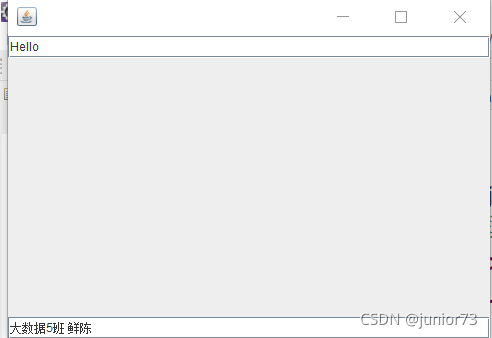
成果如图:
密码框代码:
package Demo01;
import java.awt.BorderLayout;
import java.awt.Container;
import javax.swing.JFrame;
import javax.swing.JPasswordField;
import javax.swing.JTextField;
import javax.swing.WindowConstants;
public class Demo01 extends JFrame{
public Demo01() {
Container container = this.getContentPane();
JPasswordField passwordField = new JPasswordField();
passwordField.setEchoChar('^');
container.add(passwordField);
this.setVisible(true);
this.setSize(500, 350);
this.setDefaultCloseOperation(WindowConstants.EXIT_ON_CLOSE);
}
public static void main(String[] args) {
new Demo01();
}
}
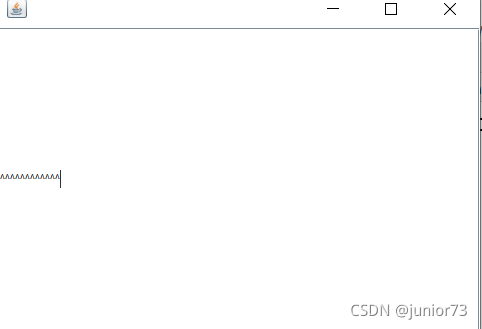
成果如图:
二,事件的类型和处理方法
AWT和Swing定义了多种类型的事件,这些事件大致可分为以下两大类型。
(1)低级事件。
这类事件指由窗口系统发生的事件或者底层输入而产生的事件,主要包括组件事件(跟踪组件位置、大小可见性的变化)、容器事件(反应容器中组件的添加和删除)、焦点事件(组件获得或失去键盘焦点,拥有键盘的组件可响应键盘的输入)、窗口事件(反映窗口或对话框的基本状态)、鼠标事件(用户使用鼠标进行交互)、键盘事件(用户使用键盘进行输入)等。
(2)语义事件。
这类事件是指低级事件以外的具有丰富含义的与组件有关的事件,如单击按钮、滚拖动滚动条等。这些世界源于图形用户界面,其含义由程序设计员赋予,如单击“确定”按钮将确认刚才的操作。按“取消”按钮将撤销刚才的操作。
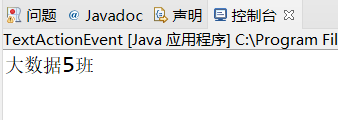
动作监听代码:
package Demo01;
import java.awt.BorderLayout;
import java.awt.Button;
import java.awt.event.ActionEvent;
import java.awt.event.ActionListener;
import javax.swing.JFrame;
import javax.swing.WindowConstants;
public class Demo01 {
public static void main(String[] args) {
JFrame frame = new JFrame();
frame.setSize(400, 400);
frame.locate(400, 300);
MyActionListener myactionListener = new MyActionListener();
Button button = new Button();
button.addActionListener(myactionListener);
frame.add(button,BorderLayout.CENTER);
frame.pack();
frame.setVisible(true);
frame.setDefaultCloseOperation(WindowConstants.EXIT_ON_CLOSE);
}
}
class MyActionListener implements ActionListener{
@Override
public void actionPerformed(ActionEvent e) {
System.out.println("大数据5班 ");
}
}
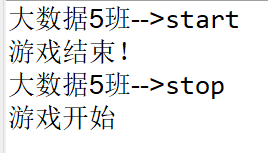
TextActionTwo代码如下:
package Demo02;
import java.awt.BorderLayout;
import java.awt.Button;
import java.awt.event.ActionEvent;
import java.awt.event.ActionListener;
import javax.swing.JFrame;
import javax.swing.WindowConstants;
public class TextActionTwo {
public static void main(String[] args) {
JFrame frame = new JFrame("开始---停止");
frame.setSize(400, 400);
frame.locate(400, 300);
Button button1 = new Button("start");
Button button2 = new Button("stop");
//动作监听
MyMonitor myMonitor = new MyMonitor();
button1.addActionListener(myMonitor);
button2.addActionListener(myMonitor);
frame.add(button1,BorderLayout.NORTH);
frame.add(button2,BorderLayout.SOUTH);
frame.pack();
frame.setVisible(true);
frame.setDefaultCloseOperation(WindowConstants.EXIT_ON_CLOSE);
}
}
class MyMonitor implements ActionListener{
@Override
public void actionPerformed(ActionEvent e) {
System.out.println("大数据5班-->"+e.getActionCommand());
if(e.getActionCommand().equals("stop")) {
System.out.println("游戏开始");
}else {
System.out.println("游戏结束!");
}
}
}
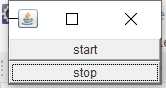
成果如图:
文本域代码:
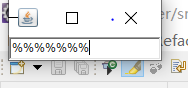
package Demo02;
import java.awt.TextField;
import java.awt.event.ActionEvent;
import java.awt.event.ActionListener;
import javax.swing.JFrame;
import com.sun.jdi.Field;
//文本域
public class TextText01 {
public static void main(String[] args) {
new MyFrame();
}
}
class MyFrame extends JFrame{
public MyFrame() {
TextField txetField = new TextField();
this.add(txetField);
MyActionListener2 myActionListener2 = new MyActionListener2();
txetField.addActionListener(myActionListener2);
//文本域
txetField.setEchoChar('%');
this.setVisible(true);
this.pack();
this.setDefaultCloseOperation(EXIT_ON_CLOSE);
}
}
class MyActionListener2 implements ActionListener{
@Override
public void actionPerformed(ActionEvent e) {
TextField field = (TextField) e.getSource();
System.out.println(field.getText());
field.setText("");
}
}
成果如图:
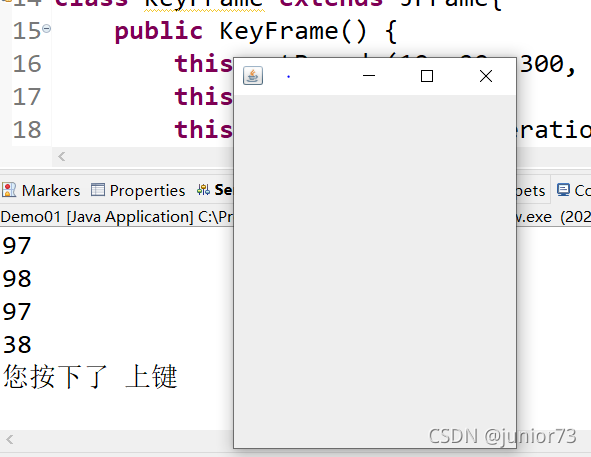
键盘事件代码:
package Demo03;
import java.awt.event.KeyAdapter;
import java.awt.event.KeyEvent;
import javax.swing.JFrame;
public class TestKeyListener {
public static void main(String[] args) {
new KeyFrame();
}
}
class KeyFrame extends JFrame{
public KeyFrame() {
this.setBounds(10, 20, 300, 400);
this.setVisible(true);
this.setDefaultCloseOperation(EXIT_ON_CLOSE);
this.addKeyListener(
new KeyAdapter() {
@Override
public void keyPressed(KeyEvent e) {
int keycode=e.getKeyCode();
System.out.println(keycode);
if(keycode==KeyEvent.VK_UP) {
System.out.println("您按下了 上键");
}if(keycode==KeyEvent.VK_W) {
System.out.println("您按下了 下键");
}
}
});
}
}
成果如图:
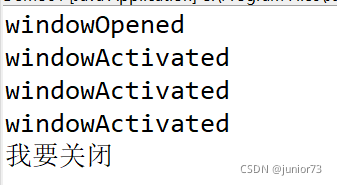
窗口代码:
package Demo03;
import java.awt.Color;
import java.awt.event.WindowAdapter;
import java.awt.event.WindowEvent;
import javax.swing.JFrame;
public class TestWindow {
public static void main(String[] args) {
new WindowFrame();
}
}
class WindowFrame extends JFrame{
public WindowFrame() {
this.setBackground(Color.cyan);
this.setBounds(166, 200, 300, 400);
this.setVisible(true);
//this.setDefaultCloseOperation(EXIT_ON_CLOSE);
//this.addWindowListener(new MyWindowListener());//匿名类
this.addWindowListener(
new WindowAdapter() {
//匿名内部类
@Override
public void windowClosing(WindowEvent e) {
super.windowClosing(e);
setVisible(false);//设置不可见
System.out.println("我要关闭");
//System.exit(0);
}
@Override
public void windowActivated(WindowEvent e) {
super.windowActivated(e);
System.out.println("windowActivated");
}
@Override
public void windowClosed(WindowEvent e) {
super.windowClosed(e);
System.out.println("windowClosed");
}
@Override
public void windowOpened(WindowEvent e) {
super.windowOpened(e);
System.out.println("windowOpened");
}
}
);
}
}
成果如图:
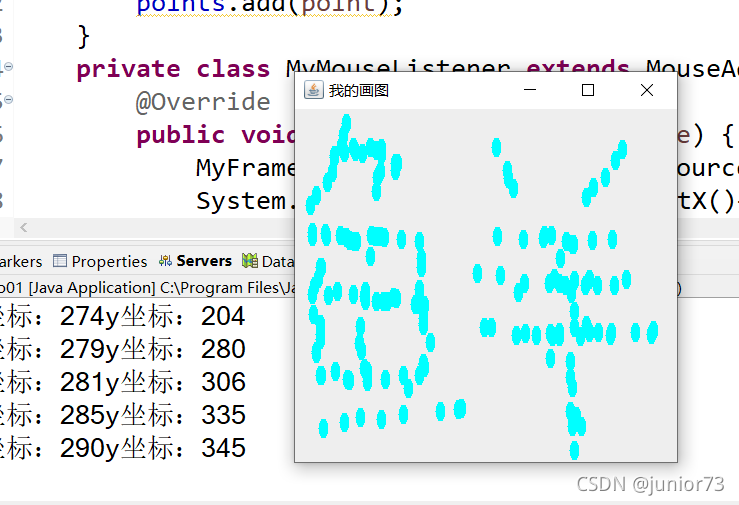
鼠标事件代码:
package Demo03;
import java.awt.Color;
import java.awt.Graphics;
import java.awt.Point;
import java.awt.event.MouseAdapter;
import java.awt.event.MouseEvent;
import java.util.ArrayList;
import javax.swing.JFrame;
import javax.swing.text.html.HTMLDocument.Iterator;
public class TestMouseListener {
public static void main(String[] args) {
new MyFrame("我的画图");
}
}
class MyFrame extends JFrame{
ArrayList points;
public MyFrame(String title) {
super(title);
this.setBounds(200, 200, 400, 400);
this.setVisible(true);
this.setDefaultCloseOperation(EXIT_ON_CLOSE);
points=new ArrayList<>();
this.addMouseListener(new MyMouseListener());
}
public void paint(Graphics g) {
java.util.Iterator iterator = points.iterator();
while(iterator.hasNext()) {
Point point=(Point)iterator.next();
g.setColor(Color.cyan);
g.fillOval(point.x, point.y, 10, 20);
}
}
public void addPaint(Point point) {
points.add(point);
}
private class MyMouseListener extends MouseAdapter{
@Override
public void mousePressed(MouseEvent e) {
MyFrame myFrame=(MyFrame) e.getSource();
System.out.println("x坐标:"+e.getX()+"y坐标:"+e.getY());
myFrame.addPaint(new Point(e.getX(),e.getY()));
myFrame.repaint();
}
}
}
成果如图:
代码很多。





 扫一扫
扫一扫


 2675
2675

 被折叠的 条评论
为什么被折叠?
被折叠的 条评论
为什么被折叠?
 到【灌水乐园】发言





