



修改前端登录模块
修改页面逻辑
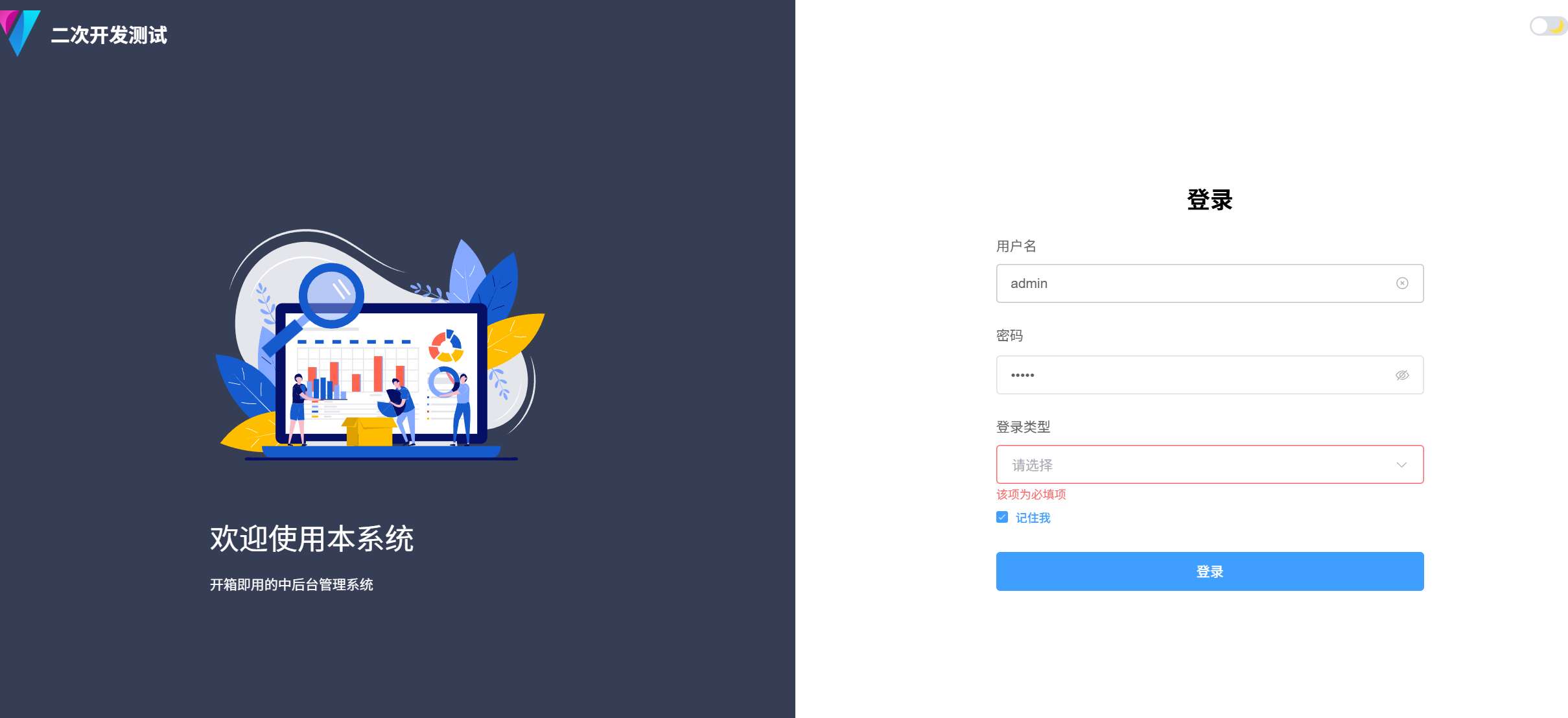
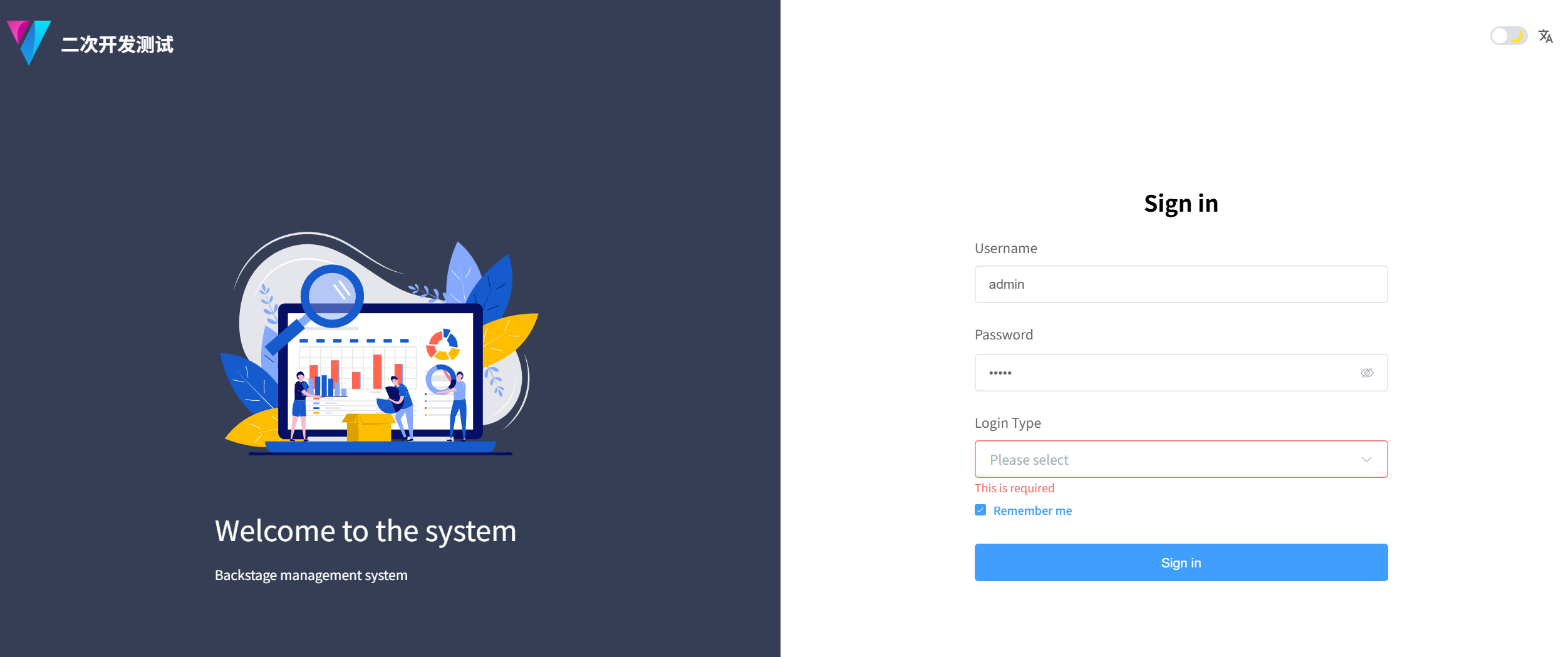
1. 根据自己的需要修改登录页,假设需页面是如下所示
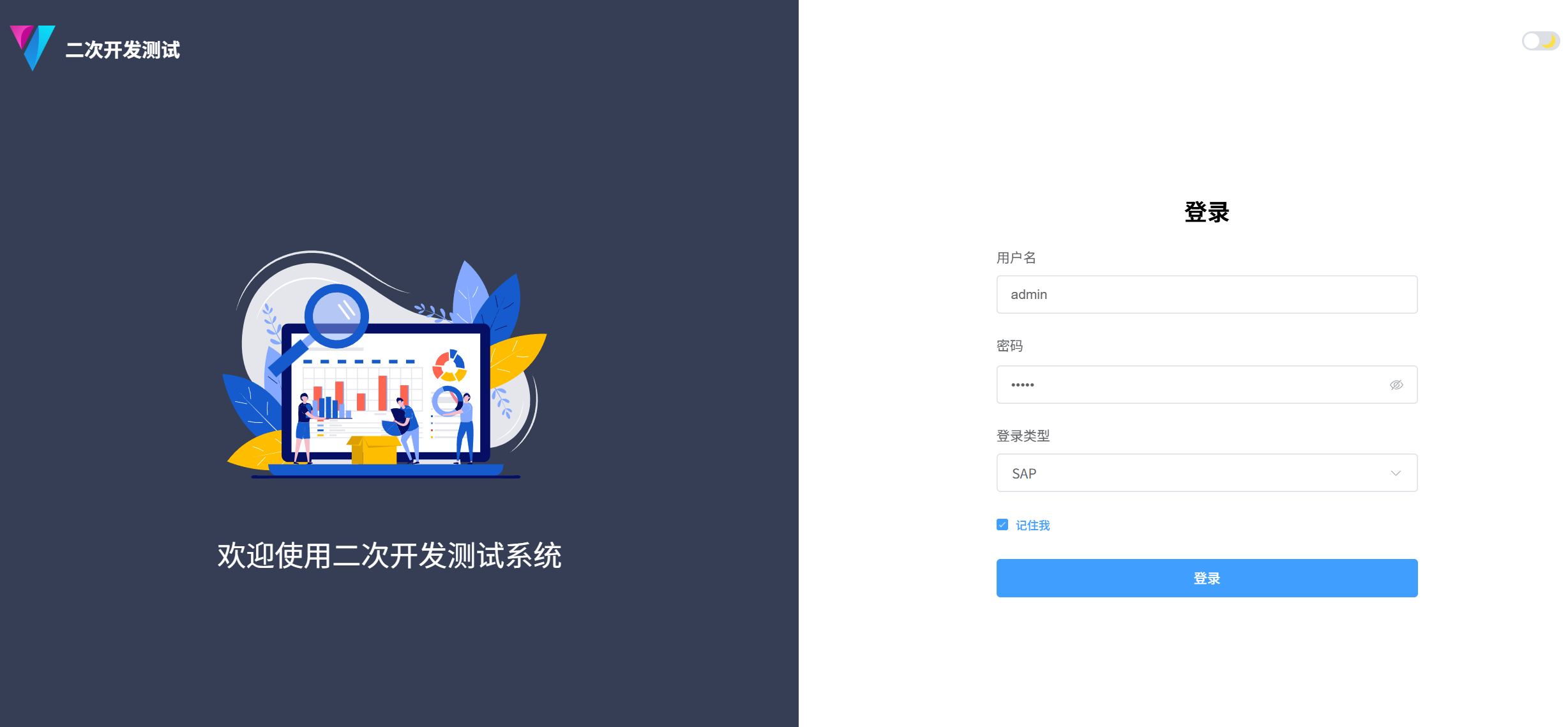
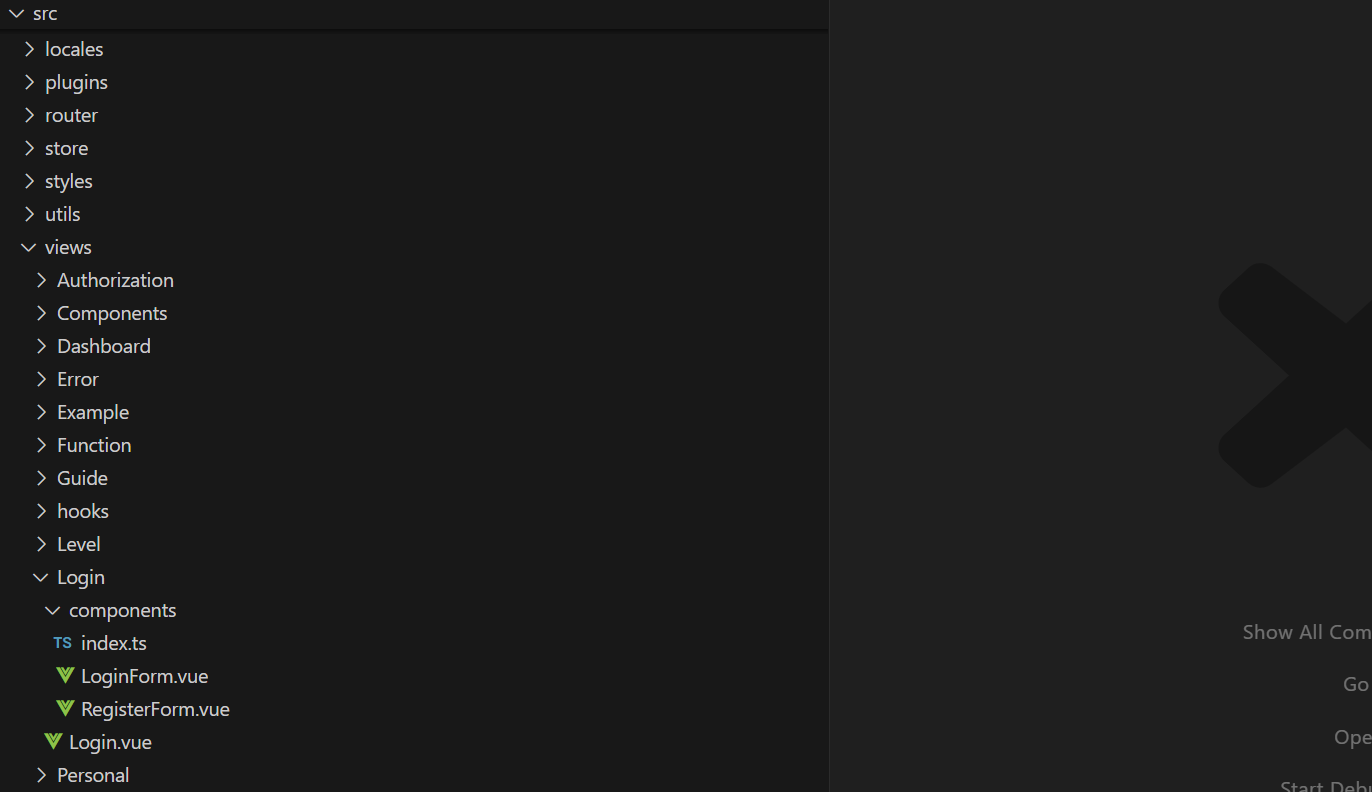
2. 找到页面文件夹src-》views-》Login, 此文件夹就是所有的login模块所需要的页面内容
3. 找到页面文件夹src-》api-》login, 这里包含所有和后端交互的对象和接口访问功能
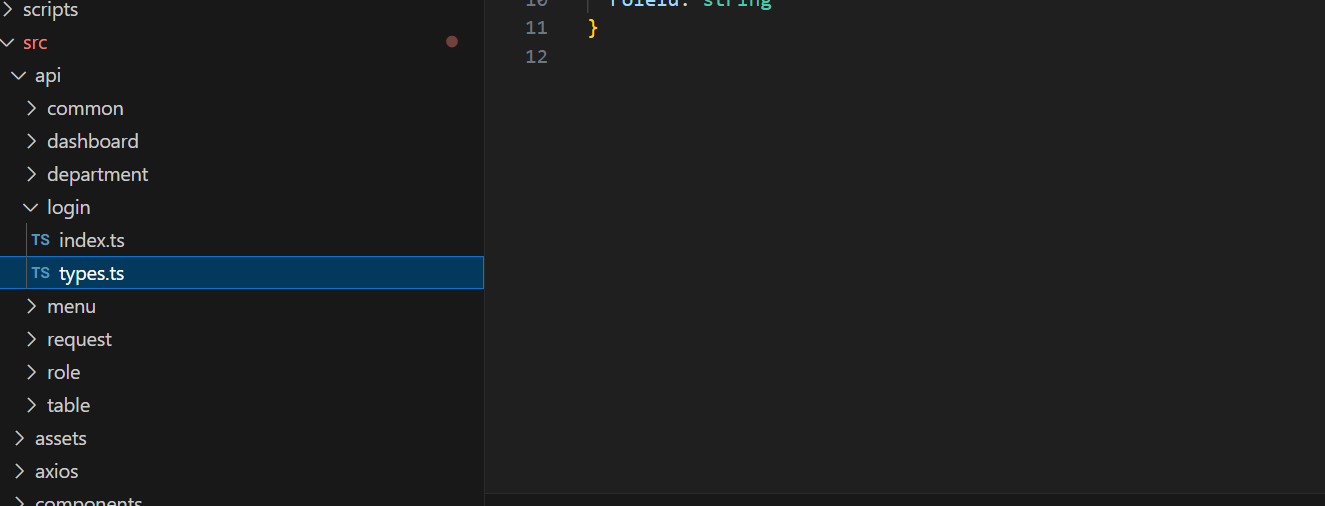
基于我们登录请求的参数包括 用户名, 密码 和 登录类型,修改api/login/types.ts 文件如下
//用于login 页面请求后端模型对象
export interface UserLoginType {
  username: string
  password: string
  loginType: string
}
//用于登录后返回内容的模型对象
export interface UserType {
  username: string
  password: string
  role: string
  roleId: string
  loginType: string
  token: string
}
修改api/login/index.ts 文件如下
//使用axios框架封装的请求
import request from '@/axios'
import type { UserLoginType, UserType } from './types'

interface RoleParams {
  roleName?: string
  userName?: string
}

//新建与后台交互的apis
//登录的后台的URL
const LOGIN_API_URL = '/config/console/api/login'
//注销登录的后台URL
const LOGIN_OUT_API_URL = '/config/console/api/route/loginOut'
//获得左边导航栏配置的URL
const ROLE_API_URL = '/config/console/api/route/roleList'

//登录请求方法
export const loginApi = (data: UserLoginType): Promise<IResponse<UserType>> => {
  console.log(data)
  return request.post({ url: LOGIN_API_URL, data })
}

//注销登录的方法
export const loginOutApi = (): Promise<IResponse> => {
  return request.get({ url: LOGIN_OUT_API_URL })
}

//获得后端导航配置的端口
export const getUserRoleApi = (
  params: RoleParams
): Promise<IResponse<AppCustomRouteRecordRaw[]>> => {
  console.log('请求UserRoleAPi', params)
  return request.get({ url: ROLE_API_URL, params })
}

export const getUserListApi = ({ params }: AxiosConfig) => {
  return request.get<{
    code: string
    data: {
      list: UserType[]
      total: number
    }
  }>({ url: '/mock/user/list', params })
}

export const getAdminRoleApi = (
  params: RoleParams
): Promise<IResponse<AppCustomRouteRecordRaw[]>> => {
  console.log('请求adminRoleAPi', params)
  return request.get({ url: '/mock/role/list', params })
}

export const getTestRoleApi = (params: RoleParams): Promise<IResponse<string[]>> => {
  console.log('请求TestRoleAPi', params)
  return request.get({ url: '/mock/role/list2', params })
}
NOTE:我们看到我们定义后端URL路由的时候是以/config/console/api,这是为了同时支持mock和后端访问,因为在vite里设置的mock代理是以api开头的,为了区分没有以api开头,大家可以根据自己需要自己定义后端路径
修改src-》views-》Login/components/LoginForm.vue 文件
<script setup lang="tsx">
import { reactive, ref, watch, onMounted, unref } from 'vue'
import { Form, FormSchema } from '@/components/Form'
import { useI18n } from '@/hooks/web/useI18n'
import { ElCheckbox, ElLink } from 'element-plus'
import { useForm } from '@/hooks/web/useForm'
//引入后端交互端口
import { loginApi, getTestRoleApi, getUserRoleApi } from '@/api/login'
import { useAppStore } from '@/store/modules/app'
import { usePermissionStore } from '@/store/modules/permission'
import { useRouter } from 'vue-router'
import type { RouteLocationNormalizedLoaded, RouteRecordRaw } from 'vue-router'
import { UserType, UserLoginType } from '@/api/login/types'
import { useValidator } from '@/hooks/web/useValidator'
import { useUserStore } from '@/store/modules/user'
import { BaseButton } from '@/components/Button'

const { required } = useValidator()

const emit = defineEmits(['to-register'])

const appStore = useAppStore()

const userStore = useUserStore()

const permissionStore = usePermissionStore()

const { currentRoute, addRoute, push } = useRouter()
//用来国际化的键值对定义
const { t } = useI18n()

//检验登录页面的
const rules = {
  username: [required()],
  password: [required()],
  loginType: [required()]
}

//定义登录form表单的内容
const schema = reactive<FormSchema[]>([
  //表单的标题
  {
    field: 'title',
    colProps: {
      span: 24
    },
    formItemProps: {
      slots: {
        default: () => {
          ////国际化文件中定义
          return <h2 class="text-2xl font-bold text-center w-[100%]">{t('login.login')}</h2>
        }
      }
    }
  },
  //form 用户名input项
  {
    field: 'username',
    //国际化文件中定义
    label: t('login.username'),
    // value: 'admin',
    component: 'Input',
    colProps: {
      span: 24
    },
    componentProps: {
      placeholder: 'admin or test'
    }
  },
  //form 密码input项
  {
    field: 'password',
    label: t('login.password'),
    // value: 'admin',
    component: 'InputPassword',
    colProps: {
      span: 24
    },
    componentProps: {
      style: {
        width: '100%'
      },
      //提示
      placeholder: 'admin or test',
      // 按下enter键触发登录
      onKeydown: (_e: any) => {
        if (_e.key === 'Enter') {
          _e.stopPropagation() // 阻止事件冒泡
          signIn()
        }
      }
    }
  },
  //form logintype 的select 选项
  {
    field: 'loginType',
    //国际化定义
    label: t('login.loginType'),
    // value: 'admin',
    component: 'Select',
    colProps: {
      span: 24
    },
    componentProps: {
      style: {
        width: '100%'
      },
      //placeholder: 'sign type',
      // 按下enter键触发登
      options: [
        { label: 'SAP', value: 'secSAPR3' },
        { label: 'Enterprise', value: 'secEnterprise' }
      ]
    },
    value: 'secSAPR3'
  },
  {
    field: 'tool',
    colProps: {
      span: 24
    },
    formItemProps: {
      slots: {
        default: () => {
          return (
            <>
              <div class="flex justify-between items-center w-[100%]">
                <ElCheckbox v-model={remember.value} label={t('login.remember')} size="small" />
              </div>
            </>
          )
        }
      }
    }
  },
  {
    field: 'login',
    colProps: {
      span: 24
    },
    formItemProps: {
      slots: {
        default: () => {
          return (
            <>
              <div class="w-[100%]">
                <BaseButton
                  loading={loading.value}
                  type="primary"
                  class="w-[100%]"
                  onClick={signIn}
                >
                  {t('login.login')}
                </BaseButton>
              </div>
            </>
          )
        }
      }
    }
  }
  //删除不需要的选项
  /**
  {
    field: 'other',
    component: 'Divider',
    label: t('login.otherLogin'),
    componentProps: {
      contentPosition: 'center'
    }
  },

  {
    field: 'otherIcon',
    colProps: {
      span: 24
    },
    formItemProps: {
      slots: {
        default: () => {
          return (
            <>
              <div class="flex justify-between w-[100%]">
                <Icon
                  icon="vi-ant-design:github-filled"
                  size={iconSize}
                  class="cursor-pointer ant-icon"
                  color={iconColor}
                  hoverColor={hoverColor}
                />
                <Icon
                  icon="vi-ant-design:wechat-filled"
                  size={iconSize}
                  class="cursor-pointer ant-icon"
                  color={iconColor}
                  hoverColor={hoverColor}
                />
                <Icon
                  icon="vi-ant-design:alipay-circle-filled"
                  size={iconSize}
                  color={iconColor}
                  hoverColor={hoverColor}
                  class="cursor-pointer ant-icon"
                />
                <Icon
                  icon="vi-ant-design:weibo-circle-filled"
                  size={iconSize}
                  color={iconColor}
                  hoverColor={hoverColor}
                  class="cursor-pointer ant-icon"
                />
              </div>
            </>
          )
        }
      }
    }
  }
    */
])

const iconSize = 30

const remember = ref(userStore.getRememberMe)

//对记住密码进行重新赋值
const initLoginInfo = () => {
  const loginInfo = userStore.getLoginInfo
  if (loginInfo) {
    const { username, password, loginType } = loginInfo
    setValues({ username, password, loginType })
  }
}

//在登录页面onMounted 阶段进行操作()
onMounted(() => {
  initLoginInfo()
})

const { formRegister, formMethods } = useForm()
const { getFormData, getElFormExpose, setValues } = formMethods

const loading = ref(false)

const iconColor = '#999'

const hoverColor = 'var(--el-color-primary)'

const redirect = ref<string>('')

watch(
  () => currentRoute.value,
  (route: RouteLocationNormalizedLoaded) => {
    redirect.value = route?.query?.redirect as string
  },
  {
    immediate: true
  }
)

// 登录整个流程
const signIn = async () => {
  //得到验证表单对象
  const formRef = await getElFormExpose()
  //验证执行
  await formRef?.validate(async (isValid) => {
    if (isValid) {
      loading.value = true
      //得到login的请求参数内容
      const formData = await getFormData<UserLoginType>()

      try {
        //访问后台并返回登录结果
        const res = await loginApi(formData)

        console.log(res)
        //是否有内容
        if (res) {
          // 是否记住我
          if (unref(remember)) {
            //如何记住我,把登录的参数存储在本地浏览器
            userStore.setLoginInfo({
              username: formData.username,
              password: formData.password,
              loginType: formData.loginType
            })
          } else {
            //如果没有选择记住我清空本地登录参数
            userStore.setLoginInfo(undefined)
          }
          //存储到本地浏览器的内容
          userStore.setRememberMe(unref(remember))
          userStore.setUserInfo(res.data)
          //设置返回的JWT token内容
          userStore.setToken(res.data.token)
          //设置登录后每次请求后端在http头中的token名称
          userStore.setTokenKey('token')

          // 是否使用动态路由
          if (appStore.getDynamicRouter) {
            //使用动态路由,从后端取得导航栏内容
            console.log('run dynamic route')
            getRole()
          } else {
            console.log('run static route')
            await permissionStore.generateRoutes('static').catch(() => {})
            permissionStore.getAddRouters.forEach((route) => {
              addRoute(route as RouteRecordRaw) // 动态添加可访问路由表
            })
            permissionStore.setIsAddRouters(true)
            push({ path: redirect.value || permissionStore.addRouters[0].path })
          }
        }
      } finally {
        loading.value = false
      }
    }
  })
}

// 获取角色信息
const getRole = async () => {
  const formData = await getFormData<UserType>()
  const params = { userName: formData.username }
  //获得服务器角色
  const res =
    appStore.getDynamicRouter && appStore.getServerDynamicRouter
      ? await getUserRoleApi(params)
      : await getTestRoleApi(params)
  console.log('dynamic route data', JSON.stringify(res))

  if (res) {
    const routers = res.data || []
    userStore.setRoleRouters(routers)
    appStore.getDynamicRouter && appStore.getServerDynamicRouter
      ? await permissionStore.generateRoutes('server', routers).catch(() => {})
      : await permissionStore.generateRoutes('frontEnd', routers).catch(() => {})

    permissionStore.getAddRouters.forEach((route) => {
      addRoute(route as RouteRecordRaw) // 动态添加可访问路由表
    })
    permissionStore.setIsAddRouters(true)
    push({ path: redirect.value || permissionStore.addRouters[0].path })
  }
}

// 去注册页面, 我们不需要此功能
const toRegister = () => {
  emit('to-register')
}
</script>

<template>
  <Form
    :schema="schema"
    :rules="rules"
    label-position="top"
    hide-required-asterisk
    size="large"
    class="dark:(border-1 border-[var(--el-border-color)] border-solid)"
    @register="formRegister"
  />
</template>
修改修改src-》views-》Login/Login.vue 文件内容如下
<script setup lang="ts">
import { LoginForm } from './components'
import { ThemeSwitch } from '@/components/ThemeSwitch'
import { LocaleDropdown } from '@/components/LocaleDropdown'
import { useI18n } from '@/hooks/web/useI18n'
import { underlineToHump } from '@/utils'
import { useAppStore } from '@/store/modules/app'
import { useDesign } from '@/hooks/web/useDesign'
import { ref } from 'vue'
import { ElScrollbar } from 'element-plus'

const { getPrefixCls } = useDesign()

const prefixCls = getPrefixCls('login')

const appStore = useAppStore()

const { t } = useI18n()

const isLogin = ref(true)

const toRegister = () => {
  isLogin.value = false
}

const toLogin = () => {
  isLogin.value = true
}
</script>

<template>
  <div
    :class="prefixCls"
    class="h-[100%] relative lt-xl:bg-[var(--login-bg-color)] lt-sm:px-10px lt-xl:px-10px lt-md:px-10px"
  >
    <ElScrollbar class="h-full">
      <div class="relative flex mx-auto min-h-100vh">
        <div
          :class="`${prefixCls}__left flex-1 bg-gray-500 bg-opacity-20 relative p-30px lt-xl:hidden`"
        >
          <div class="flex items-center relative text-white">
            <img src="@/assets/imgs/logo.png" alt="" class="w-48px h-48px mr-10px" />
            <span class="text-20px font-bold">{{ underlineToHump(appStore.getTitle) }}</span>
          </div>
          <div class="flex justify-center items-center h-[calc(100%-60px)]">
            <TransitionGroup
              appear
              tag="div"
              enter-active-class="animate__animated animate__bounceInLeft"
            >
              <!-- 定义在国际化的欢迎词-->
              <img src="@/assets/svgs/login-box-bg.svg" key="1" alt="" class="w-350px" />
              <div class="text-3xl text-white" key="2">{{ t('login.welcome') }}</div>
              <div class="mt-5 font-normal text-white text-14px" key="3">
                {{ t('login.message') }}
              </div>
            </TransitionGroup>
          </div>
        </div>
        <div class="flex-1 p-30px lt-sm:p-10px dark:bg-[var(--login-bg-color)] relative">
          <div
            class="flex justify-between items-center text-white at-2xl:justify-end at-xl:justify-end"
          >
            <div class="flex items-center at-2xl:hidden at-xl:hidden">
              <img src="@/assets/imgs/logo.png" alt="" class="w-48px h-48px mr-10px" />
              <span class="text-20px font-bold">{{ underlineToHump(appStore.getTitle) }}</span>
            </div>

            <div class="flex justify-end items-center space-x-10px">
              <ThemeSwitch />
              <LocaleDropdown class="lt-xl:text-white dark:text-white" />
            </div>
          </div>
          <Transition appear enter-active-class="animate__animated animate__bounceInRight">
            <div
              class="h-full flex items-center m-auto w-[100%] at-2xl:max-w-500px at-xl:max-w-500px at-md:max-w-500px at-lg:max-w-500px"
            >
              <!--
              <LoginForm
                v-if="isLogin"
                class="p-20px h-auto m-auto lt-xl:rounded-3xl lt-xl:light:bg-white"
                @to-register="toRegister"
              />
              <RegisterForm
                v-else
                class="p-20px h-auto m-auto lt-xl:rounded-3xl lt-xl:light:bg-white"
                @to-login="toLogin"
              />
              引入修改后的新的 登录页面
              -->
              <LoginForm class="p-20px h-auto m-auto lt-xl:rounded-3xl lt-xl:light:bg-white" />
            </div>
          </Transition>
        </div>
      </div>
    </ElScrollbar>
  </div>
</template>

<style lang="less" scoped>
@prefix-cls: ~'@{adminNamespace}-login';

.@{prefix-cls} {
  overflow: auto;

  &__left {
    &::before {
      position: absolute;
      top: 0;
      left: 0;
      z-index: -1;
      width: 100%;
      height: 100%;
      background-image: url('@/assets/svgs/login-bg.svg');
      background-position: center;
      background-repeat: no-repeat;
      content: '';
    }
  }
}
</style>
修改后页面如图所示
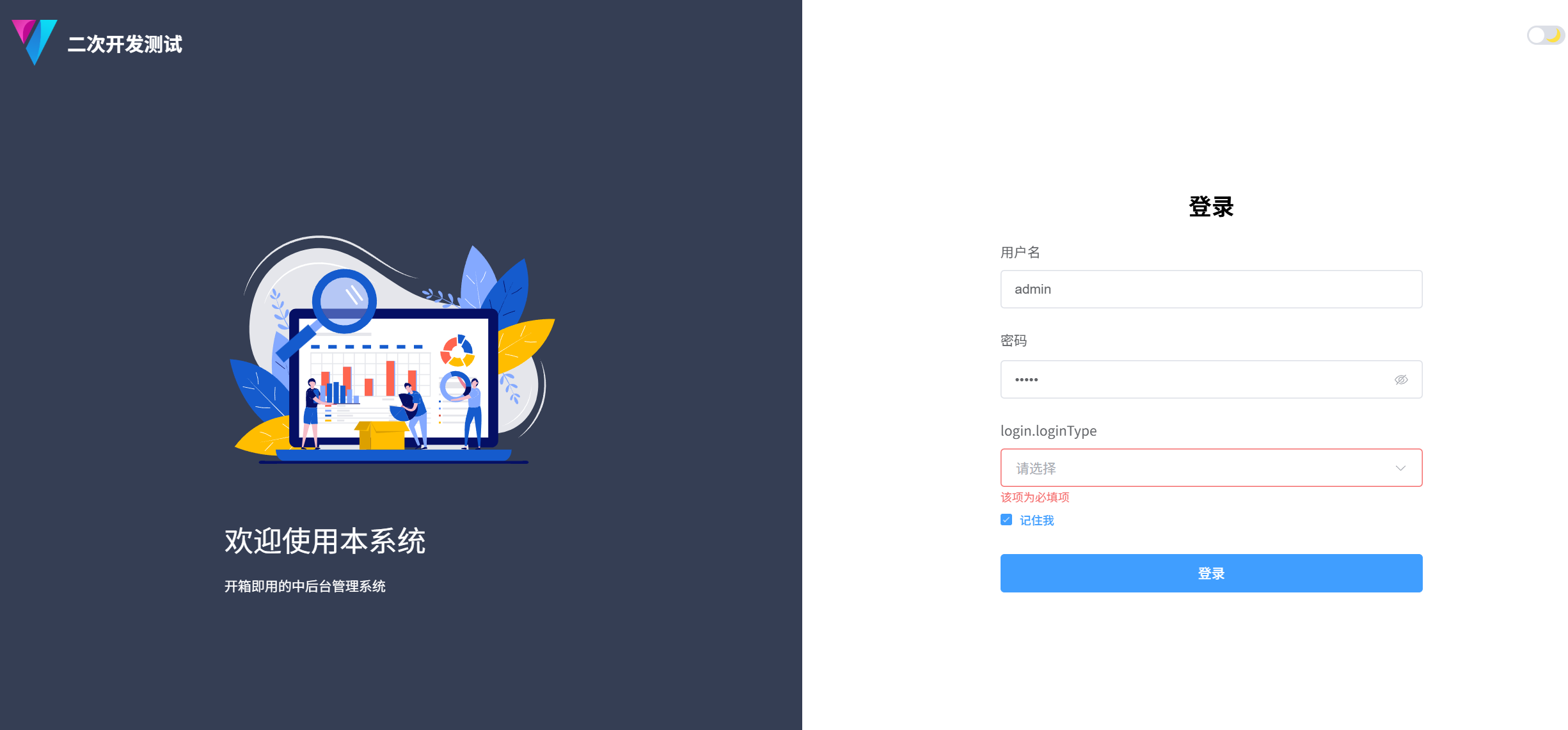
Note:代码里还有很多不需要的内容,大家可以根据自己的需求删除
修改国际化显示的标签
我们看到欢迎词和登录类型没有显示我们想要的,接下来我们来设置这些在国际化下的键值对,使我们的程序支持多中语言
首先找到src-》locales文件夹,国际化的文件都在此文件夹下
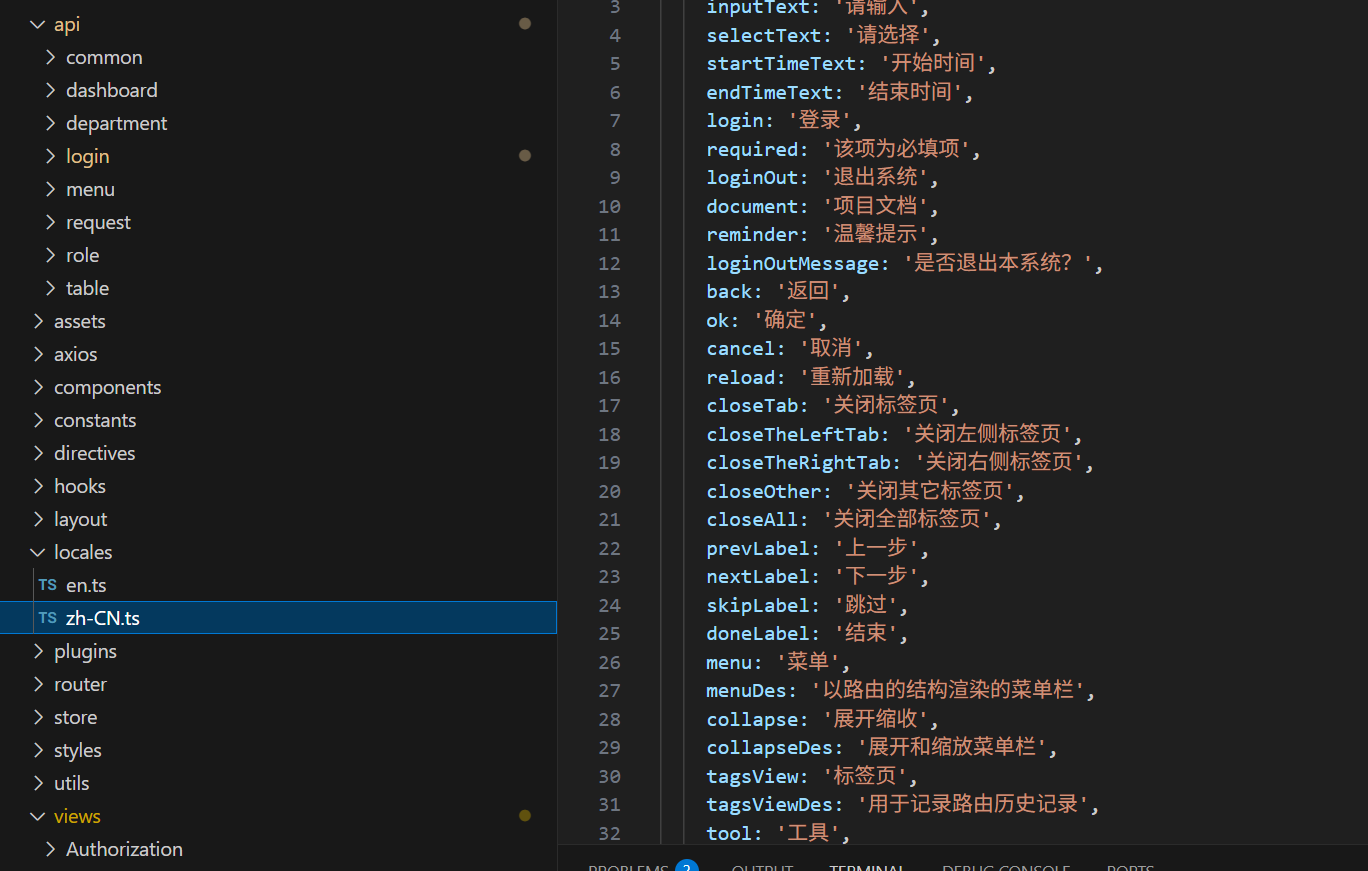
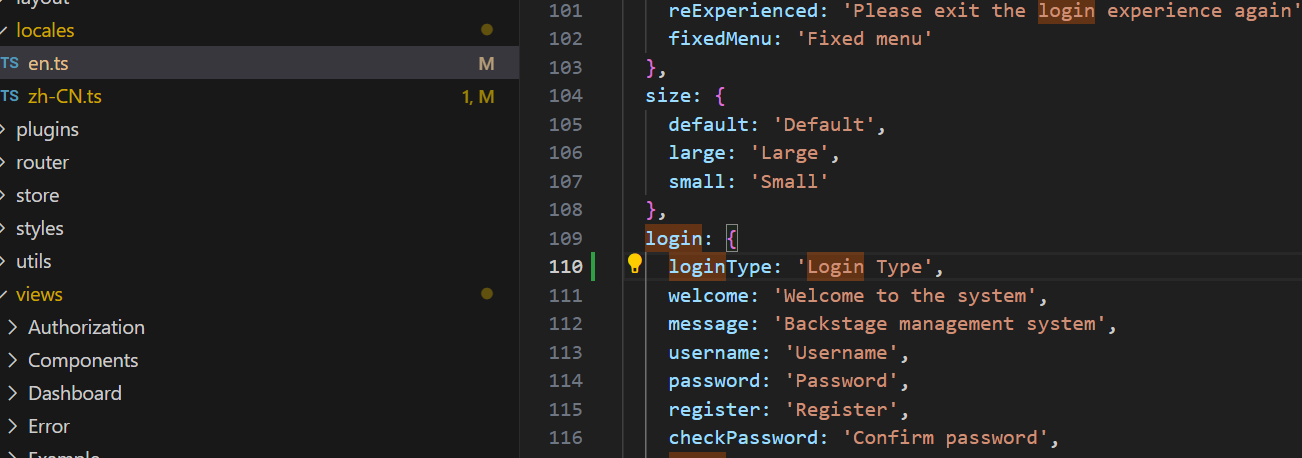
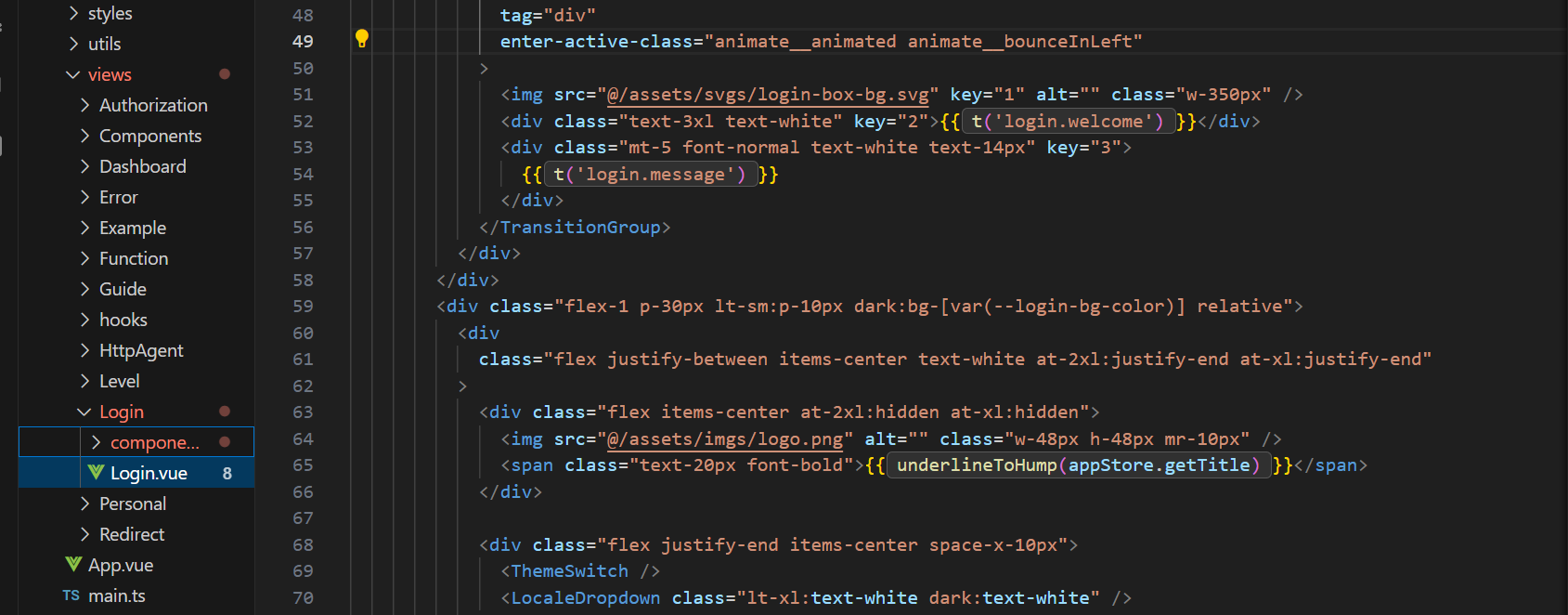
我们看到LoginForm.vue 中的登录类型的定义的key值是login.loginType,如下图
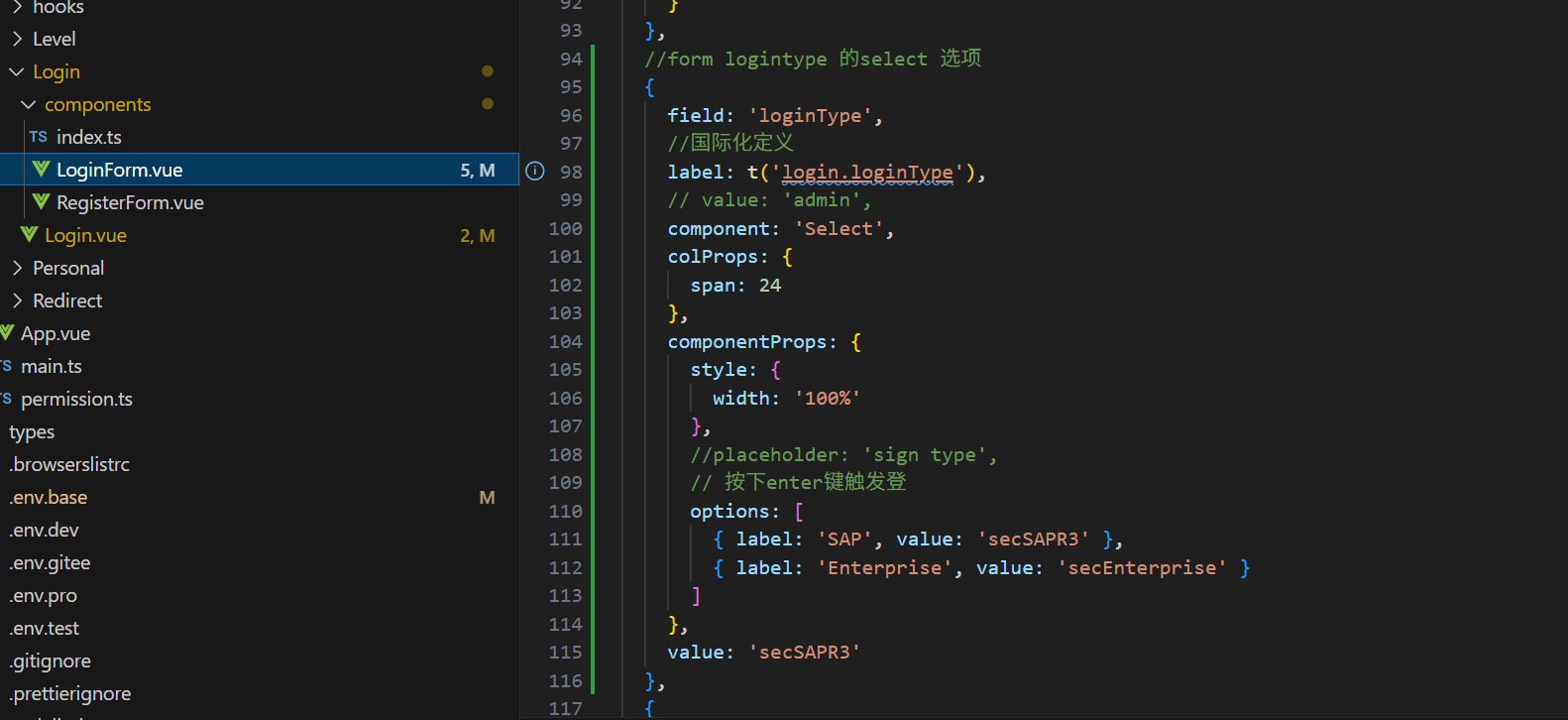
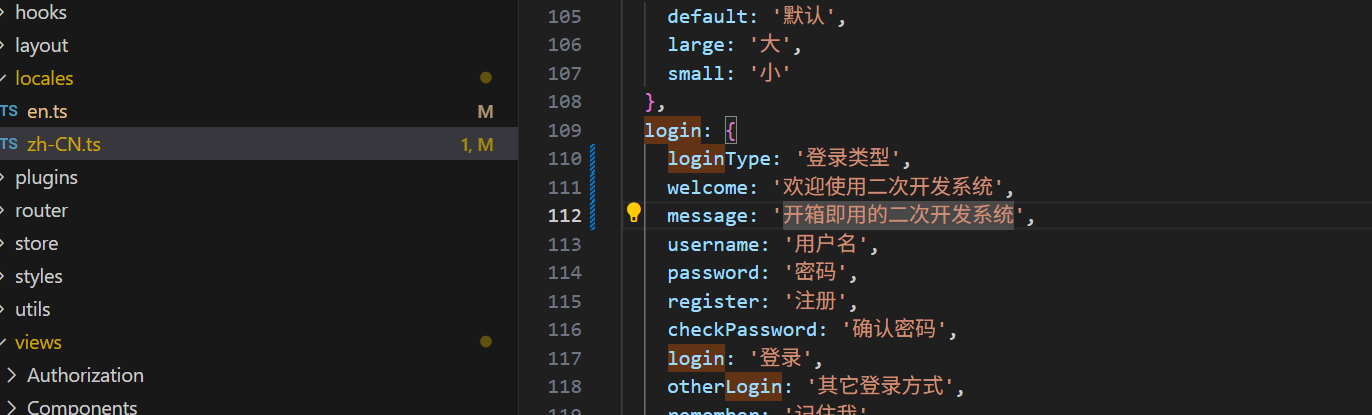
我们在src-》locales/zh-CN.ts 里找到key,在里面添加loginType配置项
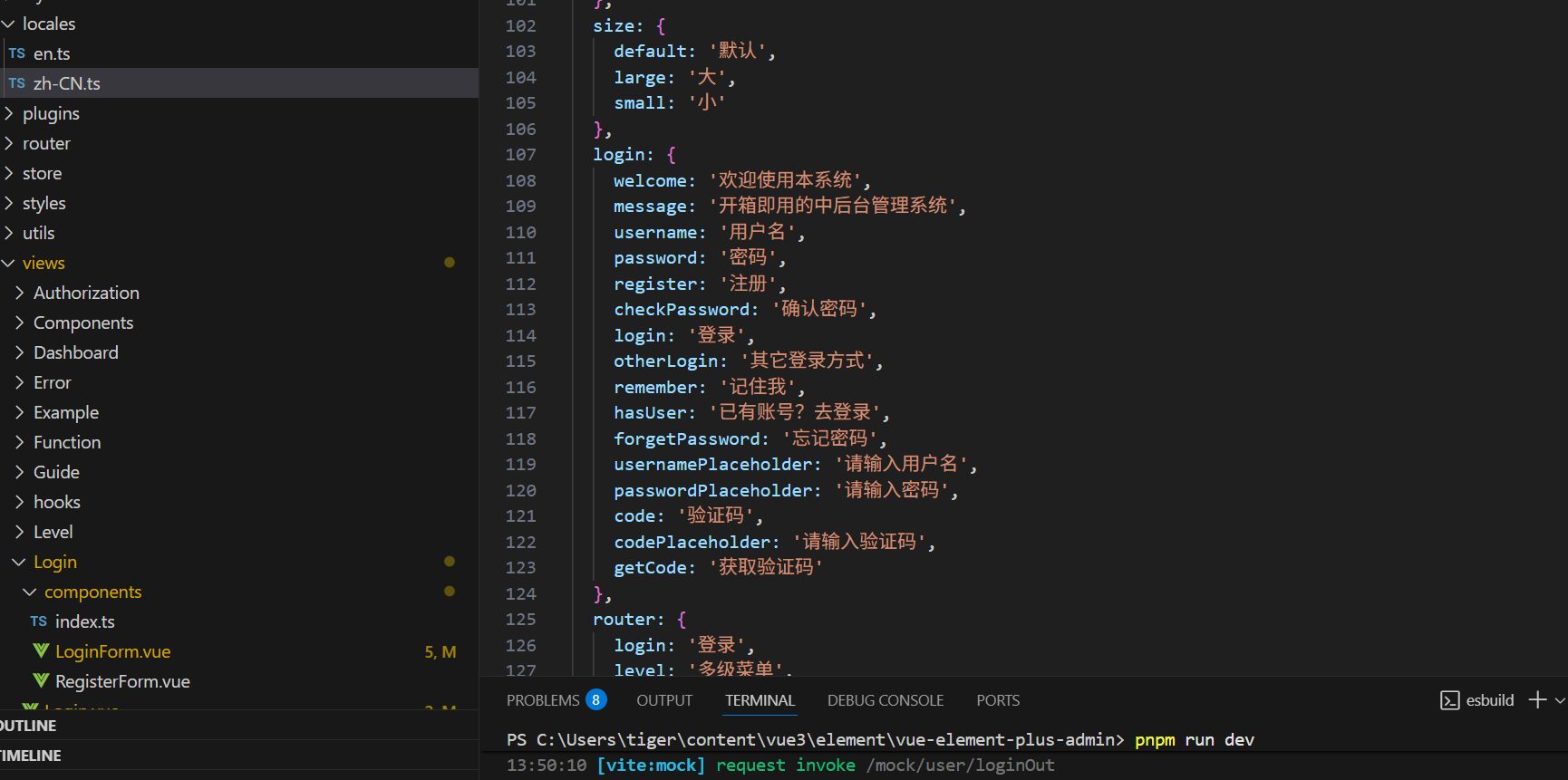
在locales/zh-CN.ts 修改如下图
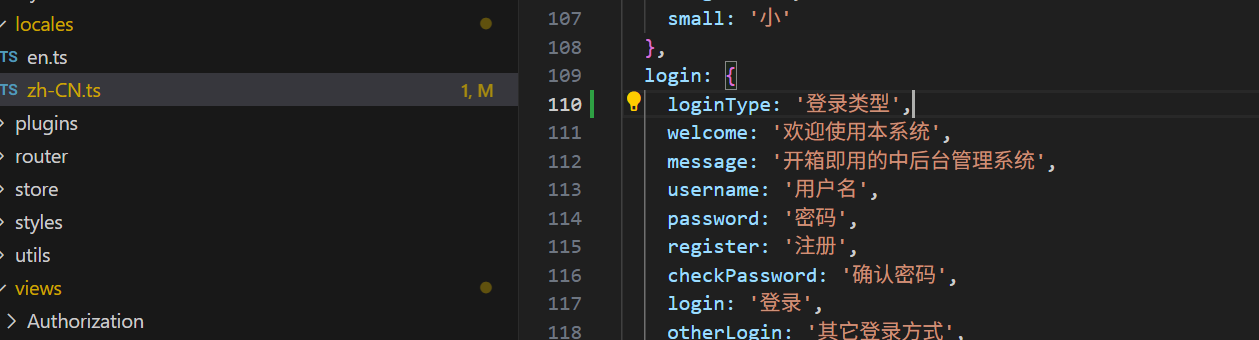
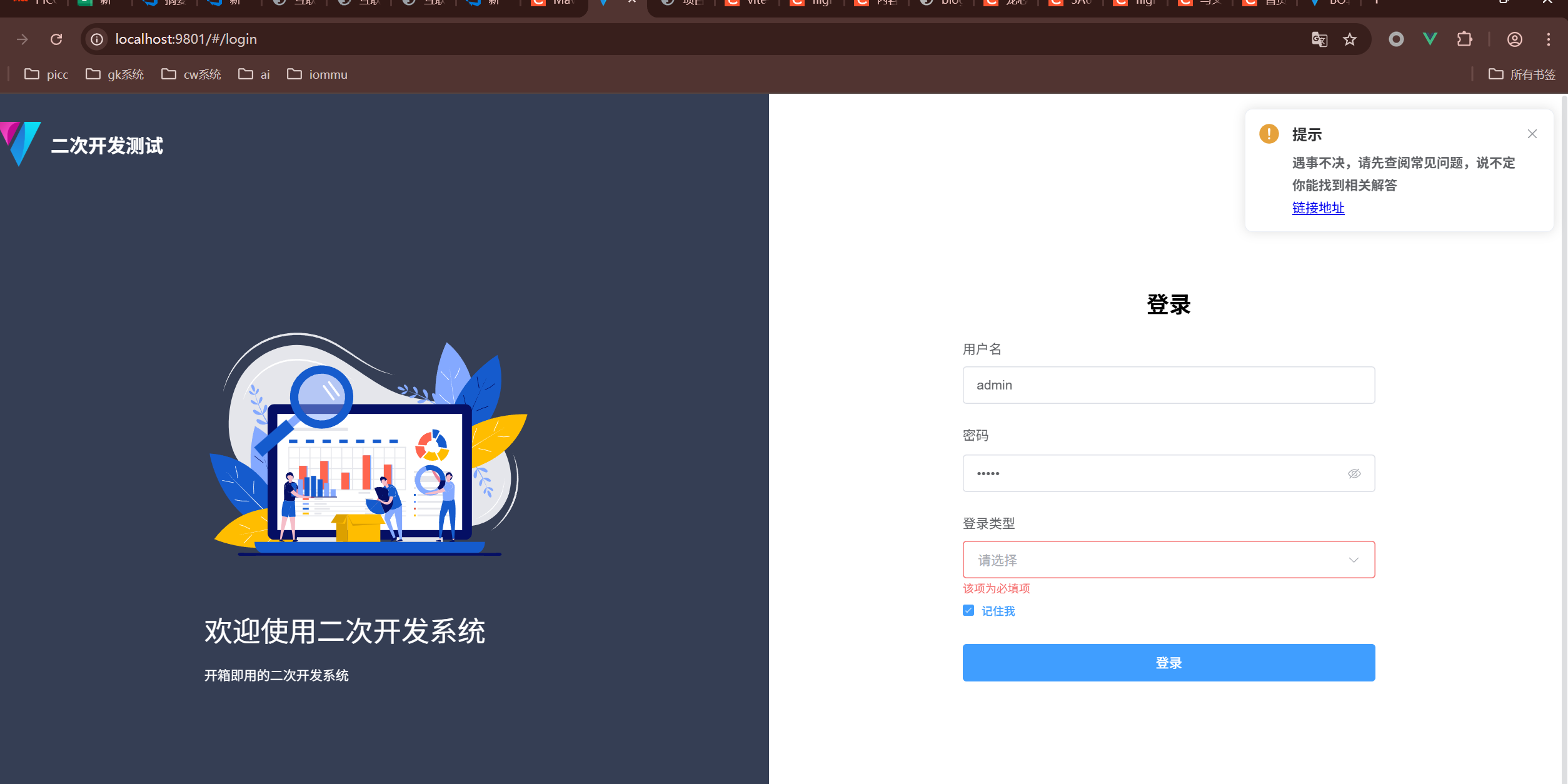
修改后,登录页面如下图
如果想让页面同时支持英文,只需要在在在locales/en.ts 修改如下图
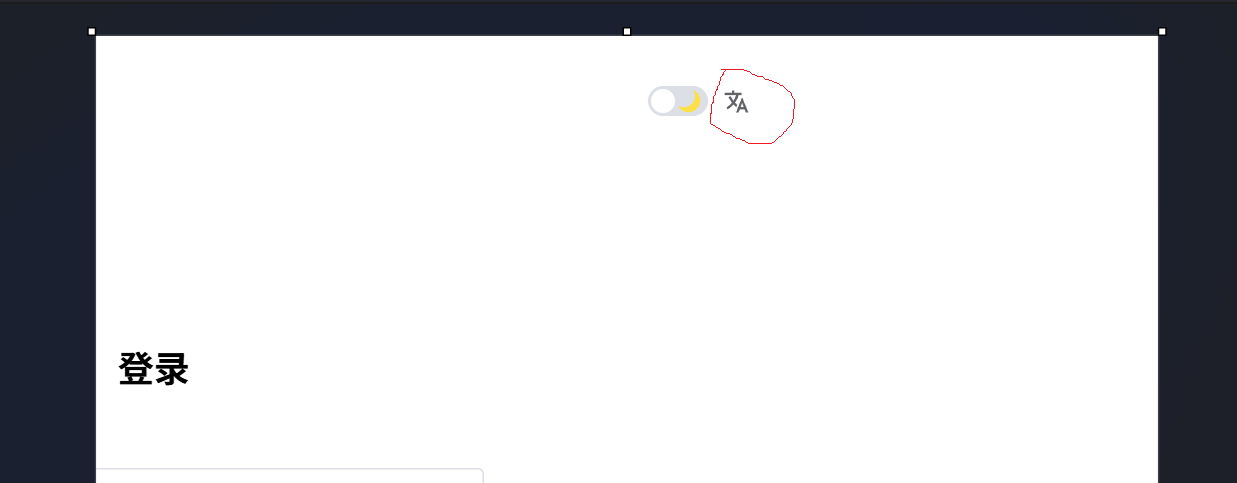
点击登录的页面的语言选择就可以改变语言选择
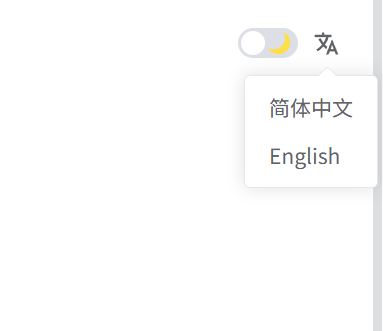
选择English就可以显示英文界面
修改欢迎词,只需要修改locales/zh-CN.ts 文件中被src-》views-》Login/Login.vue引用的的login.welcome和login.message 配置项
配置项如下图
显示如下图
创建后端java web 内容
本文使用的spring boot webflux作为web后台,后台只是做数据的模拟,没有进行后台逻辑设计,对于其他语言经验的小伙伴,可以非常容易的替换其他web后台。
具体项目请下载: git clone https://gitee.com/tigershi123/finance-back-parent.git
根据前端src/api/login文件夹下API 交互,创建后台模型
根据前端的模型
//用于login 页面请求后端模型对象
export interface UserLoginType {
  username: string
  password: string
  loginType: string
}
//用于登录后返回内容的模型对象
export interface UserType {
  username: string
  password: string
  role: string
  roleId: string
  loginType: string
  token: string
}
//用于role分类
interface RoleParams {
  roleName?: string
  userName?: string
}
根据UserLoginType创建如下java模型
public class User implements Serializable {


    private static final long serialVersionUID = 7614263512668832594L;


    private String username;
    private String password;
    private String loginType;
    private String newPassword;

    public String getLoginType() {
        return loginType;
    }

    public void setLoginType(String loginType) {
        this.loginType = loginType;
    }

    public String getUsername() {
        return username;
    }

    public void setUsername(String username) {
        this.username = username;
    }

    public String getPassword() {
        return password;
    }

    public void setPassword(String password) {
        this.password = password;
    }

    public String getNewPassword() {
        return newPassword;
    }

    public void setNewPassword(String newPassword) {
        this.newPassword = newPassword;
    }
}
根据RoleParams创建java模型
package com.finance.vue3.model;

import java.io.Serial;
import java.io.Serializable;

public class RoleParams implements Serializable {
    @Serial
    private static final long serialVersionUID = -6811801571410972581L;
    private String roleName;
    private String userName;

    public String getRoleName() {
        return roleName;
    }

    public void setRoleName(String roleName) {
        this.roleName = roleName;
    }

    public String getUserName() {
        return userName;
    }

    public void setUserName(String userName) {
        this.userName = userName;
    }
}
前端的UserType使用的Java的HashMap类做代替,如果需要可以根据UserType生成java类
根据/type/router.d.ts(注意是项目根文件夹下的/type文件夹)文件中的AppCustomRouteRecordRaw interface 如图
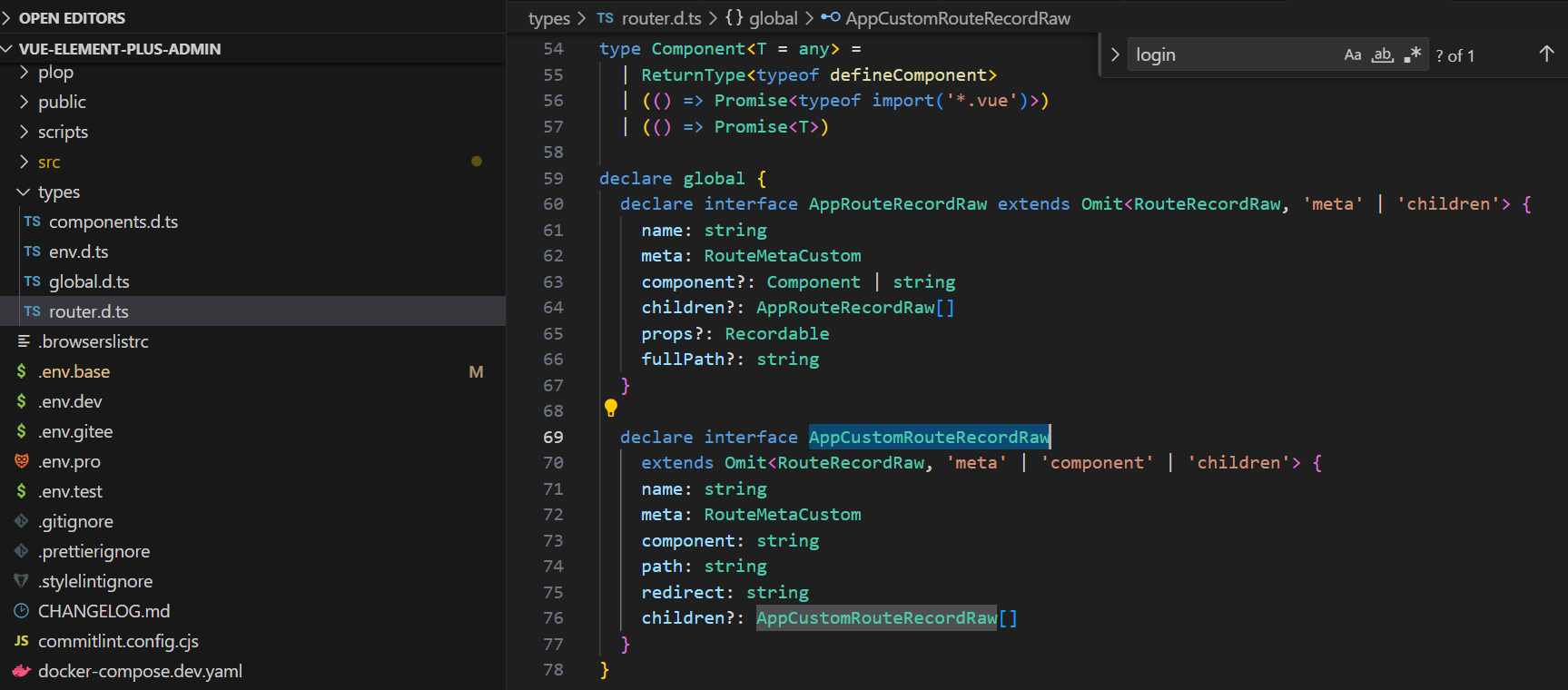
此模型主要是用于左边导航栏的动态路由数据的组织
package com.finance.vue3.model;

import java.io.Serial;
import java.io.Serializable;
import java.util.List;

public class AppCustomRouteRecordRaw implements Serializable {

        @Serial
        private static final long serialVersionUID = -4044078442792309744L;

        private String name;
        private RouteMetaCustom meta;
        private String component;
        private String path;
        private String redirect;
        private List<AppCustomRouteRecordRaw> children;

        public List<AppCustomRouteRecordRaw> getChildren() {
                return children;
        }

        public void setChildren(List<AppCustomRouteRecordRaw> children) {
                this.children = children;
        }

        public String getComponent() {
                return component;
        }

        public void setComponent(String component) {
                this.component = component;
        }

        public RouteMetaCustom getMeta() {
                return meta;
        }

        public void setMeta(RouteMetaCustom meta) {
                this.meta = meta;
        }

        public String getName() {
                return name;
        }

        public void setName(String name) {
                this.name = name;
        }

        public String getPath() {
                return path;
        }

        public void setPath(String path) {
                this.path = path;
        }

        public String getRedirect() {
                return redirect;
        }

        public void setRedirect(String redirect) {
                this.redirect = redirect;
        }
}
JAVA业务逻辑
package com.finance.vue3.web.controller;

import com.alibaba.fastjson.JSON;
import com.alibaba.fastjson.JSONArray;
import com.alibaba.fastjson.serializer.SerializerFeature;
import com.finance.vue3.model.*;
import com.finance.vue3.service.JWTService;
import com.finance.vue3.utils.FileUtils;
import org.slf4j.Logger;
import org.slf4j.LoggerFactory;
import org.springframework.beans.factory.annotation.Autowired;
import org.springframework.context.annotation.Bean;
import org.springframework.core.io.ClassPathResource;
import org.springframework.core.io.ResourceLoader;
import org.springframework.http.MediaType;
import org.springframework.stereotype.Component;
import org.springframework.web.reactive.function.BodyInserters;
import org.springframework.web.reactive.function.server.RouterFunction;
import org.springframework.web.reactive.function.server.ServerResponse;
import reactor.core.publisher.Mono;

import java.io.IOException;
import java.io.InputStream;
import java.util.*;

import static org.springframework.web.reactive.function.server.RequestPredicates.*;
import static org.springframework.web.reactive.function.server.RouterFunctions.route;

@Component
public class HttpLoginUI {
    //user
    private final static String routeLogin = "/config/console/api/login";
    private final static String routeLoginOut = "/config/console/api/route/loginOut";
    private final static String routeRoleList= "/config/console/api/route/roleList";

    private static Logger logger = LoggerFactory.getLogger(HttpLoginUI.class);
    @Autowired
    private JWTService jwtService;

    //login登录
    @Bean
    public RouterFunction<ServerResponse> loginRouterFunction(ResourceLoader resourceLoader) {
        return route(POST(routeLogin).and(accept(MediaType.APPLICATION_JSON)), request -> {
                    String bastPath = request.uri().toString();
                    logger.info("request login path:{}", bastPath);


                    Mono<User> loginUserMono = request.bodyToMono(User.class);

                    return loginUserMono.flatMap(user -> {
                        logger.info("-username----------{}----{}",user.getUsername(), user.getLoginType());
                        try {
                            String token = jwtService.createAPPToken(user);
                            Map<String, String> map = new HashMap<String, String>();
                            logger.info("responseToken:{}" , token);
                            map.put("username", user.getUsername());
                            map.put("token", token);
                            return ServerResponse.ok().contentType(MediaType.APPLICATION_JSON)
                                    .body( Mono.just(JSON.toJSONString( APIResponseDTO.buildSuccess(map))), String.class);

                        }catch (Exception e){
                            APIResponseDTO respErr = APIResponseDTO.buildFailure(-1);
                            respErr.setMsg("error");

                            return ServerResponse.ok().contentType(MediaType.APPLICATION_JSON)
                                    .body( Mono.just(JSON.toJSONString(respErr)), String.class);
                        }

                    });
                }
        );
    }


    //loginOut退出
    @Bean
    public RouterFunction<ServerResponse> loginOutRouterFunction(ResourceLoader resourceLoader) {

        return route(GET(routeLoginOut).and(accept(MediaType.APPLICATION_JSON)), request -> {
                    String bastPath = request.uri().toString();
                    logger.info("request login path:{}", bastPath);
                    Mono<User> loginUserMono = request.bodyToMono(User.class);
                    return ServerResponse.ok().contentType(MediaType.APPLICATION_JSON)
                            .body( Mono.just(JSON.toJSONString( APIResponseDTO.buildSuccess(null))), String.class);
                }
        );
    }


    //roleList根据用户名拿到路由
    @Bean
    public RouterFunction<ServerResponse> roleListRouterFunction(ResourceLoader resourceLoader) {
        return route(GET(routeRoleList).and(accept(MediaType.APPLICATION_JSON)), request -> {
                    String bastPath = request.uri().toString();
                    logger.info("request roleList path:{}", bastPath);

                    String username = request.queryParam("userName").get().trim();
                    logger.info("userName;{}", username);
                    String str = new String(getRoleListFileContent());
                    List<AppCustomRouteRecordRaw> list = JSONArray.parseArray(str, AppCustomRouteRecordRaw.class);
                    String val = JSON.toJSONString(APIResponseDTO.buildSuccess(list), SerializerFeature.PrettyFormat);
                    logger.info("result:{}", val);
                    return ServerResponse.ok().contentType(MediaType.APPLICATION_JSON)
                            .body(BodyInserters.fromValue(val));
                }
        );
    }


    private byte[] getRoleListFileContent(){
        ClassPathResource classPathResource = new ClassPathResource("roleList.json");
        InputStream inputStream = null;
        try {
            inputStream = classPathResource.getInputStream();
        } catch (IOException e) {
            throw new RuntimeException(e);
        }
        return FileUtils.readFile(inputStream);
    }


}
roleList 文件是根据mock的导航类内容组织的
[
{
"path": "/dashboard",
"component": "#",
"redirect": "/dashboard/analysis",
"name": "Dashboard",
"meta": {
"title": "router.dashboard",
"icon": "vi-ant-design:dashboard-filled",
"alwaysShow": true
},
"children": [
{
"path": "analysis",
"component": "views/Dashboard/Analysis",
"name": "Analysis",
"meta": {
"title": "router.analysis",
"noCache": true,
"affix": true
}
},
{
"path": "workplace",
"component": "views/Dashboard/Workplace",
"name": "Workplace",
"meta": {
"title": "router.workplace",
"noCache": true,
"affix": true
}
}
]
},
{
"path": "/external-link",
"component": "#",
"meta": {},
"name": "ExternalLink",
"children": [
{
"path": "https://element-plus-admin-doc.cn/",
"name": "DocumentLink",
"meta": {
"title": "router.document",
"icon": "vi-clarity:document-solid"
}
}
]
},
{
"path": "/guide",
"component": "#",
"name": "Guide",
"meta": {},
"children": [
{
"path": "index",
"component": "views/Guide/Guide",
"name": "GuideDemo",
"meta": {
"title": "router.guide",
"icon": "vi-cib:telegram-plane"
}
}
]
},
{
"path": "/components",
"component": "#",
"redirect": "/components/form/default-form",
"name": "ComponentsDemo",
"meta": {
"title": "router.component",
"icon": "vi-bx:bxs-component",
"alwaysShow": true
},
"children": [
{
"path": "form",
"component": "##",
"name": "Form",
"meta": {
"title": "router.form",
"alwaysShow": true
},
"children": [
{
"path": "default-form",
"component": "views/Components/Form/DefaultForm",
"name": "DefaultForm",
"meta": {
"title": "router.defaultForm"
}
},
{
"path": "use-form",
"component": "views/Components/Form/UseFormDemo",
"name": "UseForm",
"meta": {
"title": "UseForm"
}
}
]
},
{
"path": "table",
"component": "##",
"redirect": "/components/table/default-table",
"name": "TableDemo",
"meta": {
"title": "router.table",
"alwaysShow": true
},
"children": [
{
"path": "default-table",
"component": "views/Components/Table/DefaultTable",
"name": "DefaultTable",
"meta": {
"title": "router.defaultTable"
}
},
{
"path": "use-table",
"component": "views/Components/Table/UseTableDemo",
"name": "UseTable",
"meta": {
"title": "UseTable"
}
},
{
"path": "tree-table",
"component": "views/Components/Table/TreeTable",
"name": "TreeTable",
"meta": {
"title": "TreeTable"
}
},
{
"path": "table-image-preview",
"component": "views/Components/Table/TableImagePreview",
"name": "TableImagePreview",
"meta": {
"title": "router.PicturePreview"
}
},
{
"path": "table-video-preview",
"component": "views/Components/Table/TableVideoPreview",
"name": "TableVideoPreview",
"meta": {
"title": "router.tableVideoPreview"
}
},
{
"path": "card-table",
"component": "views/Components/Table/CardTable",
"name": "CardTable",
"meta": {
"title": "router.cardTable"
}
}
]
},
{
"path": "editor-demo",
"component": "##",
"redirect": "/components/editor-demo/editor",
"name": "EditorDemo",
"meta": {
"title": "router.editor",
"alwaysShow": true
},
"children": [
{
"path": "editor",
"component": "views/Components/Editor/Editor",
"name": "Editor",
"meta": {
"title": "router.richText"
}
},
{
"path": "json-editor",
"component": "views/Components/Editor/JsonEditor",
"name": "JsonEditor",
"meta": {
"title": "router.jsonEditor"
}
},
{
"path": "code-editor",
"component": "views/Components/Editor/CodeEditor",
"name": "CodeEditor",
"meta": {
"title": "router.codeEditor"
}
}
]
},
{
"path": "search",
"component": "views/Components/Search",
"name": "Search",
"meta": {
"title": "router.search"
}
},
{
"path": "descriptions",
"component": "views/Components/Descriptions",
"name": "Descriptions",
"meta": {
"title": "router.descriptions"
}
},
{
"path": "image-viewer",
"component": "views/Components/ImageViewer",
"name": "ImageViewer",
"meta": {
"title": "router.imageViewer"
}
},
{
"path": "dialog",
"component": "views/Components/Dialog",
"name": "Dialog",
"meta": {
"title": "router.dialog"
}
},
{
"path": "icon",
"component": "views/Components/Icon",
"name": "Icon",
"meta": {
"title": "router.icon"
}
},
{
"path": "icon-picker",
"component": "views/Components/IconPicker",
"name": "IconPicker",
"meta": {
"title": "router.iconPicker"
}
},
{
"path": "echart",
"component": "views/Components/Echart",
"name": "Echart",
"meta": {
"title": "router.echart"
}
},
{
"path": "count-to",
"component": "views/Components/CountTo",
"name": "CountTo",
"meta": {
"title": "router.countTo"
}
},
{
"path": "qrcode",
"component": "views/Components/Qrcode",
"name": "Qrcode",
"meta": {
"title": "router.qrcode"
}
},
{
"path": "highlight",
"component": "views/Components/Highlight",
"name": "Highlight",
"meta": {
"title": "router.highlight"
}
},
{
"path": "infotip",
"component": "views/Components/Infotip",
"name": "Infotip",
"meta": {
"title": "router.infotip"
}
},
{
"path": "input-password",
"component": "views/Components/InputPassword",
"name": "InputPassword",
"meta": {
"title": "router.inputPassword"
}
},
{
"path": "waterfall",
"component": "views/Components/Waterfall",
"name": "Waterfall",
"meta": {
"title": "router.waterfall"
}
},
{
"path": "image-cropping",
"component": "views/Components/ImageCropping",
"name": "ImageCropping",
"meta": {
"title": "router.imageCropping"
}
},
{
"path": "video-player",
"component": "views/Components/VideoPlayer",
"name": "VideoPlayer",
"meta": {
"title": "router.videoPlayer"
}
},
{
"path": "avatars",
"component": "views/Components/Avatars",
"name": "Avatars",
"meta": {
"title": "router.avatars"
}
},
{
"path": "i-agree",
"component": "views/Components/IAgree",
"name": "IAgree",
"meta": {
"title": "router.iAgree"
}
},
{
"path": "tree",
"component": "views/Components/Tree",
"name": "Tree",
"meta": {
"title": "router.tree"
}
}
]
},
{
"path": "/function",
"component": "#",
"redirect": "/function/multipleTabs",
"name": "Function",
"meta": {
"title": "router.function",
"icon": "vi-ri:function-fill",
"alwaysShow": true
},
"children": [
{
"path": "multipleTabs",
"component": "views/Function/MultipleTabs",
"name": "MultipleTabs",
"meta": {
"title": "router.multipleTabs"
}
},
{
"path": "multiple-tabs-demo/:id",
"component": "views/Function/MultipleTabsDemo",
"name": "MultipleTabsDemo",
"meta": {
"hidden": true,
"title": "router.details",
"canTo": true
}
},
{
"path": "request",
"component": "views/Function/Request",
"name": "Request",
"meta": {
"title": "router.request"
}
},
{
"path": "test",
"component": "views/Function/Test",
"name": "Test",
"meta": {
"title": "router.permission",
"permission": [
"add",
"edit",
"delete"
]
}
}
]
},
{
"path": "/hooks",
"component": "#",
"redirect": "/hooks/useWatermark",
"name": "Hooks",
"meta": {
"title": "hooks",
"icon": "vi-ic:outline-webhook",
"alwaysShow": true
},
"children": [
{
"path": "useWatermark",
"component": "views/hooks/useWatermark",
"name": "UseWatermark",
"meta": {
"title": "useWatermark"
}
},
{
"path": "useTagsView",
"component": "views/hooks/useTagsView",
"name": "UseTagsView",
"meta": {
"title": "useTagsView"
}
},
{
"path": "useValidator",
"component": "views/hooks/useValidator",
"name": "UseValidator",
"meta": {
"title": "useValidator"
}
},
{
"path": "useCrudSchemas",
"component": "views/hooks/useCrudSchemas",
"name": "UseCrudSchemas",
"meta": {
"title": "useCrudSchemas"
}
},
{
"path": "useClipboard",
"component": "views/hooks/useClipboard",
"name": "UseClipboard",
"meta": {
"title": "useClipboard"
}
},
{
"path": "useNetwork",
"component": "views/hooks/useNetwork",
"name": "UseNetwork",
"meta": {
"title": "useNetwork"
}
}
]
},
{
"path": "/level",
"component": "#",
"redirect": "/level/menu1/menu1-1/menu1-1-1",
"name": "Level",
"meta": {
"title": "router.level",
"icon": "vi-carbon:skill-level-advanced"
},
"children": [
{
"path": "menu1",
"name": "Menu1",
"component": "##",
"redirect": "/level/menu1/menu1-1/menu1-1-1",
"meta": {
"title": "router.menu1"
},
"children": [
{
"path": "menu1-1",
"name": "Menu11",
"component": "##",
"redirect": "/level/menu1/menu1-1/menu1-1-1",
"meta": {
"title": "router.menu11",
"alwaysShow": true
},
"children": [
{
"path": "menu1-1-1",
"name": "Menu111",
"component": "views/Level/Menu111",
"meta": {
"title": "router.menu111"
}
}
]
},
{
"path": "menu1-2",
"name": "Menu12",
"component": "views/Level/Menu12",
"meta": {
"title": "router.menu12"
}
}
]
},
{
"path": "menu2",
"name": "Menu2Demo",
"component": "views/Level/Menu2",
"meta": {
"title": "router.menu2"
}
}
]
},
{
"path": "/example",
"component": "#",
"redirect": "/example/example-dialog",
"name": "Example",
"meta": {
"title": "router.example",
"icon": "vi-ep:management",
"alwaysShow": true
},
"children": [
{
"path": "example-dialog",
"component": "views/Example/Dialog/ExampleDialog",
"name": "ExampleDialog",
"meta": {
"title": "router.exampleDialog"
}
},
{
"path": "example-page",
"component": "views/Example/Page/ExamplePage",
"name": "ExamplePage",
"meta": {
"title": "router.examplePage"
}
},
{
"path": "example-add",
"component": "views/Example/Page/ExampleAdd",
"name": "ExampleAdd",
"meta": {
"title": "router.exampleAdd",
"noTagsView": true,
"noCache": true,
"hidden": true,
"showMainRoute": true,
"activeMenu": "/example/example-page"
}
},
{
"path": "example-edit",
"component": "views/Example/Page/ExampleEdit",
"name": "ExampleEdit",
"meta": {
"title": "router.exampleEdit",
"noTagsView": true,
"noCache": true,
"hidden": true,
"showMainRoute": true,
"activeMenu": "/example/example-page"
}
},
{
"path": "example-detail",
"component": "views/Example/Page/ExampleDetail",
"name": "ExampleDetail",
"meta": {
"title": "router.exampleDetail",
"noTagsView": true,
"noCache": true,
"hidden": true,
"showMainRoute": true,
"activeMenu": "/example/example-page"
}
}
]
},
{
"path": "/error",
"component": "#",
"redirect": "/error/404",
"name": "Error",
"meta": {
"title": "router.errorPage",
"icon": "vi-ci:error",
"alwaysShow": true
},
"children": [
{
"path": "404-demo",
"component": "views/Error/404",
"name": "404Demo",
"meta": {
"title": "404"
}
},
{
"path": "403-demo",
"component": "views/Error/403",
"name": "403Demo",
"meta": {
"title": "403"
}
},
{
"path": "500-demo",
"component": "views/Error/500",
"name": "500Demo",
"meta": {
"title": "500"
}
}
]
},
{
"path": "/authorization",
"component": "#",
"redirect": "/authorization/user",
"name": "Authorization",
"meta": {
"title": "router.authorization",
"icon": "vi-eos-icons:role-binding",
"alwaysShow": true
},
"children": [
{
"path": "department",
"component": "views/Authorization/Department/Department",
"name": "Department",
"meta": {
"title": "router.department"
}
},
{
"path": "user",
"component": "views/Authorization/User/User",
"name": "User",
"meta": {
"title": "router.user"
}
},
{
"path": "menu",
"component": "views/Authorization/Menu/Menu",
"name": "Menu",
"meta": {
"title": "router.menuManagement"
}
},
{
"path": "role",
"component": "views/Authorization/Role/Role",
"name": "Role",
"meta": {
"title": "router.role"
}
}
]
}
]启动后端测试功能
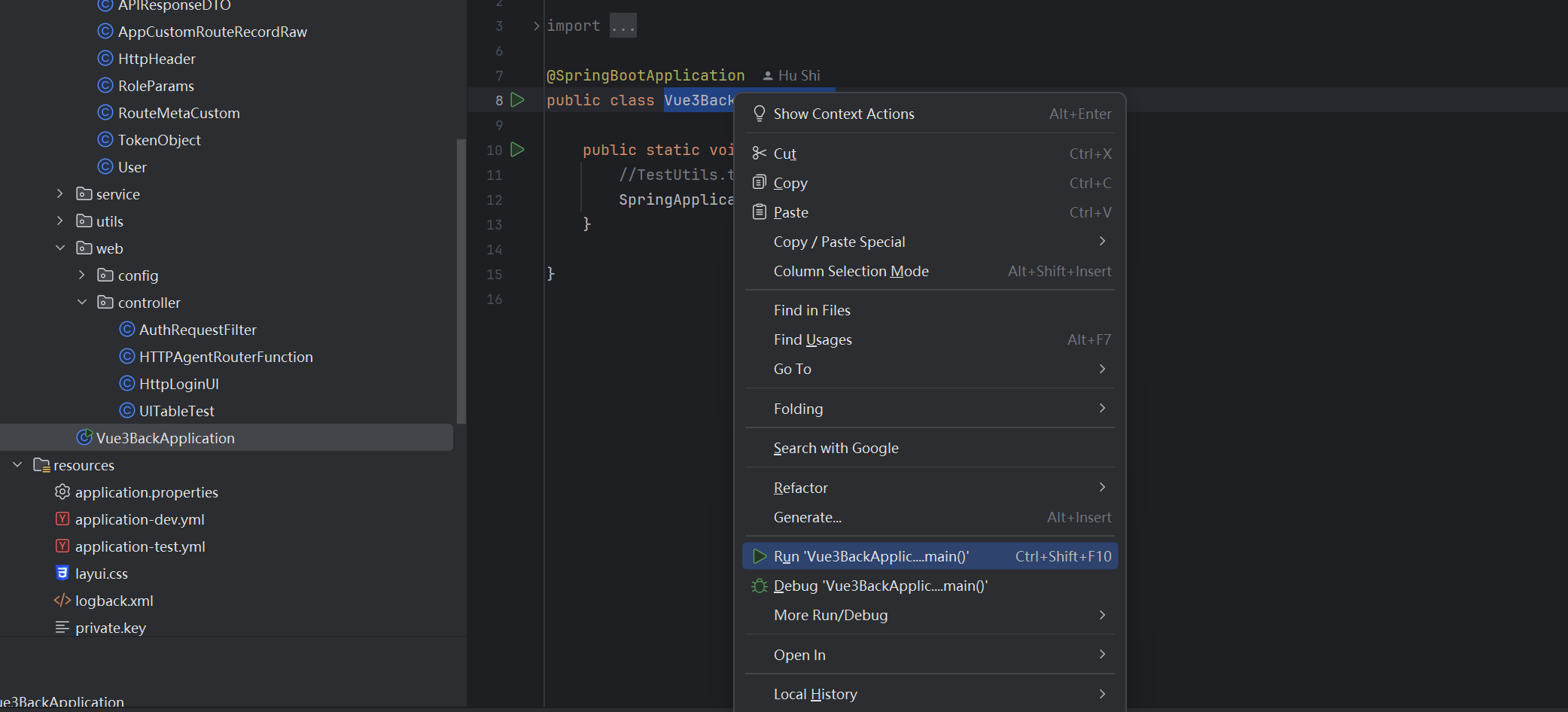
本地启动如图所示:
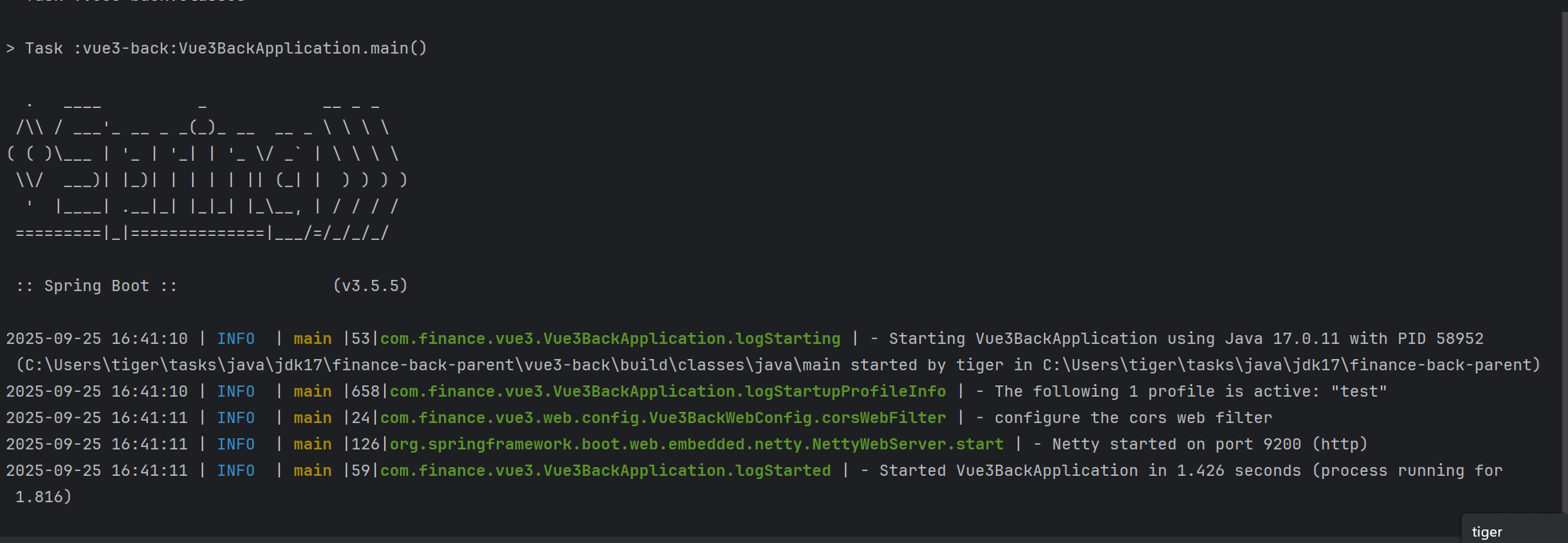
启动成功后日志如图
下面用postman或者其他工具测试后端接口功能状况
前后端通用业务接口返回模型设计
后端业务通用接口返回模型,此模型用于接口业务的数据返回的封装,无论业务成功与否都返回此模型
package com.finance.vue3.model;

import java.io.Serial;
import java.io.Serializable;

public class APIResponseDTO implements Serializable {

    @Serial
    private static final long serialVersionUID = 918371778765836705L;

    private int code = 0;
    private String msg = "success";
    private Object data;

    public static APIResponseDTO buildSuccess(Object data){
        APIResponseDTO result = new APIResponseDTO();
        result.setData(data);
        return result;
    }
    public static APIResponseDTO buildFailure(int code){
        APIResponseDTO result = new APIResponseDTO();
        result.setCode(code);
        return result;
    }
    public static APIResponseDTO buildFailure(int code, String msg){
        APIResponseDTO result = new APIResponseDTO();
        result.setCode(code);
        result.setMsg(msg);
        return result;
    }

    public int getCode() {
        return code;
    }

    public void setCode(int code) {
        this.code = code;
    }

    public Object getData() {
        return data;
    }

    public void setData(Object data) {
        this.data = data;
    }

    public String getMsg() {
        return msg;
    }

    public void setMsg(String msg) {
        this.msg = msg;
    }


}
前端通用接口设计
找到根据/type/global.d.ts(注意是项目根文件夹下的/type文件夹)文件中的declare interface IResponse 如图所示
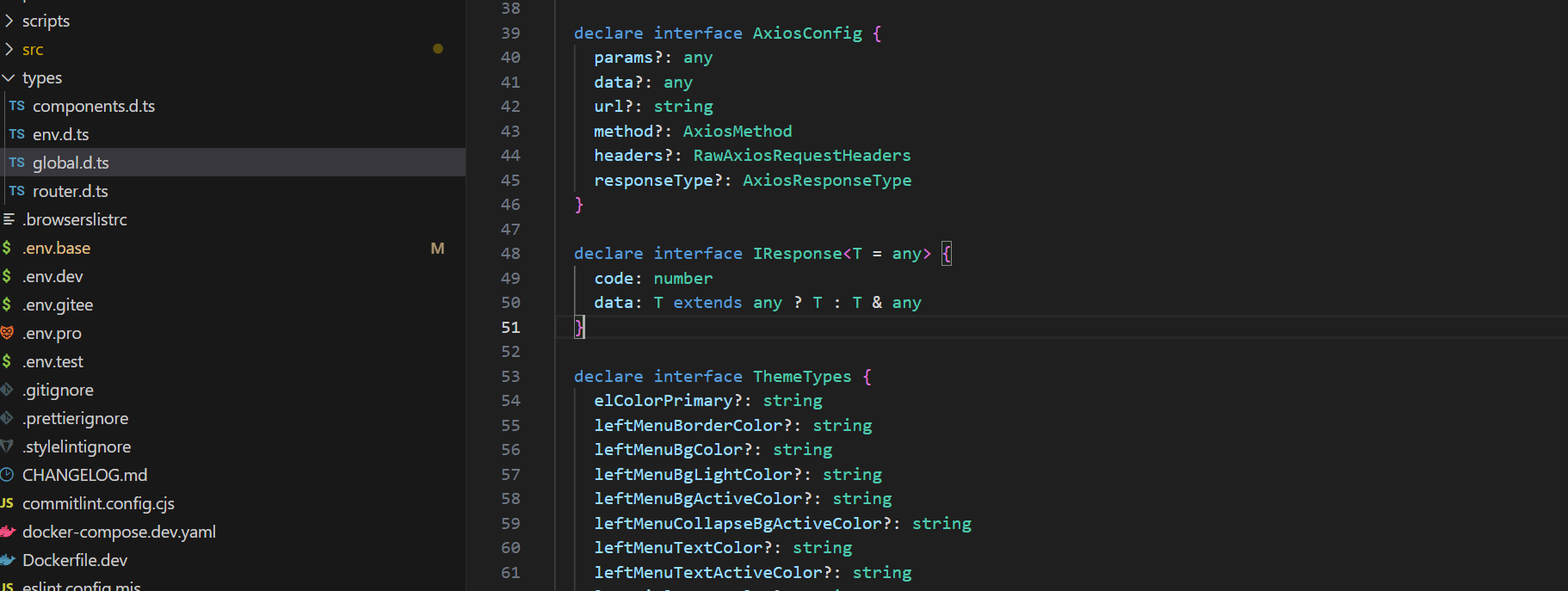 为了和后端的业务通用接口统一,需要修改为如下所示
  declare interface IResponse<T = any> {
    code: number
    msg: string
    data: T extends any ? T : T & any
  }
这样就可以和后端的APIResponseDTO类统一了
设置vite代理使其login接口访问后端
在根目录vite.config.ts的文件里找到代理设置位置如下图
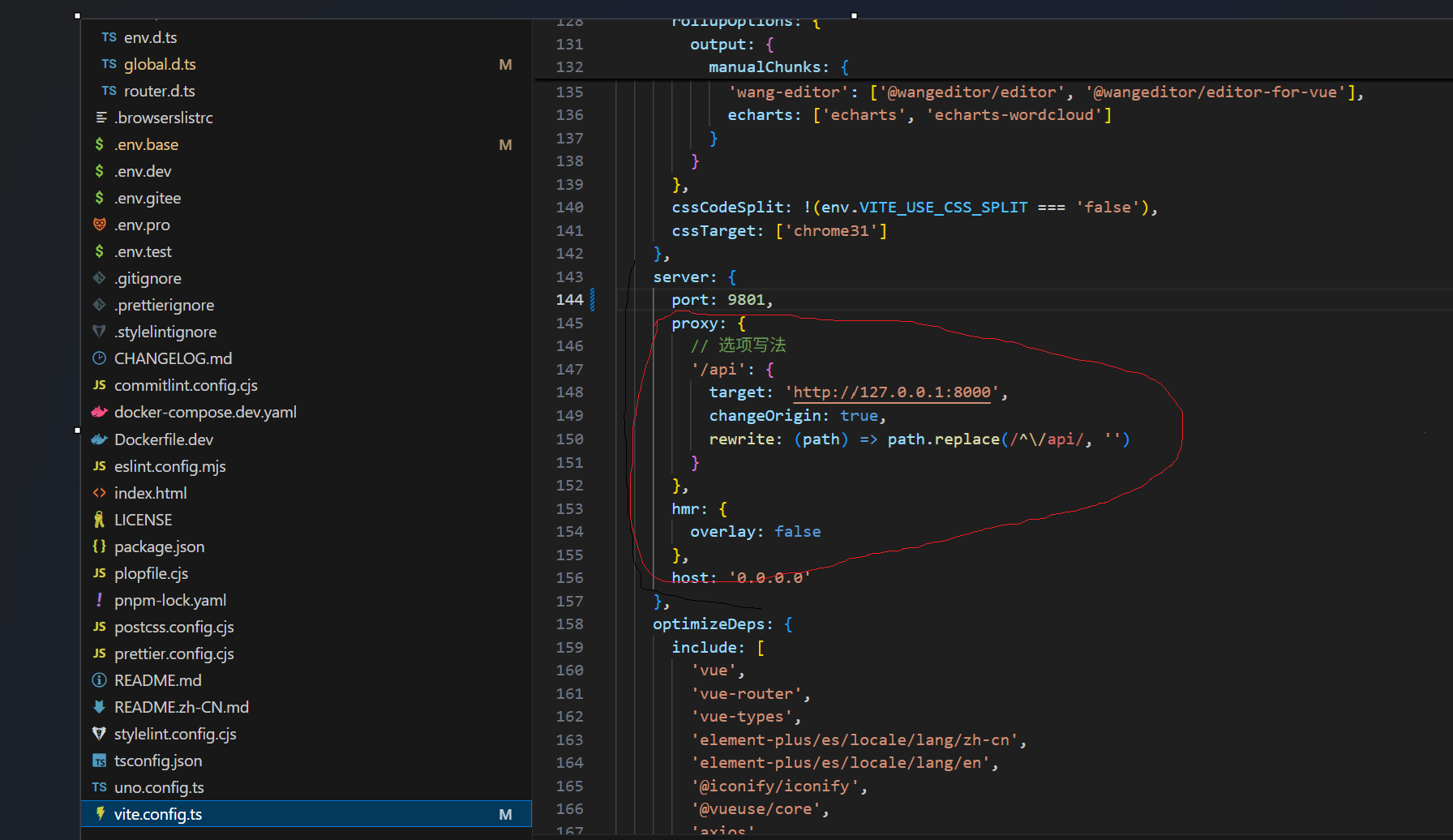
在里面添加配置项
 proxy: {
        // 选项写法
        '/api': {
          target: 'http://127.0.0.1:8000',
          changeOrigin: true,
          rewrite: (path) => path.replace(/^\/api/, '')
        },
        '/config/console':{
          target:'http://localhost:9200',
          changeOrigin:true,
          secure: false //不验证https证书
        }
      },
添加后如下图所示:
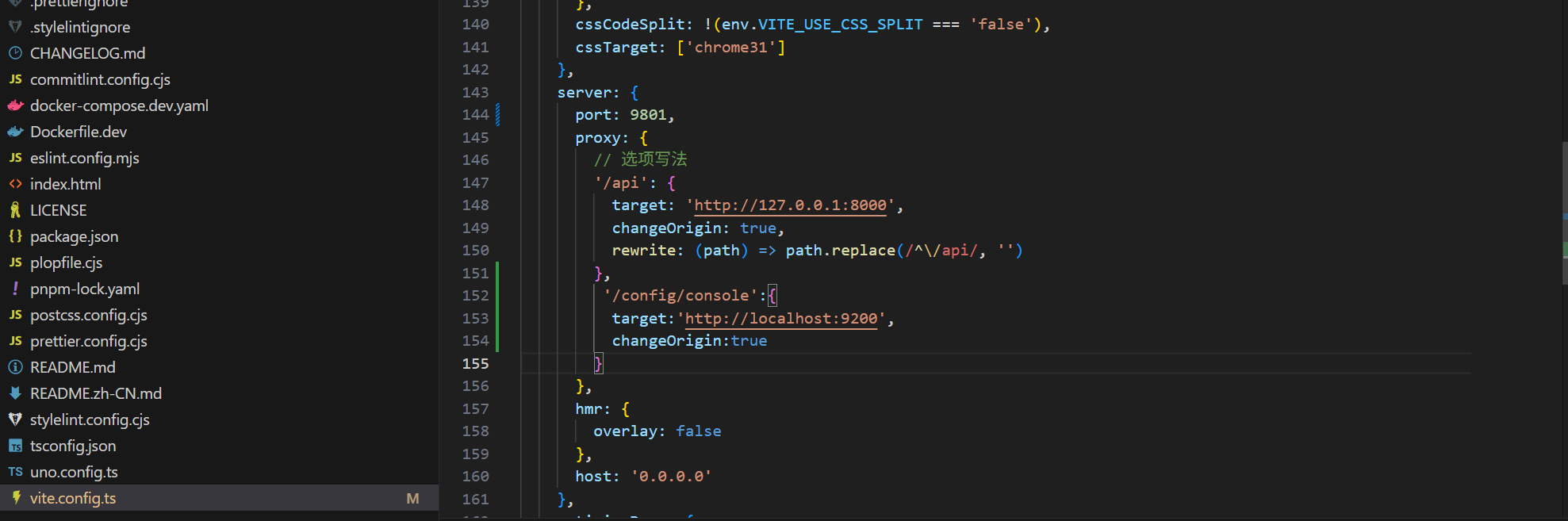
此时就可以使用和后端进行互动登录了
如图,在用户名和密码里输入admin并选择登录类型,点击登录
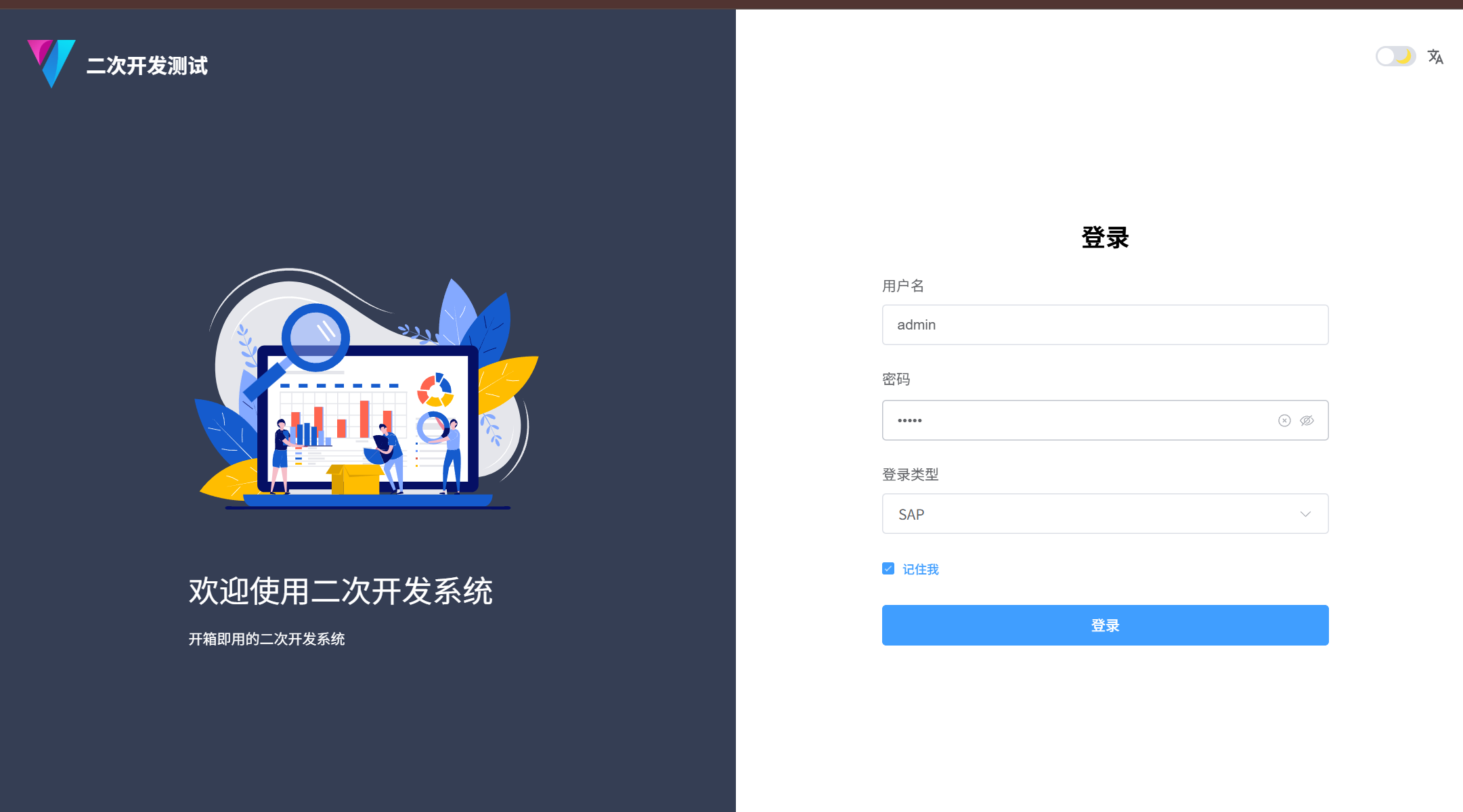
登录后得到如下图所示
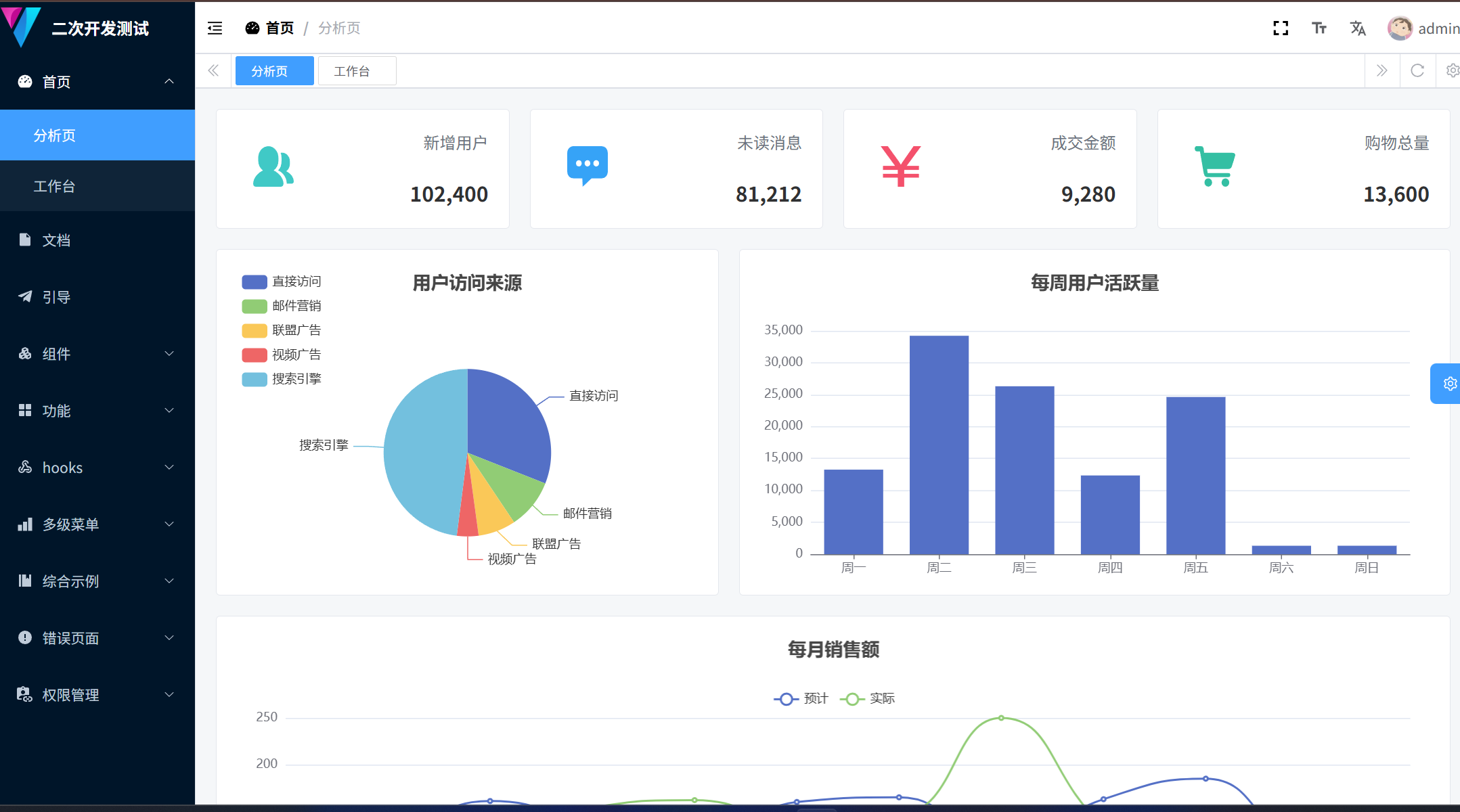
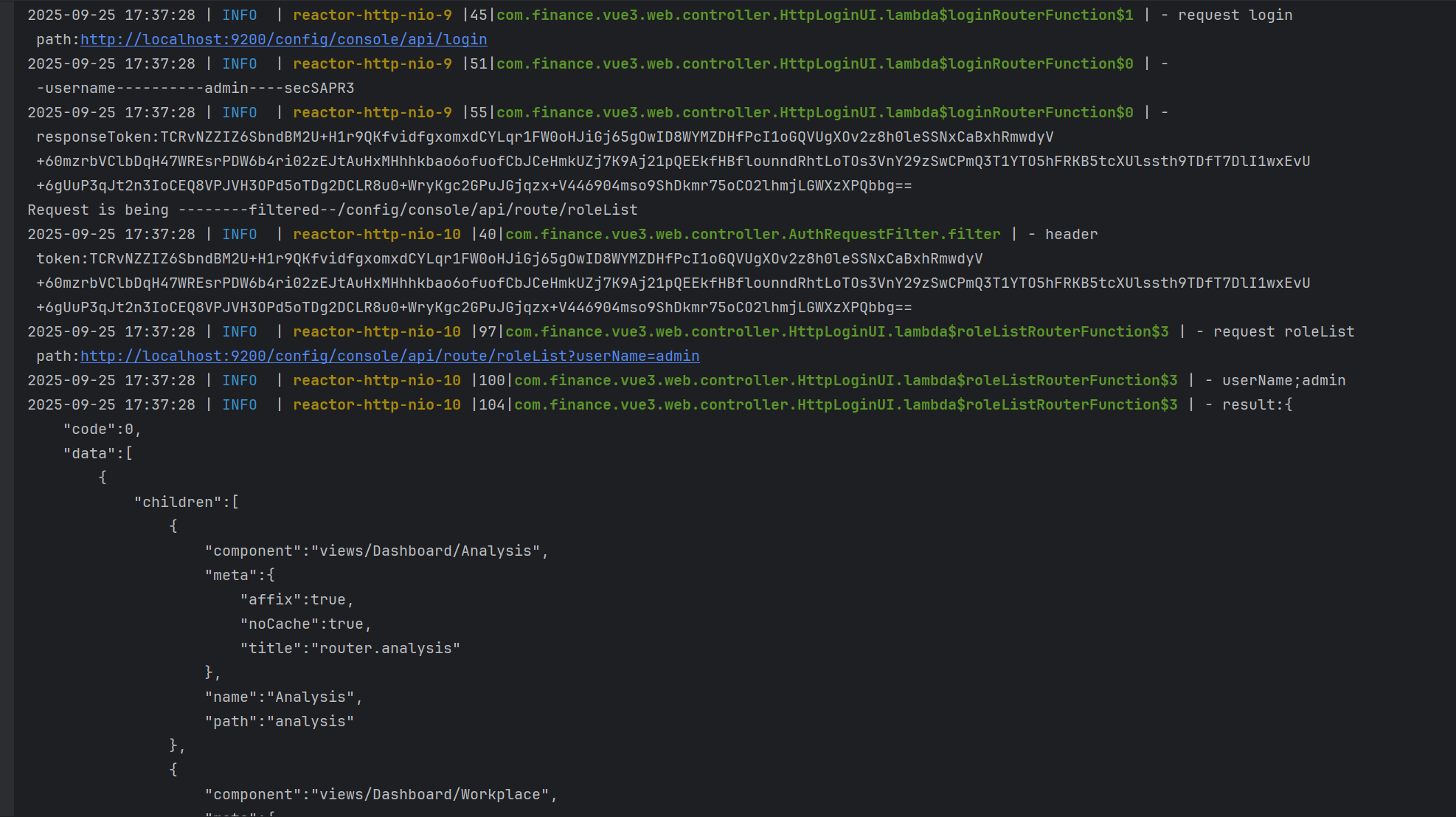
后台日志
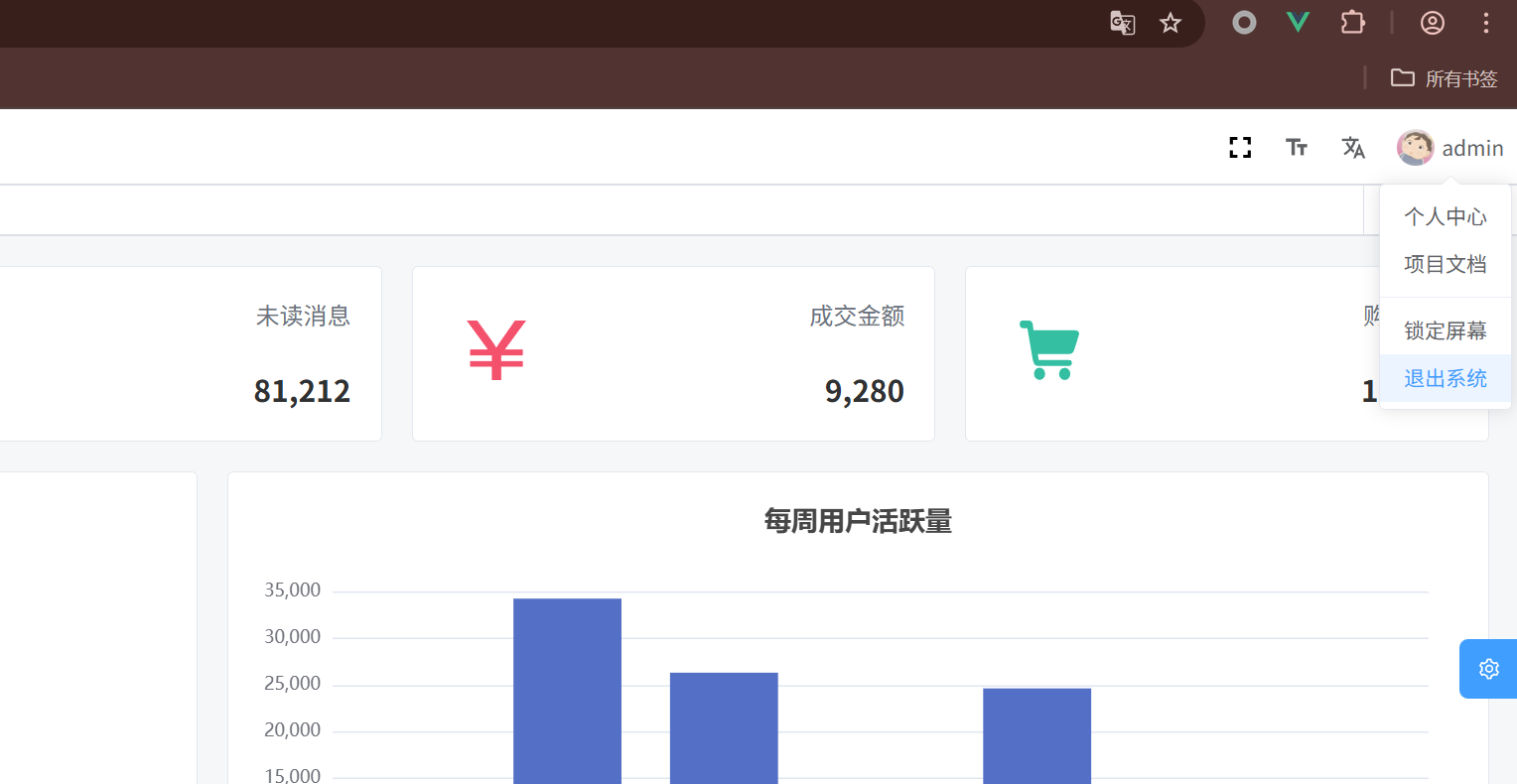
注销操作,点击桌面右上角的用户图标,然后选择 退出系统
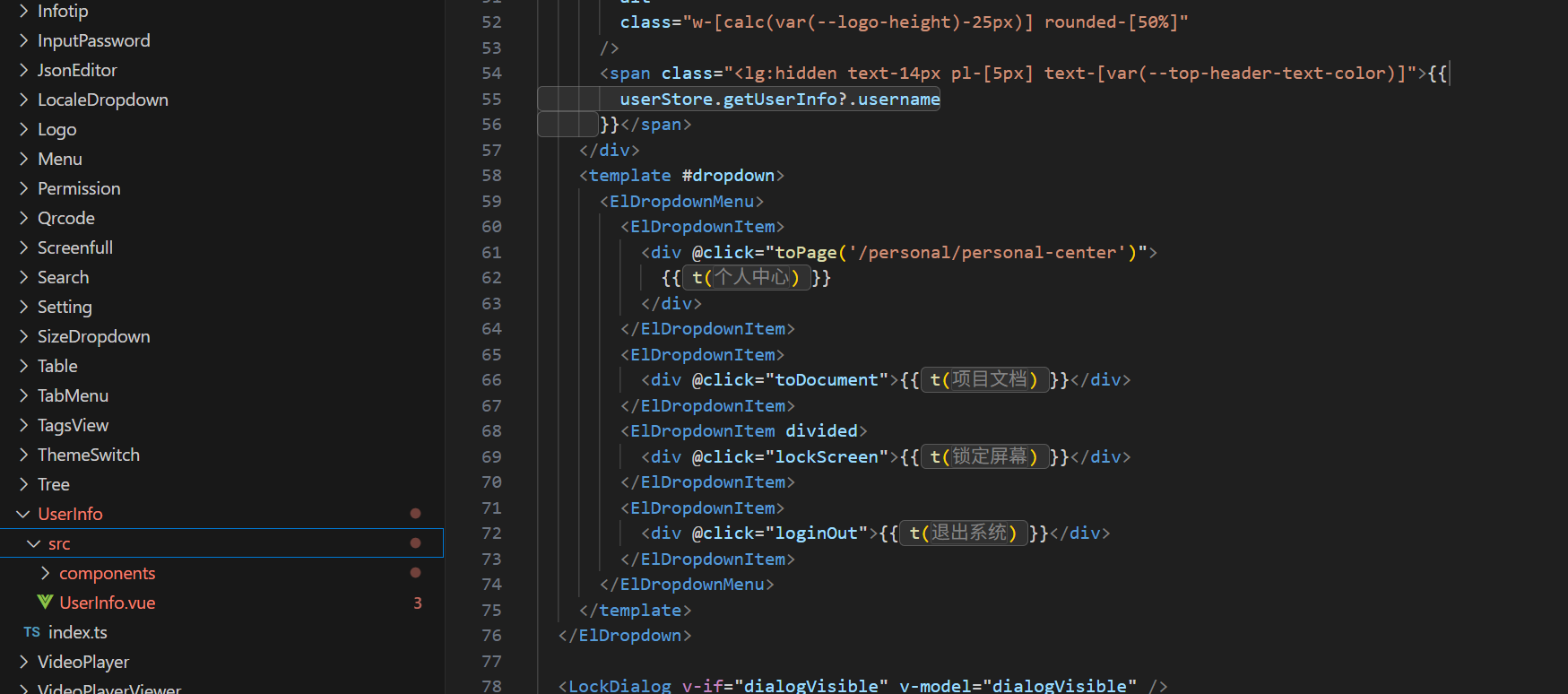
注销操作的页面代码在src/components/UserInfo/src/UserInfo.vue文件中,如下图






 扫一扫
扫一扫


 7571
7571

 被折叠的 条评论
为什么被折叠?
被折叠的 条评论
为什么被折叠?
 到【灌水乐园】发言





