文件柜截图
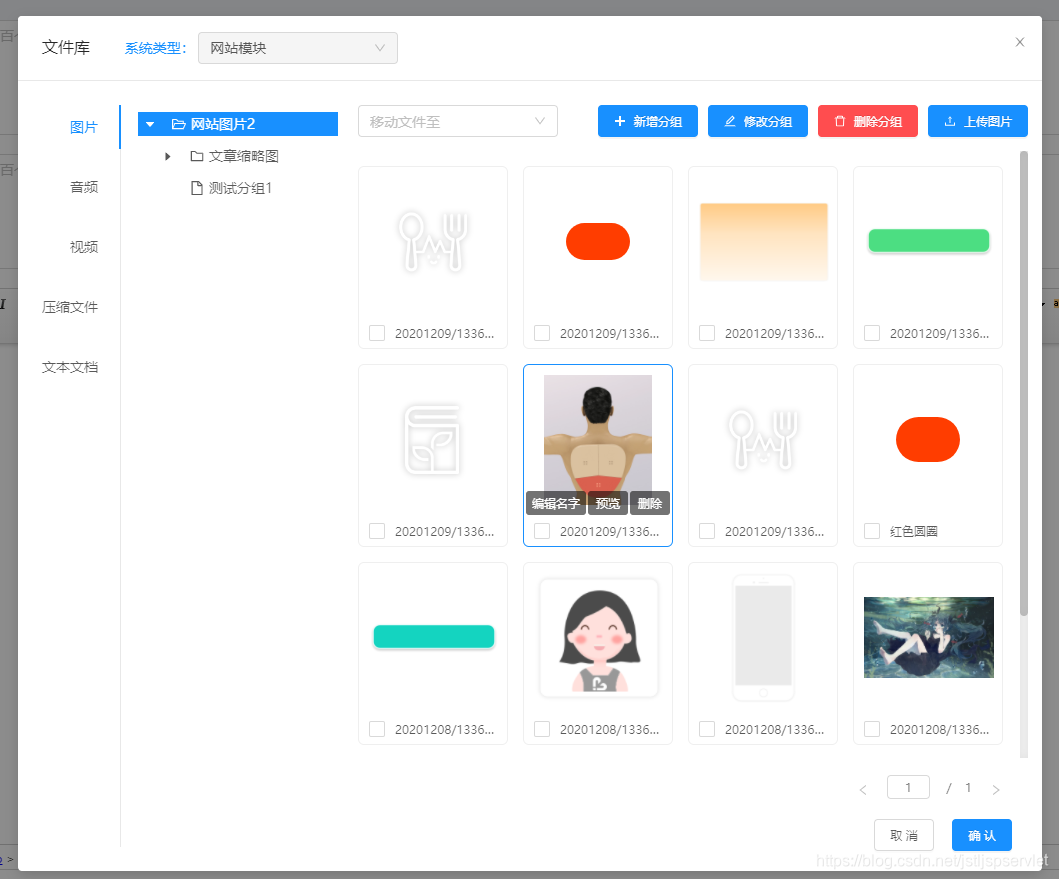
文件柜代码FileLibrary.vue
<template>
<div>
<a-modal
v-if="ready"
width="1024px"
:visible="true"
:maskClosable="false"
@cancel="$emit('cancel')"
:footer="null"
>
<div slot="title">
<span class="ant-modal-title">
文件库
<span class="title-select">
<label>系统类型:</label>
<a-select class="group-input" v-model="showSysType" disabled placeholder="请选择系统类型">
<a-select-option @click="this.curSysType=item.key;findFileGroup();" v-for="(item, index) in sysTypeList" :key="index" :value="item.sysType">{{item.title}}</a-select-option>
</a-select>
<a-button type="primary" v-if="!showSysType && $store.state.permissions[`uploadGroup#save`]" style="margin: 0 0 0 30px"
@click="addGroupBtnClick('addSysType')">新增系统类型</a-button>
</span>
</span>
</div>
<div class="all-content" :style="{height: $store.state.windowHeight ? `${$store.state.windowHeight - 315}px` : '540px'}">
<a-tabs class="file-type-list" :default-active-key="activedFileType" tab-position="left" @change="fileTypeClick">
<a-tab-pane :key="item.value" :tab="item.label" v-for="item in dict['file_library_file_type']">
</a-tab-pane>
</a-tabs>
<ul class="group-list">
<a-directory-tree
multiple
default-expand-all
:treeData="groupTree"
v-model="groupCheckedKeys"
:selectedKeys="groupCheckedKeys"
:expandedKeys="groupExpandedKeys"
@select="onSelectGroup"
@expand="onExpandGroup">
</a-directory-tree>
</ul>
<div class="img-content">
<div class="opr-row" v-if="showSysType">
<a-cascader
v-show="showMoveInput"
v-model="moveGroupList"
class="move-group-input"
allowClear
changeOnSelect
:filter-option="filterOption"
placeholder="移动文件至"
:options="groupTree"
@popupVisibleChange="changeMoveGroup"
>
</a-cascader>
<div class="upload-btn">
<a-button type="primary" v-if="$store.state.permissions[`uploadGroup#save`]" class="add-group-btn" icon="plus" @click="addGroupBtnClick">新增分组</a-button>
<a-button type="primary" v-if="groupObj.key && $store.state.permissions[`uploadGroup#update`]" class="add-group-btn" icon="edit" @click="addGroupBtnClick('update')">修改分组</a-button>
<a-button type="danger" v-if="groupObj.key && $store.state.permissions[`uploadGroup#delete`]" class="add-group-btn" icon="delete" @click="deleteGroupBtnClick">删除分组</a-button>
<UploadFile v-if="groupObj.key" :allowFileType="activedFileType" style="float: left"
:showTooltip="true"
tooltipPosition="left"
@change="uploadFileChange"/>
</div>
</div>
<div class="img-loading" v-if="tableLoading">
<div class="line-scale-pulse-out">
<div></div>
<div></div>
<div></div>
<div></div>
<div></div>
</div>
</div>
<ul class="q_option_ul" :style="{height: $store.state.windowHeight ? `${$store.state.windowHeight - 450}px` : '410px'}">
<li class="option_item q_option_img_li">
<div class="img-item" v-for="(img, imgIdx) in fileList" :key="imgIdx" :class="(imgIdx+1)%4===0 ? 'img-item-4' : ''">
<div class="option_img_box">
<div class="option_img" @click="changeChecked(img.checked = !img.checked, imgIdx)">
<img v-if="!groupObj.groupType || groupObj.groupType === 'image'"
:src="$store.state.fileUrl + '/' + img.fileKey" class="ui-sortable-handle">
<img v-if="groupObj.groupType && groupObj.groupType === 'audio'"
src="@Images/fileLibrary/audio-icon.png" class="ui-sortable-handle">
<img v-if="groupObj.groupType && groupObj.groupType === 'video'"
:src="$store.state.fileUrl + '/' + img.fileKey + '?vframe/jpg/offset/10'" class="ui-sortable-handle">
<img v-if="groupObj.groupType && groupObj.groupType === 'application'"
src="@Images/fileLibrary/application-icon.png" class="ui-sortable-handle">
<img v-if="groupObj.groupType && groupObj.groupType === 'text'"
src="@Images/fileLibrary/text-icon.png" class="ui-sortable-handle">
</div>
<input type="file" name="files[]" multiple="multiple" style="display: none;">
<div class="img_handle">
<a class="btn_txt btn_img_edit" @click="editFileName(imgIdx)">编辑名字</a>
<a class="btn_txt btn_img_del" @click="viewImg(img.fileKey)">预览</a>
<a class="btn_txt btn_img_del" @click="deleteBtnClick('delOne', img)">删除</a>
</div>
</div>
<div class="option_title_wrap">
<a-checkbox v-if="checkType === 'checkbox'" v-model="img.checked" @change="changeChecked($event, imgIdx)" class="float-left" />
<span @click="changeChecked(img.checked = !img.checked, imgIdx)" v-if="checkType === 'radio'" class="float-left">
<a-radio v-model="img.checked" />
</span>
<div class="file-name-show ellipsis float-left" @click="changeChecked(img.checked = !img.checked, imgIdx)">{{img.fileName}}</div>
</div>
</div>
</li>
</ul>
</div>
<div slot="footer" style="margin: 20px 0; position: absolute;bottom: 0;right: 30px;">
<a-pagination style="margin: 0 0 20px 0;" simple
:defaultCurrent="1"
:pageSize="fileConditon.pageSize"
:total="totalRecord" @change="tableChange"
@showSizeChange="tableChange"/>
<div style="text-align: right">
<a-button @click="$emit('cancel')">取消</a-button>
<a-button type="primary" @click="okChooseImg" style="margin: 0 0 0 15px;">确认</a-button>
</div>
</div>
</div>
</a-modal>
<a-modal
title="提示"
:visible="modalObj.visible"
:maskClosable="false"
@ok="modalHandleOk"
@cancel="modalObj.visible = false"
>
<p class="modal-text" v-html="modalObj.modalText"></p>
</a-modal>
<a-modal
:title="addGroupTitle"
:visible="showAddGroupModal"
:maskClosable="false"
width="700px"
@cancel="showAddGroupModal = false"
>
<a-form :form="groupForm" layout="inline"
:formItemLayout="formItemLayout">
<a-form-item label="系统类型" v-if="addGroupType === 'addSysType'">
<a-select allowClear class="my-form-content"
:options="dict['file_library_sys_type']"
showSearch
:filter-option="filterOption"
v-decorator="[ 'sysType', {
'initialValue': this.curSysType || '',
rules: [{ required: true, message: '请选择系统类型' }]
}]">
</a-select>
</a-form-item>
<a-form-item label="分组类型" v-if="addGroupType !== 'addSysType'">
<a-select allowClear class="my-form-content"
:disabled="groupFormData.key ? true : false"
:options="dict['file_library_file_type']"
showSearch
@change="changeFormSysType"
:filter-option="filterOption"
v-decorator="[ 'groupType', {
'initialValue': activedFileType || '',
rules: [{ required: true, message: '请选择分组类型' }]
}]">
</a-select>
</a-form-item>
<a-form-item label="分组名称" v-if="addGroupType !== 'addSysType'">
<a-input allowClear
placeholder="请输入分组名称"
v-decorator="[ 'groupName', {
'initialValue': groupFormData.groupName || '',
rules: [{ required: true, message: '请输入分组名称'}]
}]">
</a-input>
</a-form-item>
<a-form-item label="排序">
<a-input-number allowClear
placeholder="请输入分组排序"
v-decorator="[ 'groupSort', {
'initialValue': groupFormData.groupSort || '',
rules: [{ required: true, message: '请输入分组排序'}]
}]">
</a-input-number>
</a-form-item>
<a-form-item label="父级分组" v-if="addGroupType !== 'addSysType' && (!groupObj.isTop || !groupFormData.key) && groupTree && groupTree.length">
<a-cascader
allowClear
changeOnSelect
:disabled="groupFormData.key ? true : false"
placeholder=""
:filter-option="filterOption"
:options="groupTree"
@change="changeCascader($event, 'parentId')"
v-decorator="[ 'parentId_cascader', {
'initialValue': groupFormData.parentId_cascader || [],
rules: [{ required: true, message: '请选择父级分组'}]
}]"
>
</a-cascader>
<a-input allowClear style="display: none;"
placeholder="请输入父级分组"
v-decorator="[ 'parentId', {
'initialValue': groupFormData.groupType || '',
rules: [{ required: true, message: '请选择父级分组'}]
}]">
</a-input>
</a-form-item>
</a-form>
<div slot="footer">
<div class="text-align-center">
<a-button @click="showAddGroupModal=false">取消</a-button>
<a-button type="primary" @click="saveGroup" :loading="groupLoading">保存</a-button>
</div>
</div>
</a-modal>
<a-modal
title="修改文件名字"
:visible="editFileNameModal"
:maskClosable="false"
width="500px"
@ok="updateFileName"
@cancel="editFileNameModal = false"
>
<a-input v-model="fileObj.fileName" class="group-name-input"></a-input>
</a-modal>
</div>
</template>
<script>
import UploadFile from '@Components/UploadFile'
export default {
components: {
UploadFile
},
props: {
checkType: {
type: String,
default: 'checkbox'
},
sysType: {
type: String,
default: 'common'
},
fileType: {
type: String,
default: 'all'
}
},
data() {
return {
activedFileType: '',
groupLoading: false,
dict: {},
ready: false,
curSysType: '',
showSysType: '',
sysTypeList: [],
groupCheckedKeys: [],
groupExpandedKeys: [],
groupTree: [],
fileList: [],
modalObj: {
modalText: '',
visible: false,
type: '',
},
fileConditon: {
pageNo: 0,
pageSize: 32,
queryTypeByFields: {
status: {'EQ': '0'},
},
orderByFields: {
'createDate': 'desc'
}
},
totalRecord: 32,
showAddGroupModal: false,
deleteOneImgId: [],
uploadLoading: false,
uploadTooltip: '',
fileObj: {
fileName: ''
},
editFileNameModal: false,
tableLoading: false,
loading: false,
groupObj: {},
groupForm: this.$form.createForm(this),
addGroupType: '',
addGroupTitle: '新增分组',
groupFormData: {},
formItemLayout: {
labelCol: {
xs: { span: 24 },
sm: { span: 12 },
},
wrapperCol: {
xs: { span: 24 },
sm: { span: 16 },
},
},
showMoveInput: false,
moveGroupList: [],
}
},
watch: {
'sysType': function () {
this.curSysType = this.sysType
this.findFileGroup()
}
},
created() {
this.findFileGroup('findSysTypeList')
this.$tools.http('dictData#getData', {dictTypes: ['file_library_sys_type', 'file_library_file_type']}).then(data => {
data = data || {}
if (data['file_library_file_type'] && this.fileType && typeof this.fileType === 'string' && this.fileType !== 'all') {
let fileTypeList = this.fileType.split(',')
data['file_library_file_type'] = data['file_library_file_type'].filter(dictRow => {
let returnValue = false
fileTypeList.filter(row=>{
if (dictRow.value === row) {
returnValue = true
}
})
return returnValue
})
}
this.dict = data
this.ready = true
this.activedFileType = data && data['file_library_file_type'] && data['file_library_file_type'].length ? data['file_library_file_type'][0].value : ''
this.findFileGroup()
})
this.curSysType = this.sysType
},
methods: {
formatTree: function (data) {
data.map(item => {
item.label = item.title || ''
item.value = item.key || ''
item.isLeaf = item.children && item.children.length > 0 ? 1 : 0;
if (item.children && item.children.length > 0) {
item.isLeaf = false;
this.formatTree(item.children);
} else {
delete item.children
item.isLeaf = true;
}
})
return data;
},
onSelectGroup(keys, event) {
this.groupCheckedKeys = keys || []
if (this.groupCheckedKeys.length) {
this.groupExpandedKeys = this.getParentList(this.groupTree, dataRes=> dataRes.value===this.groupCheckedKeys[0])
} else {
this.groupExpandedKeys = []
}
this.groupObj = event && event.selectedNodes && event.selectedNodes.length &&
event.selectedNodes[0].dataRef ? event.selectedNodes[0].dataRef : {}
this.fileList = []
this.fileConditon.pageNo = 0
this.findFileList()
},
onExpandGroup(expandedKeys) {
this.groupExpandedKeys = expandedKeys
},
viewImg: function (img) {
if (this.groupObj.groupType && this.groupObj.groupType !== 'image') {
window.open(this.$env.fileUrl + '/' + img);
return
}
if (img && (img.indexOf('http://') >= 0 || img.indexOf('https://') >= 0)) {
this.$previewPic({
list: [img]
})
} else if(img) {
this.$previewPic({
list: [(this.$env.fileUrl + '/' + img)]
})
}
},
okChooseImg: function () {
let checkArr = this.getCheckedImg()
this.$emit('changeImgUrl', checkArr)
},
uploadFileChange: function (e) {
if (e && e.fileList) {
this.fileList = []
e.fileList.filter(row => {
if (row.fileKey) {
this.addFile(row.fileKey)
}
})
}
},
fileTypeClick: function (item) {
this.activedFileType = item || ''
this.fileList = []
this.fileConditon.pageNo = 0
this.groupObj = {}
this.groupCheckedKeys = []
this.groupExpandedKeys = []
this.showMoveInput = false
this.moveGroupList = []
this.findFileGroup()
},
changeMoveGroup: function (show, selectedOptions) {
if (show) {
return
}
let checkArr = this.getCheckedImg()
if(!checkArr.length){
window.$message('请先选择需要移动的文件', 'warning')
return
}
if (!this.moveGroupList.length) {
window.$message('请先选择移动的分组', 'warning')
return
}
let groupName = ''
let curFileGroupId = this.fileList && this.fileList.length && this.fileList[0].groupId ? this.fileList[0].groupId : ''
let curKey = this.moveGroupList[this.moveGroupList.length-1]
if (curFileGroupId && String(curFileGroupId) === String(curKey)) {
window.$message('移动的分组和当前文件的分组相同,不支持移动', 'warning')
return
}
let filterChild = function (childList) {
childList.filter(row => {
if (curKey && curKey === row.key) {
groupName = row.title
}
if(row.children && row.children.length) {
filterChild(row.children)
}
})
}
filterChild(this.groupTree)
this.modalObj = {
modalText: `是否将已选中文件移至分组<span style="color: #1890ff;font-size: 14px;">${groupName}</span>`,
visible: true,
type: 'moveToGroup',
}
},
changeFormSysType: function (e) {
this.groupTree = []
this.findFileGroup('', e)
this.groupForm.setFieldsValue({
parentId_cascader: [],
parentId: ''
})
},
findFileGroup: function (type, groupType) {
let param = {}
if (type && type === 'findSysTypeList') {
param = {}
} else {
param = {
sysType: this.curSysType,
groupType: groupType || this.activedFileType
}
}
this.$tools.http('uploadGroup#treeData', param).then(res => {
res = res && Array.isArray(res) ? this.formatTree(res) : []
if (type && type === 'findSysTypeList') {
let sysTypeList = []
if (res.length) {
res.filter(row => {
sysTypeList.push(row)
delete row.children
if (row.sysType && row.sysType === this.curSysType && this.curSysType) {
this.showSysType = this.curSysType
}
})
}
this.sysTypeList = sysTypeList
} else {
res.filter(row => {
row.isTop = true
})
this.groupTree = res
if (this.groupTree.length && !this.groupCheckedKeys.length) {
this.groupObj = this.groupTree[0]
this.groupCheckedKeys = [this.groupObj.key]
this.groupExpandedKeys = [this.groupObj.key]
}
if (this.groupTree && this.groupTree.length && this.groupTree[0].children && this.groupTree[0].children.length) {
this.showMoveInput = true
}
this.findFileList()
}
}).catch(res=>{
this.groupTree = []
})
},
getParentList: function (tree, func, path = []) {
if (!tree) return []
for (const data of tree) {
path.push(data.value)
if (func(data)) return path
if (data.children) {
const findChildren = this.getParentList(data.children, func, path)
if (findChildren.length) return findChildren
}
path.pop()
}
return []
},
addGroupBtnClick: function (type) {
this.addGroupType = type || ''
this.showAddGroupModal=true;
if (type && type === 'update') {
this.getNewGroupObj()
this.addGroupTitle = '修改分组'
this.groupFormData = JSON.parse(JSON.stringify(this.groupObj))
let parentList = this.getParentList(this.groupTree, dataRes=> dataRes.value===this.groupObj.key)
if (parentList.length > 1) {
parentList.splice(parentList.length - 1, 1)
}
let formObj = {
groupType: this.groupObj.groupType || this.activedFileType,
groupName: this.groupObj.title || '',
groupSort: this.groupObj.groupSort || 0,
parentId_cascader: parentList,
parentId: this.groupObj.parentKey || ''
}
let myTimeout = setTimeout(()=>{
this.groupForm.setFieldsValue(formObj)
clearTimeout(myTimeout)
}, 100)
} else {
let formObj = {}
if (type && type === 'addSysType') {
this.addGroupTitle = '新增系统类型'
formObj = {
sysType: this.curSysType,
groupSort: 10
}
} else {
this.addGroupTitle = '新增分组'
formObj = {
groupType: this.activedFileType,
groupName: '',
groupSort: 10,
parentId_cascader: [],
parentId: ''
}
}
this.groupFormData = formObj
let myTimeout = setTimeout(()=>{
this.groupForm.setFieldsValue(formObj)
clearTimeout(myTimeout)
}, 100)
}
},
getNewGroupObj: function(){
let _this = this
let filterChild = function (childList) {
childList.filter(row => {
if (_this.groupObj.key && _this.groupObj.key === row.key) {
_this.groupObj = row
}
if(row.children && row.children.length) {
filterChild(row.children)
}
})
}
if (Array.isArray(_this.groupTree) && _this.groupTree.length) {
filterChild(_this.groupTree)
}
},
changeCascader: function (data, item) {
let value = data && data.length ? data[data.length-1] : ''
this.groupForm.setFieldsValue({[item]: value})
this.groupFormData[item] = value
},
saveGroup: function() {
this.groupForm.getForm().validateFields((error, values) => {
if (error) {
return null;
} else {
if (this.groupLoading) {
return
}
this.groupLoading = true
if (this.addGroupType !== 'addSysType') {
values.sysType = this.curSysType
}
if (this.addGroupType === 'addSysType' && this.dict['file_library_sys_type']) {
this.dict['file_library_sys_type'].filter(row =>{
if (row.value && row.value === values.sysType) {
values.groupName = row.label
}
})
} else {
if(!values.parentId) {
this.sysTypeList.filter(row => {
if (row.sysType === this.curSysType) {
values.parentId = row.key
}
})
}
}
delete values.parentId_cascader
if (this.groupFormData.key) {
values.groupId = this.groupFormData.key
this.$tools.http('uploadGroup#update', values).then(() => {
this.showSysType = this.curSysType
this.findFileGroup(this.addGroupType === 'addSysType' ? 'findSysTypeList' : '')
window.$message('修改分组成功', 'success')
this.showAddGroupModal = false
this.groupLoading = false
}).catch((res) => {
this.groupLoading = false
})
} else {
this.$tools.http('uploadGroup#save', values).then(() => {
this.findFileGroup('findSysTypeList')
let findTimeout = setTimeout(()=>{
this.findFileGroup()
clearTimeout(findTimeout)
}, 100)
window.$message(this.addGroupType === 'addSysType' ? '新增系统类型成功' : '新增分组成功', 'success')
this.showAddGroupModal = false
this.groupLoading = false
}).catch((res) => {
if (this.addGroupType === 'addSysType' && !this.showSysType) {
this.findFileGroup('findSysTypeList')
let findTimeout = setTimeout(() => {
this.findFileGroup()
clearTimeout(findTimeout)
}, 100)
}
this.groupLoading = false
})
}
}
});
},
editGroupBtnClick: function (item) {
this.showAddGroupModal = true;
this.groupName = item.groupName || '';
this.groupFormData = item
this.cancelBubble()
},
cancelBubble(e) {
var evt = e ? e : window.event;
if(evt.stopPropagation) {
evt.stopPropagation();
} else {
evt.cancelBubble = true;
}
},
addFile: function (fileKey) {
let data = {
groupId: this.groupObj.key,
fileName: fileKey,
fileKey: fileKey
}
this.$tools.http('uploadFile#save', data).then(() => {
this.findFileList()
window.$message('新增文件成功', 'success')
this.uploadLoading = false
}).catch((res)=>{
this.uploadLoading = false
})
},
updateFile: function (param) {
let _this = this
if (!param) {
let checkArr = this.getCheckedImg()
let fileId = []
let fileName = []
checkArr.filter((row, index)=>{
fileId.push(row.fileId)
fileName.push(row.fileName)
let curKey = this.moveGroupList[this.moveGroupList.length-1]
let data = {
groupId: curKey,
fileId: row.fileId,
fileName: row.fileName,
}
let checkArrTimeout = setTimeout(()=>{
let showMessage = checkArr.length > 1 && index < (checkArr.length - 1) ? true: false
updateFun(data, showMessage)
clearTimeout(checkArrTimeout)
}, 300 * index)
})
} else {
updateFun(param)
}
function updateFun(data, hideMessage) {
_this.$tools.http('uploadFile#update', data).then(() => {
if (!hideMessage) {
window.$message(param ? '文件名字修改成功' : '移动分组成功', 'success')
}
_this.findFileList()
_this.editFileNameModal = false
}).catch(()=>{
if (!hideMessage) {
window.$message(param ? '文件名字修改失败' : '移动分组失败', 'error')
}
})
}
},
updateFileName: function () {
if (!this.fileObj.fileName || (typeof this.fileObj.fileName === 'string' && !this.fileObj.fileName.trim())) {
window.$message('文件名字不能为空', 'warning')
return
}
let data = {
groupId: this.fileObj.groupId,
fileId: this.fileObj.fileId,
fileName: this.fileObj.fileName,
}
this.updateFile(data)
},
tableChange: function (pageNo) {
this.fileConditon.pageNo = pageNo > 0 ? pageNo - 1 : 0;
this.findFileList()
},
findFileList: function () {
if (!this.groupObj.key) {
return
}
this.tableLoading = true
this.fileConditon.queryTypeByFields.groupId = {'EQ': this.groupObj.key}
this.$tools.http('uploadFile#listPageData', this.fileConditon).then(data => {
data.data = data && data.data && Array.isArray(data.data) ? data.data : []
data.data.filter(row=>{
row.checked = false
})
this.totalRecord = data.totalRecord || 0
this.fileList = data.data
this.tableLoading = false
}).catch(() => {
this.fileList = []
this.tableLoading = false
})
},
changeChecked(e, index) {
if (this.checkType === 'radio') {
this.fileList.filter(row => {
row.checked = false
})
}
this.fileList[index].checked = e && typeof e === 'object' && e.target.checked !== undefined ? e.target.checked : e
this.cancelBubble()
},
editFileName(index) {
this.fileObj = JSON.parse(JSON.stringify(this.fileList[index]))
this.editFileNameModal = true
},
getCheckedImg: function () {
let checkArr = []
this.fileList.filter(row=>{
if(row.checked) {
checkArr.push(row)
}
})
return checkArr
},
deleteBtnClick(type, item) {
if (type === 'delChecked') {
let checkArr = this.getCheckedImg()
if(!checkArr.length){
window.$message('请先选择需要删除的文件', 'warning')
return
}
}
if (item){
this.deleteOneImgId[0] = item.fileId
}
this.modalObj = {
modalText: '是否删除文件?',
visible: true,
type: type,
}
},
deleteGroupBtnClick(item) {
this.getNewGroupObj()
this.groupFormData = item
this.modalObj = {
modalText: '是否确定删除' + (this.groupObj.title ? `分组<span style="color: #1890ff;font-size: 14px;">${this.groupObj.title}</span>` : '分组') + '?',
visible: true,
type: 'deleteGroup'
}
this.cancelBubble()
},
deleteGroup() {
this.$tools.http('uploadGroup#delete', {groupId: this.groupObj.key}).then(() => {
this.groupCheckedKeys = []
this.groupExpandedKeys = []
this.findFileGroup()
let formObj = {
groupType: this.activedFileType,
groupName: '',
groupSort: 10,
parentId_cascader: [],
parentId: ''
}
this.groupFormData = formObj
let myTimeout = setTimeout(()=>{
this.groupForm.setFieldsValue(formObj)
clearTimeout(myTimeout)
}, 100)
window.$message('删除成功', 'success')
})
},
deleteImgList() {
let fileId = []
if (this.modalObj.type === 'delOne') {
fileId = this.deleteOneImgId
} else {
let checkArr = this.getCheckedImg()
checkArr.filter(row=>{
fileId.push(row.fileId)
})
}
this.$tools.http('uploadFile#delete', {fileId: fileId[0]}).then(() => {
this.findFileList()
window.$message('删除成功', 'success')
})
},
modalHandleOk() {
this.modalObj.visible = false;
if (this.modalObj.type === 'moveToGroup') {
this.updateFile();
} else if (this.modalObj.type === 'delOne') {
this.deleteImgList();
} else if (this.modalObj.type === 'delChecked') {
this.deleteImgList();
} else if (this.modalObj.type === 'deleteGroup') {
this.deleteGroup();
}
},
filterOption(input, option) {
return (
option.componentOptions.children[0].text.toLowerCase().indexOf(input.toLowerCase()) >= 0
);
}
}
}
</script>
<style lang="less" scoped>
/deep/ .ant-tabs .ant-tabs-nav .ant-tabs-tab {
height: 44px;
line-height: 28px;
font-size: 14px;
}
/deep/ .ant-modal-body {
padding: 24px 0;
}
/deep/ .title-select div {
font-size: 14px;
}
.title-select {
margin: 0 0 0 30px;
label, select {
font-size: 14px;
}
label {
color: #1890ff;
}
}
.all-content{
height: 540px;
}
.file-type-list {
width: 120px;
text-align: center;
float: left;
}
.group-list{
float: left;
width: 200px;
height: 100%;
list-style: none;
overflow: auto;
margin: 0 20px 0 0;
padding: 0;
}
.group-list li{
position: relative;
padding: 8px 8px;
margin: 4px 0 0 0;
color: #555555;
font-size: 14px;
cursor: pointer;
}
.group-list li.active, .group-list li:hover {
background: rgba(48, 145, 242, 0.1);
border-radius: 6px;
}
/deep/ .ant-tree-title, /deep/ .ant-tree .anticon svg {
font-size: 14px;
}
.add-group-btn{
margin: 0 10px 0 0;
float: left;
}
.group-name{
display: inline-block;
width: 100px;
font-size: 14px;
position: relative;
top: 4px;
}
.show-edit-icon{
visibility: hidden;
display: inline-block;
width: 14px;
position: relative;
top: -2px;
}
.group-list li:hover .show-edit-icon{
visibility: visible;
}
/deep/ .show-edit-icon .anticon svg {
display: inline-block;
width: 14px;
height: 14px;
}
.show-del-icon {
position: absolute;
right: 8px;
top: 16px;
}
.img-content{
float: left;
width: 670px;
position: relative;
}
.opr-row{
position: relative;
height: 36px;
}
.upload-btn{
display: inline-block;
position: absolute;
right:0;
}
.q_option_ul{
list-style: none;
margin: 10px 0 0 0;
padding: 0;
height: 410px;
overflow: auto;
}
.q_option_img_li .img-item{
display: inline-block;
margin: 15px 15px 0 0;
width: 150px;
padding: 0;
box-sizing: border-box;
vertical-align: top;
position: relative;
background-color: #fff;
border: 1px solid #efefef;
border-radius: 6px;
-webkit-border-radius: 6px;
-moz-border-radius: 6px;
-ms-border-radius: 6px;
-o-border-radius: 6px;
cursor: pointer;
}
.q_option_img_li .img-item:hover {
border: 1px solid #1890ff;
}
.q_option_img_li .img-item-4{
margin: 15px 0 0 0;
}
.img-item .content_editable{
margin: 0 !important;
}
.img-item .option_title {
padding: 5px 10px 5px 10px !important;
word-break: break-all;
word-wrap: break-word;
}
.img-item .icon_radio, .img-item .icon_square {
position: absolute;
top: 15px !important;
left: 14px;
}
.option_img {
padding: 10px 10px;
width: 150px;
height: 150px;
display: table-cell;
vertical-align: middle;
text-align: center;
}
.q_option_img_li .option_img img {
max-width: 130px;
max-height: 130px;
}
.option_img_box .img_handle {
display: none;
position: absolute;
top: 126px;
left: 2px;
right: 2px;
bottom: 2px;
font-size: 0;
}
.q_option_img_li .img-item:hover .img_handle {
display: block !important;
}
.option_img_box .img_handle .btn_txt:first-child {
margin-right: 2px;
}
.option_img_box .img_handle .btn_txt {
display: inline-block;
width: 60px;
height: 24px;
line-height: 24px;
text-align: center;
color: #fff;
font-size: 10px;
background-color: rgba(0,0,0,0.55);
cursor: pointer;
border-radius: 3px;
-webkit-border-radius: 3px;
-moz-border-radius: 3px;
-ms-border-radius: 3px;
-o-border-radius: 3px;
}
.option_img_box .img_handle .btn_img_del {
width: 40px;
margin-right: 2px;
}
.option_img_box .img_handle .btn_img_del:last-child {
margin-right: 0;
}
.q_option_img_li .option_title_wrap {
padding: 4px 3px 3px 10px;
position: relative;
}
.q_option_img_li .option_title_wrap .icon_wj {
position: absolute;
top: 11px;
left: 8px;
}
.q_option_img_li .option_title_wrap .option_title {
font-size: 14px;
padding: 3px;
border-radius: 2px;
word-wrap: break-word;
}
.float-left{
float: left;
}
/deep/ .ant-checkbox-wrapper{
margin: 5px 0 0 0;
}
.group-input{
width: 200px;
}
/deep/ .ant-radio-wrapper {
margin: 4px 0 0 0;
margin-right: 0;
}
.file-name-show{
width: 100px;
margin: 0px 0 3px 10px;
height: 24px;
line-height: 24px;
font-size: 12px;
}
.ellipsis {
overflow: hidden;
white-space: nowrap;
text-overflow: ellipsis;
}
::-webkit-scrollbar {
width : 8px;
height: 8px;
border-radius: 4px;
}
::-webkit-scrollbar-thumb {
box-shadow: inset 0 0 8px rgba(0, 0, 0, 0.07);
background: #c1c1c1;
border-radius: 4px;
}
::-webkit-scrollbar-track {
box-shadow: inset 0 0 8px rgba(0, 0, 0, 0.07);
background: #f1f1f1;
}
.img-loading {
position: absolute;
top: 0;
left: 0;
bottom: 0;
right: 0;
display: flex;
disabled: -webkit-flex;
align-items: center;
justify-content: center;
margin: 40px 0 0 -40px;
z-index: 9;
}
.line-scale-pulse-out {
transform: scale(1);
}
.line-scale-pulse-out > div {
background-color: #4394f0;
width: 4px;
height: 35px;
border-radius: 2px;
margin: 2px;
-webkit-animation-fill-mode: both;
animation-fill-mode: both;
display: inline-block;
-webkit-animation: line-scale-pulse-out 0.9s -0.60s infinite cubic-bezier(0.85, 0.25, 0.37, 0.85);
animation: line-scale-pulse-out 0.9s -0.60s infinite cubic-bezier(0.85, 0.25, 0.37, 0.85);
}
.line-scale-pulse-out > div:nth-child(2), .line-scale-pulse-out > div:nth-child(4) {
-webkit-animation-delay: -0.4s !important;
animation-delay: -0.4s !important;
}
.line-scale-pulse-out > div:nth-child(1), .line-scale-pulse-out > div:nth-child(5) {
-webkit-animation-delay: -0.2s !important;
animation-delay: -0.2s !important;
}
.group-name-input {
width: 400px;
margin: 0 50px;
}
.move-group-input {
width: 200px;
}
/deep/ .ant-form-item {
margin-bottom: 15px;
}
/deep/ .ant-form-item input, /deep/ .ant-form-item .ant-select
, /deep/ .ant-form-item .ant-time-picker , /deep/ .ant-form-item .ant-radio-group, /deep/ .ant-input-number{
width: 400px;
}
/deep/ .ant-form-item-label {
display: inline-block;
vertical-align: middle;
min-width: 180px;
}
.modal-text {
font-size: 14px;
margin: 10px 25px;
line-height: 20px;
}
/deep/ .ant-cascader-picker-disabled {
color: #555555;
}
@-webkit-keyframes line-scale-pulse-out {
0% {
-webkit-transform: scaley(1);
transform: scaley(1);
}
50% {
-webkit-transform: scaley(0.4);
transform: scaley(0.4);
}
100% {
-webkit-transform: scaley(1);
transform: scaley(1);
}
}
@keyframes line-scale-pulse-out {
0% {
-webkit-transform: scaley(1);
transform: scaley(1);
}
50% {
-webkit-transform: scaley(0.4);
transform: scaley(0.4);
}
100% {
-webkit-transform: scaley(1);
transform: scaley(1);
}
}
</style>
上传文件组件UploadFile.vue
<template>
<div>
<a-tooltip :placement="tooltipPosition" v-if="showTooltip">
<template slot="title">
<span>{{uploadTooltip}}</span>
</template>
<a-button type="primary" icon="upload" @click="uploadBtnCLick">
{{uploadLoading ? '上传中...' : '上传' + $tools.getLabel(dict['file_library_file_type'], allowFileType)}}
</a-button>
</a-tooltip>
<a-button v-if="!showTooltip" type="primary" icon="upload" @click="uploadBtnCLick">
{{uploadLoading ? '上传中...' : '上传' + $tools.getLabel(dict['file_library_file_type'], allowFileType)}}
</a-button>
<input
type="file"
:multiple="acceptType && acceptType.indexOf('image')>=0 ? true : false"
:accept="acceptType"
:id="fileInputId"
name="files"
@change="setImagePreviews();"
style="display: none"
/>
</div>
</template>
<script>
import * as Qiniu from "qiniu-js";
export default {
props: {
title: String,
defaultValue: {
type: Array,
default: ()=>{
return []
}
},
allowFileType: String,
number: {
type: Number,
default: 1
},
showTooltip: Boolean,
tooltipPosition: {
type: String,
default: 'top'
},
readonly: Boolean,
},
data() {
return {
fileInputId: '',
uploadLoading: false,
uploadTooltip: '',
fileType: '',
fileTypeToken: '',
fileLabel: '',
fileList: [],
startUpload: false,
uploadPercent: 0,
uploadStatus: 'active',
showUploadStatus: false,
dict: {},
acceptType: '*/',
}
},
watch: {
'defaultValue': {
deep: true,
handler() {
this.filesInit();
}
},
'allowFileType': function () {
this.getUploadTooltip()
}
},
created() {
this.fileInputId = String(new Date().getTime())
this.$tools.http('dictData#getData', {dictTypes: ['file_library_file_type']}).then(data => {
this.dict = data || {}
})
},
mounted() {
this.getUploadTooltip()
},
methods: {
getUploadTooltip: function() {
switch (this.allowFileType) {
case "image":
this.acceptType = 'image/jpeg,image/png'
this.uploadTooltip = '仅支持上传jpg、jpeg、png等类型的图片'
break;
case "audio":
this.acceptType = 'audio/wav,audio/mpeg,audio/mp4a-latm'
this.uploadTooltip = '仅支持上传wav、mp3、m4a等类型的音频文件'
break;
case "video":
this.acceptType = 'video/mp4,video/x-msvideo,video/3gpp,video/x-ms-wmv'
this.uploadTooltip = '仅支持上传mp4、avi、3gp、wmv等类型的视频文件'
break;
case "application":
this.acceptType = 'application/x-tar,application/x-gzip,application/x-zip-compressed'
this.uploadTooltip = '仅支持上传tar、gzip、zip等类型的压缩文件'
break;
case "text":
this.acceptType = 'text/plain,application/vnd.openxmlformats-officedocument.wordprocessingml.document,application/vnd.openxmlformats-officedocument.presentationml.presentation'
this.uploadTooltip = '仅支持上传txt、xml、docx、pptx等类型的文档文件'
break;
default:
this.uploadTooltip = ''
this.acceptType = '*/'
break;
}
},
uploadBtnCLick() {
if (this.uploadLoading) {
return
}
document.getElementById(this.fileInputId).value = null;
document.getElementById(this.fileInputId).click();
},
setImagePreviews() {
var docObj = document.getElementById(this.fileInputId);
var fileList = docObj && docObj.files ? docObj.files : [];
if (fileList.length > 9 && this.acceptType && this.acceptType.indexOf('image')>=0) {
window.$message('最多只能上传9张图片', 'warning')
return
}
for(let i=0; i < fileList.length; i++) {
let item = fileList[i]
this.beforeUpload(item)
}
},
endUpload: function () {
if (this.showUploadStatus && !this.fileList) {
window.$message('文件尚未上传成功,保存失败', 'warning')
return
}
if (!this.doCheck()) {
return
}
this.startUpload = false;
let param = {
templateName: this.templateName,
file: this.fileList[0].fileKey
}
this.$tools.http('template#uploadTemplateZipFile', param).then(res => {
this.closeModal()
})
},
closeModal: function () {
this.$emit('cancel')
},
beforeUpload: function (file) {
this.fileType = '';
this.fileTypeToken = '';
this.fileLabel = '';
this.startUpload = false;
this.uploadPercent = 0;
this.uploadStatus = 'active';
if (file.type.indexOf('image') > -1 && (file.type.indexOf('jpg') > -1 || file.type.indexOf('jpeg') > -1 || file.type.indexOf('png') > -1)) {
this.fileType = 'image'
this.fileTypeToken = 'imageToken'
this.fileLabel = '图片文件'
}
if (file.type.indexOf('audio') > -1 && (file.type.indexOf('mpeg') > -1 || file.type.indexOf('wav') > -1 || file.type.indexOf('m4a') > -1)) {
this.fileType = 'audio'
this.fileTypeToken = 'audioToken'
this.fileLabel = '音频文件'
}
if (file.type.indexOf('video') > -1 && (file.type.indexOf('mp4') > -1 || file.type.indexOf('avi') > -1 || file.type.indexOf('3gp') > -1 || file.type.indexOf('wmv') > -1)) {
this.fileType = 'video'
this.fileTypeToken = 'videoToken'
this.fileLabel = '视频文件'
}
if (file.type.indexOf('application') > -1) {
if (file.type.indexOf('tar') > -1 || file.type.indexOf('gzip') > -1 || file.type.indexOf('zip') > -1) {
this.fileType = 'application'
this.fileTypeToken = 'zipToken'
this.fileLabel = '压缩文件'
}
}
if (this.allowFileType === 'text' && this.acceptType.indexOf(file.type) > -1) {
this.fileType = 'text'
this.fileTypeToken = 'docToken'
this.fileLabel = '文档文件'
}
if (this.allowFileType && this.allowFileType !== this.fileType) {
this.fileType = ''
}
if (this.fileType) {
this.startUpload = true;
let type = file.type.split('/')[1] || '';
if (type === 'jpeg') {
type = 'jpg'
}
if (type === 'mpeg') {
type = 'mp3'
}
if (type.indexOf('3gp') >= 0) {
type = '3gp'
}
if (type.indexOf('wmv') >= 0) {
type = 'wmv'
}
if (type.indexOf('m4a') >= 0) {
type = 'm4a'
}
if (type === 'x-zip-compressed') {
type = 'zip'
}
if (type === 'x-tar') {
type = 'tar'
}
if (type === 'x-gzip') {
type = 'tar'
}
if (type === 'plain') {
type = 'txt'
}
if (type.indexOf('wordprocessingml.document') >= 0) {
type = 'docx'
}
this.showUploadStatus = true
this.uploadLoading = true
let _this = this
this.$tools.http(`file#${_this.fileTypeToken}`, {
bucket: _this.$store.state.qiniuBucker[_this.$store.state.env],
exts: [type]
}).then(res => {
Qiniu.upload(file, res[0].key, res[0].token).subscribe({
next: (fileRes) => {
_this.uploadPercent = parseInt(fileRes.total.percent)
},
complete: (fileRes) => {
if (fileRes.data) {
_this.uploadStatus = 'success'
_this.fileList = [{
language: '',
audioDuration: '',
fileKey: fileRes.data.key
}]
_this.$emit('change', {fileList: _this.fileList})
_this.uploadLoading = false
_this.showUploadStatus = false
} else {
_this.uploadLoading = false
_this.showUploadStatus = false
_this.uploadStatus = 'exception'
let errorMsg = fileRes && fileRes.message ? fileRes.message : ''
window.$message('上传文件失败!' + (fileRes && fileRes.error ? fileRes.error : errorMsg), 'error')
}
},
error(fileRes) {
_this.uploadLoading = false
_this.showUploadStatus = false
_this.uploadStatus = 'exception'
let errorMsg = fileRes && fileRes.message ? fileRes.message : ''
window.$message('上传文件失败!' + (fileRes && fileRes.error ? fileRes.error : errorMsg), 'error')
}
})
}).catch(res => {
_this.uploadLoading = false
_this.showUploadStatus = false
window.$message(res && res.data && res.data.msg ? res.data.msg : '获取上传凭证失败', 'error')
})
} else {
window.$message('不支持的文件格式,请重新上传', 'warn')
}
return null
}
}
}
</script>
<style scoped lang="less">
</style>


 博客围绕Vue技术展开,包含文件柜截图,展示了文件柜代码FileLibrary.vue,还涉及上传文件组件UploadFile.vue,体现了利用Vue实现文件柜及相关功能的内容。





 扫一扫
扫一扫


 777
777

 被折叠的 条评论
为什么被折叠?
被折叠的 条评论
为什么被折叠?
 到【灌水乐园】发言





