



 在Ubuntu上实现Solarized主题的完整体验,不仅需要在Vim中安装插件,还必须配置Terminal的主题。本文介绍了如何安装git,从GitHub下载并应用Solarized配色方案,调整ls命令的显示颜色,以及在Vim中设置Solarized主题的详细步骤。
在ubuntu上想使用solarized 主题的vim,仅仅是安装solarized插件是不够的,需要同时对ubuntu的terminal的主题也做solarized的配置。
说明:ubuntu中如果只修改vim使用solarized配色,会因terminal配色和vim配色叠加造成亮灰色,因此terminal也需要修改成solarized配色:
##1.如果没有安装git,先通过sudo apt-get install git-core安装git
##2.从github上下载配色方案
git clone https://github.com/sigurdga/gnome-terminal-colors-solarized.git
进入gome-terminal-colors-solarized后,运行./set_dark.sh或./set_light.sh

##3.此时ls 命令的话会看到显示都是白色,接着我们来修改ls 的配色
先从solarized项目中下载配色文件
git clone https://github.com/seebi/dircolors-solarized.git
下载完后会有256dark,ansi-dark,ansi-light等多个配色,这里用256dark
执行cp ~/dircolors-solarized/dircolors.256dark ~/.dircolors,复制后的.dircolors就是待会要读取的ls配色文件
在./bashrc文件中加入 eval dircolors ~/.dircolors ,每次启动bash读取配色文件,接着我们关闭打开另一个bash,此时ls命令可以看到有颜色了
##4.接着我们来对vim进行配色,通过
git clone https://github.com/altercation/vim-colors-solarized.git
下载vim solarized主题,复制vim-colors-solarized/colors/下的solarized.vim到/usr/share/vim/vim74目录下,注意solarized.vim的权限,然后在~/.vimrc中添加几句
syntax enable
let g:solarized_termcolors=256
set background=dark
colorscheme solarized
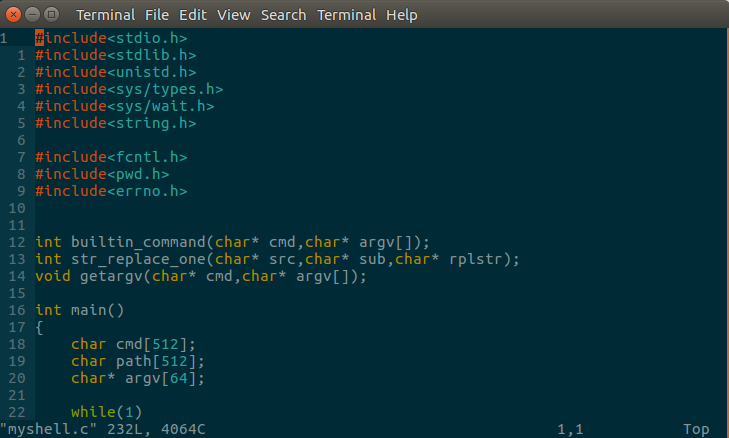
这样就配置完成,最终效果如下图:
下面是在ubuntu16.04上执行set_dart.sh的log:
jack@jack-VirtualBox:~/gnome-terminal-colors-solarized$ ./set_dark.sh

This script will ask you which color scheme you want, and which Gnome Terminal profile to overwrite.

Please note that there is no uninstall option yet. If you do not wish to overwrite any of your profiles, you should create a new profile before you run this script. However, you can reset your colors to the Gnome default, by running:

    Gnome >= 3.8 dconf reset -f /org/gnome/terminal/legacy/profiles:/
    Gnome < 3.8 gconftool-2 --recursive-unset /apps/gnome-terminal

By default, it runs in the interactive mode, but it also can be run non-interactively, just feed it with the necessary options, see 'install.sh --help' for details.

Please select a Gnome Terminal profile:
1) Unnamed
#? 1

You have selected:

  Scheme:  dark
  Profile: Unnamed (b1dcc9dd-5262-4d8d-a863-c897e6d979b9)

Are you sure you want to overwrite the selected profile?
(YES to continue) YES
Confirmation received -- applying settings

A dircolors adapted to solarized can be automatically downloaded.

1) Download seebi' dircolors-solarized: https://github.com/seebi/dircolors-solarized

2) [DEFAULT] I don't need any dircolors.

Enter your choice : [2] 2
jack@jack-VirtualBox:~/gnome-terminal-colors-solarized$ ls





 扫一扫
扫一扫


 7646
7646

 被折叠的 条评论
为什么被折叠?
被折叠的 条评论
为什么被折叠?
 到【灌水乐园】发言





