



 本文详细介绍了如何使用SpringCloud构建微服务架构,包括Eureka服务注册中心的搭建,服务提供者的创建,以及通过Feign实现的服务消费者调用流程。涵盖了从环境配置到代码实现的全过程。
SpringCloud服务的注册和调用
1. 新建Eureka服务
2. 新建服务提供者
3. 新建服务消费者(feign调用)
1.新建Eureka Server
pom
<parent>
    <groupId>org.springframework.boot</groupId>
    <artifactId>spring-boot-starter-parent</artifactId>
    <version>2.1.6.RELEASE</version>
</parent>
<properties>
    <java.version>1.8</java.version>
    <spring-cloud.version>Greenwich.SR2</spring-cloud.version>
</properties>
<!-- 这个千万别导错了 -->
<dependency>
    <groupId>org.springframework.cloud</groupId>
    <artifactId>spring-cloud-starter-netflix-eureka-server</artifactId>
</dependency>

<dependency>
    <groupId>org.springframework.boot</groupId>
    <artifactId>spring-boot-devtools</artifactId>
    <scope>runtime</scope>
    <optional>true</optional>
</dependency>
<dependency>
    <groupId>org.springframework.boot</groupId>
    <artifactId>spring-boot-starter-test</artifactId>
    <scope>test</scope>
</dependency>
<!-- springCloud 依赖的包-->
<dependencyManagement>
    <dependencies>
        <dependency>
            <groupId>org.springframework.cloud</groupId>
            <artifactId>spring-cloud-dependencies</artifactId>
            <version>${spring-cloud.version}</version>
            <type>pom</type>
            <scope>import</scope>
        </dependency>
    </dependencies>
</dependencyManagement>
application.yml
server:
  port: 8761


spring:
  application:
    name: eureka-server
eureka:
  client:
    #是否将自己注册到eureka
    register-with-eureka: false
    #是否从eureka获取注册信息
    fetch-registry: false
    service-url:
      #设置与Eureka Server交互的地址
      defaultZone: http://127.0.0.1:${server.port}/eureka
启动项
import org.springframework.boot.SpringApplication;
import org.springframework.boot.autoconfigure.SpringBootApplication;
import org.springframework.cloud.netflix.eureka.server.EnableEurekaServer;
//千万别导错包

@EnableEurekaServer
@SpringBootApplication
public class EurekaServerApplication {

    public static void main(String[] args) {
        SpringApplication.run(EurekaServerApplication.class, args);
    }
}
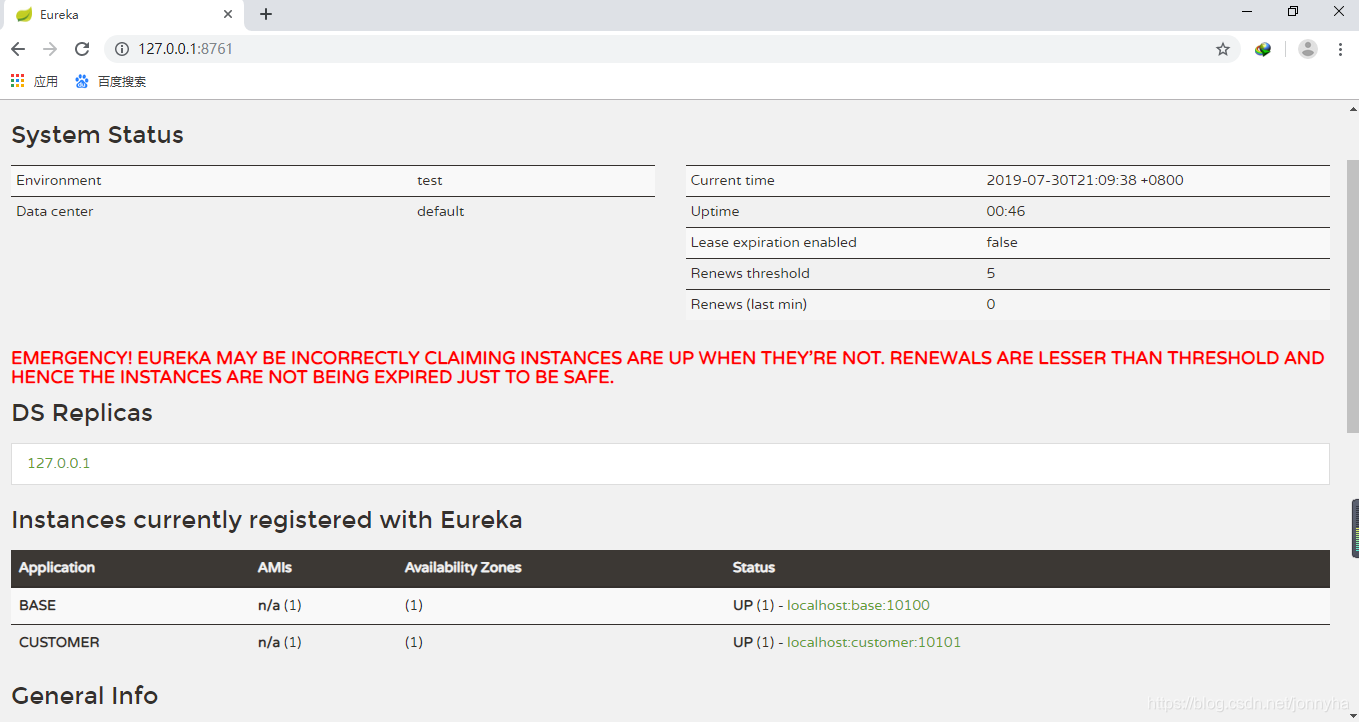
至此 Eureka server 创建成功
2.服务提供者
pom
<parent>
    <groupId>org.springframework.boot</groupId>
    <artifactId>spring-boot-starter-parent</artifactId>
    <version>2.1.6.RELEASE</version>
</parent>
<properties>
    <java.version>1.8</java.version>
    <spring-cloud.version>Greenwich.SR2</spring-cloud.version>
</properties>
<dependency>
    <groupId>org.springframework.cloud</groupId>
    <artifactId>spring-cloud-starter-netflix-eureka-client</artifactId>
</dependency>

<dependency>
    <groupId>org.springframework.boot</groupId>
    <artifactId>spring-boot-starter-web</artifactId>
</dependency>
<dependencyManagement>
    <dependencies>
        <dependency>
            <groupId>org.springframework.cloud</groupId>
            <artifactId>spring-cloud-dependencies</artifactId>
            <version>${spring-cloud.version}</version>
            <type>pom</type>
            <scope>import</scope>
        </dependency>
    </dependencies>
</dependencyManagement>
application.yml
server:
  port: 10100

spring:
  application:
    name: base
eureka:
  client:
    service-url:
      defaultZone: http://127.0.0.1:8761/eureka
启动项
import org.springframework.boot.SpringApplication;
import org.springframework.boot.autoconfigure.SpringBootApplication;
import org.springframework.cloud.client.discovery.EnableDiscoveryClient;

@SpringBootApplication
@EnableDiscoveryClient
public class BaseApplication {

    public static void main(String[] arg){
        SpringApplication.run(BaseApplication.class,arg);
    }
}
模拟服务
@RestController
public class IndexController {
    @RequestMapping("/hello")
    public String index(@RequestParam String name){
        String msg = "Hello " + name + ", this time is " + System.currentTimeMillis();
        return msg;
    }
}
服务提者完成

3 .服务消费者 (feign)
pom
<parent>
    <groupId>org.springframework.boot</groupId>
    <artifactId>spring-boot-starter-parent</artifactId>
    <version>2.1.6.RELEASE</version>
</parent>
<properties>
    <java.version>1.8</java.version>
    <spring-cloud.version>Greenwich.SR2</spring-cloud.version>
</properties>
<dependency>
    <groupId>org.springframework.boot</groupId>
    <artifactId>spring-boot-starter-web</artifactId>
</dependency>
<dependency>
    <groupId>org.springframework.cloud</groupId>
    <artifactId>spring-cloud-starter-netflix-eureka-client</artifactId>
</dependency>
<dependency>
    <groupId>org.springframework.cloud</groupId>
    <artifactId>spring-cloud-starter-openfeign</artifactId>
</dependency>
<dependencyManagement>
    <dependencies>
        <dependency>
            <groupId>org.springframework.cloud</groupId>
            <artifactId>spring-cloud-dependencies</artifactId>
            <version>${spring-cloud.version}</version>
            <type>pom</type>
            <scope>import</scope>
        </dependency>
    </dependencies>
</dependencyManagement>
application.yml
server:
  port: 10101
spring:
  application:
    name: customer
  main:
    allow-bean-definition-overriding: true
eureka:
  client:
    service-url:
      defaultZone: http://127.0.0.1:8761/eureka
feign:
  hystrix:
    enabled: true
启动项
import org.springframework.boot.SpringApplication;
import org.springframework.boot.autoconfigure.SpringBootApplication;
import org.springframework.cloud.client.discovery.EnableDiscoveryClient;
import org.springframework.cloud.openfeign.EnableFeignClients;
@SpringBootApplication
@EnableDiscoveryClient
@EnableFeignClients
public class CustomerApplication {

    public static void main(String[] arg){
        SpringApplication.run(CustomerApplication.class,arg);
    }
}
feign 接口
import org.springframework.cloud.openfeign.FeignClient;
import org.springframework.web.bind.annotation.RequestMapping;
import org.springframework.web.bind.annotation.RequestParam;
@FeignClient(value = "base")
public interface Index {
    @RequestMapping(value = "/hello")
    public String hello(@RequestParam("name") String name);

}
value : 要调用的spring.application.name
@requestMapping 要调用的服务的地址,必须为完整路径,即使是GetMapping ,也必 须写成RequestMapping (Method=Get) 格式
调用
import org.springframework.beans.factory.annotation.Autowired;
import org.springframework.web.bind.annotation.PathVariable;
import org.springframework.web.bind.annotation.RequestMapping;
import org.springframework.web.bind.annotation.RestController;

/**
 * Date: 2019/7/29
 * Author: POPPET
 * Description:
 */
@RestController
public class IndexController {

    @Autowired
    private Index index;

    @RequestMapping("hello/{name}")
    public String index(@PathVariable("name") String name){
        return index.hello(name);
    }
}
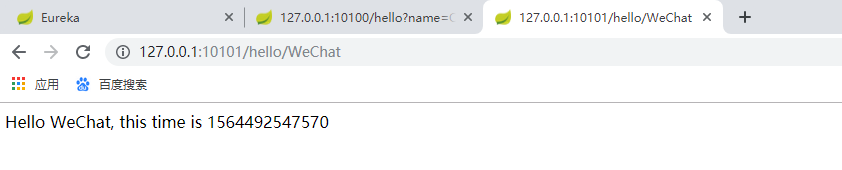
至此 服务调用结束
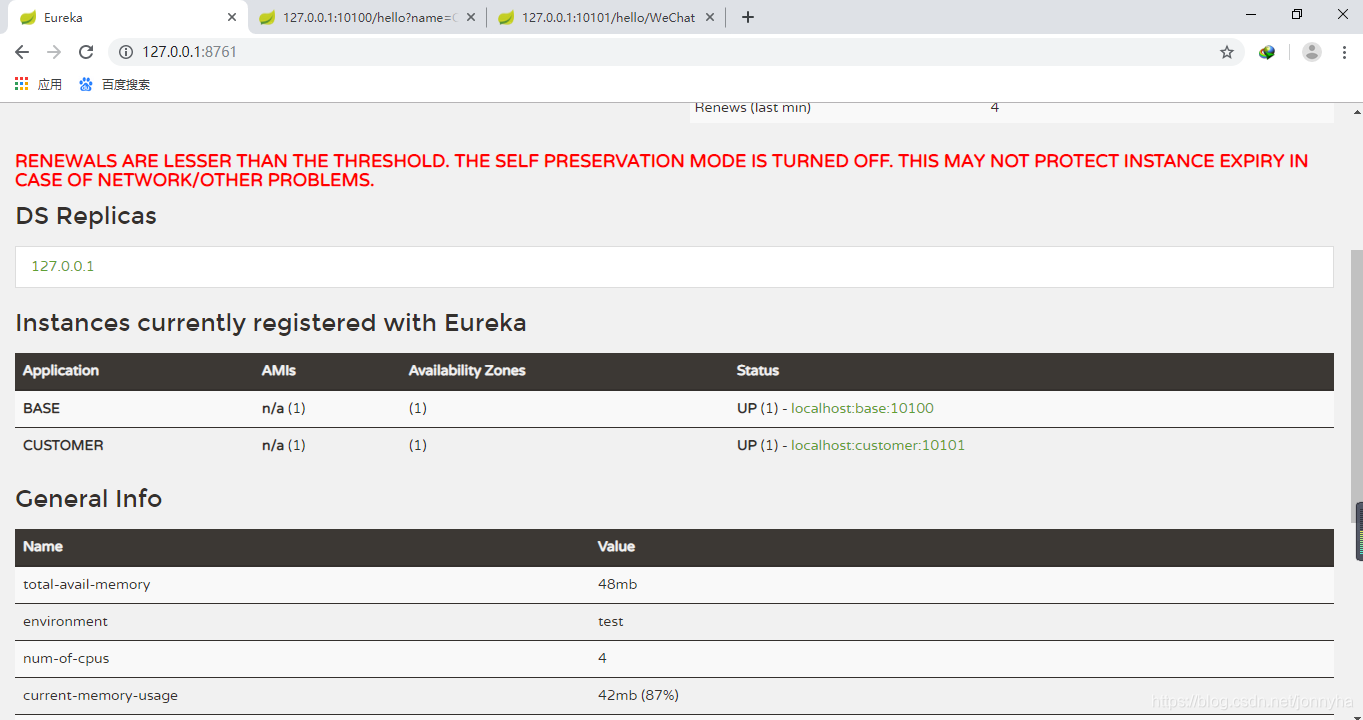
同时,eureka-server 注册中心,两个服务都注册了过去
如有疑问,欢迎指正。





 扫一扫
扫一扫


 167万+
167万+

 被折叠的 条评论
为什么被折叠?
被折叠的 条评论
为什么被折叠?
 到【灌水乐园】发言





