





 博客介绍了微信H5支付相关内容,包括登陆商户平台查看APPID的网址,以及授权域名的使用方法。还针对调起H5支付时referer为空的问题给出解决方案,如按正常流程跳转页面支付、在APP的webview中手动设置referer等。
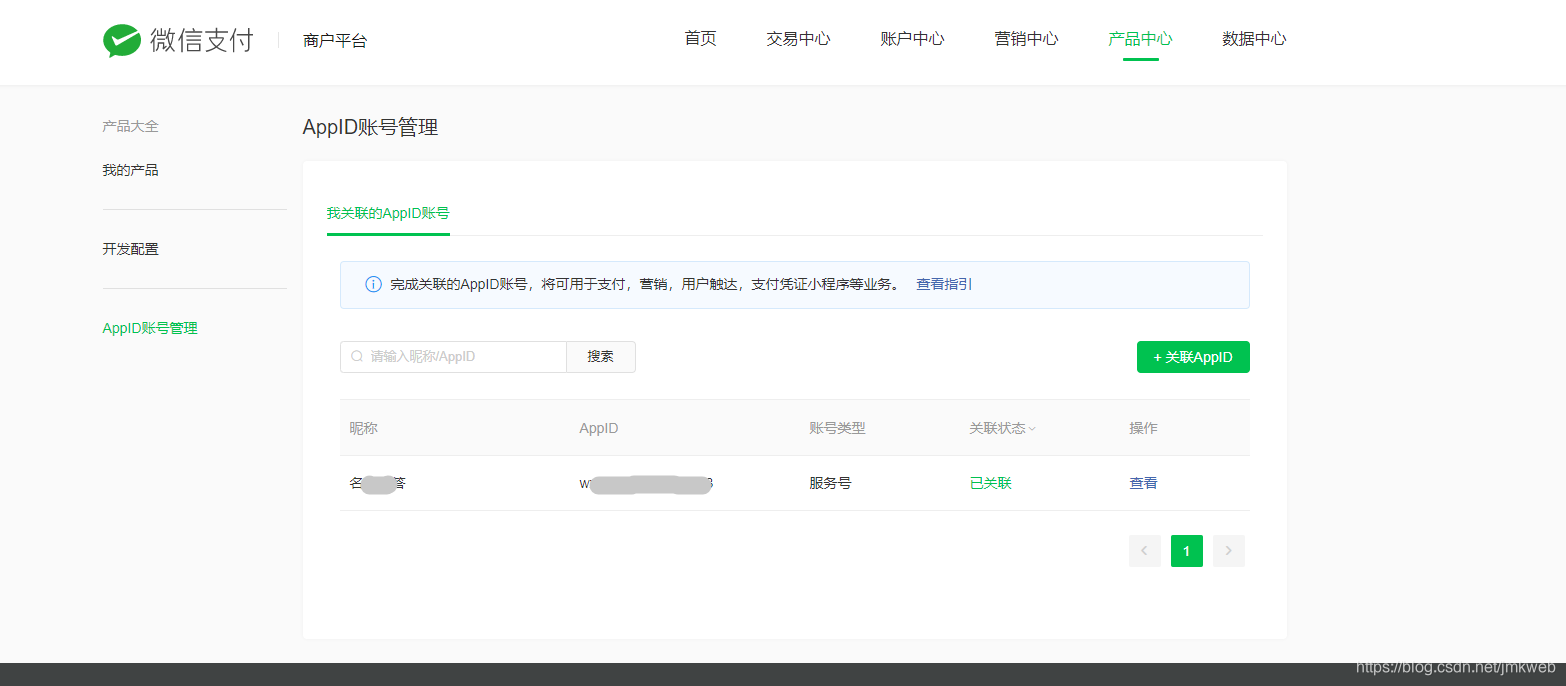
- 登陆商户平台 查看APPID , https://pay.weixin.qq.com
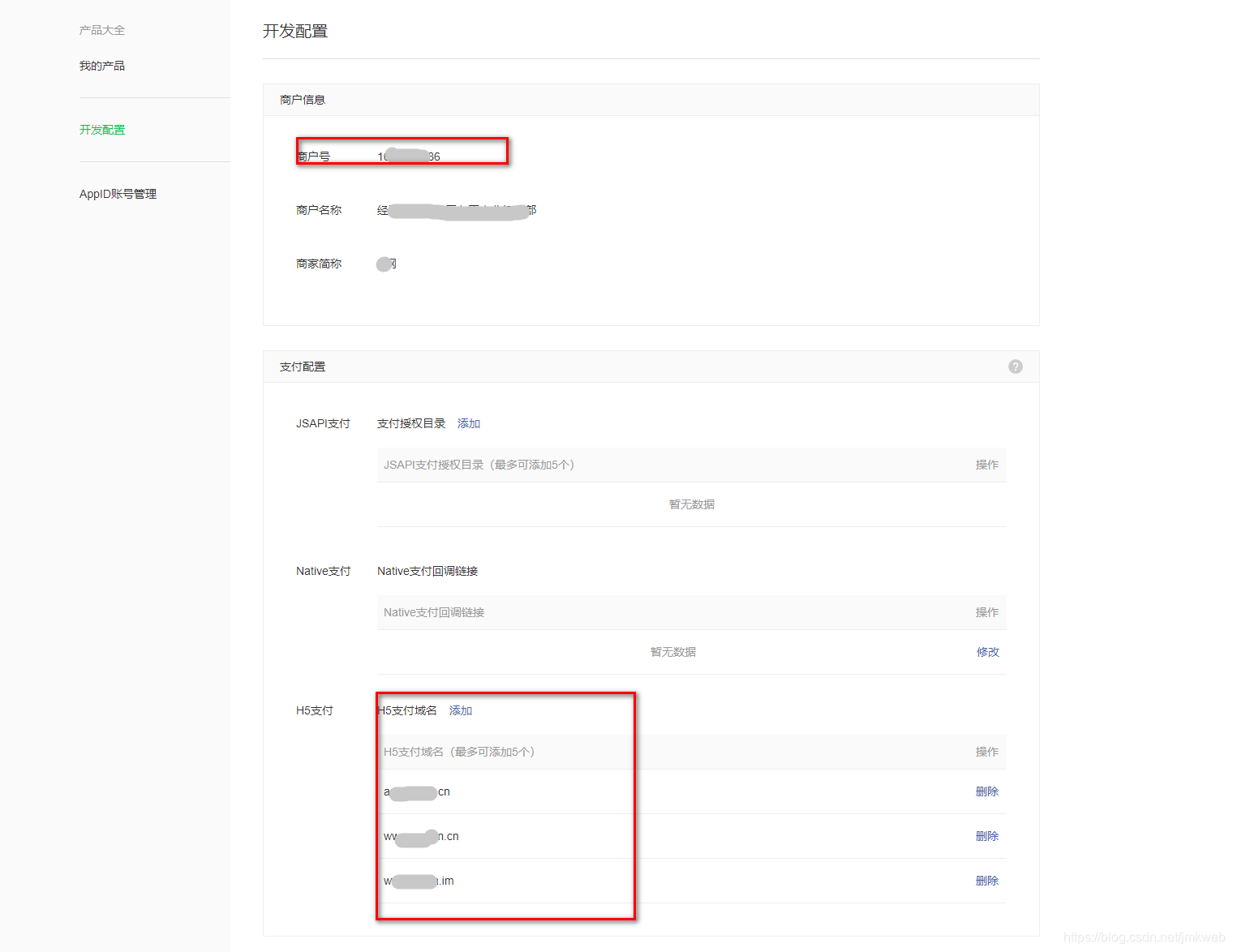
2.授权域名
<?php
namespace app\v1\controller;
class WxH5
{
protected $config;
protected $appid;
protected $mch_id;
protected $notify_url;
protected $key;
protected $ip;
protected $trade_type;
public function __construct()
{
$this->config= array(
# app id
'appid'=>'',
# 异步通知地址
'notify_url'=> "",
# 同步通知地址
'return_url'=> "",
# 商户号
'mch_id'=>'',
# 自己设置的微信商家key
'key' => 'tv0ov06vgvavh1ml5enx9dgocetsvbyg',
);
$this->appid=$this->config['appid'];
$this->mch_id=$this->config['mch_id'];;
$this->notify_url=$this->config['notify_url'];
$this->key=$this->config['key'];
$this->ip=$this->get_client_ip();
$this->trade_type='MWEB';
}
public function sign($nonce_str,$out_trade_no,$scene_info,$total_fee,$body=''){
$signA ="appid=$this->appid&body=$body&mch_id=$this->mch_id&nonce_str=$nonce_str¬ify_url=$this->notify_url&out_trade_no=$out_trade_no&scene_info=$scene_info&spbill_create_ip=$this->ip&total_fee=$total_fee&trade_type=$this->trade_type";
$strSignTmp = $signA."&key=$this->key"; //拼接字符串 注意顺序微信有个测试网址 顺序按照他的来 直接点下面的校正测试 包括下面XML 是否正确
$sign = strtoupper(MD5($strSignTmp)); // MD5 后转换成大写
return $sign;
}
public function post_data($body,$nonce_str,$out_trade_no,$scene_info,$total_fee,$sign){
$post_data="<xml>
<appid>$this->appid</appid>
<body>$body</body>
<mch_id>$this->mch_id</mch_id>
<nonce_str>$nonce_str</nonce_str>
<notify_url>$this->notify_url</notify_url>
<out_trade_no>$out_trade_no</out_trade_no>
<scene_info>$scene_info</scene_info>
<spbill_create_ip>$this->ip</spbill_create_ip>
<total_fee>$total_fee</total_fee>
<trade_type>$this->trade_type</trade_type>
<sign>$sign</sign>
</xml>";//拼接成XML 格式
return $post_data;
}
// /**
// * 订单查询
// *
// */
// public function orderQuery( $out_trade_no = '' )
// {
// $config = [
// 'out_trade_no' => $out_trade_no,
// 'appid' => $this->appid,
// 'mch_id' => $this->mch_id,
// 'nonce_str' => self::getNonceStr()
// ];
// $this->values = $config;
// $sign = $this->sign(); //生成sign签名
// $this->values['sign'] = $sign;
// $xmlstr = $this->ToXml(); //生成微信请求xml数据格式
// $url = "https://api.mch.weixin.qq.com/pay/orderquery"; //查询订单url
// $dataxml = self::postXmlCurl( $xmlstr, $url, false );//传参调用curl请求
// $objectxml = $this->xmlToArray( $dataxml );
// if ( $objectxml['return_code'] == 'SUCCESS' && $objectxml['result_code'] == 'SUCCESS' && $objectxml['trade_state'] == 'SUCCESS' ) {
// return true;
// } else {
// return false;
// }
// }
public function headers(){
$headers = array();
$headers[] = 'Accept: text/html,application/xhtml+xml,application/xml;q=0.9,*/*;q=0.8';
$headers[] = 'Connection: Keep-Alive';
$headers[] = 'Accept-Language: ru-RU,ru;q=0.8,en-US;q=0.5,en;q=0.3';
$headers[] = 'Accept-Encoding: gzip, deflate';
$headers[] = 'User-Agent: Mozilla/5.0 (Windows NT 6.1; rv:22.0) Gecko/20100101 Firefox/22.0';
return $headers;
}
/**
* 获取客户端ip
* @return string
*/
public function get_client_ip() {
if(getenv('HTTP_CLIENT_IP') && strcasecmp(getenv('HTTP_CLIENT_IP'), 'unknown')) {
$ip = getenv('HTTP_CLIENT_IP');
} elseif(getenv('HTTP_X_FORWARDED_FOR') && strcasecmp(getenv('HTTP_X_FORWARDED_FOR'), 'unknown')) {
$ip = getenv('HTTP_X_FORWARDED_FOR');
} elseif(getenv('REMOTE_ADDR') && strcasecmp(getenv('REMOTE_ADDR'), 'unknown')) {
$ip = getenv('REMOTE_ADDR');
} elseif(isset($_SERVER['REMOTE_ADDR']) && $_SERVER['REMOTE_ADDR'] && strcasecmp($_SERVER['REMOTE_ADDR'], 'unknown')) {
$ip = $_SERVER['REMOTE_ADDR'];
}
return preg_match ( '/[\d\.]{7,15}/', $ip, $matches ) ? $matches [0] : '';
}
/**
* 发送请求
* @param $url
*/
public function http_post($url='',$post_data=array(),$header=array(),$timeout=30) {
$ch = curl_init();
curl_setopt($ch, CURLOPT_SSL_VERIFYPEER, false); // 跳过证书检查
curl_setopt($ch, CURLOPT_SSL_VERIFYHOST, false); // 从证书中检查SSL加密算法是否存在
curl_setopt($ch, CURLOPT_URL, $url);
curl_setopt($ch, CURLOPT_HTTPHEADER, $header);
curl_setopt($ch, CURLOPT_POST, true);
curl_setopt($ch, CURLOPT_POSTFIELDS, $post_data);
curl_setopt($ch, CURLOPT_RETURNTRANSFER, true);
curl_setopt($ch, CURLOPT_TIMEOUT, $timeout);
$response = curl_exec($ch);
curl_close($ch);
return $response;
}
}
使用方法:
/**
     * 微信充值
     */
    public function wxpay(){
        $out_trade_no='J1605701503943';//订单号
        $nonce_str=MD5($out_trade_no);//随机字符串
        $total_fee =1; //金额
        $body='充值';
        $scene_info ='{"h5_info":{"type":"Wap","wap_url":"https://www.aa.cn","wap_name":"充值"}}';//场景信息 必要参数
        $wxh5=new WxH5();
        $sign =$wxh5->sign($nonce_str,$out_trade_no,$scene_info,$total_fee,$body);
        $post_data=$wxh5->post_data($body,$nonce_str,$out_trade_no,$scene_info,$total_fee,$sign);
        $url = "https://api.mch.weixin.qq.com/pay/unifiedorder";//微信传参地址
        $dataxml =$wxh5->http_post($url,$post_data,$wxh5->headers());
        $objectxml = (array)simplexml_load_string($dataxml,'SimpleXMLElement',LIBXML_NOCDATA); //将微信返回的XML 转换成数组
//        halt($objectxml);
        if($objectxml['return_code'] == 'SUCCESS'){
//            $redirect_url ="http://api.aaa.cn/v1/pay/wxNotify?orderId=$out_trade_no";
            $url = $objectxml['mweb_url'].'&redirect_url=https%3A%2F%2Fwww.aa.cn';//redirect_url 是支付完成后返回的页面
//            header("Location:$url");
            exit( "<script>location.href='" . $url . "';</script>" );
        }
    }```
错误码
名称	描述	原因	解决方案
NOAUTH	商户无此接口权限	商户未开通此接口权限	请商户前往申请此接口权限
NOTENOUGH	余额不足	用户帐号余额不足	用户帐号余额不足,请用户充值或更换支付卡后再支付
ORDERPAID	商户订单已支付	商户订单已支付,无需重复操作	商户订单已支付,无需更多操作
ORDERCLOSED	订单已关闭	当前订单已关闭,无法支付	当前订单已关闭,请重新下单
SYSTEMERROR	系统错误	系统超时	系统异常,请用相同参数重新调用
APPID_NOT_EXIST	APPID不存在	参数中缺少APPID	请检查APPID是否正确
MCHID_NOT_EXIST	MCHID不存在	参数中缺少MCHID	请检查MCHID是否正确
APPID_MCHID_NOT_MATCH	appid和mch_id不匹配	appid和mch_id不匹配	请确认appid和mch_id是否匹配
LACK_PARAMS	缺少参数	缺少必要的请求参数	请检查参数是否齐全
OUT_TRADE_NO_USED	商户订单号重复	同一笔交易不能多次提交	请核实商户订单号是否重复提交
SIGNERROR	签名错误	参数签名结果不正确	请检查签名参数和方法是否都符合签名算法要求
XML_FORMAT_ERROR	XML格式错误	XML格式错误	请检查XML参数格式是否正确
REQUIRE_POST_METHOD	请使用post方法	未使用post传递参数 	请检查请求参数是否通过post方法提交
POST_DATA_EMPTY	post数据为空	post数据不能为空	请检查post数据是否为空
NOT_UTF8	编码格式错误	未使用指定编码格式	请使用UTF-8编码格式
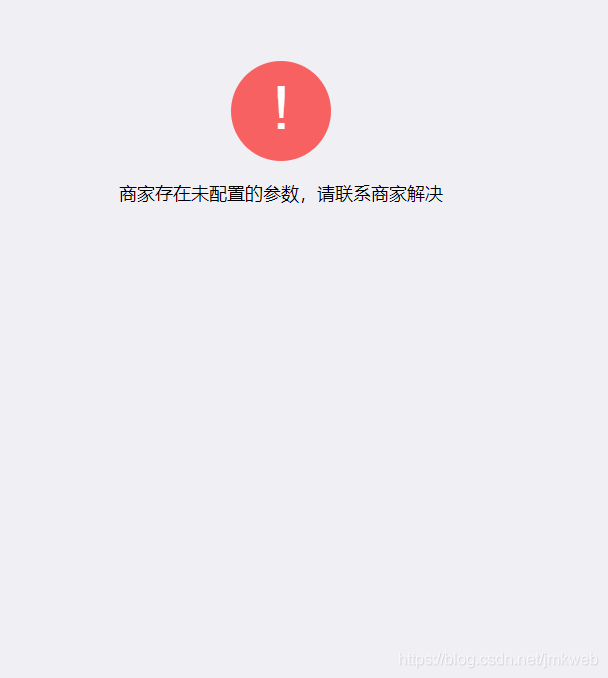
1.当前调起H5支付的referer为空导致, -般是因为直接访问页面调起H5支付,请按正常流程进行页面跳转后发起支付,或自行抓包确认referer值是否为空
2.如果是APP里调起H5支付,需要在webview中手动设置referer ,如(Map extraHeaders = new HashMap0;
extraHeaders.put(“Referer”, "商户申请H5时提交的授权域名);//例如http://www.baidu.com ))






 扫一扫
扫一扫


 1014
1014

 被折叠的 条评论
为什么被折叠?
被折叠的 条评论
为什么被折叠?
 到【灌水乐园】发言





