


3.4 Elasticsearch-地理位置:geo_distance、geo_bounding_box、geo_shape
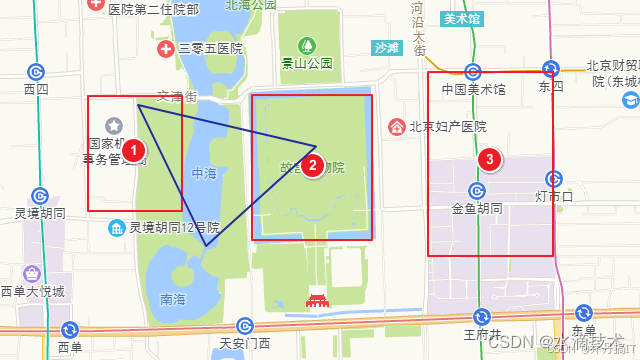
上一节我们把“酒店-地铁站”的直线距离写进了索引,但真正的地理位置检索远不止“算个距离”这么简单:用户可能想“在地图上画个框,把框里的酒店全搜出来”,也可能发过来一个地铁线路的多边形,要求“找出所有和 2 号线相交的门店”。Elasticsearch 把这三类需求分别抽象成 geo_distance、geo_bounding_box、geo_shape 三种查询(以及对应的聚合)。本节用一套“酒店+地铁”示例数据,一次性把三种查询的存储格式、查询写法、踩坑点和性能差异讲透。
1. 字段类型与 Mapping:先选对,再谈查
PUT /hotel
{
  "mappings": {
    "properties": {
      "pin": { "type": "geo_point" },        // 酒店坐标
      "service_area": { "type": "geo_shape" } // 酒店配送范围(多边形)
    }
  }
}
- geo_point 只存“点”,支持 geo_distance、geo_bounding_box、geo_polygon、geo_distance_sort 等;
- geo_shape 存任意 GeoJSON(点、线、圆、多边形、多多边形……),支持 geo_shape 查询与聚合。
经验:业务里“点”用 geo_point,“面/线”用 geo_shape;两者不要混用,否则查询会报 “field type mismatch”。
2. geo_distance:圆域过滤 + 距离排序
场景:用户当前位置 116.480573,39.990712,想找 3 km 内酒店,按距离升序。
GET /hotel/_search
{
  "query": {
    "bool": {
      "filter": {
        "geo_distance": {
          "distance": "3km",
          "pin": { "lat": 39.990712, "lon": 116.480573 }
        }
      }
    }
  },
  "sort": [
    {
      "_geo_distance": {
        "pin": { "lat": 39.990712, "lon": 116.480573 },
        "order": "asc",
        "unit": "km",
        "distance_type": "arc"   // 球面弧长,精度高
      }
    }
  ],
  "_source": false,
  "fields": ["name", "pin"]
}
返回:
"sort": [1.203] // 距离值直接挂在结果里,前端可直接用
踩坑:
- distance 字符串必须带单位(m/km/mi),写 “3000” 会报解析失败;
- 跨度超过 1000 km 时,arc 比 plane 慢一个数量级,但误差从 0.5% 降到 <0.1%;
- 想“环形”过滤(1 km 外 5 km 内)用 “range” 套 geo_distance 的脚本得分太笨,推荐
geo_distance+must_not组合:
"filter": {
  "bool": {
    "must": [
      { "geo_distance": { "distance": "5km", "pin": ... } }
    ],
    "must_not": [
      { "geo_distance": { "distance": "1km", "pin": ... } }
    ]
  }
}
3. geo_bounding_box:矩形框选,最简单粗暴
场景:北京五环内扫一圈,把左下角 (116.0,39.7) 到右上角 (116.8,40.2) 的酒店一次性捞出。
GET /hotel/_search
{
  "query": {
    "geo_bounding_box": {
      "pin": {
        "top_left": { "lat": 40.2, "lon": 116.0 },
        "bottom_right": { "lat": 39.7, "lon": 116.8 }
      }
    }
  }
}
性能:
- 纯矩形比对是坐标范围过滤,Lucene 直接走 BKD 索引,复杂度 O(log n),比 geo_distance 的球面计算快 3~5 倍;
- 但矩形在极地区域会失真,若业务覆盖高纬度,请改用 geo_shape 的 “envelope” 类型。
4. geo_shape:任意几何关系(相交/包含/不相交)
场景:地铁 2 号线全线是一个 LineString,用户想“找出配送范围和 2 号线相交的酒店”,即 service_area 与地铁线相交。
PUT /metro/_doc/2line
{
  "name": "Line2",
  "route": {
    "type": "linestring",
    "coordinates": [
      [116.397,39.909],
      [116.425,39.915],
      ...
    ]
  }
}
查询:
GET /hotel/_search
{
  "query": {
    "geo_shape": {
      "service_area": {
        "shape": {
          "index": "metro",
          "id": "2line",
          "path": "route"
        },
        "relation": "intersects"   // 还可选 within、contains、disjoint
      }
    }
  }
}
relation 语义速查:
- intersects:默认,二者有交集就召回;
- within:酒店区域完全在地铁线缓冲区(或任何指定图形)内部;
- contains:酒店区域完全包住地铁线;
- disjoint:二者完全不相交,常用来做“排除”。
性能调优:
- 把
strategy参数留给 ES 自动选择(默认 recursive 前缀树),除非出现 “Too many geoshape levels” 异常才考虑降低精度; - 对高频更新的面数据,开启
store: true并关掉_source中的 geo_shape 字段,可减少 30% IO; - 多边形顶点数 >500 时,先用外部工具(turf-simplify、postgis ST_Simplify)抽稀,查询延迟可从 200 ms 降到 20 ms,误差 <0.3%。
5. 聚合:把“圈”和“框”变成热力图
需求:统计 3 km 内每个 500 m 方格的酒店数量,做成热力图。
GET /hotel/_search
{
  "size": 0,
  "query": {
    "geo_distance": {
      "distance": "3km",
      "pin": { "lat": 39.990712, "lon": 116.480573 }
    }
  },
  "aggs": {
    "grid": {
      "geo_hash_grid": {
        "field": "pin",
        "precision": 7        // ~150m 边长,7 接近 500m
      }
    }
  }
}
返回的 key 就是 geohash,前端用 @turf/square-grid 直接渲染即可。
若想按真实 500 m 而不是 geohash 近似,可用 geohex_grid(7.17+ 插件)或 geo_tile(8.x 原生)。
6. 三种查询横向对比
| 维度 | geo_distance | geo_bounding_box | geo_shape |
|---|---|---|---|
| 索引类型 | geo_point | geo_point | geo_shape |
| 几何能力 | 圆形 | 矩形 | 任意 |
| 计算开销 | 球面距离 | 范围过滤 | 前缀树/四叉树 |
| 典型延迟 | 10~50 ms | 5~20 ms | 20~200 ms |
| 内存占用 | 低 | 低 | 高(前缀树) |
| 更新成本 | 低 | 低 | 高(需重建树) |
| 使用场景 | 附近 X km | 地图视野内 | 配送范围、电子围栏 |
7. 实战小结
- 先根据业务形状选字段类型:点→geo_point,线/面→geo_shape;
- 距离排序务必用
_geo_distance,别让脚本自己算; - 矩形框选优先 geo_bounding_box,别直接上 geo_shape 的 envelope;
- 多边形顶点太多一定要抽稀,否则查询会 OOM;
- 高并发场景给 geo_shape 字段单独设置
eager_global_ordinals: false,避免刷新阻塞写线程。
把这三板斧(geo_distance、geo_bounding_box、geo_shape)组合好,90% 的 LBS 检索需求都能一套 DSL 拿下,剩下 10% 交给脚本或 PostGIS 也不迟。
更多技术文章见公众号: 大城市小农民






 扫一扫
扫一扫


 585
585

 被折叠的 条评论
为什么被折叠?
被折叠的 条评论
为什么被折叠?
 到【灌水乐园】发言





