


2.9 Elasticsearch-监控栈:Metricbeat + Elasticsearch Exporter + Grafana
——让搜索集群自己“开口说话”
2.9.1 为什么需要专门的 ES 监控栈
Elasticsearch 暴露的 _stats、_cluster/stats、_nodes/stats 等端点已经足够丰富,但存在三个痛点:
- 指标维度多、JSON 嵌套深,Prometheus 无法直接解析;
- 部分关键指标(如 GC 次数、索引 throttle 时间)散落在不同端点,需要二次聚合;
- 日志、指标、链路分散,难以与业务监控统一展示。
Metricbeat + Elasticsearch Exporter 的组合正好补齐短板:Metricbeat 负责“采”,Exporter 负责“转”,Grafana 负责“看”,三件套零入侵、全托管,5 分钟可落地。
2.9.2 架构总览
                    ┌------------------┐
                    │  Elasticsearch   │
                    │  7.x/8.x 集群     │
                    └--------┬---------┘
                             │9200
                             │
            ┌----------------┴----------------┐
            │        Metricbeat 8.x          │
            │  module: elasticsearch         │
            │  output: Prometheus remote_write│
            └----------------┬----------------┘
                             │10902
            ┌----------------┴----------------┐
            │ elasticsearch_exporter 1.7     │
            │  --es.uri=https://<user>:<pwd> │
            │  --es.all --es.indices --es.shards│
            └----------------┬----------------┘
                             │9090
            ┌----------------┴----------------┐
            │       Prometheus 2.45          │
            │  scrape_interval: 15s          │
            └----------------┬----------------┘
                             │
                    ┌--------┴---------┐
                    │ Grafana 10.x     │
                    │  Dashboard 14191 │
                    └------------------┘
说明:
- Metricbeat 与 Exporter 可同时运行,互不冲突;前者侧重“集群+节点”层,后者侧重“索引+分片”层。
- 若已部署 Elastic Agent,可直接使用 elasticsearch 集成,省去 Metricbeat 侧配置。
- Prometheus remote_write 支持 VictoriaMetrics、Thanos、Grafana Cloud,后续扩容无感。
2.9.3 安装与配置
- Elasticsearch Exporter(二进制方式,K8s 同理)
下载
wget https://github.com/prometheus-community/elasticsearch_exporter/releases/download/v1.7.0/elasticsearch_exporter-1.7.0.linux-amd64.tar.gz
tar xzf elasticsearch_exporter-1.7.0.linux-amd64.tar.gz
systemd 服务
cat > /etc/systemd/system/elasticsearch_exporter.service <<‘EOF’
[Unit]
Description=Elasticsearch Exporter
After=network.target
[Service]
Type=simple
User=elastic
ExecStart=/usr/local/bin/elasticsearch_exporter \
–es.uri=https://elastic:changeme@localhost:9200 \
–es.all --es.indices --es.shards --es.snapshots \
–es.ca=“” --es.client-private-key=“” --es.client-cert=“” \
–web.listen-address=:9090
Restart=always
[Install]
WantedBy=multi-user.target
EOF
systemctl daemon-reload && systemctl enable --now elasticsearch_exporter
- Metricbeat(采集节点、索引、分片、ML、CCR 等 47 类指标)
8.x 默认已带 elasticsearch module
metricbeat modules enable elasticsearch
cat > /etc/metricbeat/modules.d/elasticsearch.yml <<‘EOF’
- module: elasticsearch
metricsets:- node # 节点 CPU、内存、磁盘
- node_stats # JVM、线程池、GC
- index # 索引级 docs、store、throttle
- index_recovery # 恢复流量、耗时
- index_summary # 集群级索引总量
- shard # 分片分布、unassigned 原因
- ml_job # 机器学习作业状态
- ccr_stats # 跨集群复制延迟
period: 10s
hosts: [“https://localhost:9200”]
username: “elastic”
password: “changeme”
ssl.verification_mode: “none”
EOF
输出到 Prometheus remote_write(需启用 beat-exporter 或 remote_write 插件)
cat >> /etc/metricbeat/metricbeat.yml <<‘EOF’
output.prometheus:
hosts: [“localhost:9201”]
namespace: “metricbeat”
EOF
systemctl restart metricbeat
- Prometheus 抓取
scrape_configs:
- job_name: ‘elasticsearch_exporter’
static_configs:- targets: [‘es-master01:9090’,‘es-data01:9090’,‘es-data02:9090’]
- job_name: ‘metricbeat’
static_configs:- targets: [‘es-master01:9201’,‘es-data01:9201’,‘es-data02:9201’]
- Grafana 导入
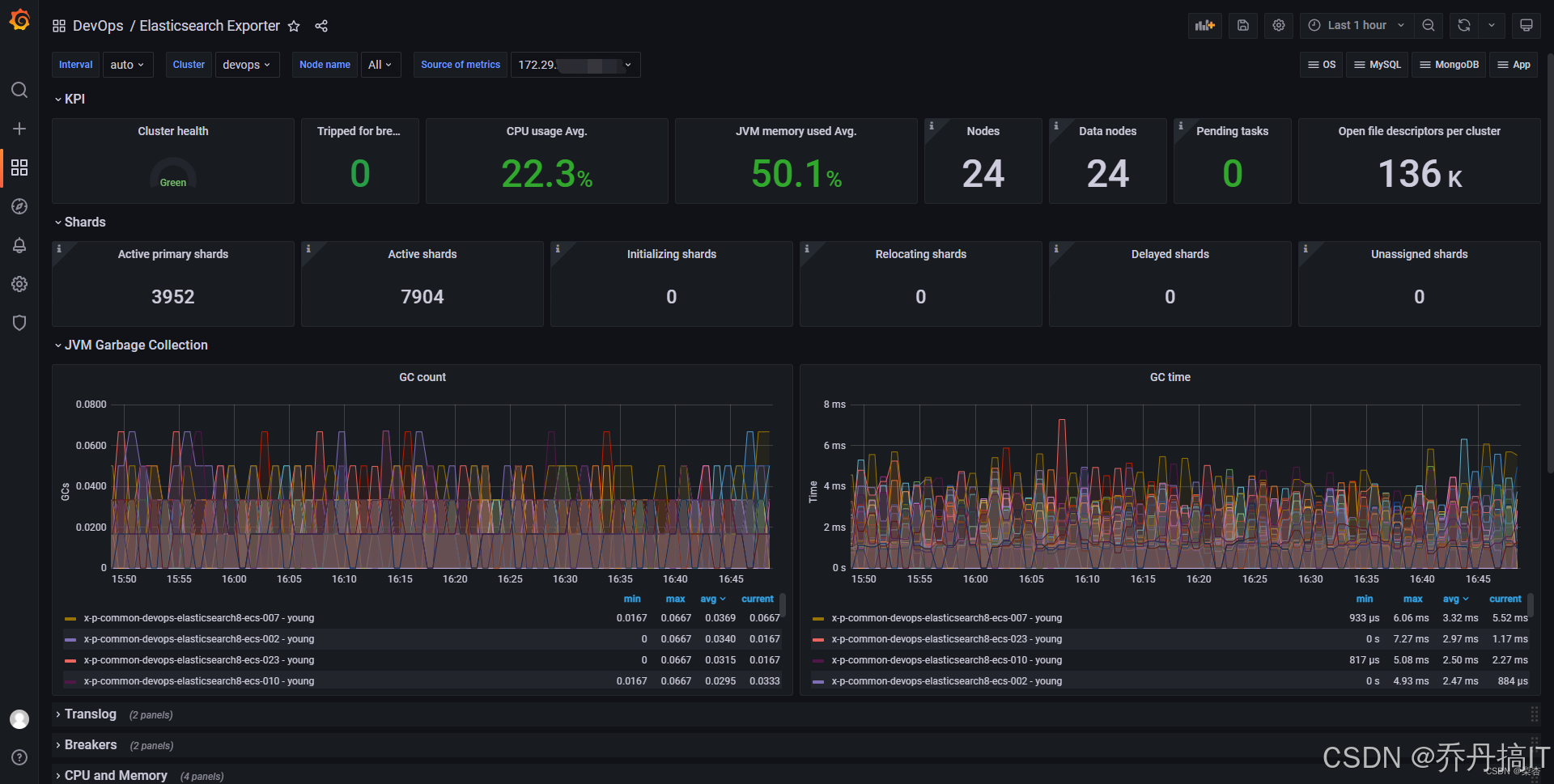
- 官方 Dashboard ID 14191(Elasticsearch Exporter Full),再叠加自建“Metricbeat ES Overview”(ID 2324)。
- 建议变量模板化:cluster、node、index、shard,方便多集群横向对比。
2.9.4 核心指标与告警规则
| 层级 | 指标 | 说明 | 推荐阈值 |
|---|---|---|---|
| 集群 | elasticsearch_cluster_health_status{color=“red”} | 分片无法分配 | ==1 立即告警 |
| 集群 | elasticsearch_cluster_health_number_of_unassigned_shards | 未分配分片数 | >0 持续 5min |
| 节点 | elasticsearch_node_stats_jvm_mem_percent | JVM 堆使用率 | >85% 警告,>95% 严重 |
| 节点 | elasticsearch_node_stats_process_cpu_percent | 节点 CPU | >80% 持续 10min |
| 索引 | elasticsearch_index_store_size_bytes / elasticsearch_index_docs_count | 单文档平均大小突增 | 相比 1h 前 +300% |
| 索引 | elasticsearch_index_indexing_throttle_time_seconds_total | 索引限速时间 | 5min 内增量 >30s |
| 线程池 | elasticsearch_thread_pool_queue_count{name=“write”} | write 队列堆积 | >1000 |
| GC | elasticsearch_jvm_gc_collection_seconds_sum{gc=“young”} | Young GC 累计耗时 | 1min 速率 >5s |
| GC | elasticsearch_jvm_gc_collection_seconds_sum{gc=“old”} | Old GC 累计耗时 | 1min 速率 >2s |
PrometheusRule 示例:
groups:
- name: elasticsearch
interval: 15s
rules:- alert: ESClusterRed
expr: elasticsearch_cluster_health_status{color=“red”}==1
for: 0m
labels:
severity: critical
annotations:
summary: “ES cluster {{ $labels.cluster }} status RED” - alert: ESHeapUsageHigh
expr: elasticsearch_node_stats_jvm_mem_percent > 95
for: 2m
labels:
severity: critical
annotations:
summary: “Node {{ $labels.node }} heap usage > 95%”
- alert: ESClusterRed
2.9.5 索引级精细化监控
-
热温冷架构
利用 elasticsearch_index_settings_routing_allocation_require_* 标签,在 Grafana 中按 node_role 分组,对比 hot/warm/cold 节点的写入速率、合并段大小、查询 QPS,验证 ILM 策略是否生效。 -
分片重平衡
监控 elasticsearch_cluster_routing_table_shards_number{state=“RELOCATING”},配合 elasticsearch_indices_indexing_index_time_seconds_total 速率,判断重平衡是否影响写入。 -
慢查询 TopN
Metricbeat 已采集 elasticsearch_index_search_query_time_seconds_sum,通过 Recording Rule 预聚合:
- topk(10, rate(elasticsearch_index_search_query_time_seconds_sum[5m]) / rate(elasticsearch_index_search_query_total[5m]))
在 Grafana 中做“慢查询榜”,直接下钻到对应索引与节点。
2.9.6 性能调优 checklist
-
Exporter 自身耗时
–es.timeout 默认 5s,集群大时调大到 30s;–es.snapshots 若无需快照指标可关闭,减少拉取时间。 -
Prometheus 样本量
单集群 3000 索引、10 节点时,exporter 暴露约 18 万样本,建议:
- 丢弃高基数 label:metric_relabel_configs 丢弃 elasticsearch_index_settings_uuid、elasticsearch_shard_id;
- 采样周期从 15s 放宽到 30s,样本量减半。
-
Metricbeat 负载
metricbeat 单实例可扛 50 节点,超过时拆分为多实例,按 node_attr 分组采集。 -
安全加固
- exporter 只读账号:
POST _security/role/elasticsearch_exporter
{ “cluster”: [“monitor”], “indices”: [{“names”: [“*”],“privileges”: [“monitor”]}]} - 开启 HTTPS + RBAC,Grafana 端使用 Token 访问 Prometheus。
2.9.7 小结
Metricbeat 做“厚”采集,Elasticsearch Exporter 做“深”转换,Grafana 做“炫”呈现,三件套互补,覆盖集群、节点、索引、分片、线程池、GC、快照、CCR 等 200+ 指标,配合 Prometheus 的告警生态,可在“业务感知”前提前发现:
- 分片分配失败
- 节点磁盘写满
- 索引限速
- 慢查询堆积
- Young/Old GC 异常
落地过程零代码、零入侵,只需 systemd 或 Helm 一键部署,即可让 Elasticsearch 像普通中间件一样纳入云原生监控体系,为后续 SLA、容量预测、自动扩缩容提供数据底座。
更多技术文章见公众号: 大城市小农民






 扫一扫
扫一扫


 被折叠的 条评论
为什么被折叠?
被折叠的 条评论
为什么被折叠?
 到【灌水乐园】发言





