


2.5 Elasticsearch-扩容与缩容:_cluster/reroute & _shrink API
——————————————————————————————
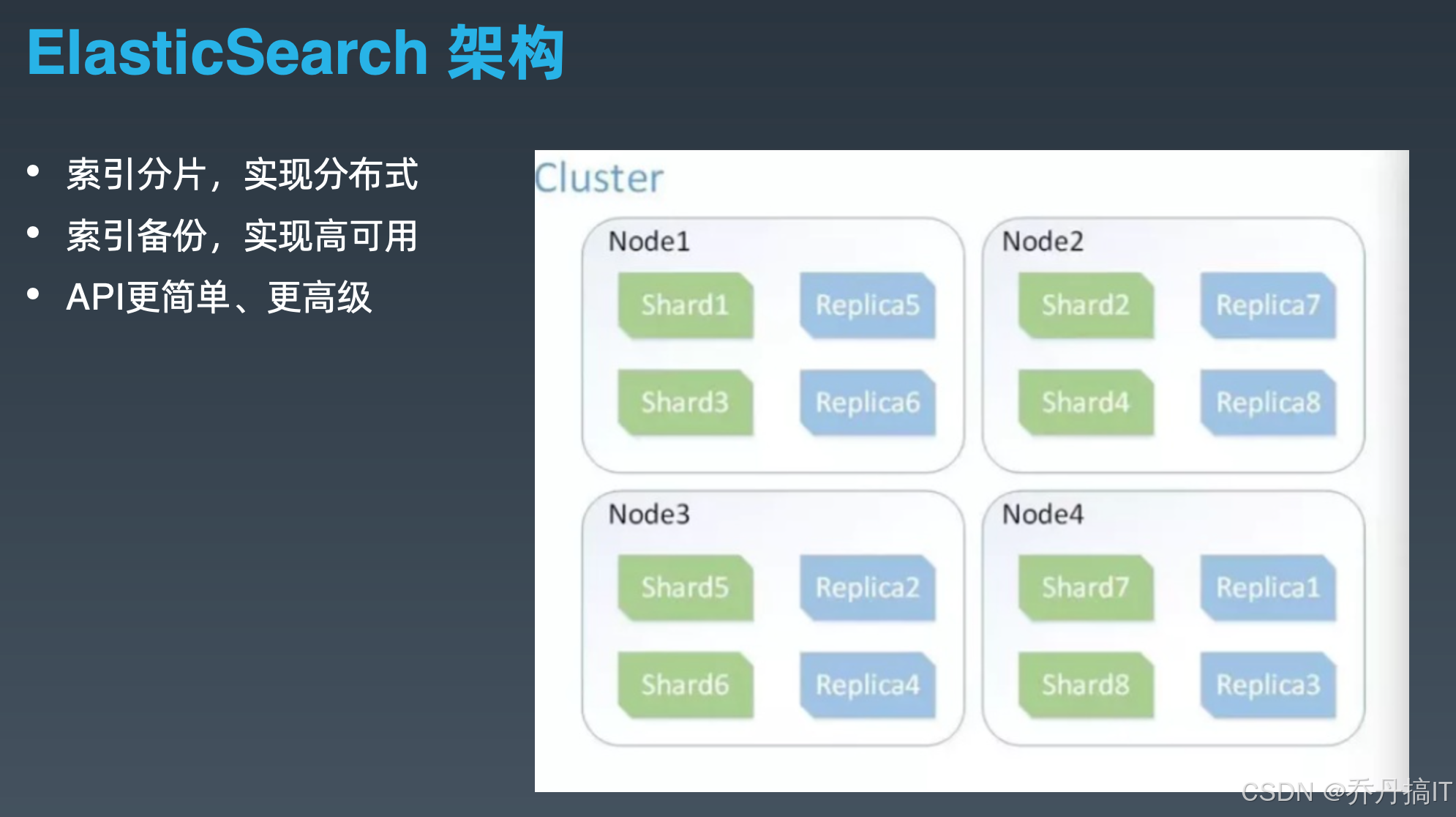
上一节我们把索引从 3 副本 6 分片强行“压”进了 2 节点的 8 GB 内存里,但业务高峰刚过,老板立刻要求“把富余节点还回去,账单砍一半”。扩容人人会,缩容能把数据安全地“塞”进更少的节点而不丢片、不红集群,才是生产级玩法。本节只讲两条 API:_cluster/reroute 与 _shrink,前者让你徒手移动分片,后者让你把 5 个主片折叠成 1 个,配合在一起就能完成“平滑缩容”这一反向操作。下面所有命令基于 7.17.23,8.x 仅路径前缀由 _shrink 换成 _resize 而已,参数兼容。
一、先厘清三个事实
- Elasticsearch 的“缩容”≠ Kubernetes 的 Pod 缩容,它必须解决“分片数不能改”这一硬约束——主分片个数在索引创建时写死,想减少主分片只能“重建索引”。
- 重建索引有两条路:
a. reindex + alias 切换,需要 2× 磁盘空间;
b._shrink原地硬链接,只需要 1.1× 空间,秒级完成。 - 无论哪条路,前提都是“所有主片必须同时存在于同一个节点”,否则无法硬链接。把散布在各节点的片“搬”到一起,就是
_cluster/reroute的舞台。
二、_cluster/reroute:手工搬运分片
reroute 有三种指令:move、allocate、cancel。缩容场景只用 move:把分片从即将下线的节点挪到保留节点。
-
查看当前分布
GET _cat/shards/my_index?v&s=prirep,shard -
下线前的“软驱逐”
PUT _cluster/settings
{
“transient”: {
“cluster.routing.allocation.exclude._name”: “node-to-drop”
}
}
集群会自动搬迁,但 7.x 默认仅 2 并发,大索引慢如蜗牛;此时可临时调大并发:
“cluster.routing.allocation.cluster_concurrent_rebalance”: “20” -
精确控制:reroute 批量 move
当自动均衡速度不满意,或者必须让某片落在指定节点(例如目标节点有 SSD),就手动 move:
POST _cluster/reroute
{
“commands”: [
{“move”: {“index”: “my_index”, “shard”: 0, “from_node”: “node-to-drop”, “to_node”: “node-keep-1”}},
{“move”: {“index”: “my_index”, “shard”: 1, “from_node”: “node-to-drop”, “to_node”: “node-keep-1”}}
]
}
注意:
- move 只能搬“STARTED”片;如果片正在 relocate,需先 cancel 再 move。
- 搬片速度受限于
indices.recovery.max_bytes_per_sec,默认 40 MB/s;缩容窗口紧就把它提到 200 MB/s,完事再改回。
- 等待集群 green
GET _cluster/health?wait_for_status=green&timeout=600s
三、_shrink:把 5 主片折叠成 1 主片
假设 my_index 原配置 5 主 1 副,现在业务量级下降,想缩成 1 主 1 副并砍掉 2 台节点。
- 前置检查
- 所有主片必须落在同一节点(reroute 已保证)。
- 索引必须置为只读,且副本为 0(否则硬链接会复制副本,浪费空间)。
PUT my_index/_settings
{
“settings”: {
“index.blocks.write”: true,
“index.number_of_replicas”: 0
}
}
- 执行 shrink
POST my_index/_shrink/my_index_shrink
{
“settings”: {
“index.number_of_shards”: 1,
“index.number_of_replicas”: 0,
“index.routing.allocation.include._name”: “node-keep-1”, // 强制落在小集群
“index.routing.rebalance.enable”: “none” // 缩完先别乱搬
},
“aliases”: {
“my_index_active”: {} // 原子切换用
}
}
shrink 会在 node-keep-1 上创建新索引 my_index_shrink,通过硬链接复用原分段,1 TB 索引也能在秒级完成。完成后原索引可删除,磁盘瞬间省出 80%。
- 把副本加回来
PUT my_index_shrink/_settings
{
“index.number_of_replicas”: 1
}
等待集群 green,即完成缩容。
四、回滚方案
- 原索引保留 24 h,alias 先指向
my_index_shrink,出问题秒切回原索引:
POST _aliases
{
“actions”: [
{“remove”: {“index”: “my_index_shrink”, “alias”: “my_index_active”}},
{“add”: {“index”: “my_index”, “alias”: “my_index_active”}}
]
} - 若已删除原索引,可再利用
_split把 1 主拆回 5 主,过程与 shrink 对称,但需保证index.number_of_routing_shards是 5 的倍数,创建索引时提前规划。
五、自动化脚本(Ansible 片段)
-
name: exclude node
uri:
url: “http://{{ es_master }}:9200/_cluster/settings”
method: PUT
body: ‘{“transient”:{“cluster.routing.allocation.exclude._name”:“{{ node_to_drop }}”}}’ -
name: wait for no relocating shards
shell: |
while true; do
relocating=$(curl -s http://{{ es_master }}:9200/_cluster/health | jq -r .relocating_shards)
[[ $relocating -eq 0 ]] && break || sleep 10
done -
name: shrink index
uri:
url: “http://{{ es_master }}:9200/{{ item }}/_shrink/{{ item }}_shrink”
method: POST
body_format: json
body:
settings:
index.number_of_shards: 1
index.number_of_replicas: 0
aliases:
“{{ item }}_active”: {}
loop: “{{ indices_to_shrink }}”
六、常见坑
- shrink 报 “all shards must be on the same node”——多半是副本没关,或 exclude 后尚未 relocate 完就执行;脚本里一定先循环检查
relocating_shards==0。 - 硬链接不跨文件系统——若
path.data是多块盘拼接,确保目标节点只挂一块盘,否则 shrink 会退化成全量复制,耗时从秒级变小时级。 - 缩容后段合并压力——1 主片体积变大,merge 线程数默认不变,高峰期可能 CPU 飙高;可在 shrink 前做一次
force_merge?max_num_segments=1,减少后续合并。 - 快照别省——即使硬链接看似“原地”,一旦删除原索引就不可逆,快照仓库必须提前准备好,SLA 要求高的集群建议先全量快照再动手。
七、小结
_cluster/reroute 让你像玩积木一样把分片挪来挪去,是缩容的前置工序;_shrink 利用硬链接黑科技,把“主分片不可变”这一金科玉律撕开一道口子,实现原地折片。两者配合,可在 10 分钟之内把原本占用 5 节点 2 TB 的索引压到 2 节点 400 GB,而业务零感知。下一节我们将用 ILM 把这套流程固化成“热-温-冷-删”四阶段策略,让集群在凌晨三点自动完成“扩容-缩容-归档”一条龙,彻底把值班人从熬夜中解放出来。
更多技术文章见公众号: 大城市小农民






 扫一扫
扫一扫


 1043
1043

 被折叠的 条评论
为什么被折叠?
被折叠的 条评论
为什么被折叠?
 到【灌水乐园】发言





