package cn.attackme.myuploader.controller;
import cn.attackme.myuploader.service.impl.FileServiceImpl;
import org.springframework.beans.factory.annotation.Autowired;
import org.springframework.web.bind.annotation.CrossOrigin;
import org.springframework.web.bind.annotation.PostMapping;
import org.springframework.web.bind.annotation.RequestMapping;
import org.springframework.web.bind.annotation.RestController;
import org.springframework.web.multipart.MultipartFile;
import java.io.IOException;
/**
* 大文件上传
*/
@RestController
@RequestMapping("/BigFile")
@CrossOrigin
public class BigFileUploadController {
@Autowired
private FileServiceImpl fileService;
@PostMapping("/")
public void upload(String name,
String md5,
Long size,
Integer chunks,
Integer chunk,
MultipartFile file) throws IOException {
if (chunks != null && chunks != 0) {
fileService.uploadWithBlock(name, md5,size,chunks,chunk,file);
} else {
fileService.upload(name, md5,file);
}
}
}
package cn.attackme.myuploader.controller;
import cn.attackme.myuploader.model.File;
import cn.attackme.myuploader.model.OssFile;
import cn.attackme.myuploader.minio.MinioProperties;
import cn.attackme.myuploader.minio.MinioService;
import cn.attackme.myuploader.minio.MinioTemplate;
import cn.attackme.myuploader.service.impl.FileServiceImpl;
import cn.attackme.myuploader.utils.CryptoUtil;
import cn.attackme.myuploader.utils.RequestBean;
import cn.attackme.myuploader.utils.Result;
import com.baomidou.mybatisplus.extension.plugins.pagination.Page;
import org.apache.commons.io.IOUtils;
import org.springframework.beans.factory.annotation.Autowired;
import org.springframework.web.bind.annotation.*;
import org.springframework.web.multipart.MultipartFile;
import javax.crypto.SecretKey;
import javax.servlet.ServletOutputStream;
import javax.servlet.http.HttpServletResponse;
import java.io.ByteArrayInputStream;
import java.io.InputStream;
import java.net.URLEncoder;
import java.nio.charset.StandardCharsets;
import java.util.HashMap;
import java.util.List;
import java.util.Map;
@RestController
@RequestMapping("/files")
public class FileMinioController {
// AES 密钥(必须为16字节,真实项目中建议从配置中获取或使用更安全的方式管理)
private static final String ENCRYPTION_KEY = "0123456789abcdef";
@Autowired
private MinioTemplate minioTemplate; // 自定义的上传封装类
@Autowired
private MinioProperties minioProperties;
@Autowired
private MinioService minioService; // 用于获取公开 URL 或下载文件
@Autowired
private FileServiceImpl fileService;
/**
* 上传文件:先加密后上传到 Minio
*/
@PostMapping("/upload")
public Map<String, String> uploadFile(@RequestParam("file") MultipartFile file) {
Map<String, String> resultMap = new HashMap<>();
try {
// 读取文件内容
byte[] fileData = file.getBytes();
// 生成 AES 密钥
SecretKey secretKey = CryptoUtil.getSecretKey(ENCRYPTION_KEY);
// 对文件数据进行加密
byte[] encryptedData = CryptoUtil.encrypt(fileData, secretKey);
// 将加密后的数据转换为 InputStream 进行上传
ByteArrayInputStream encryptedInputStream = new ByteArrayInputStream(encryptedData);
// 检查文件名格式(必须包含扩展名)
String originalFilename = file.getOriginalFilename();
if (originalFilename == null || !originalFilename.contains(".")) {
resultMap.put("code", "0001");
resultMap.put("msg", "无效的文件名");
return resultMap;
}
int dotIndex = originalFilename.lastIndexOf(".");
String fileNameWithoutSuffix = originalFilename.substring(0, dotIndex);
String suffix = originalFilename.substring(dotIndex + 1).toLowerCase();
// 可选:根据需求设置上传时的 contentType,此处直接使用上传文件的 contentType
String contentType = file.getContentType();
// 调用 minioTemplate 上传文件,返回文件信息对象 OssFile
OssFile ossFile = minioTemplate.upLoadFile(
minioProperties.getBucketName(),
minioProperties.getFolderName(),
fileNameWithoutSuffix,
suffix,
encryptedInputStream,
contentType
);
System.out.println("文件的位置filePath:" + ossFile.getFilePath());
// 获取公开访问地址
String publicObjectUrl = minioService.getPublicObjectUrl(ossFile.getFilePath());
resultMap.put("code", "0000");
resultMap.put("msg", "上传成功");
resultMap.put("url", publicObjectUrl);
return resultMap;
} catch (Exception e) {
// 建议使用日志记录完整异常,方便调试
e.printStackTrace();
resultMap.put("code", "0001");
resultMap.put("msg", "上传失败");
return resultMap;
}
}
@PostMapping("/download")
public void downloadFile(@RequestBody File file, HttpServletResponse response) {
try {
String filePath = file.getPath();
String md5 = file.getMd5();
// 1. 获取文件名
String fileName = filePath.substring(filePath.lastIndexOf("/") + 1);
// 2. 从 MinIO 读取加密数据
InputStream inputStream = minioService.getObjectInputStream(filePath);
byte[] encryptedData = IOUtils.toByteArray(inputStream);
// 3. 如果 md5 为空,直接返回加密数据(不解密)
if (md5 == null || md5.isEmpty()) {
response.setContentType("application/octet-stream");
response.setHeader("Content-Disposition",
"attachment; filename=" + URLEncoder.encode(fileName, StandardCharsets.UTF_8.name()));
response.setContentLength(encryptedData.length);
ServletOutputStream outputStream = response.getOutputStream();
outputStream.write(encryptedData);
outputStream.flush();
outputStream.close();
}
// 4. md5 存在时,执行解密
SecretKey secretKey = CryptoUtil.getSecretKey(md5);
byte[] decryptedData = CryptoUtil.decrypt(encryptedData, secretKey);
// 5. 返回解密后的数据
response.setContentType("application/octet-stream");
response.setHeader("Content-Disposition",
"attachment; filename=" + URLEncoder.encode(fileName, StandardCharsets.UTF_8.name()));
response.setContentLength(decryptedData.length);
ServletOutputStream outputStream = response.getOutputStream();
outputStream.write(decryptedData);
outputStream.flush();
outputStream.close();
} catch (Exception e) {
response.setStatus(HttpServletResponse.SC_INTERNAL_SERVER_ERROR);
// 建议记录日志:log.error("文件下载失败", e);
}
}
@GetMapping("/selectAll")
public Result<List<File>> selectAll(RequestBean requestBean){
return fileService.selectAll(requestBean);
}
// 创建文件记录
@PostMapping
public boolean create(@RequestBody File file) {
return fileService.save(file);
}
// 删除文件记录
@DeleteMapping("/{id}")
public boolean delete(@PathVariable Long id) {
return fileService.removeById(id);
}
// 更新文件记录
@PutMapping
public boolean update(@RequestBody File file) {
return fileService.updateById(file);
}
// 根据ID获取文件记录
@GetMapping("/{id}")
public File getById(@PathVariable Long id) {
return fileService.getById(id);
}
// 获取所有文件记录
@GetMapping("/all")
public List<File> listAll() {
return fileService.list();
}
// 以下是增强功能示例(根据需求可选添加)
// 根据MD5查询文件(用于秒传校验)
@GetMapping("/byMd5/{md5}")
public File getByMd5(@PathVariable String md5) {
return fileService.lambdaQuery()
.eq(File::getMd5, md5)
.one();
}
// 分页查询(需配合PageHelper或MyBatis-Plus分页插件)
@GetMapping("/page")
public List<File> pageList(@RequestParam int pageNum,
@RequestParam int pageSize) {
return fileService.page(new Page<>(pageNum, pageSize)).getRecords();
}
}
package cn.attackme.myuploader.controller;
import cn.attackme.myuploader.model.File;
import cn.attackme.myuploader.service.impl.FileServiceImpl;
import com.baomidou.mybatisplus.extension.plugins.pagination.Page;
import org.springframework.beans.factory.annotation.Autowired;
import org.springframework.web.bind.annotation.*;
import org.springframework.web.multipart.MultipartFile;
import java.io.IOException;
import java.util.List;
/**
* 文件上传
*/
@RestController
@RequestMapping("/File")
@CrossOrigin
public class FileUploadController {
@Autowired
private FileServiceImpl fileService;
@PostMapping("/")
public void upload(String name,
String md5,
MultipartFile file) throws IOException {
fileService.upload(name, md5,file);
}
}
package cn.attackme.myuploader.controller;
import cn.attackme.myuploader.service.impl.FileServiceImpl;
import org.springframework.beans.factory.annotation.Autowired;
import org.springframework.web.bind.annotation.CrossOrigin;
import org.springframework.web.bind.annotation.GetMapping;
import org.springframework.web.bind.annotation.RequestMapping;
import org.springframework.web.bind.annotation.RestController;
/**
* 秒传
*/
@RestController
@RequestMapping("/QuickUpload")
@CrossOrigin
public class QuickUploadController {
@Autowired
private FileServiceImpl fileService;
@GetMapping("/")
public boolean upload(String md5) {
return fileService.checkMd5(md5);
}
}
package cn.attackme.myuploader.controller;
import org.springframework.web.bind.annotation.GetMapping;
import org.springframework.web.bind.annotation.RequestMapping;
import org.springframework.web.bind.annotation.RestController;
import static cn.attackme.myuploader.utils.LogUtils.logToFile;
/**
* 测试日志功能
*/
@RestController
@RequestMapping("/Ex")
public class TestExceptionController {
/**
* 测试日志切面
* @return
*/
@GetMapping("/aspect")
public int aspect() {
int i = 1 / 0;
return i;
}
/**
* 测试日志util
*/
@GetMapping("/util")
public void util() {
try {
System.out.println(1/0);
} catch (Exception e) {
logToFile(e);
}
}
}
package cn.attackme.myuploader.controller;
import cn.attackme.myuploader.model.UserSecret;
import cn.attackme.myuploader.service.UserSecretService;
import org.springframework.beans.factory.annotation.Autowired;
import org.springframework.web.bind.annotation.*;
import java.util.List;
@RestController
@RequestMapping("/userSecrets")
public class UserSecretController {
@Autowired
private UserSecretService userSecretService;
@PostMapping
public boolean create(@RequestBody UserSecret userSecret) {
return userSecretService.save(userSecret);
}
@DeleteMapping("/{id}")
public boolean delete(@PathVariable Long id) {
return userSecretService.removeById(id);
}
@PutMapping
public boolean update(@RequestBody UserSecret userSecret) {
return userSecretService.updateById(userSecret);
}
@GetMapping("/{id}")
public UserSecret getById(@PathVariable Long id) {
return userSecretService.getById(id);
}
@GetMapping("/all")
public List<UserSecret> listAll() {
return userSecretService.list();
}
}
package cn.attackme.myuploader.model;
import lombok.AllArgsConstructor;
import lombok.Data;
import lombok.ToString;
import java.io.Serializable;
import java.util.Date;
/**
* File表存储上传的文件信息
*/
@Data
@AllArgsConstructor
@ToString
public class File implements Serializable {
private static final long serialVersionUID = -6956947981866795431L;
private Long id;
private String name;
private String md5;
private String path;
private Date uploadTime;
public File() {
}
public File(String name, String md5, String path, Date uploadTime) {
this.name = name;
this.md5 = md5;
this.path = path;
this.uploadTime = uploadTime;
}
}
package cn.attackme.myuploader.model;
import lombok.Data;
import java.util.Date;
/**
* OssFile
*
* @author houzhaoran
*/
@Data
public class OssFile {
/**
* 文件地址
*/
private String filePath;
/**
* 域名地址
*/
private String domain;
/**
* 文件名
*/
private String name;
/**
* 原始文件名
*/
private String originalName;
/**
* 文件hash值
*/
public String hash;
/**
* 文件大小
*/
private long size;
/**
* 文件上传时间
*/
private Date putTime;
/**
* 文件contentType
*/
private String contentType;
}
<template>
<div>
<uploader
browse_button="browse_button"
:url="server_config.url+'/BigFile/'"
chunk_size="100MB"
:filters="{prevent_duplicates:true}"
:FilesAdded="filesAdded"
:BeforeUpload="beforeUpload"
@inputUploader="inputUploader"
/>
<el-button type="primary" id="browse_button">选择多个文件</el-button>
<br/>
<el-table
:data="tableData"
style="width: 100%; margin: 10px 10px;">
<el-table-column
label="文件名">
<template slot-scope="scope">
<span>{{scope.row.name}}</span>
</template>
</el-table-column>
<el-table-column
label="大小">
<template slot-scope="scope">
<span>{{scope.row.size}}</span>
</template>
</el-table-column>
<el-table-column
label="状态">
<template slot-scope="scope">
<span v-if="scope.row.status === -1">正在计算MD5</span>
<span v-if="scope.row.status === 1">MD5计算完成,准备上传</span>
<span v-if="scope.row.status === 4" style="color: brown">上传失败</span>
<span v-if="scope.row.status === 5" style="color: chartreuse">已上传</span>
<el-progress v-if="scope.row.status === 2" :text-inside="true" :stroke-width="20" :percentage="scope.row.percent"></el-progress>
</template>
</el-table-column>
<el-table-column
label="操作">
<template slot-scope="scope">
<el-button type="danger" @click="deleteFile(scope.row.id)">删除</el-button>
</template>
</el-table-column>
</el-table>
<br/>
<el-button type="danger" @click="up.start()">开始上传</el-button>
</div>
</template>
<script>
import FileMd5 from '../models/file-md5.js'
import Uploader from './Uploader'
export default {
name: 'BigFileUpload',
data() {
return {
server_config: this.global.server_config,
up: {},
files:[],
tableData: []
}
},
components: {
'uploader': Uploader
},
watch: {
files: {
handler() {
this.tableData = [];
this.files.forEach((e) => {
this.tableData.push({
name: e.name,
size: e.size,
status: e.status,
id: e.id,
percent: e.percent
});
});
},
deep: true
}
},
methods: {
inputUploader(up) {
this.up = up;
this.files = up.files;
},
filesAdded(up, files) {
files.forEach((f) => {
f.status = -1;
FileMd5(f.getNative(), (e, md5) => {
f["md5"] = md5;
f.status = 1;
});
});
},
deleteFile(id) {
let file = this.up.getFile(id);
this.up.removeFile(file);
},
beforeUpload(up, file) {
up.setOption("multipart_params", {"size":file.size,"md5":file.md5});
}
}
}
</script>
<style scoped>
</style>
<template>
<div>
<uploader
browse_button="browse_button"
:url="server_config.url+'/BigFile/'"
chunk_size="2MB"
:filters="{prevent_duplicates:true}"
:FilesAdded="filesAdded"
:BeforeUpload="beforeUpload"
@inputUploader="inputUploader"
/>
<el-button type="primary" id="browse_button">选择多个文件</el-button>
<br/>
<el-table
:data="tableData"
style="width: 100%; margin: 10px 10px;">
<el-table-column
label="文件名">
<template slot-scope="scope">
<span>{{scope.row.name}}</span>
</template>
</el-table-column>
<el-table-column
label="大小">
<template slot-scope="scope">
<span>{{scope.row.size}}</span>
</template>
</el-table-column>
<el-table-column
label="状态">
<template slot-scope="scope">
<span v-if="scope.row.status === -1">正在计算MD5</span>
<span v-if="scope.row.status === 1">MD5计算完成,准备上传</span>
<span v-if="scope.row.status === 4" style="color: brown">上传失败</span>
<span v-if="scope.row.status === 5 && scope.row.percent === 100" style="color: chartreuse">已上传</span>
<span v-if="scope.row.status === 5 && scope.row.percent < 100" style="color: darkgreen">秒传成功</span>
<el-progress v-if="scope.row.status === 2" :text-inside="true" :stroke-width="20" :percentage="scope.row.percent"></el-progress>
</template>
</el-table-column>
<el-table-column
label="操作">
<template slot-scope="scope">
<el-button type="danger" @click="deleteFile(scope.row.id)">删除</el-button>
</template>
</el-table-column>
</el-table>
<br/>
<el-button type="danger" @click="uploadStart()">开始上传</el-button>
</div>
</template>
<script>
import FileMd5 from '../models/file-md5.js'
import Uploader from './Uploader'
export default {
name: 'QuickUpload',
data() {
return {
server_config: this.global.server_config,
up: {},
files:[],
tableData: []
}
},
components: {
'uploader': Uploader
},
watch: {
files: {
handler() {
this.tableData = [];
this.files.forEach((e) => {
this.tableData.push({
name: e.name,
size: e.size,
status: e.status,
id: e.id,
percent: e.percent
});
});
},
deep: true
}
},
methods: {
inputUploader(up) {
this.up = up;
this.files = up.files;
},
filesAdded(up, files) {
files.forEach((f) => {
f.status = -1;
FileMd5(f.getNative(), (e, md5) => {
f["md5"] = md5;
f.status = 1;
});
});
},
deleteFile(id) {
let file = this.up.getFile(id);
this.up.removeFile(file);
},
beforeUpload(up, file) {
up.setOption("multipart_params", {"size":file.size,"md5":file.md5});
},
uploadStart() {
let count = 0, size = this.files.length;
this.files.forEach((e) => {
if (e.status == 1) {
this.$http.get(this.server_config.url+'/QuickUpload/?md5='+e.md5)
.then((response) => {
count += 1;
console.log(count);
if (!response.data) {
e.status = 5;
}
if (count == size){
this.up.start();
}
});
}
});
}
}
}
</script>
<style scoped>
</style>
<template>
<div>
<uploader
browse_button="browse_button"
:url="server_config.url+'/BigFile/'"
chunk_size="2MB"
:max_retries="3"
:filters="{prevent_duplicates:true}"
:FilesAdded="filesAdded"
:BeforeUpload="beforeUpload"
:Error="error"
:UploadComplete="uploadComplete"
@inputUploader="inputUploader"
/>
<el-tag type="warning">自动重传三次</el-tag>
<br/>
<br/>
<el-button type="primary" id="browse_button">选择多个文件</el-button>
<br/>
<el-table
:data="tableData"
style="width: 100%; margin: 10px 10px;">
<el-table-column
label="文件名">
<template slot-scope="scope">
<span>{{scope.row.name}}</span>
</template>
</el-table-column>
<el-table-column
label="大小">
<template slot-scope="scope">
<span>{{scope.row.size}}</span>
</template>
</el-table-column>
<el-table-column
label="状态">
<template slot-scope="scope">
<span v-if="scope.row.status === -1">正在计算MD5</span>
<span v-if="scope.row.status === 1 && scope.row.percent === 0">MD5计算完成,准备上传</span>
<span v-if="scope.row.status === 4" style="color: brown">上传失败</span>
<span v-if="scope.row.status === 5" style="color: chartreuse">已上传</span>
<el-progress v-if="scope.row.status === 2 || scope.row.status === 1 && scope.row.percent > 0" :text-inside="true" :stroke-width="20" :percentage="scope.row.percent"></el-progress>
</template>
</el-table-column>
<el-table-column
label="操作">
<template slot-scope="scope">
<el-button type="danger" @click="deleteFile(scope.row.id)">删除</el-button>
</template>
</el-table-column>
</el-table>
<br/>
<el-button :disabled="uploading" type="danger" @click="uploadStart()">开始上传</el-button>
<el-button :disabled="!uploading" type="warring" @click="uploadStop()">暂停上传</el-button>
</div>
</template>
<script>
import FileMd5 from '../models/file-md5.js'
import Uploader from './Uploader'
export default {
name: "StopUpload",
data() {
return {
server_config: this.global.server_config,
up: {},
files:[],
tableData: [],
uploading: false
}
},
components: {
'uploader': Uploader
},
watch: {
files: {
handler() {
this.tableData = [];
this.files.forEach((e) => {
this.tableData.push({
name: e.name,
size: e.size,
status: e.status,
id: e.id,
percent: e.percent
});
});
},
deep: true
}
},
methods: {
inputUploader(up) {
this.up = up;
this.files = up.files;
},
filesAdded(up, files) {
files.forEach((f) => {
f.status = -1;
FileMd5(f.getNative(), (e, md5) => {
f["md5"] = md5;
f.status = 1;
});
});
},
deleteFile(id) {
let file = this.up.getFile(id);
this.up.removeFile(file);
},
beforeUpload(up, file) {
up.setOption("multipart_params", {"size":file.size,"md5":file.md5});
},
uploadStart() {
this.uploading = true;
this.up.start();
},
uploadStop() {
this.uploading = false;
this.up.stop();
},
error() {
this.uploading = false;
},
uploadComplete() {
this.uploading = false;
}
}
}
</script>
<style scoped>
</style>
请在上述代码的基础上利用Merkle tree算法对上传的文件进行完整性验证,并给出修改后的完整代码已经需要导入的包(尽量完整)





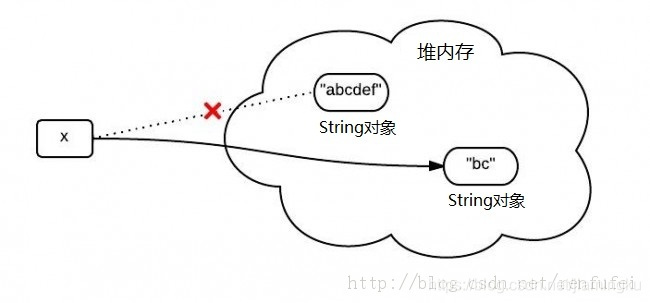
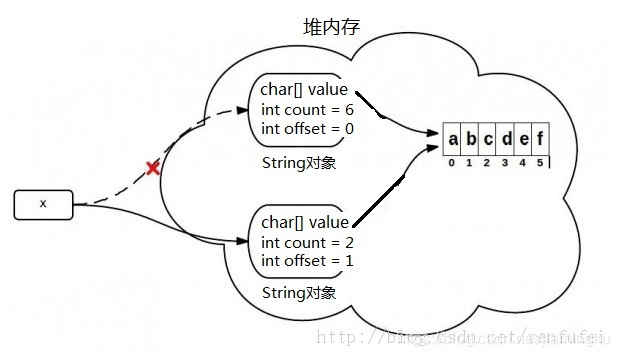
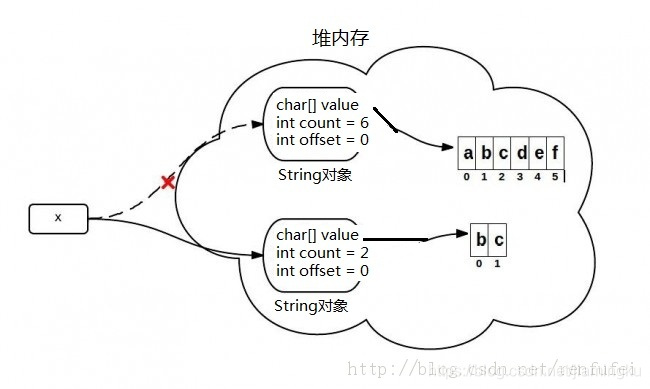
 本文对比了JDK6和JDK7中String.substring()方法的实现细节,揭示了在不同JDK版本下,该方法如何处理字符串子串的获取及潜在的性能问题。在JDK6中,substring()方法可能会导致不必要的内存占用,而在JDK7中,这一问题得到了改善。





 扫一扫
扫一扫


 356
356

 被折叠的 条评论
为什么被折叠?
被折叠的 条评论
为什么被折叠?
 到【灌水乐园】发言





