
[LayoutConstraints] Unable to simultaneously satisfy constraints.

文章讨论了在iOS开发中遇到的布局约束冲突警告,具体是由于Masonry添加的一个默认约束与自定义约束冲突。解决方法是通过设置自定义约束的高优先级来避免警告,确保label的左右边距为4,同时消除打印台的错误信息。

在项目中会看到打印台上有这样的警告:

2023-05-25 10:04:41.811357+0800 JDDDemo[23487:9760518] [LayoutConstraints] Unable to simultaneously satisfy constraints.
	Probably at least one of the constraints in the following list is one you don't want. 
	Try this: 
		(1) look at each constraint and try to figure out which you don't expect; 
		(2) find the code that added the unwanted constraint or constraints and fix it. 
(
    "<MASLayoutConstraint:0x2834265e0 UILabel:0x100d33a40.left == UIView:0x100d192a0.left + 4>",
    "<MASLayoutConstraint:0x283426640 UILabel:0x100d33a40.right == UIView:0x100d192a0.right - 4>",
    "<NSLayoutConstraint:0x283316120 UIView:0x100d192a0.width == 1>"
)

Will attempt to recover by breaking constraint 
<MASLayoutConstraint:0x283426640 UILabel:0x100d33a40.right == UIView:0x100d192a0.right - 4>

Make a symbolic breakpoint at UIViewAlertForUnsatisfiableConstraints to catch this in the debugger.
The methods in the UIConstraintBasedLayoutDebugging category on UIView listed in <UIKitCore/UIView.h> may also be helpful.

我的约束是这么写的:
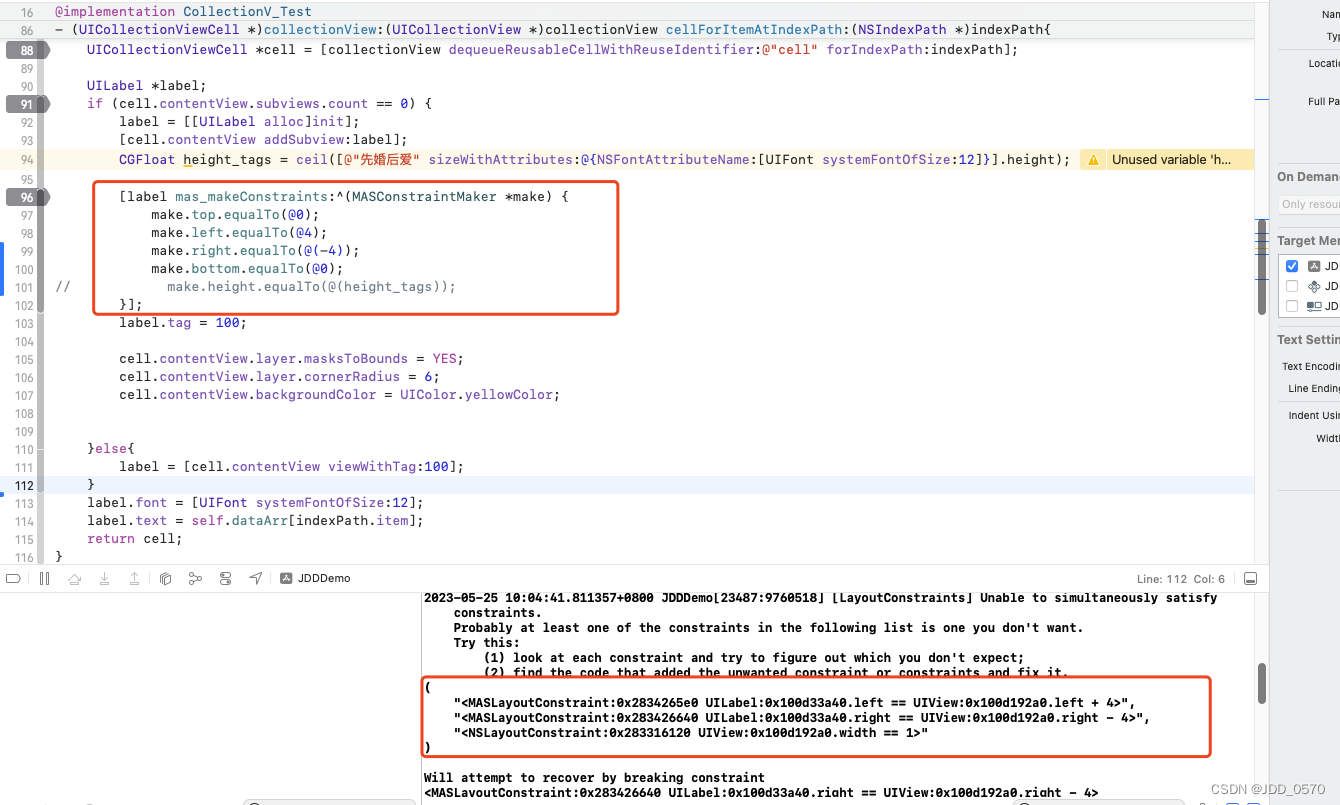
看起来没啥问题,但是貌似masonary给contentView添加了一个默认的约束width=1,然后我自己想要的约束是这个label要距contentView左右边距是4,那就是说这个contentView的宽度至少不小于8,这样就和系统默认的约束width=1相冲突了。

然后看网上的解决办法是设置一个优先级:

[label mas_makeConstraints:^(MASConstraintMaker *make) {
      make.top.equalTo(@0);
      make.left.equalTo(@4);
      make.right.equalTo(@(-4)).priorityHigh();
      make.bottom.equalTo(@0).priorityHigh();
      make.height.equalTo(@(height_tags));
}];

或者

[label mas_makeConstraints:^(MASConstraintMaker *make) {
       make.top.equalTo(@0);
       make.left.equalTo(@4);
       make.right.equalTo(@(-4)).priority(999);
       make.bottom.equalTo(@0).priority(999);
       make.height.equalTo(@(height_tags));
}];

这样就可以消除掉打印台上的警告了

make.top.equalTo(view.safeAreaLayoutGuide) // ✅ 安全区顶部 make.height.equalTo(40) make.top.equalTo(fixedTitleView.snp.bottom) // ✅ 紧接标题栏下方 还是崩溃 Unable to simultaneously satisfy constraints. Probably at least one of the constraints in the following list is one you don't want. Try this: (1) look at each constraint and try to figure out which you don't expect; (2) find the code that added the unwanted constraint or constraints and fix it. ( "<MASLayoutConstraint:0x12cb16100 TPKeyboardAvoidingTableView:0x12cb78000.top == UILayoutGuide:0x12cb50c40.top>", "<SnapKit.LayoutConstraint:0x12cb16580@DeviceListNewViewController.swift#392 UIView:0x12cad2580.top == UILayoutGuide:0x12cb50c40.top>", "<SnapKit.LayoutConstraint:0x12cb166a0@DeviceListNewViewController.swift#394 UIView:0x12cad2580.height == 40.0>", "<SnapKit.LayoutConstraint:0x12cb16880@DeviceListNewViewController.swift#405 TPKeyboardAvoidingTableView:0x12cb78000.top == UIView:0x12cad2580.bottom>" ) Will attempt to recover by breaking constraint <SnapKit.LayoutConstraint:0x12cb166a0@DeviceListNewViewController.swift#394 UIView:0x12cad2580.height == 40.0> Make a symbolic breakpoint at UIViewAlertForUnsatisfiableConstraints to catch this in the debugger. The methods in the UIConstraintBasedLayoutDebugging category on UIView listed in <UIKitCore/UIView.h> may also be helpful. 请你按照别的使用组件库的方式给我写:// MARK: - View override func setupSubviews() { super.setupSubviews() backgroundColor = .clear addSubviews([dotImageView, titleLabel]) } override func makeConstraint() { super.makeConstraint() dotImageView.snp.makeConstraints { make in make.leading.equalToSuperview() make.top.equalToSuperview().offset(4) make.height.width.equalTo(8) } titleLabel.snp.makeConstraints { make in make.leading.equalTo(dotImageView.snp.trailing).offset(8) make.top.trailing.bottom.equalToSuperview() } }
最新发布
12-03
我将我的popover绑定这个controller就可以正常展开popover窗口,绑定你给我的那个类或者我原有的listcontroller就做不到,问题在哪里?// // HomeSettingViewController.swift // OmadaSurveillance // // Created by LSL on 5/19/25. // import Cocoa class HomeSettingPopoverViewController: TPPopBaseViewController { private var settingListView = NSTableView() private var contentView = NSView() private var settingList:[String] = [] var clientSettingOnClicked: (()->())? var checkVersionOnClicked: (()->())? var helpOnClicked: (()->())? var openSourceOnClicked: (()->())? override func setupSubviews() { super.setupSubviews() view.wantsLayer = true view.layer?.backgroundColor = NSColor.tpSecondaryButton.cgColor view.layer?.cornerRadius = 6 settingListView.delegate = self settingListView.dataSource = self settingListView.usesAutomaticRowHeights = true settingListView.headerView = nil if #available(macOS 11.0, *) { settingListView.style = .plain } let column = NSTableColumn(identifier: NSUserInterfaceItemIdentifier(rawValue: "SettingListCell")) settingListView.addTableColumn(column) settingListView.selectionHighlightStyle = .none view.addSubview(contentView) contentView.addSubview(settingListView) } override func setupText() { super.setupText() settingList.removeAll() appendItemToSettingList(item: LocalizedString(key: omadaPCSetting)) appendItemToSettingList(item: LocalizedString(key: omadaSoftwareVersion)) appendItemToSettingList(item: LocalizedString(key: omadaHelpAndSuggestion)) appendItemToSettingList(item: LocalizedString(key: omadaOpenLicesence)) } override func makeConstraints() { super.makeConstraints() contentView.snp.makeConstraints { make in make.edges.equalTo(view) make.width.equalTo(178) make.height.equalTo(160) } settingListView.snp.makeConstraints { make in make.top.equalTo(contentView).offset(8) make.leading.trailing.equalTo(contentView) } } private func appendItemToSettingList(item: String) { settingList.append(item) settingListView.reloadData() } } extension HomeSettingPopoverViewController:NSTableViewDelegate, NSTableViewDataSource { func numberOfRows(in tableView: NSTableView) -> Int { return settingList.count } func tableView(_ tableView: NSTableView, rowViewForRow row: Int) -> NSTableRowView? { let cell = tableView.makeView(withIdentifier: NSUserInterfaceItemIdentifier(rawValue: "SettingListCell"), owner: self) as? HomeSettingTableRowView ?? HomeSettingTableRowView() cell.title = settingList[row] return cell } func tableView(_ tableView: NSTableView, viewFor tableColumn: NSTableColumn?, row: Int) -> NSView? { return nil } func tableViewSelectionDidChange(_ notification: Notification) { if settingListView.selectedRow < 0 {return} if settingListView.selectedRow == 0 { clientSettingOnClicked?() } else if settingListView.selectedRow == 1 { checkVersionOnClicked?() } else if settingListView.selectedRow == 2 { helpOnClicked?() } else if settingListView.selectedRow == 3 { openSourceOnClicked?() } settingListView.deselectRow(settingListView.selectedRow) } } class HomeSettingTableRowView: NSTableRowView { private var titleLabel = TPBLabel() var title: String = "" { didSet { titleLabel.text = title } } var trackingArea : NSTrackingArea? var contentView = NSView() override init(frame frameRect: NSRect) { super.init(frame: frameRect) setupSubviews() makeConstraints() } required init?(coder: NSCoder) { fatalError("init(coder:) has not been implemented") } private func setupSubviews() { titleLabel.font = NSFont.tpr14Regular() titleLabel.textColor = NSColor.tpTextWhite self.wantsLayer = true self.layer?.backgroundColor = .clear addSubview(contentView) contentView.addSubview(titleLabel) } private func makeConstraints() { contentView.snp.makeConstraints { make in make.edges.equalTo(self) make.height.equalTo(36) } titleLabel.snp.makeConstraints { make in make.top.bottom.equalTo(contentView).inset(7) make.leading.trailing.equalTo(contentView).inset(16) } } override func layout() { super.layout() updateTrackingArea() } override func mouseEntered(with event: NSEvent) { super.mouseEntered(with: event) self.layer?.backgroundColor = NSColor.tpSecondaryButtonHover.cgColor } override func mouseExited(with event: NSEvent) { super.mouseExited(with: event) self.layer?.backgroundColor = .clear } func updateTrackingArea() { self.trackingAreas.forEach { self.removeTrackingArea($0) } let opt = ( NSTrackingArea.Options.mouseEnteredAndExited.rawValue | NSTrackingArea.Options.mouseMoved.rawValue | NSTrackingArea.Options.activeAlways.rawValue ) trackingArea = NSTrackingArea(rect: self.bounds, options: NSTrackingArea.Options(rawValue: opt), owner:self, userInfo: nil) if let trackingArea = trackingArea { self.addTrackingArea(trackingArea) } } }
09-23
评论
成就一亿技术人!
拼手气红包6.0元
还能输入1000个字符
 
红包 添加红包
表情包 插入表情
 条评论被折叠 查看
添加红包

请填写红包祝福语或标题

红包个数最小为10个

红包金额最低5元

当前余额3.43前往充值 >
需支付:10.00
成就一亿技术人!
领取后你会自动成为博主和红包主的粉丝 规则
hope_wisdom
发出的红包
实付
使用余额支付
点击重新获取
扫码支付
钱包余额 0

抵扣说明:

1.余额是钱包充值的虚拟货币,按照1:1的比例进行支付金额的抵扣。
2.余额无法直接购买下载,可以购买VIP、付费专栏及课程。

余额充值


