


 本文展示了如何在React应用中利用AntDesignPro的ProForm组件和useRef、useStatehooks创建动态表单。通过actionRef.current?.addOrremove实现外部按钮对表单行的增删操作,并通过ProFormList组件管理列表数据。此外,还涉及到了接口调用保存数据和错误处理。
通过外部按钮增加删除一行
官网文档:行为守卫
通过button 触发actionRef.current?.add or actionRef.current?.remove
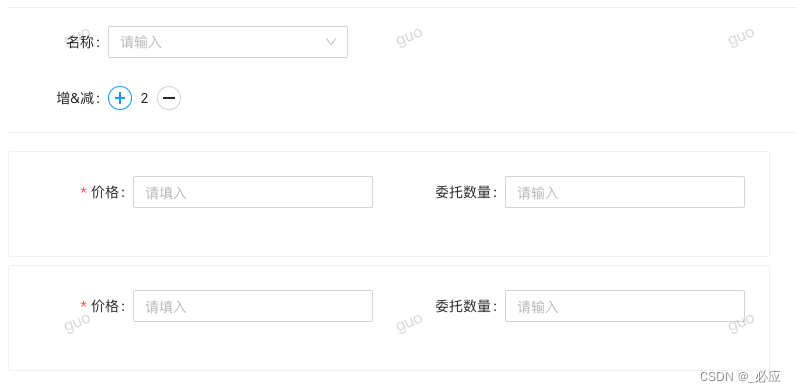
import React, { useState, useRef, useEffect } from 'react';
import { Button, message, Modal, Space, Select, Divider, Form } from 'antd';
import {
  ProFormDigit,
  ProFormInstance,
  ProFormList,
  ProFormRadio,
  ProFormSelect,
} from '@ant-design/pro-form';
import ProForm, { ModalForm, ProFormText } from '@ant-design/pro-form';
import { MinusOutlined, PlusOutlined } from '@ant-design/icons';
import type { FormListActionType } from '@ant-design/pro-form';
import { useModel, Access, useAccess } from 'umi';
import { organizationSave } from '@/services/ant-design-pro/tradingPlatformApi';
import {
  delegationDirectionEnum,
  operationTypeEnum,
  strategyNameEnum,
  ContractTypeEnum,
} from '@/constants/common';
import styles from '../../index.less';
import ProCard from '@ant-design/pro-card';

const CommitForm: React.FC<any> = (props) => {
  const { initialState } = useModel('@@initialState');
  const { currentUser } = initialState || {};
  // const { id = null, enable = false } = props.record;
  // console.log('props.record', props.record)
  const { type } = props;
  const formRef = useRef<ProFormInstance>();
  const [formList, setFormList] = useState([1]);
  const actionRef = useRef<
    FormListActionType<{
      name: string;
    }>
  >();

  const handleConfirm = async (values: any) => {
    const apiParams = {
      id: null,
      comment: values.comment,
      name: values.name,
      type,
    };
    const res = await organizationSave(apiParams);
    if (res.flag) {
      // formRef?.current?.resetFields();
      // props.query();
      message.error('申请成功!');
    } else {
      message.error('添加失败');
    }
  };

  const formItemLayout = {
    labelCol: { style: { width: 100 } },
    wrapperCol: { style: { width: 240 } },
  };

  return (
    <>
      <ProForm<{
        name: string;
        company: string;
      }>
        layout="horizontal"
        autoFocusFirstInput
        labelCol={{ style: { width: 100 } }}
        wrapperCol={{ style: { width: 240 } }}
        // submitTimeout={2000}
        formRef={formRef}
        onFinish={async (values) => {
          // 接口
          console.log('values :>> ', values);
          // await handleConfirm(values);
        }}
        initialValues={{
          total: 1,
        }}
      >
        <Divider
          style={{
            marginTop: -6,
            marginBottom: 18,
          }}
        />
        <ProForm.Group>
          <ProFormSelect
            name="comment"
            valueEnum={strategyNameEnum}
            label="名称"
            placeholder="请输入"
          />
        </ProForm.Group>
        <ProForm.Group>
          {/* <ProFormDigit
            name="total"
            min={1}
            max={10}
            fieldProps={{
              precision: 0,
              readOnly: true,
              onStep: (value, info) => {
                console.log(111, value, info.type);
                if (info.type === 'up') {
                  const list = actionRef.current?.getList();
                  actionRef.current?.add({
                    name: '新增' + list?.length,
                  });
                } else {
                  actionRef.current?.remove(1);
                }
              },
            }}
            label="增&减"
            placeholder="请输入"
          /> */}
          <Form.Item label="增&减" name="total">
            <Space>
              <Button
                type="default"
                size="small"
                shape="circle"
                onClick={() => {
                  if (formList.length === 10) {
                    return;
                  }
                  // const list = actionRef.current?.getList();
                  actionRef.current?.add(1);
                  setFormList([...formList, 1]);
                }}
                icon={<PlusOutlined />}
              />
              {formList.length}
              <Button
                type="default"
                size="small"
                shape="circle"
                onClick={() => {
                  if (formList.length === 1) {
                    return;
                  }
                  const newArr = formList.splice(1);
                  actionRef.current?.remove(1);
                  setFormList(newArr);
                }}
                icon={<MinusOutlined />}
              />
            </Space>
          </Form.Item>
        </ProForm.Group>
        <Divider
          style={{
            marginTop: -6,
            marginBottom: 18,
          }}
        />
        <ProFormList
          name={['records']}
          initialValue={formList}
          // creatorButtonProps={{
          //   position: 'top',
          // }}
          creatorButtonProps={false}
          actionRender={(props, action) => {
            return [];
          }}
          actionRef={actionRef}
        >
          {/* {listDom} */}
          <ProCard
            bordered
            style={{
              marginBottom: 8,
              position: 'relative',
            }}
          >
            <ProForm.Group>
              <ProFormDigit
                name="name"
                label="价格"
                min={0}
                rules={[{ required: true }]}
                placeholder="请填入"
                {...formItemLayout}
              />
              <ProFormDigit
                name="comment"
                min={0}
                label="委托数量"
                placeholder="请输入"
                {...formItemLayout}
              />
            </ProForm.Group>
          </ProCard>
        </ProFormList>
      </ProForm>
    </>
  );
};

export default CommitForm;





 扫一扫
扫一扫


 5421
5421

 被折叠的 条评论
为什么被折叠?
被折叠的 条评论
为什么被折叠?
 到【灌水乐园】发言





