


 本文介绍了如何在华为eNSP平台上配置静态路由表,实现路由器R1和R2间的负载分担以及R2和R3间的主备路由备份。通过配置各路由器端口IP地址和添加路由信息,确保PC1和PC2的通信。通过ping和tracert验证,确认路由转发路径符合预期,同时也解释了在主备路由备份模式下,备用路由为何显示为Inactive状态。
文章目录
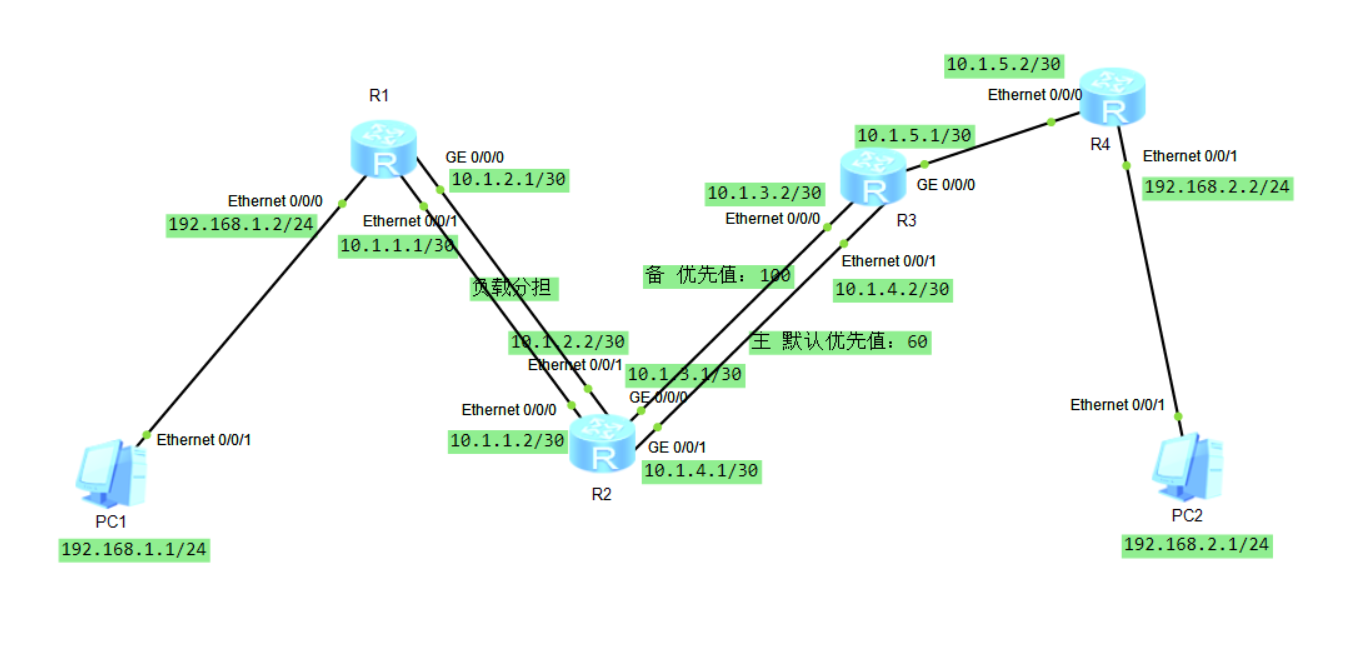
拓扑图(含IP规划)
-
配置任务
按照拓扑图要求配置IP地址,手动添加构建路由表,并在路由器R1和R2间实现静态路由的负载分担(到相同目的地址的下一跳不同,但优先级相同;到目的地的流量将均匀分布),在路由器R2和R3间实现静态路由的主备路由备份(到相同目的地址的下一跳和优先级都不同,优先级高的为主,低的为备),最终实现PC1和PC2的互相通信。 -
配置工具
华为网络设备仿真平台eNSP
配置步骤(含完整指令)
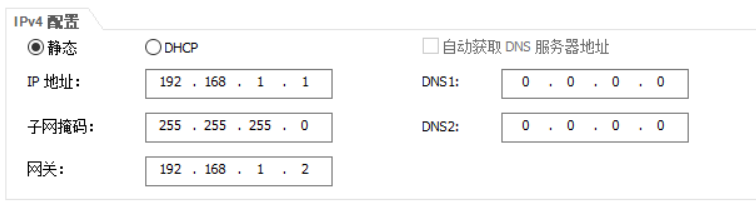
首先,配置主机PC1、PC2的IP信息很简单(留意网关就好),比如PC1就这样:
然后,需要配置的是R1、R2、R3、R4的各个端口所分配的IP地址,以R1为例,需要配置的有Eth0/0/0(192.168.1.2/24)、Eth0/0/1(10.1.1.1/30)、G0/0/0(10.1.2.1/30)这三个端口。
<Huawei>sys  #R1
Enter system view, return user view with Ctrl+Z.
[Huawei]int Eth0/0/0
[Huawei-Ethernet0/0/0]ip address 192.168.1.2 24
[Huawei-Ethernet0/0/0]
Jul 25 2019 17:11:56-08:00 Huawei %%01IFNET/4/LINK_STATE(l)[0]:The line protocol IP on the interface Ethernet0/0/0 has entered the UP state.
Jul 25 2019 17:12:02-08:00 Huawei DS/4/DATASYNC_CFGCHANGE:OID 1.3.6.1.4.1.2011.5.25.191.3.1 configurations have been changed. The current change number is 1, the change loop count is 0, and the maximum number of records is 4095.
[Huawei-Ethernet0/0/0]q
[Huawei]int Eth0/0/1
[Huawei-Ethernet0/0/1]ip address 10.1.1.1 30
[Huawei-Ethernet0/0/1]
Jul 25 2019 17:14:34-08:00 Huawei %%01IFNET/4/LINK_STATE(l)[1]:The line protocol IP on the interface Ethernet0/0/1 has entered the UP state.
Jul 25 2019 17:14:42-08:00 Huawei DS/4/DATASYNC_CFGCHANGE:OID 1.3.6.1.4.1.2011.5.25.191.3.1 configurations have been changed. The current change number is 2, the change loop count is 0, and the maximum number of records is 4095.
[Huawei-Ethernet0/0/1]q
[Huawei]int g0/0/0
[Huawei-GigabitEthernet0/0/0]ip address 10.1.2.1 30
[Huawei-GigabitEthernet0/0/0]
Jul 25 2019 17:21:12-08:00 Huawei %%01IFNET/4/LINK_STATE(l)[2]:The line protocol IP on the interface GigabitEthernet0/0/0 has entered the UP state.
Jul 25 2019 17:21:13-08:00 Huawei DS/4/DATASYNC_CFGCHANGE:OID 1.3.6.1.4.1.2011.5.25.191.3.1 configurations have been changed. The current change number is 3, the change loop count is 0, and the maximum number of records is 4095.
[Huawei-GigabitEthernet0/0/0]q
[Huawei]display ip routing-table  # 查询一下当前的路由表中有哪些表项
Route Flags: R - relay, D - download to fib
------------------------------------------------------------------------------
Routing Tables: Public
         Destinations : 8        Routes : 8

Destination/Mask    Proto   Pre  Cost      Flags NextHop         Interface

       10.1.1.0/30  Direct  0    0           D   10.1.1.1        Ethernet0/0/1
       10.1.1.1/32  Direct  0    0           D   127.0.0.1       Ethernet0/0/1
       10.1.2.0/30  Direct  0    0           D   10.1.2.1        GigabitEthernet
0/0/0
       10.1.2.1/32  Direct  0    0           D   127.0.0.1       GigabitEthernet
0/0/0
      127.0.0.0/8   Direct  0    0           D   127.0.0.1       InLoopBack0
      127.0.0.1/32  Direct  0    0           D   127.0.0.1       InLoopBack0
    192.168.1.0/24  Direct  0    0           D   192.168.1.2     Ethernet0/0/0
    192.168.1.2/32  Direct  0    0           D   127.0.0.1       Ethernet0/0/0
类似地方法不断操作,可以完成R1、R1、R2、R3、R4的各个端口IP地址的配置。
<Huawei>sys #R2
Enter syste 最低0.47元/天 解锁文章






 扫一扫
扫一扫


 5551
5551

 被折叠的 条评论
为什么被折叠?
被折叠的 条评论
为什么被折叠?
 到【灌水乐园】发言





