



思路:
1.使用TabBarController控制器,控制3个页面的跳转
2.不使用原生的tab bar,自定义3个button来控制跳转
一.创建TabBarController,继承UITabBarController
删掉controller之间的链接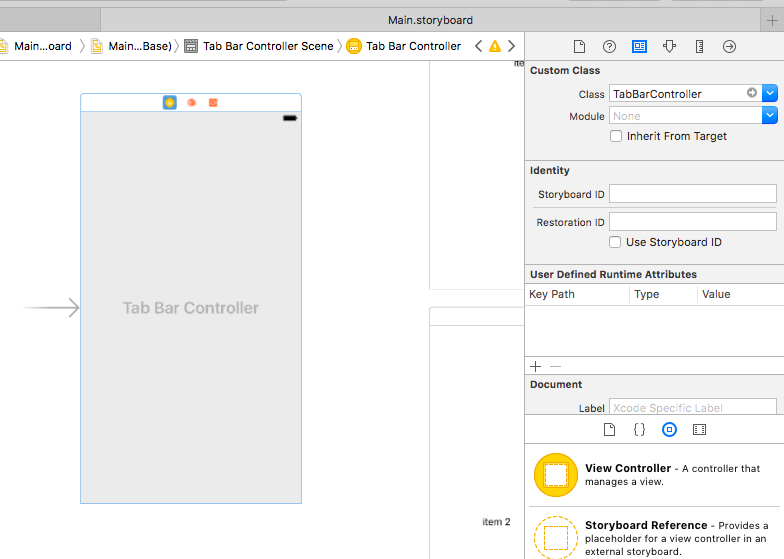
二.创建对应item的Controller的实现
三.TarBarController:
(思路:舍弃系统原生样式,自定义view作为tab bar item的载体,再添加上button。其实在storyboard上面删除tab bar controller与其item controller的链接时,系统的原生tab bar就已经被隐藏了)
@property(retain,nonatomic) UIView *tab_bar_view;
@property(retain,nonatomic) UIButton *firstButton;
@property(retain,nonatomic) UIButton *secondButton;
@property(retain,nonatomic) UIButton *thirdButton;
四.代码实现tab bar controller与各item controller的链接
-(void)initTabBarController{

    UIStoryboard *board = self.storyboard;
    TestTabBarViewController *testvc = [board instantiateViewControllerWithIdentifier:@"testvc"];
    UIViewController *testvc2 = [board instantiateViewControllerWithIdentifier:@"testvc2"];
    UIViewController *testvc3 = [board instantiateViewControllerWithIdentifier:@"testvc3"];

    [self setViewControllers:@[testvc,testvc2,testvc3]];

    [self setSelectedViewController:testvc];

}
五.自定义tab bar:
-(void)initTabBar{
    CGRect rx = [UIScreen mainScreen].bounds;
    CGFloat screenHeight = rx.size.height;
    CGFloat screenWidth  = rx.size.width;

    _tab_bar_view = [[UIView alloc] initWithFrame:CGRectMake(0, screenHeight - 50, screenWidth, 50)];

    _tab_bar_view.backgroundColor = [UIColor whiteColor];

    [self.view addSubview:_tab_bar_view];

    _firstButton = [UIButton buttonWithType:UIButtonTypeCustom];
    _secondButton = [UIButton buttonWithType:UIButtonTypeCustom];
    _thirdButton = [UIButton buttonWithType:UIButtonTypeCustom];

    [self initTabButton:_firstButton title:@"item1" buttonTag:0];
    [self initTabButton:_secondButton title:@"item2" buttonTag:1];
    [self initTabButton:_thirdButton title:@"item3" buttonTag:2];

    [_tab_bar_view addSubview:_firstButton];
    [_tab_bar_view addSubview:_secondButton];
    [_tab_bar_view addSubview:_thirdButton];

//set the button be selected style which is the first view in tab bar controller
    _firstButton.backgroundColor = [UIColor blackColor];

}
六.设置自定义tab bar item 按钮
-(void)initTabButton:(UIButton*)button title:(NSString *) title buttonTag:(int) i {
//三等分,按钮间留有缝隙
 if (i == 0) {
        button.frame = CGRectMake(0, _tab_bar_view.bounds.origin.y, _tab_bar_view.bounds.size.width/3-1, 50);
    }else if(i == 2){
        button.frame = CGRectMake(i * _tab_bar_view.bounds.size.width/3, _tab_bar_view.bounds.origin.y, _tab_bar_view.bounds.size.width/3, 50);
    }else{
        button.frame = CGRectMake(i * _tab_bar_view.bounds.size.width/3, _tab_bar_view.bounds.origin.y, _tab_bar_view.bounds.size.width/3-1, 50);
    }
    button.tag = i;
    button.backgroundColor = [UIColor lightGrayColor];
    [button setTitle:title forState:UIControlStateNormal];
    [button addTarget:self action:@selector(selectedTab:) forControlEvents:UIControlEventTouchUpInside];

}
七.设置按钮动作
(效果:被点击的按钮变黑色,其余按钮恢复成灰色)
-(void)selectedTab:(UIButton *)button{
    self.selectedIndex = button.tag;

    if (_firstButton == button) {
        _firstButton.backgroundColor = [UIColor blackColor];
        _secondButton.backgroundColor = [UIColor lightGrayColor];
        _thirdButton.backgroundColor = [UIColor lightGrayColor];
    }else if(_secondButton == button){
        _firstButton.backgroundColor = [UIColor lightGrayColor];
        _secondButton.backgroundColor = [UIColor blackColor];
        _thirdButton.backgroundColor = [UIColor lightGrayColor];
    }else if(_thirdButton == button){
        _firstButton.backgroundColor = [UIColor lightGrayColor];
        _secondButton.backgroundColor = [UIColor lightGrayColor];
        _thirdButton.backgroundColor = [UIColor blackColor];
    }

}
常用API:
//代码实现指向各item controller的链接
[self setViewControllers:@[testvc,testvc2,testvc3]];

//设置默认的被选择item controller
[self setSelectedViewController:testvc];

//点击哪个item,并跳到该controller
self.selectedIndex = button.tag;
八.整合navigation controller
(首先,如果先进入navigation controller,再进入tab bar controller,这种情况,只是第一页是自定义的tab bar item,点击进去其他的页面,虽然也拥有导航条,但是没有tab bar;其次如果不使用代码,用storyboard先进入tab bar controller,然后再进入navigation controller,显示的仍然不是自定义的tab bar,而是原生的item)
所以我们使用代码设置,修改init
-(void)initTabBarController
TabBarControllerinitTabBarControllertTabBarController
initTabBarController
UIStoryboard *board = [UIStoryboard storyboardWithName:@"Main" bundle:nil];

    HomeController *homevc = [board instantiateViewControllerWithIdentifier:@"homevc"];
    UIViewController *testvc2 = [board instantiateViewControllerWithIdentifier:@"testvc2"];
    UIViewController *testvc3 = [board instantiateViewControllerWithIdentifier:@"testvc3"];
    UINavigationController *navi = [[UINavigationController alloc]initWithRootViewController:homevc];

    [self setViewControllers:@[navi,testvc2,testvc3]];

    [self setSelectedViewController:navi];
思路是把主页装进navigation controller中,再放进tab bar controller中
第二部分,上方的自定义tab bar
一.首要问题是navigation bar会遮挡住tab bar
与属性translucent有关,IOS7以后默认为YES,在navigation bar一下的所有控件都会从(0,0)开始
所以会出现遮挡。
因此需要设置translucent为NO,这样所有控件都会从(0,64)开始
self.navigationController.navigationBar.translucent = NO;
二.跳转时隐藏tab bar
//1.设置self.tabBarController.tabBar.hidden=YES;

self.tabBarController.tabBar.hidden=YES;

//2.如果在push跳转时需要隐藏tabBar,设置self.hidesBottomBarWhenPushed=YES;

    self.hidesBottomBarWhenPushed=YES;
    NextViewController *next=[[NextViewController alloc]init];
    [self.navigationController pushViewController:next animated:YES];
    self.hidesBottomBarWhenPushed=NO;

//并在push后设置self.hidesBottomBarWhenPushed=NO;
//这样back回来的时候,tabBar会恢复正常显示。
三.设置默认tab
由于使用了自定义的view来覆盖了原来的tab bar,所以TabBarController的setSelectedController方法只能改变展示的页面,而没有办法同时改变被选中哪个tab,所以这里要通过自定义方法来设置:
思路:
1.只显示传入的view,其他隐藏;
2.因为不需要用setSelectedController方法,所以要改变一下selectedIndex,用来显示被选择的页面
-(void)setSelectedButton:(UIView *)view{
    [_cv setHidden:YES];
    [_cv2 setHidden:YES];
    [_cv3 setHidden:YES];

    self.selectedIndex = view.tag;
    [view setHidden:NO];
}
参考:
1.IOS——第二个View中使用TabbarController例子,tabbar中页面间通过非tabbar按钮跳转
http://blog.youkuaiyun.com/u012476249/article/details/39031255
2.github:https://github.com/jameskaron/CustomerTabBarView
3.UIButton选中状态下的点击:http://www.jianshu.com/p/57b2c41448bf
4.UITabBarController和UINavigationController的整合:http://blog.youkuaiyun.com/hwe_xc/article/details/50588500
5.探究navigationBar的translucent属性:http://www.jianshu.com/p/428920dd6309
6.在使用NavigationController情况下的布局的Y轴的起始位置:http://www.cnblogs.com/small-octopus/p/4746411.html#undefined





 扫一扫
扫一扫


 6186
6186

 被折叠的 条评论
为什么被折叠?
被折叠的 条评论
为什么被折叠?
 到【灌水乐园】发言





