



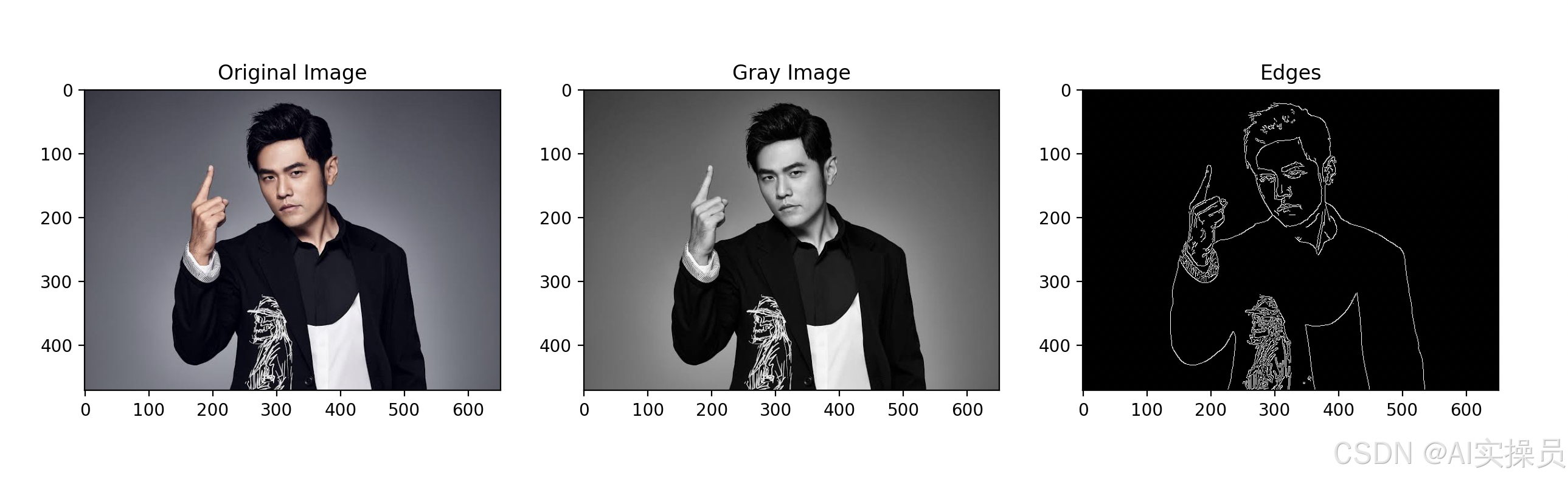
1、图片的基础信息
展示计算机如何处理图片信息
# 基础图像处理示例
import cv2
import numpy as np
import matplotlib.pyplot as plt
def show_image_info(image_path):
# 读取图片
img = cv2.imread(image_path)
if img is None:
print(f"无法读取图片: {image_path}")
return
# 转换颜色空间(OpenCV使用BGR,而matplotlib使用RGB)
img_rgb = cv2.cvtColor(img, cv2.COLOR_BGR2RGB)
# 显示原始图片
plt.figure(figsize=(15, 5))
plt.subplot(131)
plt.imshow(img_rgb)
plt.title('Original Image')
# 显示图片信息
print(f"图片形状: {img.shape}")
print(f"图片数据类型: {img.dtype}")
print("\n左上角5x5像素的值:")
print(img[0:5, 0:5])
# 显示灰度图
gray_img = cv2.cvtColor(img, cv2.COLOR_BGR2GRAY)
plt.subplot(132)
plt.imshow(gray_img, cmap='gray')
plt.title('Gray Image')
# 使用Canny算子进行边缘检测
# 参数100是低阈值,200是高阈值
# 低于低阈值的像素点会被认为不是边缘
# 高于高阈值的像素点会被认为是边缘
# 两个阈值之间的像素点,如果与确定的边缘像素点相连,则认为也是边缘
edges = cv2.Canny(gray_img, 100, 200)
# 显示边缘检测结果
plt.subplot(133) # 123表示1行2列的第3个位置
plt.imshow(edges, cmap='gray') # 使用灰度colormap显示边缘图
plt.title('Edges') # 设置标题为"Edges"
plt.show()
if __name__ == "__main__":
# 可以替换为你自己的图片路径
image_path = "people.jpg"
show_image_info(image_path)
运行结果
图片形状: (471, 651, 3)
图片数据类型: uint8

左上角5x5像素的值:
[[[67 55 55]
  [67 55 55]
  [67 55 55]
  [67 55 55]
  [67 55 55]]

 [[67 55 55]
  [67 55 55]
  [67 55 55]
  [67 55 55]
  [67 55 55]]

 [[67 55 55]
  [67 55 55]
  [67 55 55]
  [67 55 55]
  [67 55 55]]

 [[68 56 56]
  [68 56 56]
  [68 56 56]
  [68 56 56]
  [68 56 56]]

 [[68 56 56]
  [68 56 56]
  [68 56 56]
  [68 56 56]
  [68 56 56]]]
2、识别人脸
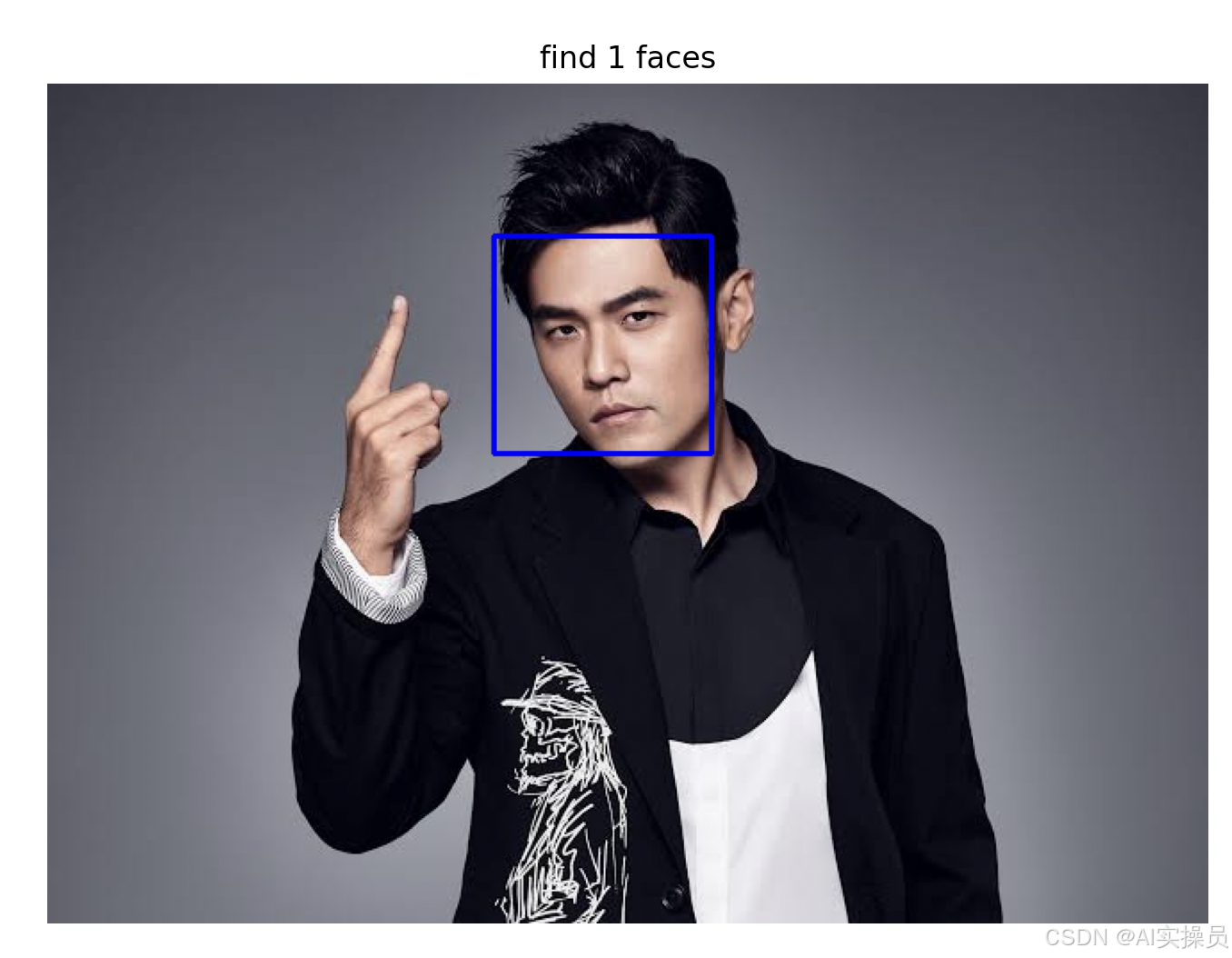
根据预训练好的模型,识别图片中的人脸并框出。
# 人脸检测示例
import cv2
import matplotlib.pyplot as plt

def detect_faces(image_path):
    # 加载人脸检测器
    # 创建一个级联分类器对象用于人脸检测
    # 加载预训练的Haar特征分类器模型文件
    # haarcascade_frontalface_default.xml 包含了人脸检测所需的特征数据
    face_cascade = cv2.CascadeClassifier(
        cv2.data.haarcascades + 'haarcascade_frontalface_default.xml'
    )

    # 读取图片
    img = cv2.imread(image_path)
    if img is None:
        print(f"无法读取图片: {image_path}")
        return

    # 转换为灰度图,人脸级联检测必须要用灰度图
    gray = cv2.cvtColor(img, cv2.COLOR_BGR2GRAY)

    # 检测人脸
    faces = face_cascade.detectMultiScale(gray, 1.1, 4)

    # 在检测到的人脸周围画框
    for (x, y, w, h) in faces:
        cv2.rectangle(img, (x, y), (x+w, y+h), (255, 0, 0), 2)

    # 显示结果
    plt.figure(figsize=(10, 6))
    plt.imshow(cv2.cvtColor(img, cv2.COLOR_BGR2RGB))
    plt.title(f'find {len(faces)} faces')
    plt.axis('off')
    plt.show()

if __name__ == "__main__":
    # 可以替换为你自己的图片路径
    image_path = "people.jpg"
    detect_faces(image_path)
运行结果
3、物体识别
根据预训练好的模型,识别分类图片。
import ssl
import torch
from torchvision.models import resnet50, ResNet50_Weights
from torchvision import transforms
from PIL import Image

# 解决SSL证书问题
ssl._create_default_https_context = ssl._create_unverified_context

def load_imagenet_labels():
    """加载ImageNet标签(扩展版本)"""
    labels = {
        # 动物
        281: "虎斑猫", 282: "狗", 283: "马", 284: "绵羊",
        285: "奶牛", 286: "大象", 287: "棕熊", 288: "斑马",
        289: "长颈鹿", 290: "袋鼠", 291: "考拉", 292: "熊猫",
        293: "狮子", 294: "老虎", 295: "猎豹", 296: "北极熊",
    }
    return labels

def predict_image(image_path):
    try:
        # 加载预训练模型
        model = resnet50(weights=ResNet50_Weights.DEFAULT)
        model.eval()

        # 图像预处理
        transform = transforms.Compose([
            transforms.Resize(256),
            transforms.CenterCrop(224),
            transforms.ToTensor(),
            transforms.Normalize(
                mean=[0.485, 0.456, 0.406],
                std=[0.229, 0.224, 0.225]
            )
        ])

        # 加载并处理图片
        image = Image.open(image_path)
        input_tensor = transform(image).unsqueeze(0)

        # 预测
        with torch.no_grad():
            output = model(input_tensor)

        # 获取预测结果
        probabilities = torch.nn.functional.softmax(output[0], dim=0)
        top5_prob, top5_catid = torch.topk(probabilities, 5)

        # 加载标签
        labels = load_imagenet_labels()

        # 显示预测结果
        print("\n图片预测结果:")
        print("-" * 40)
        print(f"{'预测类别':<15} {'可能性':<10} {'类别ID':<8}")
        print("-" * 40)

        for i in range(5):
            catid = top5_catid[i].item()
            prob = top5_prob[i].item() * 100
            label = labels.get(catid, f"未知物体")
            if label == "未知物体":
                print(f"{label:<15} {prob:>6.2f}%    (ID: {catid})")
            else:
                print(f"{label:<15} {prob:>6.2f}%")

        print("-" * 40)
        print("注:如果显示'未知物体',说明该物体不在我们的常见物品列表中")

    except FileNotFoundError:
        print(f"找不到图片文件: {image_path}")
    except Exception as e:
        print(f"处理图片时出错: {e}")

if __name__ == "__main__":
    # 可以替换为你自己的图片路径
    image_path = "lion.jpg"
    predict_image(image_path)
运行结果(效果不好,可以自行替换别的预训练模型)
图片预测结果:
----------------------------------------
预测类别            可能性        类别ID
----------------------------------------
考拉               31.35%
大象                0.68%
未知物体              0.26%    (ID: 220)
未知物体              0.26%    (ID: 200)
未知物体              0.20%    (ID: 260)
----------------------------------------
注:如果显示'未知物体',说明该物体不在我们的常见物品列表中





 扫一扫
扫一扫


 被折叠的 条评论
为什么被折叠?
被折叠的 条评论
为什么被折叠?
 到【灌水乐园】发言





