需求
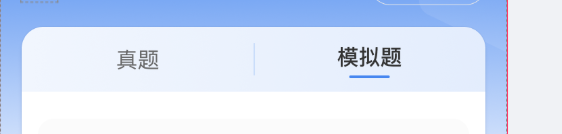
实现
    <view class="intent-container">
      <text
        class="user-intent {{selectedType === 'real' ? 'active' : ''}}"
        catchtap="switchIntent"
        data-type="real"
      >真题</text>
      <view style="height: 48rpx;width: 2rpx;background-color: rgba(173,202,248,0.4);"></view>
      <text
        class="change-intent {{selectedType === 'sim' ? 'active' : ''}}"
        catchtap="switchIntent"
        data-type="sim"
      >模拟题</text>
    </view>
.intent-container {
display: flex;
justify-content: center;
align-items: center;
background: #eff5fd;
height: 96rpx;
font-size: 32rpx;
color: #666666;
border-radius: 32rpx 0 0;
}
.intent-container text {
flex: 1;
text-align: center;
position: relative;
padding: 18rpx 0;
font-size: 28rpx;
color: #666;
}
.intent-container .active {
color: #333;
font-weight: 600;
}
.intent-container .active::after {
content: '';
position: absolute;
bottom: 0rpx;
left: 50%;
transform: translateX(-50%);
width: 50rpx;
height: 4rpx;
border-radius: 4rpx;
background-color: #4787F0;
transition: all 0.3s ease;
}








 扫一扫
扫一扫


 1078
1078

 被折叠的 条评论
为什么被折叠?
被折叠的 条评论
为什么被折叠?
 到【灌水乐园】发言





