



项目场景:
提示:这里简述项目相关背景:
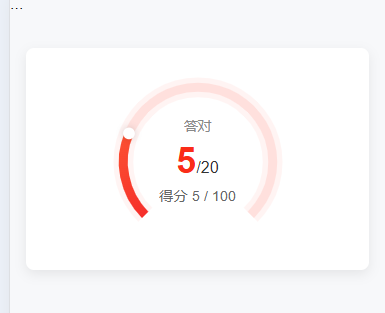
鸿图H5-报告页面-实现拱形

实现
组件
<template>
  <div class="score-arch">
    <div class="arch-wrapper">
      <svg viewBox="0 0 200 200">
        <!-- 背景环 -->
        <path :d="arcPath" stroke="#FFF4F3" stroke-width="22" fill="none" />
        <path :d="arcPath" stroke="#FFE0DD" stroke-width="10" fill="none" />

        <!-- 进度环 -->
        <path
            :d="arcPath"
            stroke="url(#grad)"
            stroke-width="10"
            fill="none"
            :stroke-dasharray="`${progressLength}, ${totalLength}`"
            stroke-dashoffset="0"
        />

        <!-- 渐变定义 -->
        <defs>
          <linearGradient id="grad" x1="0" y1="0" x2="1" y2="1">
            <stop offset="0%" stop-color="#ff6034" />
            <stop offset="100%" stop-color="#ee0a24" />
          </linearGradient>
        </defs>

        <!-- 末端小圆点 -->
        <circle
            :cx="endX"
            :cy="endY"
            r="6.5"
            fill="#fff"
            stroke-width="3"
            style="filter: drop-shadow(0 0 4px rgba(0,0,0,0.15));"
        />
      </svg>

      <!-- 中间得分文案 -->
      <div class="score-text">
        <p class="label">答对</p>
        <p class="value">
          <span class="score-value">{{ value }}</span>/<span>{{ max }}</span>
        </p>
        <p class="score" v-if="score">得分 {{ score }} / {{ totalScore }}</p>
      </div>
    </div>
  </div>
</template>

<script setup>
import { computed } from 'vue'

/**
 * Props
 * value: 当前值
 * max: 最大值
 * score: 当前得分
 * totalScore: 总分
 * radius: 圆弧半径(默认83)
 */
const props = defineProps({
  value: { type: Number, default: 10 },
  max: { type: Number, default: 100 },
  score: { type: Number, default: 0 },
  totalScore: { type: Number, default: 100 },
  radius: { type: Number, default: 83 },
})

/**
 * 缺口大小控制
 * 这里我们去掉下方 1/4 的圆弧 => 总角度 270°
 * 起始角度 135°,结束角度 405°
 */
const startAngle = (135 * Math.PI) / 180
const endAngle = (405 * Math.PI) / 180

// SVG 路径
const arcPath = computed(() => {
  const r = props.radius
  const cx = 100
  const cy = 100
  const startX = cx + r * Math.cos(startAngle)
  const startY = cy + r * Math.sin(startAngle)
  const endX = cx + r * Math.cos(endAngle)
  const endY = cy + r * Math.sin(endAngle)
  return `M ${startX},${startY} A ${r},${r} 0 1 1 ${endX},${endY}`
})

// 总长度(弧长)
const totalLength = computed(() => props.radius * Math.PI * (270 / 180))

// 当前进度长度
const progressLength = computed(() => {
  const rate = Math.min(props.value / props.max, 1)
  return totalLength.value * rate
})

// 终点坐标
const endX = computed(() => {
  const r = props.radius
  const rate = Math.min(props.value / props.max, 1)
  const angle = startAngle + (endAngle - startAngle) * rate
  const cx = 100
  return cx + r * Math.cos(angle)
})

const endY = computed(() => {
  const r = props.radius
  const rate = Math.min(props.value / props.max, 1)
  const angle = startAngle + (endAngle - startAngle) * rate
  const cy = 100
  return cy + r * Math.sin(angle)
})
</script>

<style scoped lang="scss">
.score-arch {
  background: #fff;
  width: 21.4375rem;
  height: 13.875rem;
  border-radius: 0.5rem;
  padding: 1.5rem 1rem 1rem;
  text-align: center;
  margin: 2rem auto;
  box-shadow: 0 4px 12px rgba(0, 0, 0, 0.08);
}

.arch-wrapper {
  position: relative;
  width: 11.25rem;
  margin: 0 auto;
}

.score-text {
  position: absolute;
  top: 25%;
  left: 0;
  right: 0;
  text-align: center;
  line-height: 1.4;

  .label {
    font-size: 0.85rem;
    color: #888;
  }
  .value {
    font-size: 1rem;
    color: #333333;
    .score-value {
      color: #FA2C19;
      font-size: 2.25rem;
      font-weight: 600;
    }
  }
  .score {
    font-size: 0.9rem;
    color: #666;
  }
}
</style>
调用
<template>
  <div class="report-page">
    <div class="header-bg">...</div>

    <!-- 使用组件 -->
    <ScoreArch
        :value="report.correct"
        :max="report.total"
        :score="report.score"
        :totalScore="report.totalScore"
    />

    <!-- 其他内容 -->
  </div>
</template>

<script setup>
import ScoreArch from '~/components/ScoreArch.vue'
const report = reactive({
  correct:5,
  total:20,
  score:5,
  totalScore:100,
})
</script>
实现结果
在这里插入图片描述





 扫一扫
扫一扫


 2573
2573

 被折叠的 条评论
为什么被折叠?
被折叠的 条评论
为什么被折叠?
 到【灌水乐园】发言





