


SharePoint Online和OneDrive for Business支持版本控制,可以保留文件的版本历史,方便用户随时查看和恢复以前的版本。但该功能也会占用大量SharePoint Online或OneDrive for Business存储空间。官方删除版本历史的方法无法批量操作,故今天提供一种使用Power Automate来删除SharePoint Online或OneDrive for Business文件版本历史。
第一步:添加“Get files(properties only)”操作,以获取列表中的文件。
第二步:添加“Send an HTTP request to SharePoint”操作:
Method: GET

Uri: _api/web/GetFolderByServerRelativeUrl('Dynamic content of Folder Path')/Files('Dynamic content of File name with extension')/Versions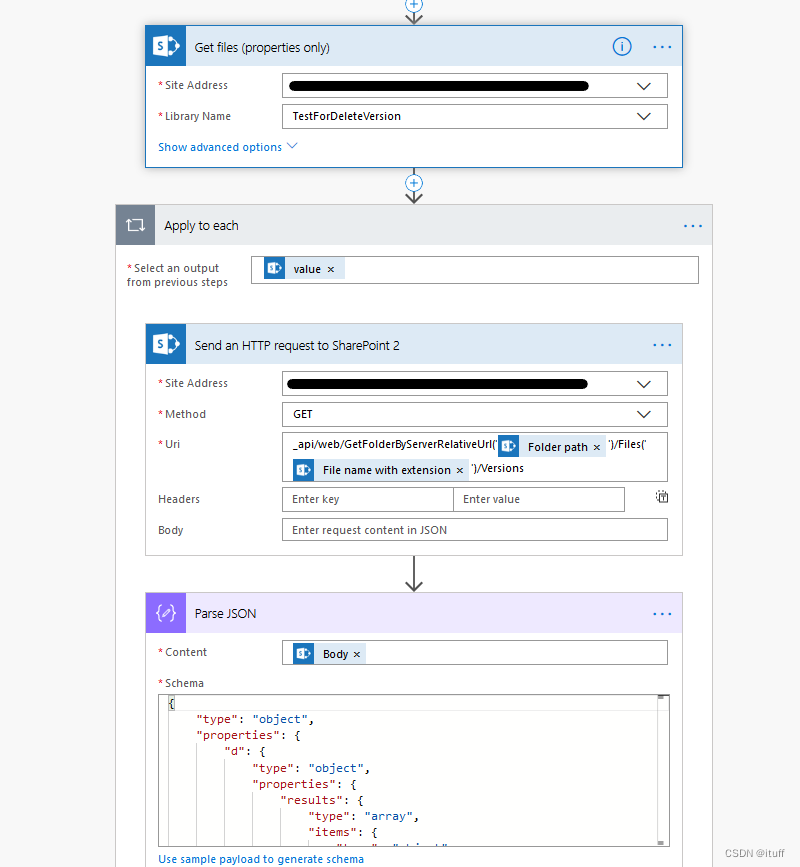
第三步:“Parse JSON”,将上一个动作的正文放入解析 JSON 动作的内容中,然后点击“使用示例负载”按钮生成 schema 粘贴如下 schema:
{
"type": "object",
"properties": {
"d": {
"type": "object",
"properties": {
"results": {
"type": "array",
"items": {
"type": "object",
"properties": {
"__metadata": {
"type": "object",
"properties": {
"id": {
&nb 最低0.47元/天 解锁文章






 扫一扫
扫一扫


 281
281

 被折叠的 条评论
为什么被折叠?
被折叠的 条评论
为什么被折叠?
 到【灌水乐园】发言





