



我们开发的时候经常需要有这样的场景:密钥验证,比如:
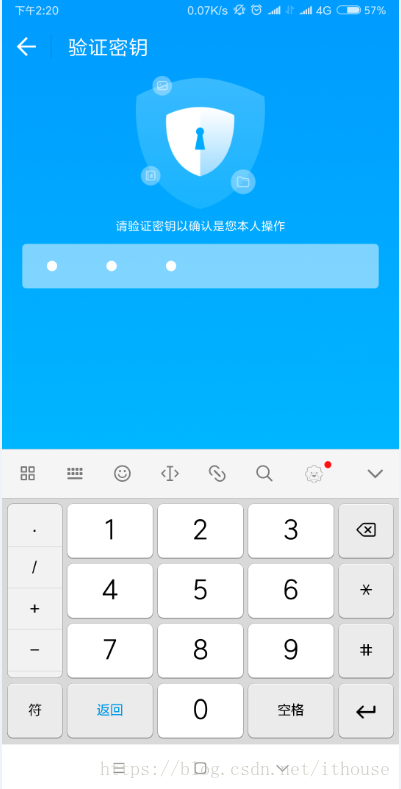
好了,大概说一下思路:
1.界面构成:就是一个FrameLayout,覆盖着一个LinearLayout和一个EditText,EditText在上方,自定义这个EditText,设置好EditText字体不可见,自动弹出键盘等条件,后面就是普通自定义控件的UI元素了,也就是原点的颜色和显示隐藏。
2.密钥验证时机。只有当输入长度等于密钥正确长度时才进行校验,也就是要有一个参数来告诉用户什么时候去校验。
使用的时候非常简单,具体源码和使用步骤可以看Github上的完整源码,如果觉得不错,记得给个star哦。
部分源码:
package com.itant.npassword;

import android.app.Activity;
import android.content.Context;
import android.content.res.TypedArray;
import android.graphics.Color;
import android.os.Build;
import android.text.Editable;
import android.text.InputFilter;
import android.text.TextUtils;
import android.text.TextWatcher;
import android.util.AttributeSet;
import android.util.TypedValue;
import android.view.Gravity;
import android.view.LayoutInflater;
import android.view.View;
import android.view.ViewGroup;
import android.view.ViewTreeObserver;
import android.view.WindowManager;
import android.widget.EditText;
import android.widget.FrameLayout;
import android.widget.LinearLayout;
import android.widget.RelativeLayout;

import java.util.ArrayList;
import java.util.List;


public class NumberPassword extends FrameLayout implements TextWatcher {

    public static final int DEFAULT_MAX_LENGTH = 6;
    public static final int DEFAULT_HEIGHT = 56;
    private int maxPasswordLength;

    public NumberPassword(final Context context, AttributeSet attrs) {
        super(context, attrs);


        LayoutInflater.from(context).inflate(R.layout.view_easy_password, this);

        final LinearLayout ll_indicator = findViewById(R.id.ll_indicator);
        final EditText et_password = findViewById(R.id.et_password);

        TypedArray typedArray = context.obtainStyledAttributes(attrs, R.styleable.NumberPassword);

        // 密码长度
        maxPasswordLength = typedArray.getInteger(R.styleable.NumberPassword_max_length, DEFAULT_MAX_LENGTH);
        if (maxPasswordLength <= 0) {
            maxPasswordLength = DEFAULT_MAX_LENGTH;
        }

        // 布局高度
        float dpHeight = typedArray.getDimension(R.styleable.NumberPassword_frame_height, DEFAULT_HEIGHT);
        if (dpHeight <= 0) {
            dpHeight = DEFAULT_HEIGHT;
        }
        final float pxHeight = TypedValue.applyDimension(TypedValue.COMPLEX_UNIT_DIP, dpHeight, context.getResources().getDisplayMetrics());

        // 布局背景
        int bgResource = typedArray.getResourceId(R.styleable.NumberPassword_frame_background, R.drawable.shape_default_frame_bg);

        // 指示器
        int indicatorResource = typedArray.getResourceId(R.styleable.NumberPassword_indicator, R.drawable.shape_default_indicator);

        initIndicator(context, ll_indicator, bgResource, indicatorResource, pxHeight, maxPasswordLength);
        initEditText(context, et_password, maxPasswordLength);

        typedArray.recycle();
    }

    // 指示器
    private List<RelativeLayout> indicatorViewList = new ArrayList<>();
    private void initIndicator(final Context context, final LinearLayout ll_indicator,
                               final int bgResource, final int indicatorResource, final float pxHeight, final int maxLength) {
        ll_indicator.getViewTreeObserver().addOnGlobalLayoutListener(new ViewTreeObserver.OnGlobalLayoutListener() {
            @Override
            public void onGlobalLayout() {
                if (Build.VERSION.SDK_INT < Build.VERSION_CODES.JELLY_BEAN) {
                    ll_indicator.getViewTreeObserver().removeGlobalOnLayoutListener(this);
                } else {
                    ll_indicator.getViewTreeObserver().removeOnGlobalLayoutListener(this);
                }

                // 整体背景和高度
                ll_indicator.setBackgroundResource(bgResource);
                ViewGroup.LayoutParams totalParams = ll_indicator.getLayoutParams();
                totalParams.height = (int) pxHeight;
                ll_indicator.setLayoutParams(totalParams);

                // LinearLayout的宽度
                int totalWidth = ll_indicator.getWidth();
                // 一个指示器的宽度
                int imageViewWidth = totalWidth / maxLength;

                for (int i = 0; i < maxLength; i++) {
                    RelativeLayout indicatorWrapper = (RelativeLayout) LayoutInflater.from(context).inflate(R.layout.view_indicator, null);
                    // 指示器的样子
                    View indicator = indicatorWrapper.findViewById(R.id.view_indicator);
                    indicator.setBackgroundResource(indicatorResource);

                    // 指示器的容器宽高
                    LayoutParams wrapperParams = new LayoutParams(imageViewWidth, (int) pxHeight);
                    indicatorWrapper.setLayoutParams(wrapperParams);
                    if (indicatorWrapper.getParent() != null) {
                        ((ViewGroup)indicatorWrapper.getParent()).removeView(indicatorWrapper);
                    }

                    ll_indicator.addView(indicatorWrapper);
                    indicatorViewList.add(indicatorWrapper);
                }
            }
        });
    }

    private void initEditText(Context context, EditText editText, int maxLength) {
        // 自动获取焦点,弹出软键盘
        editText.setFocusable(true);
        editText.setFocusableInTouchMode(true);
        editText.requestFocus();
        ((Activity)context).getWindow().setSoftInputMode(WindowManager.LayoutParams.SOFT_INPUT_STATE_ALWAYS_VISIBLE);
        // 单行居中显示
        editText.setSingleLine(true);
        editText.setEllipsize(TextUtils.TruncateAt.END);
        editText.setGravity(Gravity.CENTER);
        // 隐藏光标
        editText.setCursorVisible(false);
        // 隐藏文字
        editText.setTextSize(0);
        editText.setTextColor(Color.TRANSPARENT);
        // 设置密码长度
        editText.setFilters(new InputFilter[] { new InputFilter.LengthFilter(maxLength) });

        editText.addTextChangedListener(this);
    }

    @Override
    public void beforeTextChanged(CharSequence s, int start, int count, int after) {

    }

    @Override
    public void onTextChanged(CharSequence s, int start, int before, int count) {

    }

    @Override
    public void afterTextChanged(Editable editable) {
        int currentIndex = editable.length()-1;
        for (int i = 0, j = indicatorViewList.size(); i < j; i++) {
            if (i <= currentIndex) {
                indicatorViewList.get(i).setVisibility(View.VISIBLE);
            } else {
                indicatorViewList.get(i).setVisibility(INVISIBLE);
            }
        }

        if (onPasswordChangeListener != null) {
            onPasswordChangeListener.onPasswordChange(editable.toString(), maxPasswordLength);
        }
    }

    private OnPasswordChangeListener onPasswordChangeListener;

    public void setOnPasswordChangeListener(OnPasswordChangeListener onPasswordChangeListener) {
        this.onPasswordChangeListener = onPasswordChangeListener;
    }

    /**
     *
     * @return password length
     */
    public int getPasswordLength() {
        return maxPasswordLength;
    }
}
shape_bg_text.xml:
<?xml version="1.0" encoding="utf-8"?>
<shape xmlns:android="http://schemas.android.com/apk/res/android"
    android:shape="rectangle">
    <solid android:color="@android:color/holo_green_dark" />
    <corners android:radius="3.5dp"/>
</shape>
shape_indicator.xml:
<?xml version="1.0" encoding="utf-8"?>
<shape xmlns:android="http://schemas.android.com/apk/res/android"
    android:shape="oval">
    <solid android:color="@android:color/black" />
</shape>
view_easy_password.xml:
<FrameLayout xmlns:android="http://schemas.android.com/apk/res/android"
    android:layout_width="match_parent"
    android:layout_height="match_parent"
    android:background="@android:color/darker_gray">

    <LinearLayout
        android:id="@+id/ll_indicator"
        android:layout_width="match_parent"
        android:layout_height="56dp"
        android:orientation="horizontal"
        android:background="@android:color/white">

    </LinearLayout>

    <!--隐藏光标,单行显示,没有背景,不显示字体,最多6个字符-->
    <EditText
        android:id="@+id/et_password"
        android:layout_width="match_parent"
        android:layout_height="56dp"
        android:maxLength="6"
        android:inputType="numberPassword"
        android:background="@null"/>

</FrameLayout>
view_indicator.xml:
<?xml version="1.0" encoding="utf-8"?>
<RelativeLayout xmlns:android="http://schemas.android.com/apk/res/android"
    android:id="@+id/rl_wrapper"
    android:layout_width="wrap_content"
    android:layout_height="wrap_content"
    android:visibility="invisible">

    <View
        android:id="@+id/view_indicator"
        android:layout_width="12dp"
        android:layout_height="12dp"
        android:background="@drawable/shape_indicator"
        android:layout_centerInParent="true"/>
</RelativeLayout>
attrs.xml:
<?xml version="1.0" encoding="utf-8"?>
<resources>
    <declare-styleable name="NumberPassword">
        <attr name="frame_height" format="dimension" />
        <attr name="frame_background" format="reference|color" />
        <attr name="max_length" format="integer" />
        <attr name="indicator" format="reference|color" />
    </declare-styleable>
</resources>
使用:
<com.itant.passwordauth.NumberPassword
        android:layout_width="match_parent"
        android:layout_height="wrap_content"
        app:frame_background="@color/colorPrimary"
        app:max_length="5"
        app:indicator="@android:color/white"
        app:frame_height="16dp"/>





 扫一扫
扫一扫


 2326
2326

 被折叠的 条评论
为什么被折叠?
被折叠的 条评论
为什么被折叠?
 到【灌水乐园】发言





