我们可以发现现在很多Android App都可以通过手势横向滑动页面,是怎么实现的呢?
先看效果,就是左右滑屏的效果
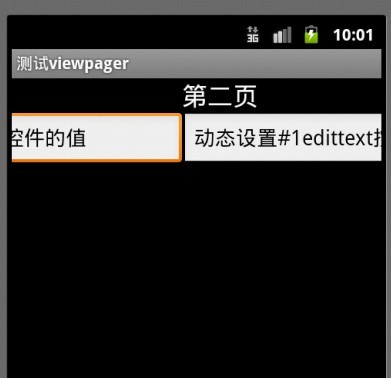
具体实现详解
android compatibility package, revision 3在7月份发布后,其中有个ViewPager引起了我的注意
官方的描述:
请参考:http://developer.android.com/sdk/compatibility-library.html#Notes
ViewPager的下载与安装
首先通过SDK Manager更新最新版android compatibility package, revision 3
更新后,在eclipse中工程上点击右键,选择android tools -> add compatibility library即可完成安装
实际上就是一个jar包,手工导到工程中也可
jar包所在位置是\android-sdk\extras\android\compatibility\v4\android-support-v4.jar
至此准备环境已经ok
下边还是通过代码进行说话吧
准备布局文件
viewpager_layout.xml
1 | <?xmlversion="1.0"encoding="utf-8"?> |
2 | <LinearLayoutxmlns:android="http://schemas.android.com/apk/res/android" |
3 | android:layout_width="fill_parent" |
4 | android:layout_height="fill_parent"android:orientation="vertical"> |
6 | <android.support.v4.view.ViewPager |
7 | android:id="@+id/viewpagerLayout"android:layout_height="fill_parent"android:layout_width="fill_parent"/> |
layout1.xml
1 | <?xmlversion="1.0"encoding="utf-8"?> |
2 | <LinearLayoutxmlns:android="http://schemas.android.com/apk/res/android" |
3 | android:layout_width="fill_parent" |
4 | android:layout_height="fill_parent"android:orientation="vertical"> |
5 | <TextViewandroid:textAppearance="?android:attr/textAppearanceLarge"android:layout_height="wrap_content"android:id="@+id/textView1"android:layout_width="fill_parent"android:text="第一页"></TextView> |
6 | <EditTextandroid:layout_width="match_parent"android:layout_height="wrap_content"android:id="@+id/editText1"> |
7 | <requestFocus></requestFocus> |
layout2.xml
1 | <?xmlversion="1.0"encoding="utf-8"?> |
2 | <LinearLayoutxmlns:android="http://schemas.android.com/apk/res/android" |
3 | android:layout_width="fill_parent" |
4 | android:layout_height="fill_parent"android:orientation="vertical"> |
5 | <TextViewandroid:textAppearance="?android:attr/textAppearanceLarge"android:layout_height="wrap_content"android:id="@+id/textView1"android:layout_width="fill_parent"android:text="第二页"></TextView> |
6 | <EditTextandroid:layout_width="match_parent"android:layout_height="wrap_content"android:id="@+id/editText1"> |
7 | <requestFocus></requestFocus> |
layout3.xml
1 | <?xmlversion="1.0"encoding="utf-8"?> |
2 | <LinearLayoutxmlns:android="http://schemas.android.com/apk/res/android" |
3 | android:layout_width="fill_parent" |
4 | android:layout_height="fill_parent"android:orientation="vertical"> |
5 | <TextViewandroid:textAppearance="?android:attr/textAppearanceLarge"android:layout_height="wrap_content"android:id="@+id/textView1"android:layout_width="fill_parent"android:text="第三页"></TextView> |
6 | <EditTextandroid:layout_width="match_parent"android:layout_height="wrap_content"android:id="@+id/editText1"> |
7 | <requestFocus></requestFocus> |
主程序
003 | importjava.util.ArrayList; |
004 | importjava.util.List; |
006 | importandroid.app.Activity; |
007 | importandroid.os.Bundle; |
008 | importandroid.os.Parcelable; |
009 | importandroid.support.v4.view.PagerAdapter; |
010 | importandroid.support.v4.view.ViewPager; |
011 | importandroid.support.v4.view.ViewPager.OnPageChangeListener; |
012 | importandroid.util.Log; |
013 | importandroid.view.LayoutInflater; |
014 | importandroid.view.View; |
015 | importandroid.widget.EditText; |
017 | publicclassTestViewPagerextendsActivity { |
018 | privateViewPager myViewPager; |
020 | privateMyPagerAdapter myAdapter; |
022 | privateLayoutInflater mInflater; |
023 | privateList<View> mListViews; |
024 | privateView layout1 =null; |
025 | privateView layout2 =null; |
026 | privateView layout3 =null; |
029 | protectedvoidonCreate(Bundle savedInstanceState) { |
030 | super.onCreate(savedInstanceState); |
031 | setContentView(R.layout.viewpager_layout); |
032 | myAdapter =newMyPagerAdapter(); |
033 | myViewPager = (ViewPager) findViewById(R.id.viewpagerLayout); |
034 | myViewPager.setAdapter(myAdapter); |
036 | mListViews =newArrayList<View>(); |
037 | mInflater = getLayoutInflater(); |
038 | layout1 = mInflater.inflate(R.layout.layout1,null); |
039 | layout2 = mInflater.inflate(R.layout.layout2,null); |
040 | layout3 = mInflater.inflate(R.layout.layout3,null); |
042 | mListViews.add(layout1); |
043 | mListViews.add(layout2); |
044 | mListViews.add(layout3); |
047 | myViewPager.setCurrentItem(1); |
050 | EditText v2EditText = (EditText)layout2.findViewById(R.id.editText1); |
051 | v2EditText.setText("动态设置第二个view的值"); |
053 | myViewPager.setOnPageChangeListener(newOnPageChangeListener() { |
056 | publicvoidonPageSelected(intarg0) { |
057 | Log.d("k","onPageSelected - "+ arg0); |
059 | View v = mListViews.get(arg0); |
060 | EditText editText = (EditText)v.findViewById(R.id.editText1); |
061 | editText.setText("动态设置#"+arg0+"edittext控件的值"); |
065 | publicvoidonPageScrolled(intarg0,floatarg1,intarg2) { |
066 | Log.d("k","onPageScrolled - "+ arg0); |
071 | publicvoidonPageScrollStateChanged(intarg0) { |
072 | Log.d("k","onPageScrollStateChanged - "+ arg0); |
075 | * Indicates that the pager is in an idle, settled state. The current page |
076 | * is fully in view and no animation is in progress. |
080 | * Indicates that the pager is currently being dragged by the user. |
084 | * Indicates that the pager is in the process of settling to a final position. |
093 | privateclassMyPagerAdapterextendsPagerAdapter{ |
096 | publicvoiddestroyItem(View arg0,intarg1, Object arg2) { |
097 | Log.d("k","destroyItem"); |
098 | ((ViewPager) arg0).removeView(mListViews.get(arg1)); |
102 | publicvoidfinishUpdate(View arg0) { |
103 | Log.d("k","finishUpdate"); |
107 | publicintgetCount() { |
108 | Log.d("k","getCount"); |
109 | returnmListViews.size(); |
113 | publicObject instantiateItem(View arg0,intarg1) { |
114 | Log.d("k","instantiateItem"); |
115 | ((ViewPager) arg0).addView(mListViews.get(arg1),0); |
116 | returnmListViews.get(arg1); |
120 | publicbooleanisViewFromObject(View arg0, Object arg1) { |
121 | Log.d("k","isViewFromObject"); |
126 | publicvoidrestoreState(Parcelable arg0, ClassLoader arg1) { |
127 | Log.d("k","restoreState"); |
131 | publicParcelable saveState() { |
132 | Log.d("k","saveState"); |
137 | publicvoidstartUpdate(View arg0) { |
138 | Log.d("k","startUpdate"); |
在实机上测试后,非常流畅,这也就是说官方版的左右滑屏控件已经实现
目前,关于viewpager的文章非常少,本文是通过阅读viewpager源代码分析出的写法
当然此文章仅是抛砖引玉,而且属于框架式程序,目的就是让读者了解API的基本用法
希望这篇原创文章对大家有帮助
欢迎感兴趣的朋友一起讨论
共同学习,共同进步
另外,ViewPager的注释上有这么一段话,大体意思是该控件目前属于早期实现,后续会有修改
02 | * Layout manager that allows the user to flip left and right |
03 | * through pages of data. You supply an implementation of a |
04 | * {@link PagerAdapter} to generate the pages that the view shows. |
06 | * <p>Note this class is currently under early design and |
07 | * development. The API will likely change in later updates of |
08 | * the compatibility library, requiring changes to the source code |
09 | * of apps when they are compiled against the newer version.</p> |
也可以参照:
http://www.cnblogs.com/dwinter/archive/2012/02/27/2369590.html


 本文介绍如何使用Android的ViewPager实现手势横向滑动页面的功能,并提供详细的步骤及代码示例。





 扫一扫
扫一扫


 1313
1313

 被折叠的 条评论
为什么被折叠?
被折叠的 条评论
为什么被折叠?
 到【灌水乐园】发言





