



 本文介绍如何在 Magento 前端为 CMS 页面创建动态导航菜单。通过在模板文件中添加特定代码,可以实现所有 CMS 页面的动态显示,并高亮当前页面。此教程包括创建 navigation.phtml 文件及在布局文件中包含 CMS 导航的具体步骤。
Introduction
As you know in Magento, catalog has dynamic menu but cms doesn’t in frontend.
If you are curios about how to create dynamic menu for CMS which can either be included in left or right sidebar for all CMS pages, then you are in right place.
Steps
1. Create navigation.phtml file
Create nagivation.phtml file in folder: app/design/frontend/[your-interface]/[your-theme]/template/cms/
and add the following code:
<?php
$cmsPages = Mage::getModel('cms/page')->getCollection()
->addStoreFilter(Mage::app()->getStore()->getId())
->addFieldToFilter('is_active',1)
->addFieldToFilter('identifier', array(
array(
'nin' => array(
'home',
'no-route',
'enable-cookies',
'empty'
)
)
)
);
?>
<script type="text/javascript" src="http://ajax.googleapis.com/ajax/libs/jquery/1/jquery.min.js"></script>
<style type="text/css">
#cms-navigation a.active { color: red; }
</style>
<script type="text/javascript">
jQuery.noConflict();
jQuery(document).ready(function() {
var url = window.location.pathname,
urlRegExp = new RegExp(url.replace(/\/$/,'') + "$");
jQuery('#cms-navigation a').each(function(){
if(urlRegExp.test(this.href.replace(/\/$/,''))){
jQuery(this).addClass('active');
}
});
});
</script>
<div class="block">
<div class="block-title">
<strong><span>CMS Navigation</span></strong>
</div>
<div class="block-content">
<ul id="cms-navigation" style="padding: 10px;">
<?php
foreach($cmsPages as $_cms):
$page = $_cms->getData();
?>
<li><a href="<?php echo $this->getBaseUrl() . $page['identifier']; ?>"><?php echo $page['title']; ?></a></li>
<?php
endforeach;
?>
</ul>
</div>
</div>OR
You can simply download the navigation.phtml file from [here]
2> Include CMS Navigation in Layout
Copy/paste the following XML code in your layout XML file (preferably in your theme’s local.xml file):
<cms_page_view>
    <reference name="left"><!--or right-->
        <block type="core/template" name="cms-navigation" template="cms/navigation.phtml" before="-" />
    </reference>
</cms_page_view>
This will automatically include the CMS navigation in layout file.
Notes:
Make sure you select the proper Layout template from CMS form (Design > Page Layout > Layout ).
For example, in order to include CMS navigation in left column you either have to use: Layout = 2 columns with left bar or 3columns .
3> That’s all.
If you visit the CMS pages in frontend you will see navigation with all the CMS pages dynamically included with current one being highlighted (see below snapshot).
This will of course make your CMS pages look more beautiful and user friendlier.
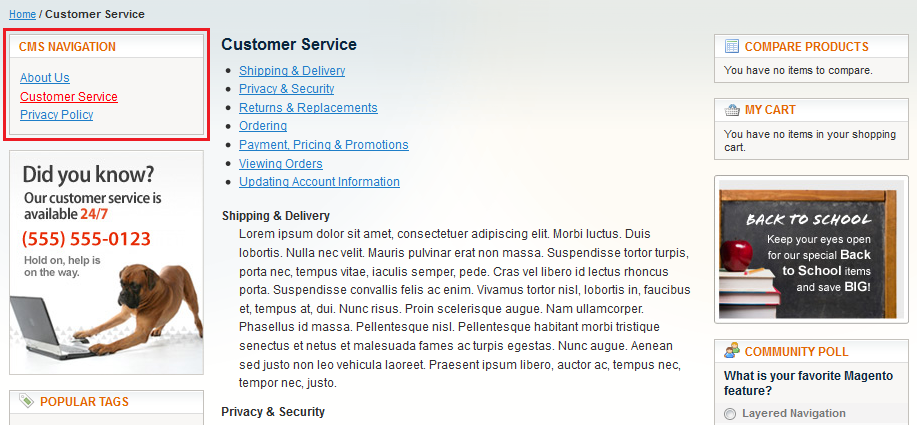
CMS Navigation
Happy E-commerce!
来源: http://www.blog.magepsycho.com/create-dynamic-cms-navigation-for-magento-frontend/





 扫一扫
扫一扫


 492
492

 被折叠的 条评论
为什么被折叠?
被折叠的 条评论
为什么被折叠?
 到【灌水乐园】发言





