


 本文介绍了一个使用C++和OpenGL在Win32平台上开发2D游戏的教程系列,重点讲解了消息循环、窗口创建、OpenGL环境搭建等内容,并演示了如何绘制简单图形。

这个系列专注于使用C++和OpenGL在windows平台上开发2D游戏,项目目标是在系列结束后能开发出一个类似俄罗斯方块的游戏。本系列分为3篇文章:
第一部分:涉及win32消息循环,窗口创建和OpenGL的搭建,并且你将会学习如何绘制一些简单的图形。
第二部分:涉及资源处理和简单动画的显示
第三部分:将前面的内容包含进来,并且讨论游戏逻辑。
项目设置
作者做了两项设置:
1)LinkeràInput中,在” Addition Dependencies”中加入”opengl32.lib”,
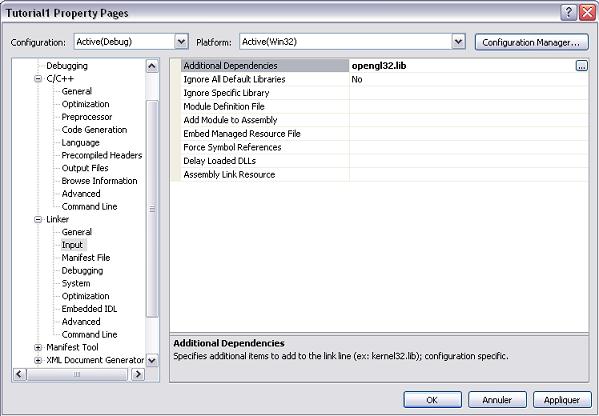
2)禁掉UNICODE,“c/c++”à” Preprocessor”,在Preprocessor Definitions中将"Inherit from parent or project defaults"不选中。

消息循环
Windows系统为每个应用程序创建一个消息队列,当指定应用程序的窗口上发生一个事件时,系统会把消息推入到这个队列中。你的应用程序应当检索并处理这些消息。这就是所谓的“消息循环“,是win32应用程序的核心。
一个典型的消息循环如下:
 MSGMessage;Message.message
=
(
~
WM_QUIT);
//
LoopuntilaWM_QUITmessageisreceived
while
(Message.message
!=
WM_QUIT)
MSGMessage;Message.message
=
(
~
WM_QUIT);
//
LoopuntilaWM_QUITmessageisreceived
while
(Message.message
!=
WM_QUIT)

 {
{ if(PeekMessage(&Message,NULL,0,0,PM_REMOVE))
 {//Ifamessagewaswaitinginthemessagequeue,processitTranslateMessage(&Message);DispatchMessage(&Message);
 }else{//空闲时//Doprocessingstuffhere}
 }
}
TranslateMessage函数的目的是为了将虚键消息(WM_KEYDOWN和WM_KEYUP)为字符消息(WM_CHAR).最后DispatchMessage会将消息定向到正确的窗口处理程序。
//Theapplicationclass,whichsimplywrapsthemessagequeueandprocess//thecommandline.classCApplication{public:CApplication(){}CApplication(HINSTANCEhInstance);~CApplication();//Parsesthecommandlinetoseeiftheapplication//shouldbeinfullscreenmode.voidParseCmdLine(LPSTRlpCmdLine);//Createsthemainwindowandstartthemessageloop.voidRun();voidSetHInst(HINSTANCEhInstance);private:HINSTANCEm_hInstance;//Specifiesiftheapplicationhastobestartedinfullscreen//mode.Thisoptionissuppliedthroughthecommandline//("-fullscreen"option).boolm_bFullScreen;};
ParseCmdLine函数功能非常直观:仅仅简单地检查命令行中是否有参数"-fullscreen",如果有,则设置m_bFullScreen为true,表示窗口模式为全屏模式。
voidCApplication::Run(){//CreatethemainwindowfirstCMainWindowmainWindow(800,600,m_bFullScreen);MSGMessage;Message.message=~WM_QUIT;DWORDdwNextDeadLine=GetTickCount()+30;DWORDdwSleep=30;boolbUpdate=false;//LoopuntilaWM_QUITmessageisreceivedwhile(Message.message!=WM_QUIT){//Waituntilamessagecomesinoruntilthetimeoutexpires.The//timeoutisrecalculatedsothatthisfunctionwillreturnat//leastevery30msec.DWORDdwResult=MsgWaitForMultipleObjectsEx(0,NULL,dwSleep,QS_ALLEVENTS,0);if(dwResult!=WAIT_TIMEOUT){//Ifthefunctionreturnedwithnotimeout,itmeansthata//messagehasbeenreceived,soprocessit.if(PeekMessage(&Message,NULL,0,0,PM_REMOVE)){//Ifamessagewaswaitinginthemessagequeue,processitTranslateMessage(&Message);DispatchMessage(&Message);}//Ifthecurrenttimeisclose(orpast)tothe//deadline,theapplicationshouldbeprocessed.if(GetTickCount()>=dwNextDeadLine-1)bUpdate=true;}else//Onatimeout,theapplicationshouldbeprocessed.bUpdate=true;//Checkiftheapplicationshouldbeprocessedif(bUpdate){DWORDdwCurrentTime=GetTickCount();//UpdatethemainwindowmainWindow.Update(dwCurrentTime);//DrawthemainwindowmainWindow.Draw();dwNextDeadLine=dwNextDeadLine+30;dwSleep=30;}elsedwSleep=dwNextDeadLine-GetCurrentTime();}}
函数第一行创建主窗口。和常见的消息循环不同,由于在2D游戏中并不需要很快地刷新屏幕,以固定地速率(这里是30毫秒)刷新,对于绘制动画和其他处理已经足够了。
作者在这里使用的技巧就是出于这个目的,他使用了MsgWaitForMultipleObjectsEx函数来等待任何事件的发生,再判断是30毫秒的时限已到,还是有事件要处理,若是后者,则先处理事件,在处理完后,若此时也已经接近30毫秒的时限的话,就重绘界面,若是超时发生了,则说明30毫秒时限已到,需要去刷新界面了。若这两种情况都没有的话,这个函数不会消耗 CPU周期,线程只是被挂起,不参与调度。
主窗口
创建窗口
CMainWindow::CMainWindow(
int
iWidth,
int
iHeight,
bool
bFullScreen):m_hWindow(NULL),m_hDeviceContext(NULL),m_hGLContext(NULL),m_bFullScreen(bFullScreen)
{RegisterWindowClass();RECTWindowRect;WindowRect.top=WindowRect.left=0;WindowRect.right=iWidth;WindowRect.bottom=iHeight;//WindowExtendedStyleDWORDdwExStyle=0;//WindowsStyleDWORDdwStyle=0;if(m_bFullScreen){DEVMODEdmScreenSettings;memset(&dmScreenSettings,0,sizeof(dmScreenSettings));dmScreenSettings.dmSize=sizeof(dmScreenSettings);dmScreenSettings.dmPelsWidth=iWidth;dmScreenSettings.dmPelsHeight=iHeight;dmScreenSettings.dmBitsPerPel=32;dmScreenSettings.dmFields=DM_PELSWIDTH|DM_PELSHEIGHT|DM_BITSPERPEL;//Changethedisplaysettingstofullscreen.Onerror,throw//anexception.if(ChangeDisplaySettings(&dmScreenSettings,CDS_FULLSCREEN)!=DISP_CHANGE_SUCCESSFUL){throwCException("Unabletoswithtofullscreenmode");}dwExStyle=WS_EX_APPWINDOW;dwStyle=WS_POPUP;//Infullscreenmode,wehidethecursor.ShowCursor(FALSE);}else{dwExStyle=WS_EX_APPWINDOW|WS_EX_WINDOWEDGE;dwStyle=WS_OVERLAPPEDWINDOW;}//AdjustthewindowtothetruerequestedsizeAdjustWindowRectEx(&WindowRect,dwStyle,FALSE,dwExStyle);//Nowcreatethemainwindowm_hWindow=CreateWindowEx(dwExStyle,TEXT(WINDOW_CLASSNAME),TEXT("Tutorial1"),WS_CLIPSIBLINGS|WS_CLIPCHILDREN|dwStyle,0,0,WindowRect.right-WindowRect.left,WindowRect.bottom-WindowRect.top,NULL,NULL,GetModuleHandle(NULL),this);if(m_hWindow==NULL)throwCException("Cannotcreatethemainwindow");CreateContext();InitGL();ShowWindow(m_hWindow,SW_SHOW);//CallOnSizemanuallybecauseinfullscreenmodeitwillbe//calledonlywhenthewindowiscreated(whichistooearly//becauseOpenGLisnotinitializedyet).OnSize(iWidth,iHeight);}
在构造函数中,检查完是否需要进入全屏模式后,通过调用ChangeDisplaySettings来切换到全屏模式,然后调用AdjustWindowRectEx来调整矩形的大小,但这个函数在全屏模式下没什么作用,最后CreateContext和InitGL对OpenGL进行初始化。
LRESULTCMainWindow::OnEvent(HWNDHandle,UINTMessage,WPARAMwParam,LPARAMlParam)
{if(Message==WM_CREATE){//Getthecreationparameters.CREATESTRUCT*pCreateStruct=reinterpret_cast<CREATESTRUCT*>(lParam);//Setasthe"userdata"parameterofthewindowSetWindowLongPtr(Handle,GWLP_USERDATA,reinterpret_cast<long>(pCreateStruct->lpCreateParams));}//GettheCMainWindowinstancecorrespondingtothewindowhandleCMainWindow*pWindow=reinterpret_cast<CMainWindow*>(GetWindowLongPtr(Handle,GWLP_USERDATA));if(pWindow)pWindow->ProcessEvent(Message,wParam,lParam);returnDefWindowProc(Handle,Message,wParam,lParam);}
由于OnEvent函数是静态的,因此就没法访问非静态成员,为了解决这个问题,在调用CreateWindowEx创建窗口时最后一个参数传的是this指针。传给窗口处理过程的第一个消息是WM_CREATE,当接收到这个消息时,wParam参数中包含一个CREATESTRUCT指针,它里面包含了额外的数据,在这里是指向CMainWindow的指针。但遗憾的是,不是每个消息都有这个结构,所以要保存起来供后面使用。因此调用SetWindowLongPtr,它的目的是为一个特定的窗口保存一些用户数据(GWLP_USERDATA)。在这里,作者保存了到类实例的指针。当接收到其他消息时,我们只是简单地通过GetWindowLongPtr来取回这个指针,然后访问非静态函数ProcessEvent,而这个函数负责具体的消息处理。
void
CMainWindow::ProcessEvent(UINTMessage,WPARAMwParam,LPARAMlParam)
{switch(Message){//QuitwhenweclosethemainwindowcaseWM_CLOSE:PostQuitMessage(0);break;caseWM_SIZE:OnSize(LOWORD(lParam),HIWORD(lParam));break;caseWM_KEYDOWN:break;caseWM_KEYUP:break;}}
异常处理
class
CException:
public
std::exception
{public:constchar*what()const{returnm_strMessage.c_str();}CException(conststd::string&strMessage=""):m_strMessage(strMessage){}virtual~CException(){}std::stringm_strMessage;}
;
使用的实例:
CApplicationtheApp;
int
WINAPIWinMain(HINSTANCEInstance,HINSTANCEhPrevInstance,LPSTRlpCmdLine,INT)
{try{//Createtheapplicationclass,//parsethecommandlineand//starttheapp.theApp.SetHInst(Instance);theApp.ParseCmdLine(lpCmdLine);theApp.Run();}catch(CException&e){MessageBox(NULL,e.what(),"Error",MB_OK|MB_ICONEXCLAMATION);}return0;}
初始化OpenGL
CreateContext用来初始化绘制上下文,使得OpenGL基本元素可以在窗口上绘制:
void
CMainWindow::CreateContext()
{//DescribesthepixelformatofthedrawingsurfacePIXELFORMATDESCRIPTORpfd;memset(&pfd,0,sizeof(PIXELFORMATDESCRIPTOR));pfd.nSize=sizeof(PIXELFORMATDESCRIPTOR);pfd.nVersion=1;//VersionNumberpfd.dwFlags=PFD_DRAW_TO_WINDOW|//DrawstoawindowPFD_SUPPORT_OPENGL|//TheformatmustsupportOpenGLPFD_DOUBLEBUFFER;//Supportfordoublebufferingpfd.iPixelType=PFD_TYPE_RGBA;//UsesanRGBApixelformatpfd.cColorBits=32;//32bitscolorsif(!(m_hDeviceContext=GetDC(m_hWindow)))throwCException("Unabletocreaterenderingcontext");intPixelFormat;//DoWindowsfindamatchingpixelformat?if(!(PixelFormat=ChoosePixelFormat(m_hDeviceContext,&pfd)))throwCException("Unabletocreaterenderingcontext");//Setthenewpixelformatif(!SetPixelFormat(m_hDeviceContext,PixelFormat,&pfd))throwCException("Unabletocreaterenderingcontext");//CreatetheOpenGLrenderingcontextif(!(m_hGLContext=wglCreateContext(m_hDeviceContext)))throwCException("Unabletocreaterenderingcontext");//Activatetherenderingcontextif(!wglMakeCurrent(m_hDeviceContext,m_hGLContext))throwCException("Unabletocreaterenderingcontext");}
函数的第一部分填充PIXELFORMATDESCRIPTOR结构体:缓冲区用来绘制到窗口上,支持OpenGL,使用双缓存(为了避免闪烁)。然后调用ChoosePixelFormat来检查像素格式是否支持,这个函数返回一个像素格式索引(若没有找到匹配的,则返回0)。一旦存在这样的像素格式索引,则通过SetPixelFormat来设置新像素格式。然后调用wglCreateContext创建OpenGL绘制上下文,最后,调用wglMakeCurrent,这指明线程接下来的OpenGL调用会绘制在这个设备上下文上。
InitGL函数很简单:
void
CMainWindow::InitGL()
{//Enable2DtexturingglEnable(GL_TEXTURE_2D);//ChooseasmoothshadingmodelglShadeModel(GL_SMOOTH);//SettheclearcolortoblackglClearColor(0.0,0.0,0.0,0.0);}
再看OnSize函数
void
CMainWindow::OnSize(GLsizeiwidth,GLsizeiheight)
{//SetsthesizeoftheOpenGLviewportglViewport(0,0,width,height);//Selecttheprojectionstackandapply//anorthographicprojectionglMatrixMode(GL_PROJECTION);glLoadIdentity();glOrtho(0.0,width,height,0.0,-1.0,1.0);glMatrixMode(GL_MODELVIEW);}
正交投影
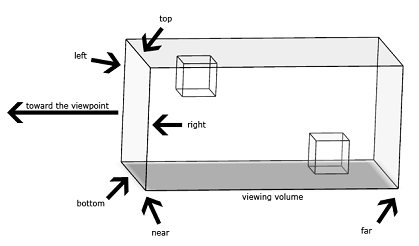
透视投影

绘制简单图形
void
CMainWindow::Draw()
{//ClearthebufferglClear(GL_COLOR_BUFFER_BIT);//HeregoesthedrawingcodeglBegin(GL_QUADS);glColor3f(1.0,0.0,0.0);glVertex3i(50,200,0);glColor3f(0.0,1.0,0.0);glVertex3i(250,200,0);glColor3f(0.0,0.0,1.0);glVertex3i(250,350,0);glColor3f(1.0,1.0,1.0);glVertex3i(50,350,0);glEnd();glBegin(GL_TRIANGLES);glColor3f(1.0,0.0,0.0);glVertex3i(400,350,0);glColor3f(0.0,1.0,0.0);glVertex3i(500,200,0);glColor3f(0.0,0.0,1.0);glVertex3i(600,350,0);glEnd();SwapBuffers(m_hDeviceContext);}





 扫一扫
扫一扫


 被折叠的 条评论
为什么被折叠?
被折叠的 条评论
为什么被折叠?
 到【灌水乐园】发言





