


 本文介绍 Eclipse IDE 中 Java 编辑的一些实用技巧,包括代码格式化、字符串换行、类型指示器等功能,帮助开发者提高编码效率。
| Generalize Type | 对对象的声明可用。 | |
| Use Supertype Where Possible | 对类可用。 |
Correct Identation 选中代码然后对齐
Shift+Left/Right 左移或者右移
Use Supertype Where Possible 对类使用
Matching Bracket 找到匹配的括号
To find a matching bracket select an opening or closing bracket and pressCtrl+Shift+P or selectNavigate > Go To > Matching Bracket. You can alsodouble click before an opening or after a closing bracket - this selects the text between the two brackets.
| Wrap strings | You can have String literals wrapped when you edit them. For example, if you have code like this: String message= "This is a very long message."; position your caret after the word "very" and press Enter. The code will be automatically changed to: String message= "This is a very" +
" long message."; This behavior can be customized in the |
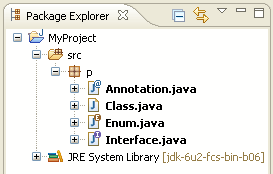
| Java type indicator | Enable the Java Type Indicator on the General > Appearance > Label Decoration preference page to find out what the first type in a compilation unit or class file is. An adornment is shown for interfaces, annotations, and enums, while an ordinary class stays undecorated. General > Appearance > Label Decoration preference page to find out what the first type in a compilation unit or class file is. An adornment is shown for interfaces, annotations, and enums, while an ordinary class stays undecorated.
|
| Word wrap in Variables view | The details area of the debugger's Variables and Expressions views supports word wrap, available from the view drop-down menu.
|

http://help.eclipse.org/helios/index.jsp?topic=/org.eclipse.jdt.doc.user/tips/jdt_tips.html





 扫一扫
扫一扫


 1万+
1万+

 被折叠的 条评论
为什么被折叠?
被折叠的 条评论
为什么被折叠?
 到【灌水乐园】发言





