


 本文介绍了一种使用 C# 在 Windows 操作系统中创建桌面快捷方式并设置应用程序开机自动启动的方法。通过调用 WindowsScriptHostObjectModel 类库中的 IWshShortcut 接口,可以轻松实现对快捷方式的创建及属性设置。
快捷方式实质上是一个扩展名为 .LNK 的文件
方法如下:
首先要添加引用 (如图)
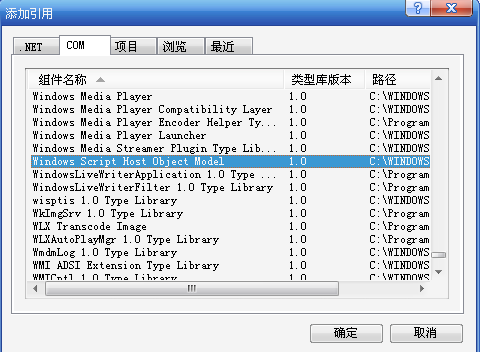
就是那个Windows Script Host Object Model的类库....
然后在程序中引入命名空间
<!--<br/ /><br/ />Code highlighting produced by Actipro CodeHighlighter (freeware)<br/ />http://www.CodeHighlighter.com/<br/ /><br/ />-->usingIWshRuntimeLibrary;
有一些文件操作,所有要引入
<!--<br/ /><br/ />Code highlighting produced by Actipro CodeHighlighter (freeware)<br/ />http://www.CodeHighlighter.com/<br/ /><br/ />-->usingSystem.IO;
关键方法如下:

<!--<br/ /><br/ />Code highlighting produced by Actipro CodeHighlighter (freeware)<br/ />http://www.CodeHighlighter.com/<br/ /><br/ />-->///<summary>
///创建桌面快捷方式并开机启动的方法
///</summary>
privatevoidShortcutAndStartup()
{
//获取当前系统用户启动目录
stringstartupPath=Environment.GetFolderPath(Environment.SpecialFolder.Startup);
//获取当前系统用户桌面目录
stringdesktopPath=Environment.GetFolderPath(Environment.SpecialFolder.Desktop);
FileInfofileStartup=newFileInfo(startupPath+"\\亿掌通.lnk");
FileInfofileDesktop=newFileInfo(desktopPath+"\\亿掌通.lnk");
if(!fileDesktop.Exists)
{
WshShellshell=newWshShell();
IWshShortcutshortcut=(IWshShortcut)shell.CreateShortcut(
Environment.GetFolderPath(Environment.SpecialFolder.DesktopDirectory)+
"\\"+"亿掌通.lnk"
);
shortcut.TargetPath=Application.StartupPath+"\\"+"Upgrade.exe";//启动更新程序★
shortcut.WorkingDirectory=System.Environment.CurrentDirectory;
shortcut.WindowStyle=1;
shortcut.Description="亿掌通";
shortcut.IconLocation=Application.ExecutablePath;
shortcut.Save();
}
if(!fileStartup.Exists)
{
//获取可执行文件快捷方式的全部路径
stringexeDir=desktopPath+"\\亿掌通.lnk";
//把程序快捷方式复制到启动目录
System.IO.File.Copy(exeDir,startupPath+"\\亿掌通.lnk",true);
}
}
///创建桌面快捷方式并开机启动的方法
///</summary>
privatevoidShortcutAndStartup()
{
//获取当前系统用户启动目录
stringstartupPath=Environment.GetFolderPath(Environment.SpecialFolder.Startup);
//获取当前系统用户桌面目录
stringdesktopPath=Environment.GetFolderPath(Environment.SpecialFolder.Desktop);
FileInfofileStartup=newFileInfo(startupPath+"\\亿掌通.lnk");
FileInfofileDesktop=newFileInfo(desktopPath+"\\亿掌通.lnk");
if(!fileDesktop.Exists)
{
WshShellshell=newWshShell();
IWshShortcutshortcut=(IWshShortcut)shell.CreateShortcut(
Environment.GetFolderPath(Environment.SpecialFolder.DesktopDirectory)+
"\\"+"亿掌通.lnk"
);
shortcut.TargetPath=Application.StartupPath+"\\"+"Upgrade.exe";//启动更新程序★
shortcut.WorkingDirectory=System.Environment.CurrentDirectory;
shortcut.WindowStyle=1;
shortcut.Description="亿掌通";
shortcut.IconLocation=Application.ExecutablePath;
shortcut.Save();
}
if(!fileStartup.Exists)
{
//获取可执行文件快捷方式的全部路径
stringexeDir=desktopPath+"\\亿掌通.lnk";
//把程序快捷方式复制到启动目录
System.IO.File.Copy(exeDir,startupPath+"\\亿掌通.lnk",true);
}
}





 扫一扫
扫一扫


 2476
2476

 被折叠的 条评论
为什么被折叠?
被折叠的 条评论
为什么被折叠?
 到【灌水乐园】发言





