


 本文介绍使用Ajax实现网页中下拉列表框的联动显示效果。通过客户端JavaScript与服务器端交互,根据用户选择的不同学院,动态加载对应的专业选项。
好久没弄Ajax了,最近的一个项目中用到了下拉框联动显示数据的功能,索性利用Ajax来实现。实现的方法有很多,网上也有很多其他的方法,web开发中会经常用到,记录下来,分享给新手。
页面中的两个下拉列表框:
<tr>
<td style="width: 130px">
所在学院:</td>
<td style="width: 100px">
<select id="college" style="width: 200px" runat="server" onchange="changcollege(this.value)">
<option value="0">
--请选择所在学院学院--
</option>
</select></td>
</tr>
<tr>
<td style="width: 130px">
所在专业:</td>
<td style="width: 100px">
<select id="specialty" style="width: 200px" runat="server" onchange="SaveSpecical(this.value)">
<option value="0">
--请选择所在专业--
</option>
</select></td>
</tr>
JS脚本代码:

 Code
Code<!--<br /><br />Code highlighting produced by Actipro CodeHighlighter (freeware)<br />http://www.CodeHighlighter.com/<br /><br />--><scripttype="text/javascript">
varhttp_request=false;
functionsend_request(method,url,content,responseType,callback)//定义发送请求的函数
{
http_request=false;
if(window.XMLHttpRequest)
{
http_request=newXMLHttpRequest();
if(http_request.overrideMimeType)
{
http_request.overrideMimeType("text/xml");
}
}
else
{
try
{
http_request=newActiveXObject("Msxml2.XMLHTTP");
}
catch(e)
{
try
{
http_request=newActiveXObject("Microsoft.XMLHTTP");
}
catch(e)
{}
}
}
if(!http_request)
{
window.alert("创建XMLHttpRequest对象失败");
returnfalse;
}
if(responseType.toLowerCase()=="text")
{
http_request.onreadystatechange=callback;
}
else
{
window.alert("ERR");
returnfalse;
}
if(method.toLowerCase()=="get")
{
http_request.open(method,url,true);
}
elseif(method.toLowerCase()=="post")
{
http_request.open(method,url,true);
http_request.setRequestHeader("Content-Type","application/x-www-form-urlencoded");
}
else
{
window.alert("Err");
returnfalse;
}
http_request.send(content);
}
functionchangcollege(va)//当学院下拉列表发生改变时触发的脚本事件
{
if(va!='0')
{
varspeciality=document.getElementById("specialty");
speciality.disabled=false;
varurl="Handler.ashx?type=college&id="+va;
send_request("GET",url,null,"text",populateClass3);
}
}
functionpopulateClass3()//Ajax执行成功的回调函数
{
varf=document.getElementById("specialty");
if(http_request.readyState==4)
{
if(http_request.status==200)
{
varlist=http_request.responseText;
varclassList=list.split("|");
f.options.length=1;
for(vari=0;i<classList.length;i++)
//将取得的结果添加到下级的列表框中
{
vartmp=classList[i].split(",");
f.add(newOption(tmp[1],tmp[0]));
}
}
else
{
alert("您所请求的页面有异常。");
}
}
}
</script>
我们将http请求发送给服务端的Handler.ashx进行处理。
Code<!--<br /><br />Code highlighting produced by Actipro CodeHighlighter (freeware)<br />http://www.CodeHighlighter.com/<br /><br />-->publicclassHandler:IHttpHandler
{
publicvoidProcessRequest(HttpContextcontext)
{
stringtype=context.Request.QueryString["type"];
if(type.Equals("college"))
{
stringid=context.Request.QueryString["id"];
context.Response.ContentType="text/plain";
context.Response.Write(getSpecialty(id));//这个是从数据库中根据传来省的id查询出来的。学院的名字和主键,主键以便去查专业的名字
}
}
publicstringgetSpecialty(stringcollege)
{
DataSetds=GetInformation.GetSpecialtyInfo(college);
stringstr="";
for(inti=0;i<ds.Tables[0].Rows.Count;i++)
{
if(i==ds.Tables[0].Rows.Count-1)
{
str+=ds.Tables[0].Rows[i]["SpecialtyID"].ToString()+","+ds.Tables[0].Rows[i]["SpecialtyName"].ToString();
}
else
{
str+=ds.Tables[0].Rows[i]["SpecialtyID"].ToString()+","+ds.Tables[0].Rows[i]["SpecialtyName"].ToString()+"|";
}
}
returnstr.Trim();
}
publicboolIsReusable{
get{
returnfalse;
}
}
}
根据学院的编号获得相应的专业,并将专业的名称用“|”分割组合成字符串返回给客户端,客户端脚本拆分字符串添加到下拉框中。
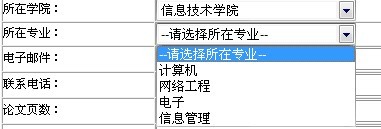
这里只是二级的联动显示,三级联动数据的现实原理是一样的。





 扫一扫
扫一扫


 976
976

 被折叠的 条评论
为什么被折叠?
被折叠的 条评论
为什么被折叠?
 到【灌水乐园】发言





