 VS2008快捷方式设置


 本文介绍如何在Visual Studio 2008中创建一个命令提示符的快捷方式,便于用户快速打开与该IDE相关的命令行界面。具体步骤包括:通过菜单栏的工具选项进入外部工具设置,添加一个指向cmd.exe的新条目,并配置参数以启动特定于Visual Studio的命令行环境。
What I wanted in Studio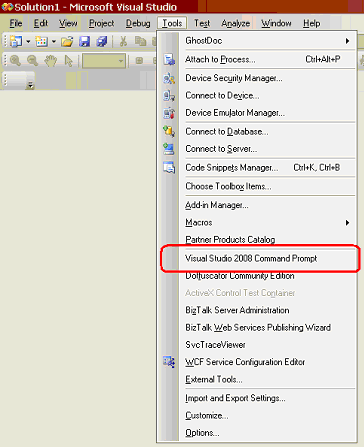
Steps:
- Open Visual Studio
- Go To "Menubar --> Tools--> External Tools"
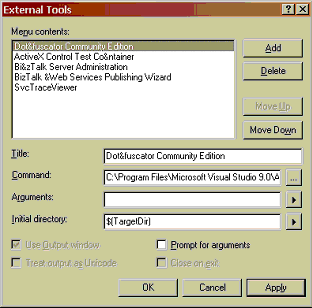
- Click "Add"
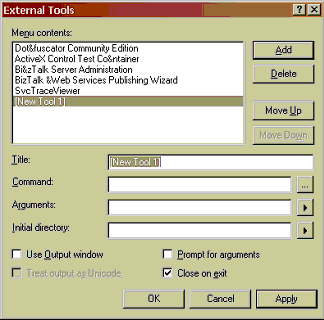
Enter Information:
Title:
Visual Studio 2008 Command Prompt
Command:
cmd.exe
Arguments:
%comspec% /k ""C:/Program Files/Microsoft Visual Studio 9.0/VC/vcvarsall.bat"" x86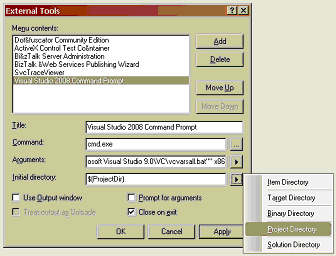
Click "Ok" and you are done.
Note:
If you have a different installation directory, the arguments you need
will probably be different.You can check the properties of the shortcut
to the Visual Studio Command Line just to be sure: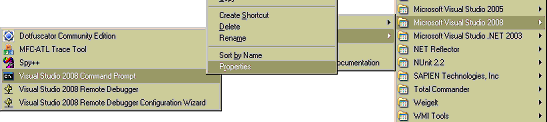
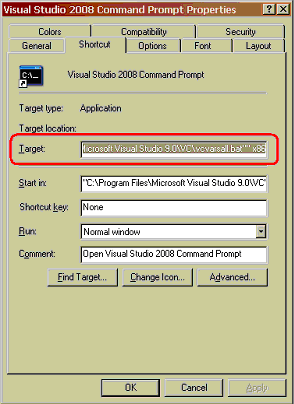
I hope you find this shortcut as useful as I did.





 扫一扫
扫一扫


 3073
3073

 被折叠的 条评论
为什么被折叠?
被折叠的 条评论
为什么被折叠?
 到【灌水乐园】发言





