下文来自:
http://www.cnblogs.com/qianxudetianxia/archive/2011/08/04/2088493.html
这个人的博客,所有技术文章 值得精读
---------------------------------------------------------------------------------------------------------------------------------------------------
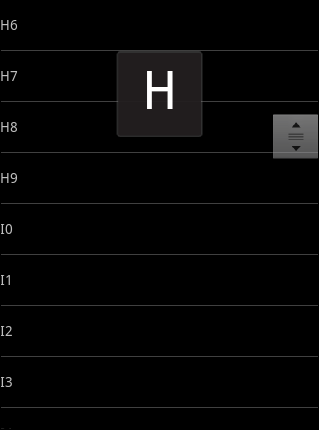
游标ListView,提供索引标签,使用户能够快速定位列表项。
也可以叫索引ListView,有的人称也为Tweaked ListView,可能更形象些吧。
一看图啥都懂了:

1.游标(Fast scroll thumb)
就是右边的那个拖动的方块,这个非常的简单:
2 | android:id="@+id/tweaked_list" |
3 | android:layout_width="fill_parent" |
4 | android:layout_height="wrap_content" |
5 | android:fastScrollEnabled="true"/> |
也可以用在java后台书写:
1 | tweakedListView.setFastScrollEnabled(true); |
在数据量有一定大的时候,滑动列表,就会出现右边的所谓的"游标"了。
简单,这也是我为什么私下里喜欢自己写控件,但是工作中却喜欢用通用控件。
我们看下源代码,其实就是启用FastScroller对象:
02 | public voidsetFastScrollEnabled(booleanenabled) { |
03 | mFastScrollEnabled = enabled; |
05 | if(mFastScroller ==null) { |
06 | mFastScroller =newFastScroller(getContext(),this); |
09 | if(mFastScroller !=null) { |
2.字母索引
在Android学习系列(10)--App列表之拖拽ListView(上)中我们使用了一种WindowManager在ListView中添加一些自定义影像,这种方法我觉得一定是可行的。
但是,android系统给我们提供了一个更简单的方法:使用AlphabetIndexer。
AlphabetIndexer,实现了SectionIndexer接口,是adapter的一个辅助类,辅助实现在快滑时,显示索引字母。
使用字母索引的话,必须保证数据列表是按字母顺序排序,以便AlphabetIndexerh采用二分查找法快速定位。
3 | * sortedColumnIndex数据集合中的第几列 |
4 | * alphabet字母列表,用的最多的是"ABCDEFGHIJKLMNOPQRSTUVWXYZ" |
6 | public AlphabetIndexer(Cursor cursor,intsortedColumnIndex, CharSequence alphabet) {} |
用到3个方法:
2 | public intgetPositionForSection(intsection) {} |
3 | public intgetSectionForPosition(intposition) {} |
4 | public Object[] getSections() {} |
3.游标Cursor的实现
Cursor接口的实现,有两种选择:
(1).直接使用数据库查询返回的cursor
(2).自定义实现Cursor接口的新类
第一种方式很简单,查询一下数据库返回Cursor即可。
这里我们以第二种方式实践,伪装一个Cursor,主要是实现3个方法:
(1).getCount()
(2).moveToPosition()
(3). getString()
002 | * 伪装一个Cursor供AlphabetIndexer作数据索引源 |
004 | privateclassIndexCursorimplementsCursor{ |
006 | privateListAdapter adapter; |
008 | privateMap<String, String> map; |
010 | publicIndexCursor(ListAdapter adapter){ |
011 | this.adapter = adapter; |
015 | publicintgetCount() {returnthis.adapter.getCount();} |
018 | * 取得索引字母,这个方法非常重要,根据实际情况具体处理 |
020 | @SuppressWarnings("unchecked") |
022 | publicString getString(intcolumnIndex) { |
023 | map = (HashMap<String, String>)adapter.getItem(position); |
024 | returnmap.get(key).substring(0,1); |
028 | publicbooleanmoveToPosition(intposition) { |
029 | if(position<-1||position>getCount()){ |
033 | this.position = position; |
046 | publicvoidcopyStringToBuffer(intarg0, CharArrayBuffer arg1) {} |
048 | publicvoiddeactivate() {} |
050 | publicbyte[] getBlob(intarg0) {returnnull;} |
052 | publicintgetColumnCount() {return0;} |
054 | publicintgetColumnIndex(String columnName) {return0;} |
056 | publicintgetColumnIndexOrThrow(String columnName)throwsIllegalArgumentException {return0;} |
058 | publicString getColumnName(intcolumnIndex) {returnnull;} |
060 | publicString[] getColumnNames() {returnnull;} |
062 | publicdoublegetDouble(intcolumnIndex) {return0;} |
064 | publicBundle getExtras() {returnnull;} |
066 | publicfloatgetFloat(intcolumnIndex) {return0;} |
068 | publicintgetInt(intcolumnIndex) {return0;} |
070 | publiclonggetLong(intcolumnIndex) {return0;} |
072 | publicintgetPosition() {returnposition;} |
074 | publicshortgetShort(intcolumnIndex) {return0;} |
076 | publicbooleangetWantsAllOnMoveCalls() {returnfalse;} |
078 | publicbooleanisAfterLast() {returnfalse;} |
080 | publicbooleanisBeforeFirst() {returnfalse;} |
082 | publicbooleanisClosed() {returnfalse;} |
084 | publicbooleanisFirst() {returnfalse;} |
086 | publicbooleanisLast() {returnfalse;} |
088 | publicbooleanisNull(intcolumnIndex) {returnfalse;} |
090 | publicbooleanmove(intoffset) {returnfalse;} |
092 | publicbooleanmoveToFirst() {returnfalse;} |
094 | publicbooleanmoveToLast() {returnfalse;} |
096 | publicbooleanmoveToNext() {returnfalse;} |
098 | publicbooleanmoveToPrevious() {returnfalse;} |
100 | publicvoidregisterContentObserver(ContentObserver observer) {} |
102 | publicvoidregisterDataSetObserver(DataSetObserver observer) {} |
104 | publicbooleanrequery() {returnfalse;} |
106 | publicBundle respond(Bundle extras) {returnnull;} |
108 | publicvoidsetNotificationUri(ContentResolver cr, Uri uri) {} |
110 | publicvoidunregisterContentObserver(ContentObserver observer) {} |
112 | publicvoidunregisterDataSetObserver(DataSetObserver observer) {} |
这个类的实例就可作为AlphaIndexer的构造函数第一个参数数据游标。
4.自定义Adapter的实现
使用前面介绍的东西,我们来实现最终的IndexAdapter:
01 | class IndexAdapterextendsSimpleAdapterimplements SectionIndexer{ |
03 | privateAlphabetIndexer alphabetIndexer; |
05 | publicIndexAdapter(Context context,List<?extendsMap<String, ?>> data,intresource,String[] from,int[] to) { |
06 | super(context, data, resource, from, to); |
09 | alphabetIndexer =newAlphabetIndexer(newIndexCursor(this),0,"ABCDEFGHIJKLMNOPQRSTUVWXYZ"); |
13 | publicObject[] getSections() { |
14 | returnalphabetIndexer.getSections(); |
18 | publicintgetPositionForSection(intsection) { |
19 | returnalphabetIndexer.getPositionForSection(section); |
23 | publicintgetSectionForPosition(intposition) { |
24 | returnalphabetIndexer.getSectionForPosition(position); |
5.跑起来
提供样本数据如下:
01 | public List<Map<String, String>> getData(){ |
02 | List<Map<String, String>> itemList =newArrayList<Map<String, String>>(); |
03 | String alphas ="ABCDEFGHIJKLMNOPQRSTUVWXYZ"; |
05 | Map<String, String> map =null; |
06 | for(charc:alphas.toCharArray()){ |
07 | for(inti=0; i<10; i++){ |
08 | map =newHashMap<String, String>(); |
09 | map.put("itemText",""+c+i); |
子项的布局文件:
01 | <?xmlversion="1.0"encoding="utf-8"?> |
03 | android:orientation="vertical" |
04 | android:layout_width="fill_parent" |
05 | android:layout_height="50dip" |
06 | android:gravity="center_vertical" |
09 | android:id="@+id/tweaked_item_text" |
10 | android:layout_width="fill_parent" |
11 | android:layout_height="wrap_content"/> |
使用并运行:
01 | protected void onCreate(Bundle savedInstanceState) { |
02 | super.onCreate(savedInstanceState); |
03 | setContentView(R.layout.tweake_list); |
05 | tweakedListView = (ListView)findViewById(R.id.tweaked_list); |
08 | List<Map<String, String>> itemList = getData(); |
09 | ListAdapter adapter =newIndexAdapter(this, itemList, R.layout.tweake_list_item,newString[]{"itemText"},newint[]{R.id.tweaked_item_text}); |
10 | tweakedListView.setAdapter(adapter); |
效果如下:
6.小结
这种索引效果,在大数据量列表显示中非常的实用,是android开发必备常识。
本文只是一个简单的sample,实际工作中肯定会需要进一步扩展定义:
(1).对于复杂类型的处理,可根据Map<String,?>扩展自定义实体类,再通过adapter转换使用即可。
(2).对于索引字母列表,可动态设置,举个例子,你的列表只有ABCD四个字母,如果索引字母列表还是设置“ABCDEFGHIJKLMNOPQRSTUVWXYZ”就不合适了,会有个索引偏位的问题。
(3).对于复杂界面的显示,可重写adapter的getView方法自定义视图。
注意:如果不想出现,右边的辅助拖动块,就 设置android:fastScrollEnabled=false


 本文详细介绍了如何在Android应用中使用游标ListView与字母索引来提升列表显示效率与用户体验。通过自定义适配器与索引器,实现大数据量列表的快速滚动与字母定位功能,特别适用于需要快速定位或按字母排序的数据展示场景。





 扫一扫
扫一扫


 1034
1034

 被折叠的 条评论
为什么被折叠?
被折叠的 条评论
为什么被折叠?
 到【灌水乐园】发言





