IE9在标准支持、性能提升、开发者反馈采纳等方面取得了显著进步,包括支持HTML5和CSS3,改进JavaScript性能,并开放平台预览供早期采用者试用。
来自:http://sixrevisions.com/web-development/five-things-ie9-is-actually-doing-right/?dhcc
IE9今天发布beta版本。
在上世纪90年代末,IE 打败老牌的 Netscape Navigator,那时 IE 被看作是充满激情和创造的。的确,IE+Windows大大简化了上网冲浪,但后来IE7、8缺乏新意,性能低下,不合规范,市场份额在达到辉煌的顶峰后,随着 firefox、chrome等众多竞争的出现,开始逐年下滑。
近些年,微软同 google 在互联网方面的竞争难现往日霸主的风采,而桌面操作系统、浏览器等传统优势领域也开始显现竞争压力。因此 IE9 应该是被赋予重要历史使命的,记得一两年前了解的 IE9 消息似乎还比较保守,比如仍然不支持SVG,现在看来实际上都支持了。
本文总结了作者认为IE所作出的五项正确决策,以下为原文:

Microsoft — the company we all love to hate — is turning over a new leaf. This is true, at least, with its latest iteration of Internet Explorer, the company’s web browser.
IE — if you’ve already forgotten — was once a great web browser in the mid-90s, usurping the spot of the dominant browser of that decade: Netscape Navigator. The browser was a market innovator once.
IE9, by the way it’s looking right now, is a vast improvement to the browsers Microsoft has been putting out as of late.
At the risk of being completely alienated by my fellow developers, who — like me — have fostered a gut instinct reaction to stand on guard and be ready to attack whenever we hear the words "Microsoft" or "Internet Explorer", I’d like to highlight a handful of things that the company is finally doing right with their browser.
1. Embracing Future Web Standards
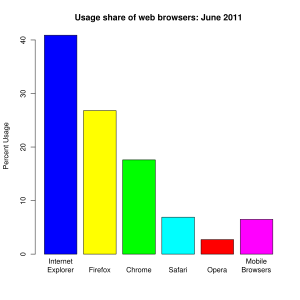
If you ask any web developer why they’re not using CSS3 or HTML5, the simple answer you’ll get is, "not all browsers implement them," most notably, Internet Explorer, who holds at present over 50% of the market.
 IE’s marketshare in April 2010, along with other web browsers such as Firefox, Safari, and Chrome. Source: Wikipedia.
Even though CSS3 and HTML5 is far from W3C Final Recommendation status, we were all fearing the Internet Explorer would wait until that time to implement CSS3 and HTML5 (2022 or later).
Good news for apprehensive web developers: IE9 will support major HTML5 and CSS3 modules.
 Cross-browser test results summary table comparing HTML5/CSS3 support. Source: Internet Explorer 9: Testing Center.
For example, IE9 supports the Media Query module in CSS3, which allows website developers a way to render pages in different ways according to the user’s client (desktop, netbook, or mobile).
 Media Query rendering a web page with different user agents in IE9.
It’s important to point out that based on their track records, older versions of Internet Explorer — which doesn’t support CSS3 and HTML5 — will undoubtedly still have plenty of users even when IE9 becomes the official version. However, we can at least be assured that when those users are ready to upgrade, they will be upgrading to a web browser that supports CSS3 and HTML5. Additionally, the prospect of CSS3/HTML5 being available IE9 can give IT managers and CTOs an incentive to upgrade their systems.
2. Paying Attention to Performance
The current version of Internet Explorer is terrible when we talk about performance compared with other browsers. IE developers have known that for a while, but haven’t done anything about it in at least 2 versions.

IE9, though, is putting up some decent numbers using SunSpider, a popular JavaScript performance-benchmarking tool.
 JavaScript execution speeds using standardized function calls of different browsers (in milliseconds). The lower the number, the better. Source: Internet Explorer 9: Platform Demos.
The bigger picture here is that there’s a stronger emphasis on software performance. If they keep improving on speed, power users and tech enthusiasts might give their browser a second look.
3. Providing Ways for Early Adopters to Weigh In
Getting the green light from early adopters is important, as we’ve seen in web apps like Twitter, where they were a key factor in introducing the service to the mainstream.
To give the public a chance to see what’s in store in IE9, they’ve set up the Internet Explorer 9: Platform Demos page.

This section on Microsoft’s site provides early adopters a way to test drive IE9 before it comes out, as well as a spot for IE developers to share data about speed and demos of HTML5 and CSS3 capabilities for anyone to try out.
They also offer an installable IE9 platform preview for you to try out IE9 yourself.

They also have a dedicated system for receiving feedback to ensure that you’re able to conveniently provide your opinions and bug reports.
4. Allowing and Encouraging External Developers to Help
Any software, whether proprietary or not, can benefit from the collective knowledge of developers. Think about Linux, WordPress, and Drupal — their successes were founded on their ability to leverage the intelligence and experience of thousands of open source developers.
In a similar way, IE9 has a suite of Developer Tools that developers can use to troubleshoot and test things with.
They’re still not going to give up their source code but at least they’re making it easier for us to poke and prod their software and debug rendering issues.
 Network inspector to see web page rendering performance.
 Resource inspector for a finer view of web page components.
And let’s be honest: It’s great for PR. When you’re on the good side of developers, you’ve got yourself a community that will evangelize and support your products to their bosses, clients, friends, and other networks.
While their competition is going backwards and making life harder for (certain types of) developers, Internet Explorer is becoming a little more open to developers outside of their company.
5. Being More Transparent and Accountable
Microsoft has never been known for transparency. That’s why it’s refreshing to see that the IE9 blog is frequently being updated about IE9’s development. They regularly talk about their progress, as well as setbacks. They engage their audience and are slowly peeling away the cloak that always seems to hang over the company’s product development and failures.
For example, they’ve publicly acknowledged on their blog that they will just support the industry standard codec, H.264, when there are still debates of what codec HTML5 video elements should use.
What’s so important about this particular example? It shows they’re being open about where they stand on an issue, instead of leaving us guessing and theorizing. Whether we like it or not, at least we get a chance to provide feedback before the product launches.
Another thing that Microsoft is not well known for is its ability to admit when they’re doing something wrong. Only recently have they recognized the need for people to upgrade IE6 due to security holes.
But IE9 seems different. When something goes wrong — like Google’s web app, Gmail, not rendering correctly in IE9 — they admit the issue (with screenshots, even) instead of ignoring the feedback from their users as they most often have done in the past.
 How Gmail currently looks in IE9 preview. Source: Official IEBlog.
The worst thing you can do to your company’s image is to cold-shoulder people when they’re telling you something’s not right. Being a web developer and web designer, I know it’s hard to take in criticisms about my work, but it’s also important to be honest, to fess up to issues that are justified and to listen to constructive feedback.
Is This the New Microsoft?
Maybe. I hope so. The skeptic in me wants to hate the company for the years of agony they’ve subjected me to in getting something to work right in their browser and, worse, ignoring my requests for help by playing nice with web standards.
They’ve placed the burden of getting their software to render web pages correctly on me, a web developer who has no control or say about their products.
But I genuinely admire the IE team’s efforts in Internet Explorer 9. And though IE9 is far from being perfect compared to Chrome or Firefox in all of the things I’ve stated in this article, and a simple show-and-tell won’t be enough for me to completely change the viewpoint I’ve developed from years of poor experience with their products, I’m happy about Microsoft’s different approach to building their newer applications.





 扫一扫
扫一扫


 774
774

 被折叠的 条评论
为什么被折叠?
被折叠的 条评论
为什么被折叠?
 到【灌水乐园】发言