


 本文介绍ExtJS的YuiGrid控件的分页机制和在线编辑功能,包括.NET环境下实现分页查询的代码示例及在线编辑的实现方法。
本文将介绍ExtJs的.NET控件YuiGrid分页机制和在线编辑功能.
一、分页
YuiGrid的分页机制不是很强大,内置有两种分页样式,下图便是其中的一种.
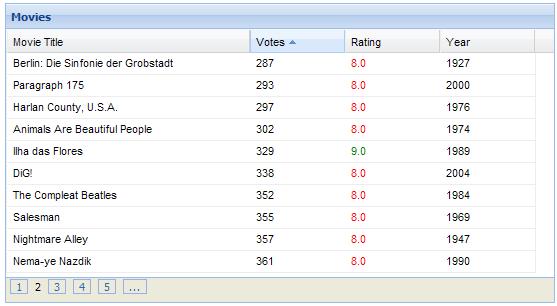
本示例代码是借鉴于YuiGrid源代码中的测试案例的代码,使用MSSQL2005数据库,下面为分页查询的代码:
<!--<br /><br />Code highlighting produced by Actipro CodeHighlighter (freeware)<br />http://www.CodeHighlighter.com/<br /><br />-->
1
 public
static
DataTableGetPagedMovies(
string
sort,
int
offset,
int
page_size,
string
dir)
public
static
DataTableGetPagedMovies(
string
sort,
int
offset,
int
page_size,
string
dir)
2

 {
{
3 SqlConnectioncon=newSqlConnection();
4con.ConnectionString=ConfigurationManager.ConnectionStrings["ConnectionString"].ConnectionString;
5con.Open();
6
7
8offset=offset/page_size;
9
10offset+=1;
11//querythatgetsonlytherecordsneededtothepage
12//usingthenewROW_NUMBERfunctioninsql2005
13stringsql="WITHMOVIESAS("+
14"SELECTROW_NUMBER()OVER"+
15"(ORDERBY"+sort+""+dir+")ASRow,"+
16"ID_MOVIE,TITLE,RATING,VOTES,YEAR,GENRE"+
17"FROMTB_MOVIE)"+
18"SELECTID_MOVIE,TITLE,GENRE,RATING,VOTES,YEAR"+
19"FROMMOVIES"+
20"WHERERowbetween(@PageIndex-1)*@PageSize+1and@PageIndex*@PageSize";
21
22SqlCommandcmd=newSqlCommand(sql,con);
23//addtheparameterstothequerytograbthecorrectpage
24cmd.Parameters.AddWithValue("@PageIndex",offset);
25cmd.Parameters.AddWithValue("@PageSize",page_size);
26SqlDataAdapteradapt=newSqlDataAdapter(cmd);
27DataSetds=newDataSet();
28adapt.Fill(ds);
29//closestheobjectsanddisposes
30
31//GetMovieCount(ds);
32con.Close();
33cmd.Dispose();
34con.Dispose();
35returnds.Tables[0];
36 }
}
public
static
DataTableGetPagedMovies(
string
sort,
int
offset,
int
page_size,
string
dir)2
{3
SqlConnectioncon=newSqlConnection();4
con.ConnectionString=ConfigurationManager.ConnectionStrings["ConnectionString"].ConnectionString;5
con.Open();6
7
8
offset=offset/page_size;9
10
offset+=1;11
//querythatgetsonlytherecordsneededtothepage12
//usingthenewROW_NUMBERfunctioninsql200513
stringsql="WITHMOVIESAS("+14
"SELECTROW_NUMBER()OVER"+15
"(ORDERBY"+sort+""+dir+")ASRow,"+16
"ID_MOVIE,TITLE,RATING,VOTES,YEAR,GENRE"+17
"FROMTB_MOVIE)"+18
"SELECTID_MOVIE,TITLE,GENRE,RATING,VOTES,YEAR"+19
"FROMMOVIES"+20
"WHERERowbetween(@PageIndex-1)*@PageSize+1and@PageIndex*@PageSize";21
22
SqlCommandcmd=newSqlCommand(sql,con);23
//addtheparameterstothequerytograbthecorrectpage24
cmd.Parameters.AddWithValue("@PageIndex",offset);25
cmd.Parameters.AddWithValue("@PageSize",page_size);26
SqlDataAdapteradapt=newSqlDataAdapter(cmd);27
DataSetds=newDataSet();28
adapt.Fill(ds);29
//closestheobjectsanddisposes30
31
//GetMovieCount(ds);32
con.Close();33
cmd.Dispose();34
con.Dispose();35
returnds.Tables[0];36
}
代码实现上很简单,有了上面的分页查询,下面只需要在Page_load里将数据进行绑定就OK了.
<!--<br /><br />Code highlighting produced by Actipro CodeHighlighter (freeware)<br />http://www.CodeHighlighter.com/<br /><br />-->
1
protected
void
Page_Load(
object
sender,EventArgse)
2 {
3 if ( ! IsPostBack)
4 {
5 int page_size = 10 ; // defaultpagesize
6 int offset = 1 ; // defaultpage
7 string sortCol,sortDir;
8 if ( string .IsNullOrEmpty(Request[ " sort " ]))
9 {
10 sortCol = " ID_MOVIE " ;
11 sortDir = " ASC " ;
12 }
13 else
14 {
15 sortCol = Request[ " sort " ];
16 sortDir = Request[ " dir " ];
17 }
18 if ( ! string .IsNullOrEmpty(Request[ " limit " ]))
19 {
20 page_size = int .Parse(Request[ " limit " ]);
21 offset = int .Parse(Request[ " start " ]);
22 }
23
24
25 YuiGrid1.TotalRecords = Movie.GetMovieCount();
26 YuiGrid1.DataSource = Movie.GetPagedMovies(sortCol,offset,page_size,sortDir);
27 YuiGrid1.DataBind();
28 }
29 }
2 {
3 if ( ! IsPostBack)
4 {
5 int page_size = 10 ; // defaultpagesize
6 int offset = 1 ; // defaultpage
7 string sortCol,sortDir;
8 if ( string .IsNullOrEmpty(Request[ " sort " ]))
9 {
10 sortCol = " ID_MOVIE " ;
11 sortDir = " ASC " ;
12 }
13 else
14 {
15 sortCol = Request[ " sort " ];
16 sortDir = Request[ " dir " ];
17 }
18 if ( ! string .IsNullOrEmpty(Request[ " limit " ]))
19 {
20 page_size = int .Parse(Request[ " limit " ]);
21 offset = int .Parse(Request[ " start " ]);
22 }
23
24
25 YuiGrid1.TotalRecords = Movie.GetMovieCount();
26 YuiGrid1.DataSource = Movie.GetPagedMovies(sortCol,offset,page_size,sortDir);
27 YuiGrid1.DataBind();
28 }
29 }
二、在线编辑
在实现YuiGrid的在线编辑,首先需将其EnableEdit属性设为True,然后通过CellEdited事件来做数据库更新操 作。其实更新数据库无非就是将当前行的数据取出来,然后执行一条相应的SQL就OK,这里的重点应该是取数据,在标准GridView里通常都是通过命令 参数来搞定的,YuiGrid不同的是通过他自己的事件传递的对象属性来获取,如下:
<!--<br /><br />Code highlighting produced by Actipro CodeHighlighter (freeware)<br />http://www.CodeHighlighter.com/<br /><br />-->
1
protected
void
YuiGrid1_CellEdited(
object
sender,ExtExtenders.GridCellEditedArgse)
2
{
3SqlConnectioncon=newSqlConnection();
4con.ConnectionString=System.Configuration.ConfigurationManager.ConnectionStrings["ConnectionString"].ConnectionString;//ConnectionString
5con.Open();
6SqlCommandcmd=newSqlCommand();
7cmd.Connection=con;
8stringsql="UPDATETB_MOVIESET"+e.Field+"=@"+e.Field+
9"WHEREID_MOVIE=@ID_MOVIE";
10
11cmd.CommandText=sql;
12cmd.Parameters.AddWithValue("@"+e.Field,e.Value);
13cmd.Parameters.AddWithValue("@ID_MOVIE",e.Record["ID_MOVIE"]);
14try
15
 {
{
16cmd.ExecuteNonQuery();
17 }
}
18catch(Exceptionex)
19{
20System.Diagnostics.Debug.WriteLine(ex.Message);
21}
22}
protected
void
YuiGrid1_CellEdited(
object
sender,ExtExtenders.GridCellEditedArgse)2
{3
SqlConnectioncon=newSqlConnection();4
con.ConnectionString=System.Configuration.ConfigurationManager.ConnectionStrings["ConnectionString"].ConnectionString;//ConnectionString5
con.Open();6
SqlCommandcmd=newSqlCommand();7
cmd.Connection=con;8
stringsql="UPDATETB_MOVIESET"+e.Field+"=@"+e.Field+9
"WHEREID_MOVIE=@ID_MOVIE";10
11
cmd.CommandText=sql;12
cmd.Parameters.AddWithValue("@"+e.Field,e.Value);13
cmd.Parameters.AddWithValue("@ID_MOVIE",e.Record["ID_MOVIE"]);14
try15
{16
cmd.ExecuteNonQuery();17
}18
catch(Exceptionex)19
{20
System.Diagnostics.Debug.WriteLine(ex.Message);21
}22
}
大致如下图: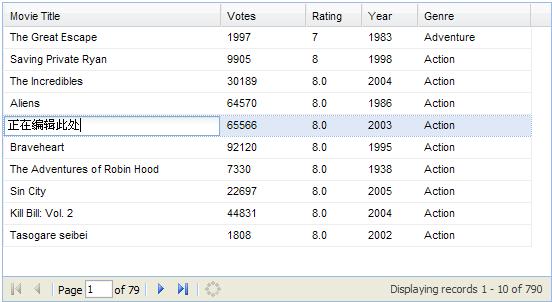
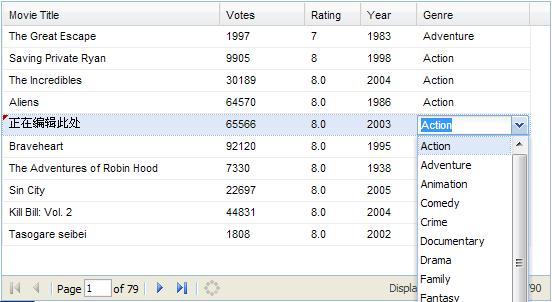
YuiGrid里可以非常方便的嵌入ListBox或DropDownList等控件,只需要在外部任意定义一个 DropDownList控件,然后将YuiGrid对应列的EditControlId属性设置为该控件ID就OK了。如下代码遍上上图的完整定义:
Code
<!--<br /><br />Code highlighting produced by Actipro CodeHighlighter (freeware)<br />http://www.CodeHighlighter.com/<br /><br />-->1
<cc1:YuiGridID="YuiGrid1"runat="server"EnableRowSorting="true"Width="550px"2
EnablePaging="true"PagingStyle="NavBar"EnableEdit="true"OnCellEdited="YuiGrid1_CellEdited"SelectMultiple="true">3
<Columns>4
<cc1:ColModelheader="ID_MOVIE"dataIndex="ID_MOVIE"hidden="true"/>5
<cc1:ColModelheader="MovieTitle"dataIndex="TITLE"sortable="true"width="230"allowBlank="false"maxLength="40"/>6
<cc1:ColModelheader="Votes"dataIndex="VOTES"sortable="true"width="90"DataType="Numeric"/>7
<cc1:ColModelheader="Rating"dataIndex="RATING"sortable="true"width="60"DataType="Numeric"/>8
<cc1:ColModelheader="Year"dataIndex="YEAR"sortable="true"width="60"EditControlId="cboYear"/>9
<cc1:ColModelheader="Genre"dataIndex="GENRE"sortable="true"width="120"EditControlId="cboGenre"/>10
11
</Columns>12
</cc1:YuiGrid>13
14
<asp:DropDownListID="cboGenre"runat="server"CssClass="x-hid">15
<asp:ListItemText="Action"Value="Action"></asp:ListItem>16
<asp:ListItemText="Adventure"Value="Adventure"></asp:ListItem>17
<asp:ListItemText="Animation"Value="Animation"></asp:ListItem>18
<asp:ListItemText="Comedy"Value="Comedy"></asp:ListItem>19
<asp:ListItemText="Crime"Value="Crime"></asp:ListItem>20
<asp:ListItemText="Documentary"Value="Documentary"></asp:ListItem>21
<asp:ListItemText="Drama"Value="Drama"></asp:ListItem>22
<asp:ListItemText="Family"Value="Family"></asp:ListItem>23
<asp:ListItemText="Fantasy"Value="Fantasy"></asp:ListItem>24
<asp:ListItemText="Horror"Value="Horror"></asp:ListItem>25
<asp:ListItemText="Independent"Value="Independent"></asp:ListItem>26
<asp:ListItemText="Musical"Value="Musical"></asp:ListItem>27
<asp:ListItemText="Mystery"Value="Mystery"></asp:ListItem>28
<asp:ListItemText="Noir"Value="Noir"></asp:ListItem>29
<asp:ListItemText="Romance"Value="Romance"></asp:ListItem>30
<asp:ListItemText="Sci-Fi"Value="Sci-Fi"></asp:ListItem>31
<asp:ListItemText="Thriller"Value="Thriller"></asp:ListItem>32
<asp:ListItemText="War"Value="War"></asp:ListItem>33
<asp:ListItemText="Western"Value="Western"></asp:ListItem>34
</asp:DropDownList>
关于ExtJS的.NET控件YuiGrid的分页和在线编辑就介绍这些,详细大家可以访问http://extendersamples.rodiniz.com或下载下面提供的示例代码了解更多。





 扫一扫
扫一扫


 138
138

 被折叠的 条评论
为什么被折叠?
被折叠的 条评论
为什么被折叠?
 到【灌水乐园】发言





