



 本程序使用Python3.1实现了一个控制台小程序,用于显示指定股票的实时价格。每分钟更新一次,支持彩色显示和多种股票webservice。通过读取股票代码列表文件,程序调用webservice获取实时数据,并以彩色格式输出。
本程序使用python3.1实现的一个运行于Windows的控制台小程序,用来显示你所关心的股票的实时价格。
1)每隔一分钟跟新一次,当然你可以改为更短的时间间隔;
2)控制台彩色显示的python模块为WConio,需要单独下载:http://newcenturycomputers.net/projects/wconio.html
3)webservice来源于sina,感谢sina,例如http://hq.sinajs.cn/list=sh600547, 返回的结果如下:
var hq_str_sh600547="山东黄金,51.02,51.00,52.71,52.86,50.68,52.70,52.72,16389139
,850524809,3000,52.70,52500,52.69,100,52.67,28849,52.66,7400,52.65,1200,52.72,43
77,52.75,11200,52.76,20000,52.77,4000,52.78,2010-12-31,15:02:06";
,850524809,3000,52.70,52500,52.69,100,52.67,28849,52.66,7400,52.65,1200,52.72,43
77,52.75,11200,52.76,20000,52.77,4000,52.78,2010-12-31,15:02:06";
4) 也可以使用其他的股票web service (http://www.webxml.com.cn/WebServices/ChinaStockWebService.asmx/getStockInfoByCode?theStockCode=sh600547),返回的结果如下:
<?
xml version="1.0" encoding="utf-8"
?>
- < ArrayOfString xmlns:xsi ="http://www.w3.org/2001/XMLSchema-instance" xmlns:xsd ="http://www.w3.org/2001/XMLSchema" xmlns ="http://WebXml.com.cn/" >
< string > sh600547 </ string >
< string > 山东黄金 </ string >
< string > 2011-01-04 14:46:20 </ string >
< string > 53.15 </ string >
< string > 52.71 </ string >
< string > 53.18 </ string >
< string > 0.44 </ string >
< string > 52.77 </ string >
< string > 53.79 </ string >
< string > 0.83% </ string >
< string > 138375.48 </ string >
< string > 73669.8408 </ string >
< string > 53.15 </ string >
< string > 53.16 </ string >
< string > -48.30% </ string >
< string > 53.15 / 94.00 </ string >
< string > 53.13 / 11.00 </ string >
< string > 53.12 / 11.00 </ string >
< string > 53.11 / 6.00 </ string >
< string > 53.10 / 304.00 </ string >
< string > 53.16 / 30.70 </ string >
< string > 53.17 / 265.65 </ string >
< string > 53.18 / 481.99 </ string >
< string > 53.19 / 194.00 </ string >
< string > 53.20 / 249.50 </ string >
</ ArrayOfString >
- < ArrayOfString xmlns:xsi ="http://www.w3.org/2001/XMLSchema-instance" xmlns:xsd ="http://www.w3.org/2001/XMLSchema" xmlns ="http://WebXml.com.cn/" >
< string > sh600547 </ string >
< string > 山东黄金 </ string >
< string > 2011-01-04 14:46:20 </ string >
< string > 53.15 </ string >
< string > 52.71 </ string >
< string > 53.18 </ string >
< string > 0.44 </ string >
< string > 52.77 </ string >
< string > 53.79 </ string >
< string > 0.83% </ string >
< string > 138375.48 </ string >
< string > 73669.8408 </ string >
< string > 53.15 </ string >
< string > 53.16 </ string >
< string > -48.30% </ string >
< string > 53.15 / 94.00 </ string >
< string > 53.13 / 11.00 </ string >
< string > 53.12 / 11.00 </ string >
< string > 53.11 / 6.00 </ string >
< string > 53.10 / 304.00 </ string >
< string > 53.16 / 30.70 </ string >
< string > 53.17 / 265.65 </ string >
< string > 53.18 / 481.99 </ string >
< string > 53.19 / 194.00 </ string >
< string > 53.20 / 249.50 </ string >
</ ArrayOfString >
程序:(Mystockinfo.py)
import
urllib.request
class Utility:
def ToGB(str):
return str.decode( ' gb2312 ' )
def ReadStocksToArray(file):
file = open(file, ' r ' )
stocks = []
if file:
for line in file:
stocks.append(line.rstrip( " \n " ))
file.close()
else :
print ( " Error Opening File. " )
return stocks
class ColorConsole:
def PrintStockInfoTitle():
import datetime
print (datetime.datetime.now())
print ( " Name " .ljust( 10 ) + " ID " .ljust( 10 ) + " CurrentPrice " .ljust( 20 ) + " Percent " .ljust( 10 ))
print ( ' ***************************************************** ' )
def PrintStockInfoTitleWithColor():
import WConio
WConio.settitle( " My Stock Info " )
WConio.clrscr()
ColorConsole.PrintStockInfoTitle()
def PrintStockInfoItem(stockitem):
print (stockitem[0].ljust( 10 ) + str(stockitem[ 1 ]).ljust( 10 ) + str(stockitem[ 2 ]).ljust( 20 ) + str(stockitem[ 3 ]).ljust( 10 ))
def PrintStockInfoItemWithColor(stockitem):
import WConio
WConio.textcolor(WConio.WHITE)
if (stockitem[ 3 ] > 0.0 ):
WConio.textcolor(WConio.RED)
ColorConsole.PrintStockInfoItem(stockitem)
else :
WConio.textcolor(WConio.GREEN)
ColorConsole.PrintStockInfoItem(stockitem)
WConio.textcolor(WConio.WHITE)
class StockInfo:
def GetStockStrByNum(num):
f = urllib.request.urlopen( ' http://hq.sinajs.cn/list= ' + str(num))
stockstr = ""
if f:
stockstr = f.readline()
f.close()
return stockstr
def ParseStockStr(stockstr):
stockitem = []
id = stockstr[ 13 : 19 ]
slist = stockstr.split( ' , ' )
name = slist[0][ - 4 :]
yesterdayendprice = slist[ 2 ]
nowprice = slist[ 3 ]
upgraderate = (float(nowprice) - float(yesterdayendprice)) / float(yesterdayendprice)
upgraderate = upgraderate * 100
stockitem.append(name)
stockitem.append(id)
stockitem.append(nowprice)
stockitem.append(upgraderate)
return stockitem
def GetStockInfo(num):
str = StockInfo.GetStockStrByNum(num)
strGB = Utility.ToGB(str)
return StockInfo.ParseStockStr(strGB)
def RunWithOutColor():
stocks = Utility.ReadStocksToArray( ' Stocks.txt ' )
ColorConsole.PrintStockInfoTitle()
for stock in stocks:
s = StockInfo.GetStockInfo(stock)
ColorConsole.PrintStockInfoItem(s)
def RunWithColor():
stocks = Utility.ReadStocksToArray( ' Stocks.txt ' )
ColorConsole.PrintStockInfoTitleWithColor()
for stock in stocks:
s = StockInfo.GetStockInfo(stock)
ColorConsole.PrintStockInfoItemWithColor(s)
def Main():
while ( 1 ):
# RunWithOutColor()
RunWithColor()
import time
time.sleep( 60 )
Main()
class Utility:
def ToGB(str):
return str.decode( ' gb2312 ' )
def ReadStocksToArray(file):
file = open(file, ' r ' )
stocks = []
if file:
for line in file:
stocks.append(line.rstrip( " \n " ))
file.close()
else :
print ( " Error Opening File. " )
return stocks
class ColorConsole:
def PrintStockInfoTitle():
import datetime
print (datetime.datetime.now())
print ( " Name " .ljust( 10 ) + " ID " .ljust( 10 ) + " CurrentPrice " .ljust( 20 ) + " Percent " .ljust( 10 ))
print ( ' ***************************************************** ' )
def PrintStockInfoTitleWithColor():
import WConio
WConio.settitle( " My Stock Info " )
WConio.clrscr()
ColorConsole.PrintStockInfoTitle()
def PrintStockInfoItem(stockitem):
print (stockitem[0].ljust( 10 ) + str(stockitem[ 1 ]).ljust( 10 ) + str(stockitem[ 2 ]).ljust( 20 ) + str(stockitem[ 3 ]).ljust( 10 ))
def PrintStockInfoItemWithColor(stockitem):
import WConio
WConio.textcolor(WConio.WHITE)
if (stockitem[ 3 ] > 0.0 ):
WConio.textcolor(WConio.RED)
ColorConsole.PrintStockInfoItem(stockitem)
else :
WConio.textcolor(WConio.GREEN)
ColorConsole.PrintStockInfoItem(stockitem)
WConio.textcolor(WConio.WHITE)
class StockInfo:
def GetStockStrByNum(num):
f = urllib.request.urlopen( ' http://hq.sinajs.cn/list= ' + str(num))
stockstr = ""
if f:
stockstr = f.readline()
f.close()
return stockstr
def ParseStockStr(stockstr):
stockitem = []
id = stockstr[ 13 : 19 ]
slist = stockstr.split( ' , ' )
name = slist[0][ - 4 :]
yesterdayendprice = slist[ 2 ]
nowprice = slist[ 3 ]
upgraderate = (float(nowprice) - float(yesterdayendprice)) / float(yesterdayendprice)
upgraderate = upgraderate * 100
stockitem.append(name)
stockitem.append(id)
stockitem.append(nowprice)
stockitem.append(upgraderate)
return stockitem
def GetStockInfo(num):
str = StockInfo.GetStockStrByNum(num)
strGB = Utility.ToGB(str)
return StockInfo.ParseStockStr(strGB)
def RunWithOutColor():
stocks = Utility.ReadStocksToArray( ' Stocks.txt ' )
ColorConsole.PrintStockInfoTitle()
for stock in stocks:
s = StockInfo.GetStockInfo(stock)
ColorConsole.PrintStockInfoItem(s)
def RunWithColor():
stocks = Utility.ReadStocksToArray( ' Stocks.txt ' )
ColorConsole.PrintStockInfoTitleWithColor()
for stock in stocks:
s = StockInfo.GetStockInfo(stock)
ColorConsole.PrintStockInfoItemWithColor(s)
def Main():
while ( 1 ):
# RunWithOutColor()
RunWithColor()
import time
time.sleep( 60 )
Main()
数据输入: (stocks.txt 此文件需要跟Mystockinfo.py在统一目录下,你可以自由的增加自己关注的股票代码)
sh601601
sh600547
sz300027
sh600196
sz002299
sh601766
sh600547
sz300027
sh600196
sz002299
sh601766
运行结果:
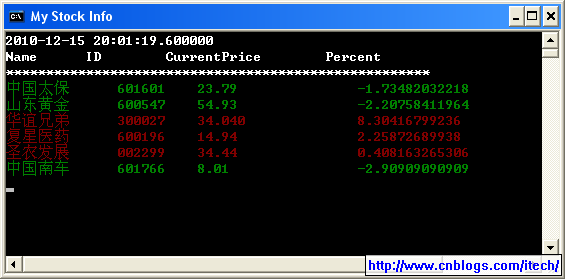
运行: (MyStockInfo.bat 双击此文件即可运行了,或者还可以对此文件创建桌面快捷方式,再桌面上直接运行)
c:\python31\python.exe mystock.py
如果希望在python2.6下运行,则需要
1)在所有的类的静态函数前加上 @staticmethod ;
2) 修改urllib.request为urllib2;
希望大家能够继续改进和共享!
完!





 扫一扫
扫一扫


 314
314

 被折叠的 条评论
为什么被折叠?
被折叠的 条评论
为什么被折叠?
 到【灌水乐园】发言





