



 本文围绕检查组管理系统展开,先进行需求分析,明确检查组与检查项的多对多关系及对应实体类和数据表。接着阐述新增检查组的步骤,包括完善页面、动态展示检查项列表和提交请求。还提及检查组分页的页面完善和后台代码编写,最后推荐了企业开发实战视频资料。
1. 需求分析
检查组其实就是多个检查项的集合,例如有一个检查组为“一般检查”,这个检查组可以包括多个检查项:身高、体重、收缩压、舒张压等。所以在添加检查组时需要选择这个检查组包括的检查项。
检查组对应的实体类为CheckGroup,对应的数据表为t_checkgroup。检查组和检查项为多对多关系,所以需要中间表t_checkgroup_checkitem进行关联。
2. 新增检查组
2.1 完善页面
检查组管理页面对应的是checkgroup.html页面,根据产品设计的原型已经完成了页面基本结构的编写,现在需要完善页面动态效果。
2.1.1 弹出新增窗口
页面中已经提供了新增窗口,只是出于隐藏状态。只需要将控制展示状态的属性dialogFormVisible改为true即可显示出新增窗口。点击新建按钮时绑定的方法为handleCreate,所以在handleCreate方法中修改dialogFormVisible属性的值为true即可。同时为了增加用户体验度,需要每次点击新建按钮时清空表单输入项。
由于新增检查组时还需要选择此检查组包含的检查项,所以新增检查组窗口分为两部分
信息:基本信息和检查项信息,如下图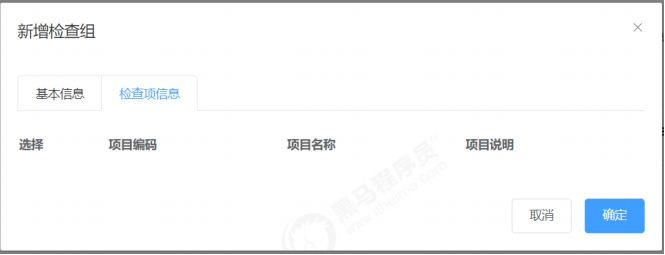
新建按钮绑定单击事件,对应的处理函数为handleCreate
|
1
2
|
<
el‐
button
type
=
"primary"
class
=
"butT"
@click
=
"handleCreate()"
>
新建
<
/
el‐
button
>
|
|
1
2
3
4
5
6
7
8
9
|
/
/
重置表单
resetForm
(
)
{
this.formData
=
{
}
;
}
,
/
/
弹出添加窗口
handleCreate
(
)
{
this.resetForm
(
)
;
this.dialogFormVisible
=
true
;
}
|
2.1.2 动态展示检查项列表
现在虽然已经完成了新增窗口的弹出,但是在检查项信息标签页中需要动态展示所有的检查项信息列表数据,并且可以进行勾选。具体操作步骤如下:
(1)定义模型数据
|
1
2
3
|
tableData
:
[]
,
/
/
新增和编辑表单中对应的检查项列表数据
checkitemIds
:
[]
,
/
/
新增和编辑表单中检查项对应的复选框,基于双向绑定可以进行回显
和数据提交
|
(2)动态展示检查项列表数据,数据来源于上面定义的tableData模型数据
|
01
02
03
04
05
06
07
08
09
10
11
12
13
14
15
16
17
18
19
20
21
|
<
table
class
=
"datatable"
>
<
thead
>
<
tr
>
<
th
>
选择
<
/
th
>
<
th
>
项目编码
<
/
th
>
<
th
>
项目名称
<
/
th
>
<
th
>
项目说明
<
/
th
>
<
/
tr
>
<
/
thead
>
<
tbody
>
<
tr v‐
for
=
"c in tableData"
>
<
td
>
<
input
:
id
=
"c.id"
v‐model
=
"checkitemIds"
type
=
"checkbox"
:
value
=
"c.id"
>
<
/
td
>
<
td
>
<
label
:
for
=
"c.id"
>
{
{
c.code
}
}
<
/
label
>
<
/
td
>
<
td
>
<
label
:
for
=
"c.id"
>
{
{
c.
name
}
}
<
/
label
>
<
/
td
>
<
td
>
<
label
:
for
=
"c.id"
>
{
{
c.remark
}
}
<
/
label
>
<
/
td
>
<
/
tr
>
<
/
tbody
>
<
/
table
>
|
(3)完善handleCreate方法,发送ajax请求查询所有检查项数据并将结果赋值给tableData模型数据用于页面表格展示
|
01
02
03
04
05
06
07
08
09
10
11
12
13
14
15
16
17
18
|
/
/
弹出添加窗口
handleCreate
(
)
{
this.dialogFormVisible
=
true
;
this.resetForm
(
)
;
/
/
默认切换到第一个标签页(基本信息)
this.activeName
=
'
first
';
/
/
重置
this.checkitemIds
=
[];
/
/
发送ajax请求查询所有检查项信息
axios.
get
(
"/checkitem/findAll.do"
)
.
then
(
(
res
)
=
>
{
if
(
res.
data
.flag
)
{
/
/
将检查项列表数据赋值给模型数据用于页面表格展示
this.tableData
=
res.
data
.
data
;
}
else
{
this.$
message
.
error
(
res.
data
.
message
)
;
}
}
)
;
}
|
(4)分别在CheckItemController、CheckItemService、CheckItemServiceImpl、CheckItemDao、CheckItemDao.xml中扩展方法查询所有检查项数据CheckItemController:
|
01
02
03
04
05
06
07
08
09
10
11
12
|
/
/
查询所有
@RequestMapping
(
"/findAll"
)
public Result findAll
(
)
{
List
<
CheckItem
>
checkItemList
=
checkItemService.findAll
(
)
;
if
(
checkItemList !
=
null
&
&
checkItemList.size
(
)
>
0
)
{
Result
result
=
new
Result
(
true
,
MessageConstant.QUERY_CHECKITEM_SUCCESS
)
;
result
.setData
(
checkItemList
)
;
return
result
;
}
return
new
Result
(
false
,
MessageConstant.QUERY_CHECKITEM_FAIL
)
;
}
|
CheckItemService:
|
1
|
public List
<
CheckItem
>
findAll
(
)
;
|
CheckItemServiceImpl:
|
1
2
3
|
public List
<
CheckItem
>
findAll
(
)
{
return
checkItemDao.findAll
(
)
;
}
|
CheckItemDao:
|
1
|
public List
<
CheckItem
>
findAll
(
)
;
|
CheckItemDao.xml:
|
1
2
3
|
<
select
id
=
"findAll"
resultType
=
"com.itheima.pojo.CheckItem"
>
select
*
from
t_checkitem
<
/
select
>
|
2.1.3 提交请求
当用户点击新增窗口中的确定按钮时发送ajax请求将数据提交到后台进行数据库操作。提交到后台的数据分为两部分:检查组基本信息(对应的模型数据为formData)和检查项id数组(对应的模型数据为checkitemIds)。
为确定按钮绑定单击事件,对应的处理函数为handleAdd
|
1
|
<
el‐
button
type
=
"primary"
@click
=
"handleAdd()"
>
确定
<
/
el‐
button
>
|
完善 handleAdd 方法
|
01
02
03
04
05
06
07
08
09
10
11
12
13
14
15
16
17
18
19
20
21
22
23
24
|
/
/
添加
handleAdd
(
)
{
/
/
发送ajax请求将模型数据提交到后台处理
axios.post
(
"/checkgroup/add.do?checkitemIds="
+
this.checkitemIds
,
this.formData
)
.
then
(
(
response
)
=
>
{
/
/
关闭新增窗口
this.dialogFormVisible
=
false
;
if
(
response.
data
.flag
)
{
/
/
新增成功,弹出成功提示
this.$
message
(
{
message
:
response.
data
.
message
,
type
:
'success'
}
)
;
}
else
{
/
/
新增失败,弹出错误提示
this.$
message
.
error
(
response.
data
.
message
)
;
}
}
)
.finally
(
(
)
=
>
{
this.findPage
(
)
;
}
)
;
}
|
2.2 后台代码
2.2.1 Controller
在 health_backend 工程中创建 CheckGroupController
|
01
02
03
04
05
06
07
08
09
10
11
12
13
14
15
16
17
18
19
20
21
22
23
24
25
26
27
28
29
30
31
32
33
34
35
36
|
package com.itheima.controller;
import com.alibaba.dubbo.config.annotation.Reference;
import com.itheima.
constant
.MessageConstant;
import com.itheima.entity.PageResult;
import com.itheima.entity.QueryPageBean;
import com.itheima.entity.Result;
import com.itheima.pojo.CheckGroup;
import com.itheima.pojo.CheckItem;
import com.itheima.service.CheckGroupService;
import org.springframework.web.bind.annotation.RequestBody;
import org.springframework.web.bind.annotation.RequestMapping;
import org.springframework.web.bind.annotation.RestController;
import java.util.List;
/
*
*
*
检查组管理
*
/
@RestController
@RequestMapping
(
"/checkgroup"
)
public
class
CheckGroupController
{
@Reference
private CheckGroupService checkGroupService;
/
/
新增
@RequestMapping
(
"/add"
)
public Result
add
(
@RequestBody CheckGroup checkGroup
,
Integer[]
checkitemIds
)
{
try
{
checkGroupService.
add
(
checkGroup
,
checkitemIds
)
;
}
catch
(
Exception e
)
{
/
/
新增失败
return
new
Result
(
false
,
MessageConstant.ADD_CHECKGROUP_FAIL
)
;
}
/
/
新增成功
return
new
Result
(
true
,
MessageConstant.ADD_CHECKGROUP_SUCCESS
)
;
}
}
|
2.2.2 服务接口
在 health_interface 工程中创建 CheckGroupService 接口
|
01
02
03
04
05
06
07
08
09
10
|
package com.itheima.service;
import com.itheima.entity.PageResult;
import com.itheima.pojo.CheckGroup;
import java.util.List;
/
*
*
*
检查组服务接口
*
/
public interface CheckGroupService
{
void
add
(
CheckGroup checkGroup
,
Integer[] checkitemIds
)
;
}
|
2.2.3 服务实现类
在 health_service_provider 工程中创建 CheckGroupServiceImpl 实现类
|
01
02
03
04
05
06
07
08
09
10
11
12
13
14
15
16
17
18
19
20
21
22
23
24
25
26
27
28
29
30
31
32
33
34
35
36
37
38
39
|
|
|
01
02
03
04
05
06
07
08
09
10
11
12
13
|
创建CheckGroupDao接口
package com.itheima.dao;
import com.github.pagehelper.Page;
import com.itheima.pojo.CheckGroup;
import java.util.List;
import java.util.Map;
/
*
*
*
持久层Dao接口
*
/
public interface CheckGroupDao
{
void
add
(
CheckGroup checkGroup
)
;
void setCheckGroupAndCheckItem
(
Map map
)
;
}
|
2.2.5 Mapper 映射文件
创建 CheckGroupDao.xml 映射文件
|
01
02
03
04
05
06
07
08
09
10
11
12
13
14
15
16
17
18
19
20
21
|
<
?xml
version
=
"1.0"
encoding
=
"UTF‐8"
?
>
<
!DOCTYPE mapper PUBLIC
"‐//mybatis.org//DTD Mapper 3.0//EN"
"http://mybatis.org/dtd/mybatis‐3‐mapper.dtd"
>
<
mapper namespace
=
"com.itheima.dao.CheckGroupDao"
>
<
!‐‐新增‐‐
>
<
insert
id
=
"add"
parameterType
=
"com.itheima.pojo.CheckGroup"
>
<
selectKey resultType
=
"java.lang.Integer"
order
=
"AFTER"
keyProperty
=
"id"
>
SELECT LAST_INSERT_ID
(
)
<
/
selectKey
>
insert
into
t_checkgroup
(
code
,
name
,
sex
,
helpCode
,
remark
,
attention
)
values
(
#{code},#{name},#{sex},#{helpCode},#{remark},#{attention})
<
/
insert
>
<
!‐‐设置检查组和检查项的关联关系‐‐
>
<
insert
id
=
"setCheckGroupAndCheckItem"
parameterType
=
"hashmap"
>
insert
into
t_checkgroup_checkitem
(
checkgroup_id
,
checkitem_id
)
values
(
#{checkgroup_id},#{checkitem_id})
<
/
insert
>
<
/
mapper
>
|
3. 检查组分页
3.1 完善页面
3.1.1 定义分页相关模型数据
|
1
2
3
4
5
6
7
|
pagination
:
{
/
/
分页相关模型数据
currentPage
:
1
,
/
/
当前页码
pageSize
:
10
,
/
/
每页显示的记录数
total
:
0
,
/
/
总记录数
queryString
:
null
/
/
查询条件
}
,
dataList
:
[]
,
/
/
当前页要展示的分页列表数据
|
3.1.2 定义分页方法
在页面中提供了 findPage 方法用于分页查询,为了能够在 checkgroup.html 页面加载后 直接可以展示分页数据,可以在 VUE 提供的钩子函数 created 中调用 findPage 方法
|
1
2
3
4
|
/
/
钩子函数,VUE对象初始化完成后自动执行
created
(
)
{
this.findPage
(
)
;
}
|
|
01
02
03
04
05
06
07
08
09
10
11
12
13
14
15
|
/
/
分页查询
findPage
(
)
{
/
/
分页参数
var param
=
{
currentPage
:
this.pagination.currentPage
,
/
/
页码
pageSize
:
this.pagination.pageSize
,
/
/
每页显示的记录数
queryString
:
this.pagination.queryString
/
/
查询条件
}
;
/
/
请求后台
axios.post
(
"/checkgroup/findPage.do"
,
param
)
.
then
(
(
response
)
=
>
{
/
/
为模型数据赋值,基于VUE的双向绑定展示到页面
this.dataList
=
response.
data
.rows;
this.pagination.total
=
response.
data
.total;
}
)
;
}
|
3.1.3 完善分页方法执行时机
除了在 created 钩子函数中调用 findPage 方法查询分页数据之外,当用户点击查询按钮或 者点击分页条中的页码时也需要调用 findPage 方法重新发起查询请求。
为查询按钮绑定单击事件,调用 findPage 方法
|
1
|
<
el‐
button
@click
=
"findPage()"
class
=
"dalfBut"
>
查询
<
/
el‐
button
>
|
为分页条组件绑定 current-change 事件,此事件是分页条组件自己定义的事件,当页码 改变时触发,对应的处理函数为 handleCurrentChange
|
1
2
3
4
5
6
7
8
|
<
el‐pagination
class
=
"pagiantion"
@current‐change
=
"handleCurrentChange"
:
current‐page
=
"pagination.currentPage"
:
page‐size
=
"pagination.pageSize"
layout
=
"total, prev, pager, next, jumper"
:
total
=
"pagination.total"
>
<
/
el‐pagination
>
|
定义 handleCurrentChange 方法
|
1
2
3
4
5
6
|
/
/
切换页码
handleCurrentChange
(
currentPage
)
{
/
/
currentPage为切换后的页码
this.pagination.currentPage
=
currentPage;
this.findPage
(
)
;
}
|
3.2 后台代码
3.2.1 Controller
在CheckGroupController中增加分页查询方法
|
01
02
03
04
05
06
07
08
09
10
|
/
/
分页查询
@RequestMapping
(
"/findPage"
)
public PageResult findPage
(
@RequestBody QueryPageBean queryPageBean
)
{
PageResult pageResult
=
checkGroupService.pageQuery
(
queryPageBean.getCurrentPage
(
)
,
queryPageBean.getPageSize
(
)
,
queryPageBean.getQueryString
(
)
)
;
return
pageResult;
}
|
3.2.2 服务接口
在 CheckGroupService 服务接口中扩展分页查询方法
|
1
2
|
public PageResult pageQuery
(
Integer currentPage
,
Integer pageSize
,
String
queryString
)
;
|
3.2.3 服务实现类
在 CheckGroupServiceImpl 服务实现类中实现分页查询方法,基于 Mybatis 分页助手插件 实现分页
|
1
2
3
4
5
6
|
public PageResult pageQuery
(
Integer currentPage
,
Integer pageSize
,
String
queryString
)
{
PageHelper.startPage
(
currentPage
,
pageSize
)
;
Page
<
CheckItem
>
page
=
checkGroupDao.selectByCondition
(
queryString
)
;
return
new
PageResult
(
page.getTotal
(
)
,
page.getResult
(
)
)
;
}
|
3.2.4 Dao 接口
在 CheckGroupDao 接口中扩展分页查询方法
|
1
|
public Page
<
CheckGroup
>
selectByCondition
(
String queryString
)
;
|
3.2.5 Mapper 映射文件
在 CheckGroupDao.xml 文件中增加 SQL 定义
|
1
2
3
4
5
6
7
|
<
select
id
=
"selectByCondition"
parameterType
=
"string"
resultType
=
"com.itheima.pojo.CheckGroup"
>
select
*
from
t_checkgroup
<
if
test
=
"value != null and value.length > 0"
>
where
code
=
#{value} or name = #{value} or helpCode = #{value}
<
/
if
>
<
/
select
>
|
4. 编辑检查组
4.1 完善页面 用户点击编辑按钮时,需要弹出编辑窗口并且将当前记录的数据进行回显,用户修改完 成后点击确定按钮将修改后的数据提交到后台进行数据库操作。此处进行数据回显的时 候,除了需要检查组基本信息的回显之外,还需要回显当前检查组包含的检查项(以复
选框勾选的形式回显)。
4.1.1 绑定单击事件
需要为编辑按钮绑定单击事件,并且将当前行数据作为参数传递给处理函数
|
1
2
|
<
el‐
button
type
=
"primary"
size
=
"mini"
@click
=
"handleUpdate(scope.row)"
>
编
辑
<
/
el‐
button
>
|
|
1
2
3
|
handleUpdate
(
row
)
{
alert
(
row
)
;
}
|
4.1.2 弹出编辑窗口回显数据
当前页面的编辑窗口已经提供好了,默认处于隐藏状态。在 handleUpdate 方法中需要将 编辑窗口展示出来,并且需要发送多个 ajax 请求分别查询当前检查组数据、所有检查项数 据、当前检查组包含的检查项 id 用于基本数据回显
|
01
02
03
04
05
06
07
08
09
10
11
12
13
14
15
16
17
18
19
20
21
22
23
24
25
26
27
28
29
30
31
32
33
34
|
handleUpdate
(
row
)
{
/
/
发送ajax请求根据
id
查询检查组信息,用于基本信息回显
axios.
get
(
"/checkgroup/findById.do?id="
+
row.
id
)
.
then
(
(
res
)
=
>
{
if
(
res.
data
.flag
)
{
/
/
弹出编辑窗口
this.dialogFormVisible
4
Edit
=
true
;
/
/
默认选中第一个标签页
this.activeName
=
'
first
';
/
/
为模型数据赋值,通过VUE数据双向绑定进行信息的回显
this.formData
=
res.
data
.
data
;
/
/
发送ajax请求查询所有的检查项信息,用于检查项表格展示
axios.
get
(
"/checkitem/findAll.do"
)
.
then
(
(
res
)
=
>
{
if
(
res.
data
.flag
)
{
/
/
为模型数据赋值,通过VUE数据双向绑定进行信息的回显
this.tableData
=
res.
data
.
data
;
/
/
查询当前检查组包含的所有检查项
id
,用于页面回显
axios.
get
(
"/checkgroup/findCheckItemIdsByCheckGroupId.do?id="
+
row.
id
)
.
then
(
(
res
)
=
>
{
/
/
为模型数据赋值,通过VUE数据双向绑定进行信息的回显
if
(
res.
data
.flag
)
{
this.checkitemIds
=
res.
data
.
data
;
}
else
{
this.$
message
.
error
(
res.
data
.
message
)
;
}
}
)
;
}
else
{
this.$
message
.
error
(
res.
data
.
message
)
;
}
}
)
;
}
else
{
this.$
message
.
error
(
"获取数据失败,请刷新当前页面"
)
;
}
}
)
;
}
|
4.1.3 发送请求
在编辑窗口中修改完成后,点击确定按钮需要提交请求,所以需要为确定按钮绑定事件并提供处理函数handleEdit
|
1
|
<
el‐
button
type
=
"primary"
@click
=
"handleEdit()"
>
确定
<
/
el‐
button
>
|
|
01
02
03
04
05
06
07
08
09
10
11
12
13
14
15
16
17
18
19
20
|
/
/
编辑
handleEdit
(
)
{
/
/
发送ajax请求,提交模型数据
axios.post
(
"/checkgroup/edit.do?
checkitemIds="
+
this.checkitemIds
,
this.formData
)
.
then
(
(
response
)
=
>
{
/
/
隐藏编辑窗口
this.dialogFormVisible
4
Edit
=
false
;
if
(
response.
data
.flag
)
{
this.$
message
(
{
message
:
response.
data
.
message
,
type
:
'success'
}
)
;
}
else
{
this.$
message
.
error
(
response.
data
.
message
)
;
}
}
)
.finally
(
(
)
=
>
{
this.findPage
(
)
;
}
)
;
}
|
4.2 后台代码
4.2.1 Controller
在 CheckGroupController 中增加方法
|
01
02
03
04
05
06
07
08
09
10
11
12
13
14
15
16
17
18
19
20
21
22
23
24
25
26
27
28
29
30
31
32
33
34
35
36
|
/
/
根据
id
查询
@RequestMapping
(
"/findById"
)
public Result findById
(
Integer
id
)
{
CheckGroup checkGroup
=
checkGroupService.findById
(
id
)
;
if
(
checkGroup !
=
null
)
{
Result
result
=
new
Result
(
true
,
MessageConstant.QUERY_CHECKGROUP_SUCCESS
)
;
result
.setData
(
checkGroup
)
;
return
result
;
}
return
new
Result
(
false
,
MessageConstant.QUERY_CHECKGROUP_FAIL
)
;
}
/
/
根据检查组合
id
查询对应的所有检查项
id
@RequestMapping
(
"/findCheckItemIdsByCheckGroupId"
)
public Result findCheckItemIdsByCheckGroupId
(
Integer
id
)
{
try
{
List
<
Integer
>
checkitemIds
=
checkGroupService.findCheckItemIdsByCheckGroupId
(
id
)
;
return
new
Result
(
true
,
MessageConstant.QUERY_CHECKITEM_SUCCESS
,
checkitemIds
)
;
}
catch
(
Exception e
)
{
e.printStackTrace
(
)
;
return
new
Result
(
false
,
MessageConstant.QUERY_CHECKITEM_FAIL
)
;
}
}
/
/
编辑
@RequestMapping
(
"/edit"
)
public Result edit
(
@RequestBody CheckGroup checkGroup
,
Integer[]
checkitemIds
)
{
try
{
checkGroupService.edit
(
checkGroup
,
checkitemIds
)
;
}
catch
(
Exception e
)
{
return
new
Result
(
false
,
MessageConstant.EDIT_CHECKGROUP_FAIL
)
;
}
return
new
Result
(
true
,
MessageConstant.EDIT_CHECKGROUP_SUCCESS
)
;
}
|
4.2.2 服务接口
在 CheckGroupService 服务接口中扩展方法
|
1
2
3
|
CheckGroup findById
(
Integer
id
)
;
List
<
Integer
>
findCheckItemIdsByCheckGroupId
(
Integer
id
)
;
public void edit
(
CheckGroup checkGroup
,
Integer[] checkitemIds
)
;
|
4.2.3 服务实现类
在 CheckGroupServiceImpl 实现类中实现编辑方法
|
01
02
03
04
05
06
07
08
09
10
11
12
13
14
15
16
17
18
19
20
21
22
23
24
25
26
27
|
public CheckGroup findById
(
Integer
id
)
{
return
checkGroupDao.findById
(
id
)
;
}
public List
<
Integer
>
findCheckItemIdsByCheckGroupId
(
Integer
id
)
{
return
checkGroupDao.findCheckItemIdsByCheckGroupId
(
id
)
;
}
/
/
编辑检查组,同时需要更新和检查项的关联关系
public void edit
(
CheckGroup checkGroup
,
Integer[] checkitemIds
)
{
/
/
根据检查组
id
删除中间表数据(清理原有关联关系)
checkGroupDao.deleteAssociation
(
checkGroup.getId
(
)
)
;
/
/
向中间表
(
t_checkgroup_checkitem
)
插入数据(建立检查组和检查项关联关系)
setCheckGroupAndCheckItem
(
checkGroup.getId
(
)
,
checkitemIds
)
;
/
/
更新检查组基本信息
checkGroupDao.edit
(
checkGroup
)
;
}
/
/
向中间表
(
t_checkgroup_checkitem
)
插入数据(建立检查组和检查项关联关系)
public void setCheckGroupAndCheckItem
(
Integer checkGroupId
,
Integer[]
checkitemIds
)
{
if
(
checkitemIds !
=
null
&
&
checkitemIds.length
>
0
)
{
for
(
Integer checkitemId
:
checkitemIds
)
{
Map
<
String
,
Integer
>
map
=
new
HashMap
<
>
(
)
;
map.put
(
"checkgroup_id"
,
checkGroupId
)
;
map.put
(
"checkitem_id"
,
checkitemId
)
;
checkGroupDao.setCheckGroupAndCheckItem
(
map
)
;
}
}
}
|
4.2.4 Dao 接口
在 CheckGroupDao 接口中扩展方法
|
1
2
3
4
5
|
CheckGroup findById
(
Integer
id
)
;
List
<
Integer
>
findCheckItemIdsByCheckGroupId
(
Integer
id
)
;
void setCheckGroupAndCheckItem
(
Map map
)
;
void deleteAssociation
(
Integer
id
)
;
void edit
(
CheckGroup checkGroup
)
;
|
4.2.5 Mapper 映射文件
在 CheckGroupDao.xml 中扩展 SQL 语句
|
01
02
03
04
05
06
07
08
09
10
11
12
13
14
15
16
17
18
19
20
21
22
23
24
25
26
27
28
29
30
31
32
33
34
35
36
37
38
39
40
41
42
43
|
<
select
id
=
"findById"
parameterType
=
"int"
resultType
=
"com.itheima.pojo.CheckGroup"
>
select
*
from
t_checkgroup
where
id
=
#{id}
<
/
select
>
<
select
id
=
"findCheckItemIdsByCheckGroupId"
parameterType
=
"int"
resultType
=
"int"
>
select
checkitem_id
from
t_checkgroup_checkitem
where
checkgroup_id
=
#
{
id
}
<
/
select
>
<
!‐‐向中间表插入数据(建立检查组和检查项关联关系)‐‐
>
<
insert
id
=
"setCheckGroupAndCheckItem"
parameterType
=
"hashmap"
>
insert
into
t_checkgroup_checkitem
(
checkgroup_id
,
checkitem_id
)
values
(
#{checkgroup_id},#{checkitem_id})
<
/
insert
>
<
!‐‐根据检查组
id
删除中间表数据(清理原有关联关系)‐‐
>
<
delete
id
=
"deleteAssociation"
parameterType
=
"int"
>
delete
from
t_checkgroup_checkitem
where
checkgroup_id
=
#{id}
<
/
delete
>
<
!‐‐编辑‐‐
>
<
update
id
=
"edit"
parameterType
=
"com.itheima.pojo.CheckGroup"
>
update
t_checkgroup
<
set
>
<
if
test
=
"name != null"
>
name
=
#{name},
<
/
if
>
<
if
test
=
"sex != null"
>
sex
=
#{sex},
<
/
if
>
<
if
test
=
"code != null"
>
code
=
#{code},
<
/
if
>
<
if
test
=
"helpCode != null"
>
helpCode
=
#{helpCode},
<
/
if
>
<
if
test
=
"attention != null"
>
attention
=
#{attention},
<
/
if
>
<
if
test
=
"remark != null"
>
remark
=
#{remark},</if>
<
/
set
>
where
id
=
#{id}
<
/
update
>
|
推荐学习:
视频链接:http://yun.itheima.com/course/295.html?stt
提取码:epxm
20天企业开发实战品优购电商系统开发下(11-20天+配置资料源码)
视频链接:https://pan.baidu.com/s/1RJK9jumxt9MARAWohy1E3Q
提取码:5b74
资料链接:https://pan.baidu.com/s/1kXYpm76eJwqXnEpWE2pXMQ
提取码:otpa





 扫一扫
扫一扫


 828
828

 被折叠的 条评论
为什么被折叠?
被折叠的 条评论
为什么被折叠?
 到【灌水乐园】发言





