



 本文详述了如何将SpringBoot项目打包成jar并利用Docker进行部署的全过程,包括编写Dockerfile、生成镜像及运行容器,并解决了在容器内SpringBoot应用访问本地Redis时遇到的权限问题。
先把项目打成jar包
移动到文件夹
touch dockerfile
编写dockerfile
vim dockerfile
FROM docker.io/centos:latest
LABEL app="springboot2" version="0.0.1" by="youjia"
#安装应用执行的环境java
RUN yum -y install java

#将指定的jar文件复制到容器中
COPY rlzy_back_web-1.0.jar /usr/local/

#执行jar文件
ENTRYPOINT ["java" ,"-jar","/usr/local/rlzy_back_web-1.0.jar"]
执行dockerfile生成镜像
docker build -t springboot2 .
通过命令查看生成镜像的id
docker images
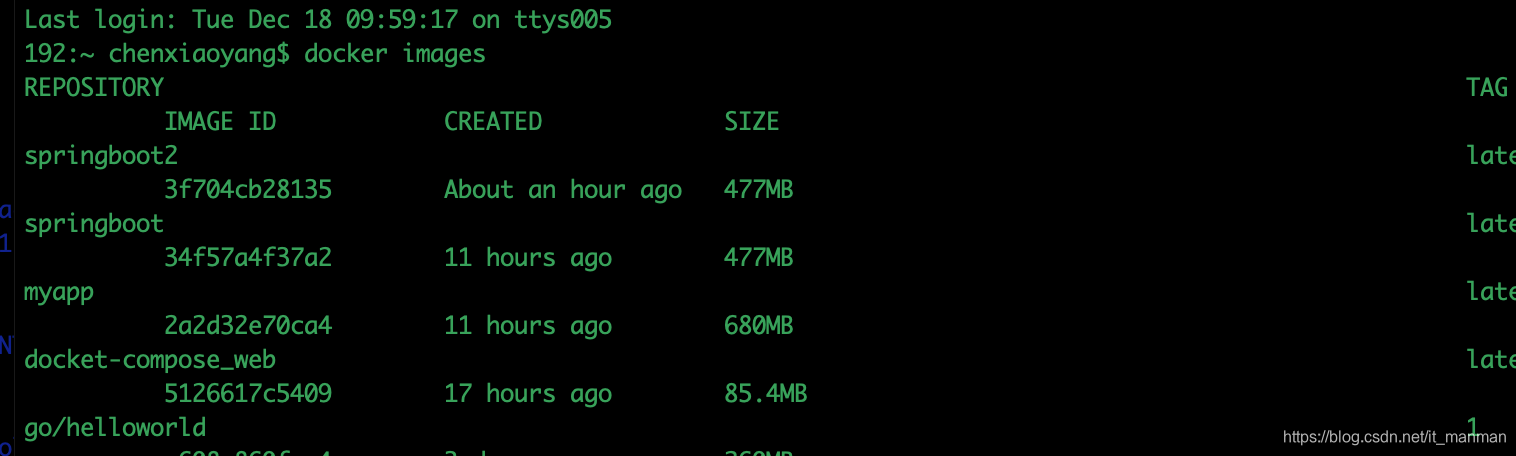
docker run --name mywebapp -p 8080:8080 -d springboot2 .
启动docker
springboot想访问本地的redis 但是出现错误,
(error) DENIED Redis is running in protected mode because protected mode is enabled, no bind address was specified, no authentication password is requested to clients. In this mode connections are only accepted from the lookback interface. If you want to connect from external computers to Redis you may adopt one of the following solutions: 1) Just disable protected mode sending the command 'CONFIG SET protected-mode no' from the loopback interface by connecting to Redis from the same host the server is running, however MAKE SURE Redis is not publicly accessible from internet if you do so. Use CONFIG REWRITE to make this change permanent. 2) Alternatively you can just disable the protected mode by editing the Redis configuration file, and setting the protected mode option to 'no', and then restarting the server. 3) If you started the server manually just for testing, restart it with the --portected-mode no option. 4) Setup a bind address or an authentication password. NOTE: You only need to do one of the above things in order for the server to start accepting connections from the outside.
是说处于保护模式,只能本地链接,我们需要修改配置文件…/redis.conf
1)打开配置文件把下面对应的注释掉
bind 127.0.0.1
1
2)Redis默认不是以守护进程的方式运行,可以通过该配置项修改,使用yes启用守护进程,设置为no
daemonize no
1
3)保护模式
protected-mode no
作者:Agly_Charlie
来源:优快云
原文:https://blog.youkuaiyun.com/Agly_Clarlie/article/details/52251746
版权声明:本文为博主原创文章,转载请附上博文链接!





 扫一扫
扫一扫


 2168
2168

 被折叠的 条评论
为什么被折叠?
被折叠的 条评论
为什么被折叠?
 到【灌水乐园】发言





