


 本文详细介绍了Redis的发布订阅(pub/sub)机制,包括如何在Spring中实现发布和订阅,以及两种不同的订阅方式。此外,还探讨了Redis的键空间通知功能,用于在键被修改时发送事件,可用于审计、监控等场景。键空间通知分为键空间和键事件通知,可以通过配置`notify-keyspace-events`启用,并通过示例展示了不同命令产生的通知类型。最后,文章提到了过期和驱逐事件的处理,并提供了验证通知功能的方法。
引用:
https://redis.io/topics/notifications
http://redisdoc.com/topic/notification.html
http://xiaorui.cc/archives/4123
pub/sub
spring集成发布订阅
发布消息
@Service
@Slf4j
public class RedisPublisher {
    @Autowired
    @Qualifier("stringRedisTemplate")
    private RedisTemplate redisTemplate;

    private AtomicInteger count = new AtomicInteger(1);

    @Scheduled( fixedDelay = 3000 )
    public void publish() {
        String msg = String.format("%04d", count.getAndIncrement());
        redisTemplate.convertAndSend(  "pubsub:queue:1",msg );
        log.info("RedisPublisher -- 发送消息: {}",msg);
    }
}
订阅消息1 – 基于subscribe
@Service
@Slf4j
public class RedisSubscriber1 implements  InitializingBean {
    @Autowired
    @Qualifier("stringRedisTemplate")
    private RedisTemplate redisTemplate;


    @Override
    public void afterPropertiesSet() throws Exception {
        redisTemplate.getConnectionFactory().getConnection().subscribe(new MessageListener(){
            @Override
            public void onMessage(Message message, byte[] pattern) {
                String channel = new String(message.getChannel(), StandardCharsets.UTF_8);
                String body = new String(message.getBody(), StandardCharsets.UTF_8);
                log.info("RedisSubscriber1 -- 接收到消息: {} -> {}",channel,body);
            }
        },"pubsub:queue:1".getBytes(StandardCharsets.UTF_8));
    }
}
订阅消息2 – 基于RedisMessageListenerContainer
@Configuration
@Slf4j
public class RedisSubscriber2  {

    @Bean
    public  MessageListenerAdapter messageListener() {
        return new MessageListenerAdapter( new MessageListener(){
            @Override
            public void onMessage(Message message, byte[] pattern) {
                String channel = new String(message.getChannel(), StandardCharsets.UTF_8);
                String body = new String(message.getBody(), StandardCharsets.UTF_8);
                log.info("RedisSubscriber2 -- 接收到消息: {} -> {}",channel,body);
            }
        });
    }

    @Bean
    public RedisMessageListenerContainer redisContainer(LettuceConnectionFactory lettuceConnectionFactory) {
        RedisMessageListenerContainer container
                = new RedisMessageListenerContainer();
        container.setConnectionFactory(lettuceConnectionFactory);
        container.addMessageListener(messageListener(), new ChannelTopic("pubsub:queue:1"));
        return container;
    }
}
执行结果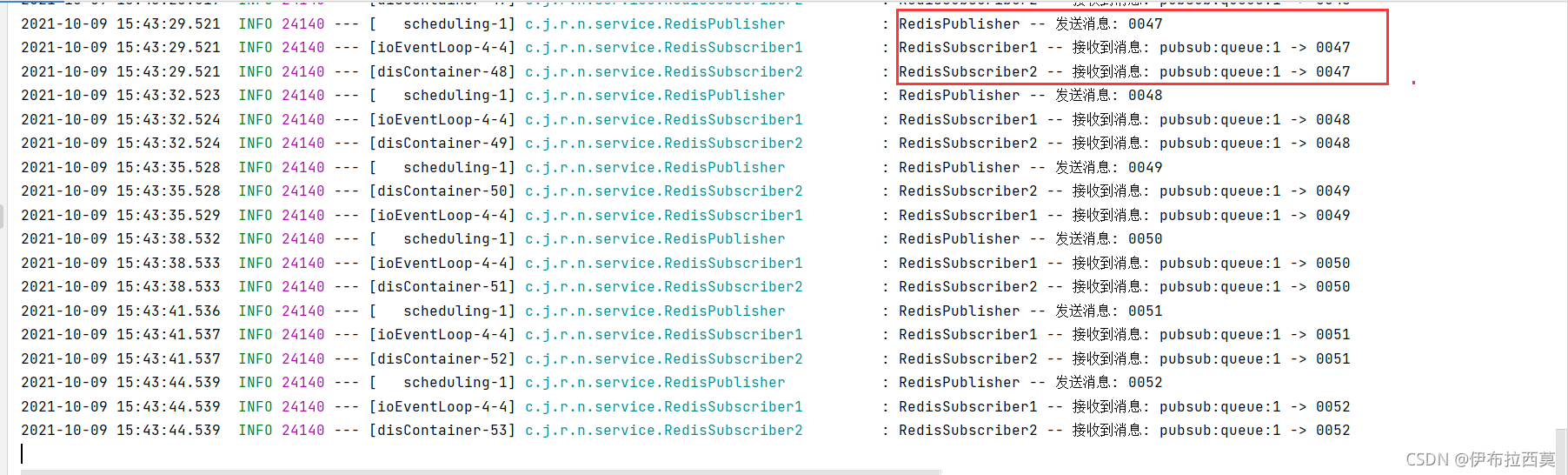
键空间通知(keyspace notification)
Keyspace notifications是自 2.8.0 以来可用的功能.
功能概览
Keyspace notifications允许客户端订阅 Pub/Sub 通道,以便以某种方式接收影响Redis数据集的事件。
可以接收的事件示例有:
- 所有修改键的命令。
- 所有接收到
[LPUSH key value [value …\]命令的键。 0号数据库中所有已过期的键。
事件通过 Redis 的订阅与发布功能(pub/sub)来进行分发, 因此所有支持订阅与发布功能的客户端都可以在无须做任何修改的情况下, 直接使用键空间通知功能。
因为 Redis 目前的订阅与发布功能采取的是发送即忘(fire and forget)策略,所以如果你的程序需要可靠事件通知(reliable notification of events), 那么目前的键空间通知可能并不适合你: 当订阅事件的客户端断线时, 它会丢失所有在断线期间分发给它的事件。
即不做信息的存储,只是在线转发,那么肯定也没有ack确认机制,另外只有订阅段监听时才会转发!!!
未来将会支持更可靠的事件分发, 这种支持可能会通过让订阅与发布功能本身变得更可靠来实现, 也可能会在 Lua 脚本中对消息(message)的订阅与发布进行监听, 从而实现类似将事件推入到列表这样的操作。
使用扩展场景
- 类似
审计或者监控的场景. - 通过expire来实现不可靠的
定时器. – key过期时,通知xx事件 - 借助expire来实现不可靠的
注册发现.
事件的类型
对于每个修改数据库的操作,键空间通知都会发送两种不同类型的事件。
比如说,对 0 号数据库的键 mykey执行 DEL 命令时, 系统将分发两条消息, 相当于执行以下两个PUBLISH channel message命令:
PUBLISH __keyspace@0__:mykey del
PUBLISH __keyevent@0__:del mykey
订阅第一个频道__keyspace@0__:mykey可以接收0 号数据库中所有修改键 mykey的事件,
而订阅第二个频道__keyevent@0__:del则可以接收0 号数据库中所有执行 del 命令的键。
- 以
keyspace为前缀的频道被称为键空间通知(key-space notification), - 而以
keyevent为前缀的频道则被称为键事件通知(key-event notification)。
配置
因为开启键空间通知功能需要消耗一些 CPU , 所以在默认配置下, 该功能处于关闭状态。
- 当
notify-keyspace-events选项的参数为空字符串时,功能关闭。 - 另一方面,当参数不是空字符串时,功能开启。

配置
- 可以通过
修改 redis.conf 文件,# 开启所有的事件 notify-keyspace-events KEA - 或者直接使用
CONFIG SET命令来开启或关闭键空间通知功能.# 开启所有的事件 redis-cli config set notify-keyspace-events KEA # 开启keyspace Events redis-cli config set notify-keyspace-events KA # 开启keyspace 所有List 操作的 Events redis-cli config set notify-keyspace-events Kl
集群需要在所有节点都增加如上配置。
通知类型
notify-keyspace-events 的参数可以是以下字符的任意组合, 它指定了服务器该发送哪些类型的通知:
| 字符 | 发送的通知 |
|---|---|
K | 键空间通知,所有通知以 __keyspace@<db>__ 为前缀 |
E | 键事件通知,所有通知以 __keyevent@<db>__ 为前缀 |
g | DEL 、 EXPIRE 、 RENAME 等类型无关的通用命令的通知 |
$ | 字符串命令的通知 |
l | 列表命令的通知 |
s | 集合命令的通知 |
h | 哈希命令的通知 |
z | 有序集合命令的通知 |
x | 过期事件:每当有过期键被删除时发送 |
e | 驱逐(evict)事件:每当有键因为 maxmemory 政策而被删除时发送 |
A | 上述参数 g$lshzxe 的别名 ,表示 all |
输入的参数中至少要有一个
K或者E, 否则的话, 不管其余的参数是什么, 都不会有任何通知被分发。
将参数设为字符串 “AKE” 表示发送所有类型的通知。
命令产生的通知
| 命令 | 产生的通知说明 |
|---|---|
DEL key [key …] | 命令为每个被删除的键产生一个del 通知。 |
RENAME key newkey | 产生两个通知: 为 来源键(source key)产生一个 rename_from 通知,并为 目标键(destination key)产生一个 rename_to 通知。 |
EXPIRE key seconds EXPIREAT key timestamp | 在键被正确设置过期时间时产生一个 expire 通知。当 EXPIREAT key timestamp设置的时间已经过期或者 EXPIRE key seconds传入的时间为负数值时,键被删除,并产生一个 del 通知。 |
SET key value [EX seconds] [PX milliseconds] [NX] [XX]以及它的所有变种 | 都产生 set 通知。其中 SETEX key seconds value 还会产生 expire 通知。 |
MSET key value [key value …] | 为每个键产生一个 set 通知。 |
INCR keyDECR keyINCRBY key incrementDECRBY key decrement | 都产生 incrby 通知。 |
INCRBYFLOAT key increment | 产生 incrbyfloat通知 |
APPEND key value | 产生 append通知。 |
| 每当一个键因为过期而被删除时 | 产生一个 expired通知。 |
每当一个键因为maxmemory政策而被删除以回收内存时 | 产生一个evicted通知。 |
所有命令都只在键真的被改动了之后,才会产生通知。
比如说,当SREM key member [member …]试图删除不存在于集合的元素时,删除操作会执行失败,因为没有真正的改动键,所以这一操作不会发送通知。
验证
命令行验证
如果对命令所产生的通知有疑问, 最好还是使用以下命令, 自己来验证一下:
$ redis-cli config set notify-keyspace-events KEA
$ redis-cli --csv psubscribe '__key*__:*'
程序验证
@Configuration
@Slf4j
public class RedisSubscriber3 {

    @Bean
    public  MessageListenerAdapter messageListener() {
        return new MessageListenerAdapter( new MessageListener(){
            @Override
            public void onMessage(Message message, byte[] pattern) {
                String channel = new String(message.getChannel(), StandardCharsets.UTF_8);
                String body = new String(message.getBody(), StandardCharsets.UTF_8);
                log.info("RedisSubscriber3 -- 接收到消息: {} -> {}",channel,body);
            }
        });
    }

    @Bean
    public RedisMessageListenerContainer redisContainer(LettuceConnectionFactory lettuceConnectionFactory) {
        RedisMessageListenerContainer container
                = new RedisMessageListenerContainer();
        container.setConnectionFactory(lettuceConnectionFactory);
        //PatternTopic
        container.addMessageListener(messageListener(), new PatternTopic("__key*__:*"));
        return container;
    }
}
结果
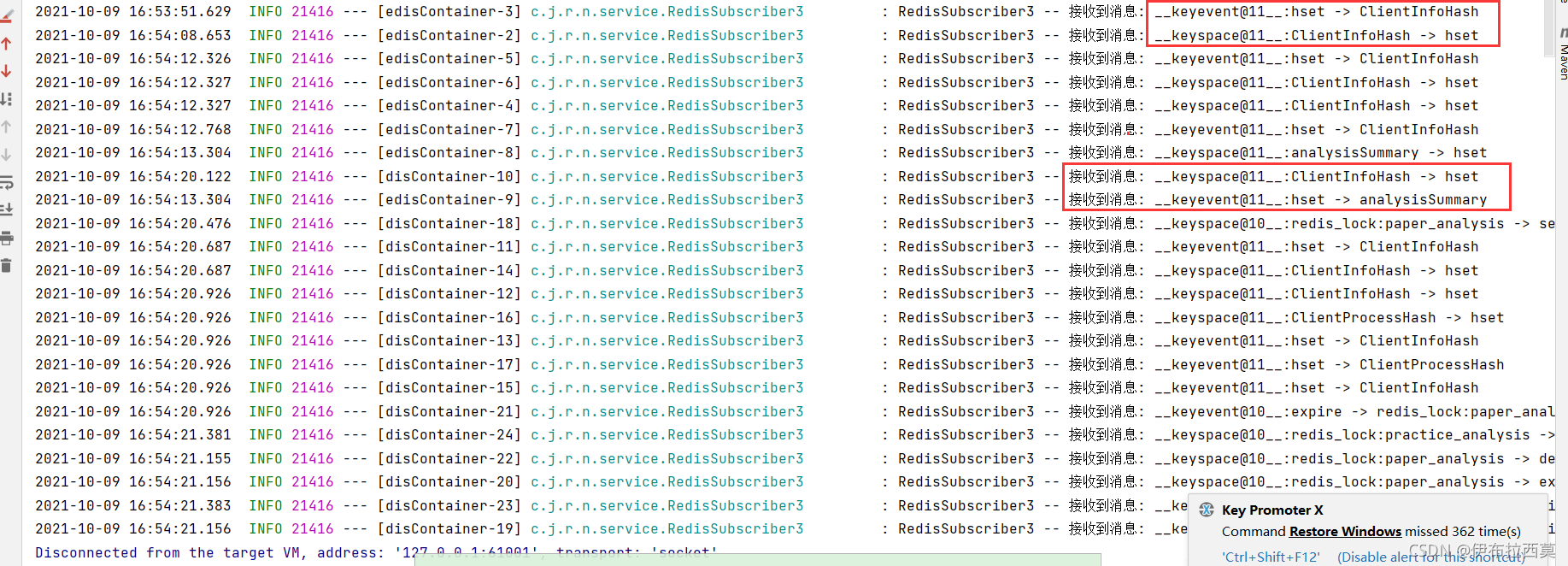
过期通知的发送时间
Redis 使用以下两种方式删除过期的键:
- 当一个键被访问时,程序会对这个键进行检查,如果键已经过期,那么该键将被删除。 –被动删除
- 底层系统会在后台渐进地查找并删除那些过期的键,从而处理那些已经过期、但是不会被访问到的键。 –主动删除
Redis 并不保证生存时间(TTL)变为 0 的键会立即被删除:
如果程序没有访问这个过期键, 或者带有生存时间的键非常多的话, 那么在键的生存时间变为 0 , 直到键真正被删除这中间, 可能会有一段比较显著的时间间隔。
因此, Redis 产生expired 通知的时间为过期键被删除的时候, 而不是键的生存时间变为 0 的时候。







 扫一扫
扫一扫


 1万+
1万+

 被折叠的 条评论
为什么被折叠?
被折叠的 条评论
为什么被折叠?
 到【灌水乐园】发言





