



 本文总结了MySQL主从同步过程中常见的八大问题及其详细解决方案,包括授权用户错误、GTID模式不一致、二进制日志丢失、事务冲突、网络问题、参数设置不当等,为数据库管理员提供实用的故障排查指南。
建立主从的命令:
change master to master_host='192.168.23.129' ,master_user='repl',master_password='repl',master_port=3306,master_log_file='binlog.000002',master_log_pos=2693528,master_auto_position=0;
# 或者
change master to master_host='192.168.23.129' ,master_user='repl',master_password='repl',master_port=3306,master_auto_position=1;
问题 1:
授权主从同步的用户,报错如下:
root@localhost|mysql>grant select ,replication slave,replication client on *.* to 'repl'@'192.168.23.222' identified by 'repl';
ERROR 1805 (HY000): Column count of mysql.user is wrong. Expected 45, found 50. The table is probably corrupte
原因:
表结构不一致。
因为建立主从前,手动使用mysqldump方式,将8.0的mysql库的数据备份&数据恢复到5.7上。
5.7和8.0的user表表结构不一致,导致授权新用户,写入数据报错。
解决方案:
导入之前备份的5.7的Mysql库的数据,恢复正常。
Tips:
做一些数据库操作前,一定要做备份!
报错1:
show slave status\G
Last_SQL_Error: Coordinator stopped because there were error(s) in the worker(s). The most recent failure being: Worker 12 failed executing transaction '53ec1d72-4962-11e9-927c-000c299fe024:293' at master log binlog.000002, end_log_pos 2717711. See error log and/or performance_schema.replication_applier_status_by_worker table for more details about this failure or others, if any.
Replicate_Ignore_Server_Ids:
查看错误日志,如下:
[root@localhost mysql]# cat err.log
……
2019-03-19T10:06:24.692279Z 64 [ERROR] [MY-010584] [Repl] Slave SQL for channel '': Worker 11 failed executing transaction '53ec1d72-4962-11e9-927c-000c299fe024:294' at master log binlog.000002, end_log_pos 2717871; Error 'Can't drop database 'seiki'; database doesn't exist' on query. Default database: 'seiki'. Query: 'drop database seiki', Error_code: MY-001008
……
2019-03-19T10:06:24.702483Z 65 [ERROR] [MY-010584] [Repl] Slave SQL for channel '': Worker 12 failed executing transaction '53ec1d72-4962-11e9-927c-000c299fe024:293' at master log binlog.000002, end_log_pos 2717711; Error 'You have an error in your SQL syntax; check the manual that corresponds to your MySQL server version for the right syntax to use near 'IDENTIFIED WITH 'mysql_native_password' AS '*A424E797037BF97C19A2E88CF7891C5C203' at line 1' on query. Default database: 'mysql'. Query: 'GRANT SELECT, REPLICATION SLAVE, REPLICATION CLIENT ON *.* TO 'repl'@'192.168.23.222' IDENTIFIED WITH 'mysql_native_password' AS '*A424E797037BF97C19A2E88CF7891C5C2038C039'', Error_code: MY-001064
原因:
新增Mysql服务器做主库,有进行过8.0的dump文件的恢复操作,这些操作被记录到binlog上,从库拉取主库binlog,并执行的时候发生报错。
解决方案:
跳过之前相关操作:
stop slave;
reset master;              #清空从库的gtid_executed和binlog信息
SET global gtid_purged= '53ec1d72-4962-11e9-927c-000c299fe024:294';   #手动让从库认为000c299fe024:294已经执行
root@localhost|(none)>START SLAVE;
或者
#直接指定主从建立的起始日志文件和pos
change master to master_host='192.168.23.129',master_user='repl',master_password='repl',master_port=3306,master_log_file='binlog.000002',master_log_pos=2717871,master_auto_position=0;
报错2:
root@localhost|(none)>change master to master_host='192.168.23.129',
master_user='repl',
master_password='repl',
master_port=3306,
master_log_file='binlog.000002',
master_log_pos=2693528;
ERROR 1776 (HY000): Parameters MASTER_LOG_FILE, MASTER_LOG_POS, RELAY_LOG_FILE and RELAY_LOG_POS cannot be set when MASTER_AUTO_POSITION is active.
原因:
建立主从连接、启用gtid状况下:
如果使用master_auto_position,就无需指定master_log_file和master_log_pos,
如果通过file和pos指定主从的起始位置,就需带上master_auto_position=0
解决方案:
使用如下命令:
root@localhost|(none)>change master to
master_host='192.168.23.129'
,master_user='repl'
,master_password='repl'
,master_port=3306
,master_log_file='binlog.000002'
,master_log_pos=2693528
,master_auto_position=0;
Query OK, 0 rows affected, 2 warnings (0.05 sec)
主从建立完成。
报错3:
show salve status\G,报错如下:从库请求的gtids不存在,master上purge 了相关日志:
Last_IO_Error: Got fatal error 1236 from master when reading data from binary log: 'The slave is connecting using CHANGE MASTER TO MASTER_AUTO_POSITION = 1, but the master has purged binary logs containing GTIDs that the slave requires.'
Last_SQL_Errno: 0
……
原因
主从虽然建立连接,但是从库请求的包含 GTIDS 信息的日志没了,因为主库删除了对应的binlog文件:
[root@localhost log]# ll
total 2680
drwxr-xr-x 2 mysql mysql 6 Mar 18 02:43 binlog
-rw-r----- 1 mysql mysql 177 Mar 18 02:43 binlog.000001
-rw-r----- 1 mysql mysql 2718457 Mar 19 18:38 binlog.000002
-rw-r----- 1 mysql mysql 1555 Mar 19 23:52 binlog.000003
-rw-r----- 1 mysql mysql 2008 Mar 19 23:58 binlog.000004
-rw-r----- 1 mysql mysql 525 Mar 20 00:11 binlog.000005
-rw-r----- 1 mysql mysql 150 Mar 19 23:58 binlog.index
[root@localhost log]# rm -rf ./binlog.000001 binlog.000002 binlog.000003 binlog.000004
[root@localhost log]# ll
total 8
drwxr-xr-x 2 mysql mysql 6 Mar 18 02:43 binlog
-rw-r----- 1 mysql mysql 525 Mar 20 00:11 binlog.000005
-rw-r----- 1 mysql mysql 150 Mar 19 23:58 binlog.index
解决方案:
在 master 上查看gtid信息
root@localhost|seiki_2>show global variables like '%gtid%';
+----------------------------------+--------------------------------------------+
| Variable_name | Value |
+----------------------------------+--------------------------------------------+
| binlog_gtid_simple_recovery | ON |
| enforce_gtid_consistency | ON |
| gtid_executed | 53ec1d72-4962-11e9-927c-000c299fe024:1-315 |
| gtid_executed_compression_period | 1000 |
| gtid_mode | ON |
| gtid_owned | |
| gtid_purged | |
| session_track_gtids | OFF |
+----------------------------------+--------------------------------------------+
8 rows in set (0.00 sec)
从库执行:
root@localhost|iris>set global gtid_purged ='53ec1d72-4962-11e9-927c-000c299fe024:1-315'; # 告诉从库  000c299fe024:1-315 已经执行过了,继续后面的。

Query OK, 0 rows affected (0.00 sec)
报错4:
遇到的报错:
root@localhost|(none)>show slave status\G;
*************************** 1. row ***************************
Slave_IO_State: Waiting for master to send event
Master_Host: 192.168.23.129
Master_User: repl
Master_Port: 3306
Connect_Retry: 60
Master_Log_File: binlog.000002
Read_Master_Log_Pos: 2718082
Relay_Log_File: relaylog.000002
Relay_Log_Pos: 24172
Relay_Master_Log_File: binlog.000002
Slave_IO_Running: Yes
Slave_SQL_Running: No
……
Replicate_Wild_Ignore_Table: mysql.%,performance_schema.%,test.%,information_schema.%
Last_Errno: 1064
Last_Error: Coordinator stopped because there were error(s) in the worker(s). The most recent failure being: Worker 12 failed executing transaction '53ec1d72-4962-11e9-927c-000c299fe024:293' at master log binlog.000002, end_log_pos 2717711. See error log and/or performance_schema.replication_applier_status_by_worker table for more details about this failure or others, if any. #经查看日志确认,主库的第1007个事务,授权用户权限。
Skip_Counter: 0
Exec_Master_Log_Pos: 2717382
Relay_Log_Space: 25073
……
Last_SQL_Error: Coordinator stopped because there were error(s) in the worker(s). The most recent failure being: Worker 12 failed executing transaction '53ec1d72-4962-11e9-927c-000c299fe024:293' at master log binlog.000002, end_log_pos 2717711. See error log and/or performance_schema.replication_applier_status_by_worker table for more details about this failure or others, if any.
Replicate_Ignore_Server_Ids:
Master_Server_Id: 231293306
Master_UUID: 53ec1d72-4962-11e9-927c-000c299fe024
Master_Info_File: mysql.slave_master_info
查看当前二进制日志中事务情况,确定建立主从时binlog的file和pos位置:
root@localhost|iris>show binlog events in 'binlog.000002'\G;
*************************** 1007. row ***************************
Log_name: binlog.000002
Pos: 2717447
Event_type: Query
Server_id: 231293306
End_log_pos: 2717711
Info: use `mysql`; GRANT SELECT, REPLICATION SLAVE, REPLICATION CLIENT ON *.* TO 'repl'@'192.168.23.222' IDENTIFIED WITH 'mysql_native_password' AS '*A424E797037BF97C19A2E88CF7891C5C2038C039'
*************************** 1008. row ***************************
Log_name: binlog.000002
Pos: 2717711
Event_type: Gtid
Server_id: 231293306
End_log_pos: 2717776
Info: SET @@SESSION.GTID_NEXT= '53ec1d72-4962-11e9-927c-000c299fe024:294'
*************************** 1009. row ***************************
Log_name: binlog.000002
Pos: 2717776
Event_type: Query
Server_id: 231293306
End_log_pos: 2717871
Info: drop database seiki
*************************** 1010. row ***************************
Log_name: binlog.000002
Pos: 2717871
Event_type: Gtid
Server_id: 231293306
End_log_pos: 2717936
Info: SET @@SESSION.GTID_NEXT= '53ec1d72-4962-11e9-927c-000c299fe024:295'
*************************** 1011. row ***************************
Log_name: binlog.000002
Pos: 2717936
Event_type: Query
Server_id: 231293306
End_log_pos: 2718082
Info: use `iris`; create table bb(id int auto_increment,name varchar(10),primary key (id))
1011 rows in set (0.00 sec)
对应详细binlog内容,如下:
# at 2717382
#190319 1:39:52 server id 231293306 end_log_pos 2717447 CRC32 0xb8b3fada GTID last_committed=292 sequence_number=293 rbr_only=no
SET @@SESSION.GTID_NEXT= '53ec1d72-4962-11e9-927c-000c299fe024:293'/*!*/;
# at 2717447
#190319 1:39:52 server id 231293306 end_log_pos 2717711 CRC32 0x32ca1808 Query thread_id=59 exec_time=0 error_code=0
SET TIMESTAMP=1552984792/*!*/;
SET @@session.foreign_key_checks=1, @@session.unique_checks=1/*!*/;
SET @@session.sql_mode=1168113664/*!*/;
GRANT SELECT, REPLICATION SLAVE, REPLICATION CLIENT ON *.* TO 'repl'@'192.168.23.222' IDENTIFIED WITH 'mysql_native_password' AS '*A424E797037BF97C19A2E88CF7891C5C2038C039'
/*!*/;
# at 2717711
#190319 2:28:42 server id 231293306 end_log_pos 2717776 CRC32 0x801b6661 GTID last_committed=293 sequence_number=294 rbr_only=no
SET @@SESSION.GTID_NEXT= '53ec1d72-4962-11e9-927c-000c299fe024:294'/*!*/;
# at 2717776
#190319 2:28:42 server id 231293306 end_log_pos 2717871 CRC32 0xd8d79bff Query thread_id=59 exec_time=0 error_code=0
SET TIMESTAMP=1552987722/*!*/;
drop database seiki
/*!*/;
# at 2717871
#190319 3:09:13 server id 231293306 end_log_pos 2717936 CRC32 0xe673b081 GTID last_committed=294 sequence_number=295 rbr_only=no
SET @@SESSION.GTID_NEXT= '53ec1d72-4962-11e9-927c-000c299fe024:295'/*!*/;
# at 2717936
#190319 3:09:13 server id 231293306 end_log_pos 2718082 CRC32 0x922fa5f1 Query thread_id=57 exec_time=0 error_code=0
use `iris`/*!*/;
SET TIMESTAMP=1552990153/*!*/;
create table bb(id int auto_increment,name varchar(10),primary key (id))
/*!*/;
解决方案:
跳过指定gtid
root@localhost|(none)>stop slave sql_thread;   #停止从库的SQL THREAD 线程
reset master;   #清空从库的gtid_executed和binlog信息
SET global gtid_purged= '53ec1d72-4962-11e9-927c-000c299fe024:294';   #手动让从库认为  000c299fe024:294  已经执行
START SLAVE SQL_THREAD;  #启动SQL THREAD 线程
问题5
主从同步终端,show slave status\G 报错如下;
Last_IO_Error:The replication receiver thread cannot start because the master has GTID_MODE = ON and this server has GTID_MODE = OFF.
原因
因为主库开启了 gtid,而从库关闭了。
解决办法:
根据需求,关闭或者开启 主库或者从库的 gtid功能
我的场景需要 gtid,开启从库 gtid 功能
1.修改从库 my.cnf 配置,新增
gtid_mode=1
2.直接修改参数 gtid_mode
root@localhost|(none)>set global gtid_mode=off_permissive;
Query OK, 0 rows affected (0.01 sec)
root@localhost|(none)>set global gtid_mode=on_permissive;
Query OK, 0 rows affected (0.00 sec)
root@localhost|(none)>set global gtid_mode=on;
Query OK, 0 rows affected (0.00 sec)
不能直接将 off 改为 on,会报错如下:
root@localhost|(none)>set global gtid_mode=off;
ERROR 1788 (HY000): The value of @@GLOBAL.GTID_MODE can only be changed one step at a time: OFF <-> OFF_PERMISSIVE <-> ON_PERMISSIVE <-> ON. Also note that this value must be stepped up or down simultaneously on all servers. See the Manual for instructions.
root@localhost|(none)>
问题6:
show slave status ,报错信息如下:
error connecting to master 'replicate@192.168.225.130:3306' - retry-time: 60 retries: 1
Seconds_Behind_Master: 0
Master_SSL_Verify_Server_Cert: No
Last_IO_Errno: 1045
Last_IO_Error: error connecting to master 'replicate@192.168.225.130:3306' - retry-time: 60 retries: 1
Last_SQL_Errno: 0
Last_SQL_Error:
Replicate_Ignore_Server_Ids:
Master_Server_Id: 2251303306
Master_UUID: 31a43b4e-5ff5-11e9-a4ec-000c29d80a27
Master_Info_File: mysql.slave_master_info
SQL_Delay: 0
SQL_Remaining_Delay: NULL
Slave_SQL_Running_State: Slave has read all relay log; waiting for more updates
Master_Retry_Count: 86400
Master_Bind:
Last_IO_Error_Timestamp: 190703 14:01:56
Last_SQL_Error_Timestamp:
Master_SSL_Crl:
Master_SSL_Crlpath:
Retrieved_Gtid_Set:
Executed_Gtid_Set: 31a43b4e-5ff5-11e9-a4ec-000c29d80a27:32958170-32958171
Auto_Position: 1
Replicate_Rewrite_DB:
Channel_Name:
问题原因
原因一般有三种:
1.网络不通
2.同步用户密码错误
3.定位的 master_log_pos 值不对
解决办法:
1.直接 ping,可能需要清理iptables 策略
2.检验密码,可以通过在从库执行 mysql -hmaster_host -umaster_user -p --default-character-set=utf8,来检测用户密码,如果不记得密码,可以在主库重新授权修改
3.再次核对主库 log 和 pos 信息,通过 show master status\G
Tips:我的环境是第二种问题,之前改过密码忘了。
root@localhost|(none)>stop slave;
Query OK, 0 rows affected (0.07 sec)
root@localhost|(none)>change master to master_host='192.168.225.130',master_user='replicate',master_password='123456',master_log_file='binlog.000067',master_log_pos=154,master_auto_position=0;
Query OK, 0 rows affected, 2 warnings (0.03 sec)
root@localhost|(none)>start slave;
Query OK, 0 rows affected (0.10 sec)
再看一下同步状态:
root@localhost|(none)>show slave status\G
……
Relay_Master_Log_File: binlog.000067
Slave_IO_Running: Yes
Slave_SQL_Running: Yes
Replicate_Do_DB:
……
问题7:
主从同步配置从库过程,报错如下:
mysql> start slave;
ERROR 29 (HY000): File '/data/iris/log/relaylog.index' not found (Errcode: 2 - No such file or directory)
mysql>
mysql> change master to master_host='172.18.6.121',master_user='repl',master_password='repl123',master_log_file='mysql-bin.008315',master_log_pos=9057351;
ERROR 29 (HY000): File '/data/iris/log/relaylog.index' not found (Errcode: 2 - No such file or directory)
mysql>
原因
查看 mysql 的配置文件 my.cnf 里没有 relay.log 相关配置
解决办法
添加如下内容
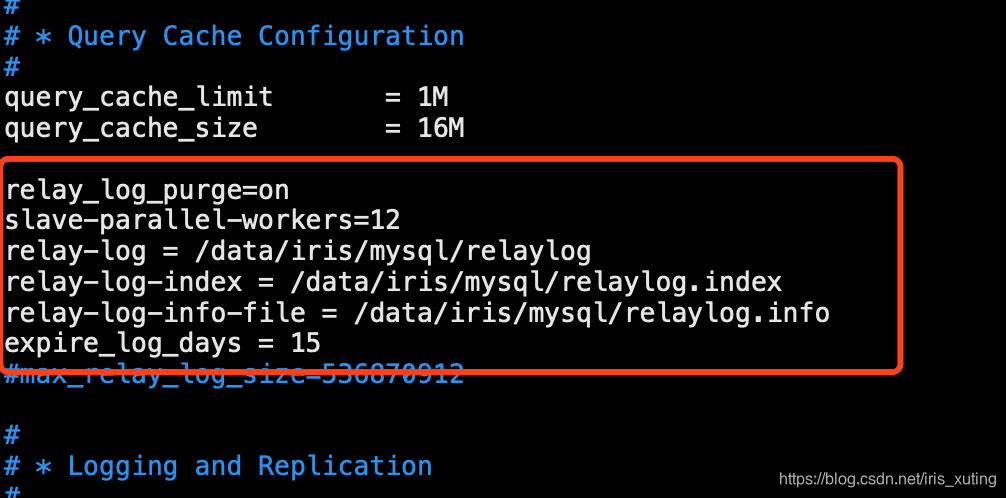
重启 mysql 服务,
重新配置主从
mysql> Reset slave;
mysql> change master to master_host='172.18.6.121',master_user='repl',master_password='repl123',master_log_file='mysql-bin.008315',master_log_pos=9057351;
mysql> start slave;
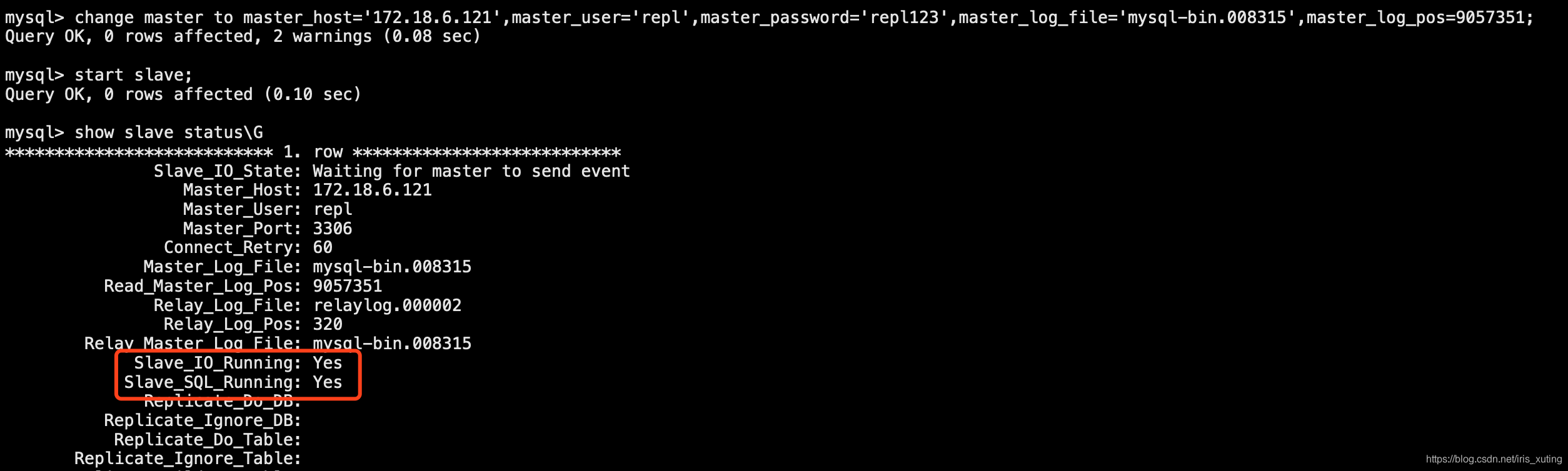
mysql> show slave status\G
修改后再确认状态,如图:
问题8:
主从同步异常
Relay_Master_Log_File: mysql-bin.008313
Slave_IO_Running: No
Slave_SQL_Running: Yes
Replicate_Do_DB:
......
Master_SSL_Verify_Server_Cert: No
Last_IO_Errno: 1236
Last_IO_Error: Got fatal error 1236 from master when reading data from binary log: 'Client requested master to start replication from position > file size'
原因
logevent超过max_allowed_packet 大小。
解决办法
修改参数max_allowed_packet 的大小。
root@localhost|(none)>set global max_allowed_packet=1073741824;
Query OK, 0 rows affected (0.00 sec)





 扫一扫
扫一扫


 4727
4727

 被折叠的 条评论
为什么被折叠?
被折叠的 条评论
为什么被折叠?
 到【灌水乐园】发言





