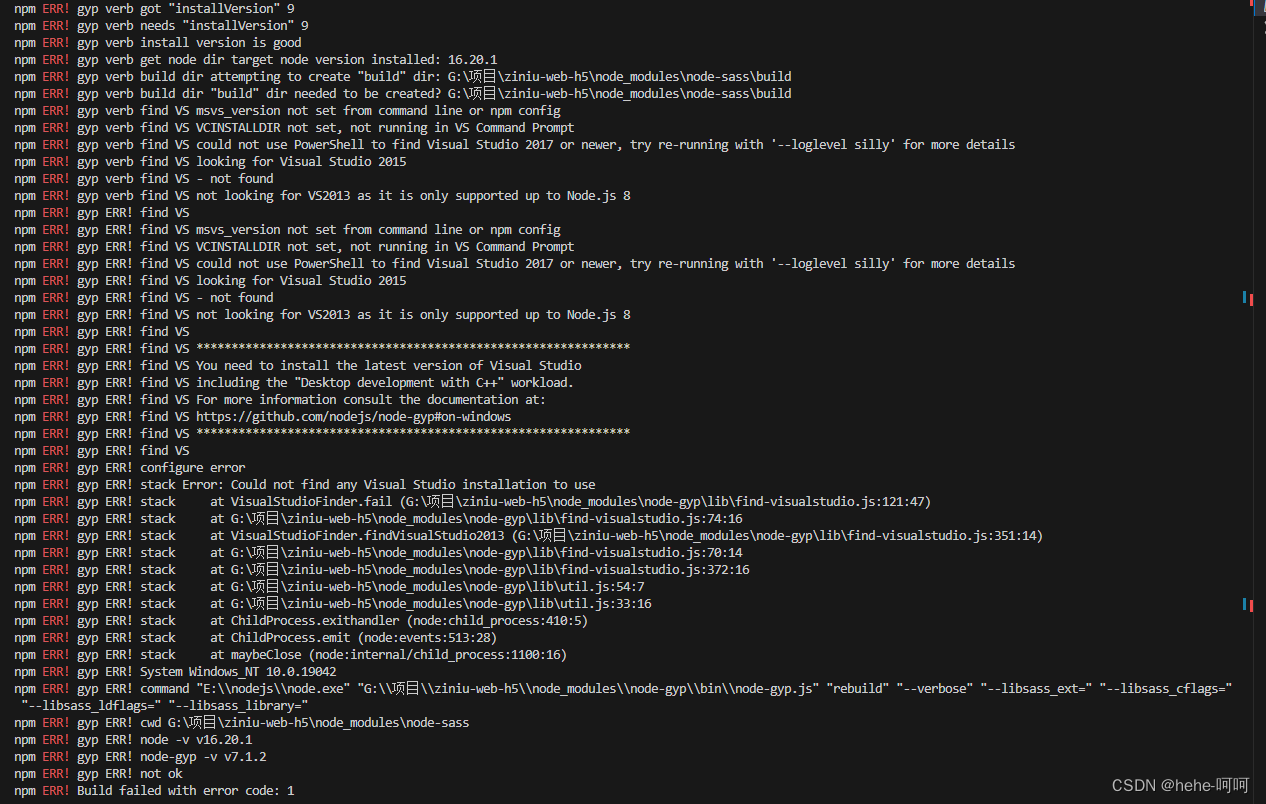
npm ERR! gyp verb find Python checking Python explicitly set from command line or npm configuration

本文主要讲述了如何在npm中设置Python的本地路径,包括使用`npmconfigsetpythonXXX`命令,查找Python安装位置(通过`wherepython`),以及重启电脑以确保配置生效。
部署运行你感兴趣的模型镜像

请添加图片描述
解决方案,没有找到python
设置本地的python地址

npm config set python XXX

XXX是python的本路径
查看python安装在哪

where python

配置好 重启电脑

您可能感兴趣的与本文相关的镜像

Python3.9

Python3.9

Conda
Python

Python 是一种高级、解释型、通用的编程语言,以其简洁易读的语法而闻名,适用于广泛的应用,包括Web开发、数据分析、人工智能和自动化脚本

vuetify@2.7.2: This version is deprecated npm ERR! code 1 npm ERR! path D:\workCode\zlt_pc\node_modules\node-sass npm ERR! command failed npm ERR! command C:\Windows\system32\cmd.exe /d /s /c node scripts/build.js npm ERR! Building: D:\nvm\nodejs\node.exe D:\workCode\zlt_pc\node_modules\node-gyp\bin\node-gyp.js rebuild --verbose --libsass_ext= --libsass_cflags= --libsass_ldflags= --libsass_library= npm ERR! gyp info it worked if it ends with ok npm ERR! gyp verb cli [ npm ERR! gyp verb cli 'D:\\nvm\\nodejs\\node.exe', npm ERR! gyp verb cli 'D:\\workCode\\zlt_pc\\node_modules\\node-gyp\\bin\\node-gyp.js', npm ERR! gyp verb cli 'rebuild', npm ERR! gyp verb cli '--verbose', npm ERR! gyp verb cli '--libsass_ext=', npm ERR! gyp verb cli '--libsass_cflags=', npm ERR! gyp verb cli '--libsass_ldflags=', npm ERR! gyp verb cli '--libsass_library=' npm ERR! gyp verb cli ] npm ERR! gyp info using node-gyp@7.1.2 npm ERR! gyp info using node@16.18.0 | win32 | x64 npm ERR! gyp verb command rebuild [] npm ERR! gyp verb command clean [] npm ERR! gyp verb clean removing "build" directory npm ERR! gyp verb command configure [] npm ERR! gyp verb find Python Python is not set from command line or npm configuration npm ERR! gyp verb find Python Python is not set from environment variable PYTHON npm ERR! gyp verb find Python checking if "python3" can be used npm ERR! gyp verb find Python - executing "python3" to get executable path npm ERR! gyp verb find Python - "python3" is not in PATH or produced an error npm ERR! gyp verb find Python checking if "python" can be used npm ERR! gyp verb find Python - executing "python" to get executable path npm ERR! gyp verb find Python - "python" is not in PATH or produced an error npm ERR! gyp verb find Python checking if "python2" can be used npm ERR! gyp verb find Python - executing "python2" to get executable path npm ERR! gyp verb find Python - "python2" is not in PATH or produced an error npm ERR! gyp verb find Python checking if Python is C:\Python37\python.exe npm ERR! gyp verb find Python - executing "C:\Python37\python.exe" to get version npm ERR! gyp verb find Python - "C:\Python37\python.exe" could not be run npm ERR! gyp verb find Python checking if Python is C:\Python27\python.exe npm ERR! gyp verb find Python - executing "C:\Python27\python.exe" to get version npm ERR! gyp verb find Python - "C:\Python27\python.exe" could not be run npm ERR! gyp verb find Python checking if the py launcher can be used to find Python npm ERR! gyp verb find Python - executing "py.exe" to get Python executable path npm ERR! gyp verb find Python - "py.exe" is not in PATH or produced an error npm ERR! gyp ERR! find Python npm ERR! gyp ERR! find Python Python is not set from command line or npm configuration npm ERR! gyp ERR! find Python Python is not set from environment variable PYTHON npm ERR! gyp ERR! find Python checking if "python3" can be used npm ERR! gyp ERR! find Python - "python3" is not in PATH or produced an error npm ERR! gyp ERR! find Python checking if "python" can be used npm ERR! gyp ERR! find Python - "python" is not in PATH or produced an error npm ERR! gyp ERR! find Python checking if "python2" can be used npm ERR! gyp ERR! find Python - "python2" is not in PATH or produced an error npm ERR! gyp ERR! find Python checking if Python is C:\Python37\python.exe npm ERR! gyp ERR! find Python - "C:\Python37\python.exe" could not be run npm ERR! gyp ERR! find Python checking if Python is C:\Python27\python.exe npm ERR! gyp ERR! find Python - "C:\Python27\python.exe" could not be run npm ERR! gyp ERR! find Python checking if the py launcher can be used to find Python npm ERR! gyp ERR! find Python - "py.exe" is not in PATH or produced an error npm ERR! gyp ERR! find Python npm ERR! gyp ERR! find Python ********************************************************** npm ERR! gyp ERR! find Python You need to install the latest version of Python. npm ERR! gyp ERR! find Python Node-gyp should be able to find and use Python. If not, npm ERR! gyp ERR! find Python you can try one of the following options: npm ERR! gyp ERR! find Python - Use the switch --python="C:\Path\To\python.exe" npm ERR! gyp ERR! find Python (accepted by both node-gyp and npm) npm ERR! gyp ERR! find Python - Set the environment variable PYTHON npm ERR! gyp ERR! find Python - Set the npm configuration variable python: npm ERR! gyp ERR! find Python npm config set python "C:\Path\To\python.exe" npm ERR! gyp ERR! find Python For more information consult the documentation at: npm ERR! gyp ERR! find Python https://github.com/nodejs/node-gyp#installation npm ERR! gyp ERR! find Python ********************************************************** npm ERR! gyp ERR! find Python npm ERR! gyp ERR! configure error npm ERR! gyp ERR! stack Error: Could not find any Python installation to use npm ERR! gyp ERR! stack at PythonFinder.fail (D:\workCode\zlt_pc\node_modules\node-gyp\lib\find-python.js:302:47) npm ERR! gyp ERR! stack at PythonFinder.runChecks (D:\workCode\zlt_pc\node_modules\node-gyp\lib\find-python.js:136:21) npm ERR! gyp ERR! stack at PythonFinder.<anonymous> (D:\workCode\zlt_pc\node_modules\node-gyp\lib\find-python.js:200:18) npm ERR! gyp ERR! stack at PythonFinder.execFileCallback (D:\workCode\zlt_pc\node_modules\node-gyp\lib\find-python.js:266:16) npm ERR! gyp ERR! stack at exithandler (node:child_process:410:5) npm ERR! gyp ERR! stack at ChildProcess.errorhandler (node:child_process:422:5) npm ERR! gyp ERR! stack at ChildProcess.emit (node:events:513:28) npm ERR! gyp ERR! stack at Process.ChildProcess._handle.onexit (node:internal/child_process:291:12) npm ERR! gyp ERR! stack at onErrorNT (node:internal/child_process:485:16) npm ERR! gyp ERR! stack at processTicksAndRejections (node:internal/process/task_queues:83:21) npm ERR! gyp ERR! System Windows_NT 10.0.17763 npm ERR! gyp ERR! command "D:\\nvm\\nodejs\\node.exe" "D:\\workCode\\zlt_pc\\node_modules\\node-gyp\\bin\\node-gyp.js" "rebuild" "--verbose" "--libsass_ext=" "--libsass_cflags=" "--libsass_ldflags=" "--libsass_library=" npm ERR! gyp ERR! cwd D:\workCode\zlt_pc\node_modules\node-sass npm ERR! gyp ERR! node -v v16.18.0 npm ERR! gyp ERR! node-gyp -v v7.1.2 npm ERR! gyp ERR! not ok npm ERR! Build failed with error code: 1 npm ERR! A complete log of this run can be found in: npm ERR! C:\Users\jinzheng04\AppData\Local\npm-cache\_logs\2025-08-25T06_58_34_769Z-debug-0.log
最新发布
08-26
评论
成就一亿技术人!
拼手气红包6.0元
还能输入1000个字符
 
红包 添加红包
表情包 插入表情
 条评论被折叠 查看
添加红包

请填写红包祝福语或标题

红包个数最小为10个

红包金额最低5元

当前余额3.43前往充值 >
需支付:10.00
成就一亿技术人!
领取后你会自动成为博主和红包主的粉丝 规则
hope_wisdom
发出的红包
实付
使用余额支付
点击重新获取
扫码支付
钱包余额 0

抵扣说明:

1.余额是钱包充值的虚拟货币,按照1:1的比例进行支付金额的抵扣。
2.余额无法直接购买下载,可以购买VIP、付费专栏及课程。

余额充值


