



 本文介绍了如何利用LayUI的layui.upload组件在Asp.net中优雅地上传文件,特别是Excel文件。首先定义上传按钮并初始化layui.upload功能,然后在后端接收文件并保存到服务器。在处理Excel数据时,需要将其读入DataSet,再插入到SQL Server数据库中。由于特殊字符可能引起插入失败,需要进行相应的处理。总结中提到,对于小量数据,此方法快速有效,但大量数据时可能需要寻找更高效的方法。
前言
LayUI中的layui.upload可以使用各种样式,比传统的Asp.net中FileUpload更为简洁方便。
这里参考了一位博主的链接:Asp.net中Excel数据导入到SQL Server
前端
首先定义一个上传按钮:
<button style="float:right;margin-right:0px;margin-bottom:30px" type="button" class="layui-btn" id="upload"><i class="layui-icon"></i></button><br />

初始化layui.upload功能
layui.use('upload', function () {
var $ = layui.jquery
, upload = layui.upload;//指定允许上传的文件类型
	upload.render({
	    elem: '#upload'
	    , url: 'UploadExcel.ashx' //改成您自己的上传接口
	    , accept: 'file' //普通文件
	    , done: function (res) {
	        console.log(res);
	        //如果上传失败
	        if (res.code > 0) {
	            if (res.code == 2) {
	                return layer.msg('Only .xlsx file types can be uploaded.');
	            } else {
	                return layer.msg('Upload failed! Please check the network.');
	            }
	        } else if (res.code == 0) {
	            return layer.msg('Uploaded successfully!');
	        }
	    }
	});
});
后端代码
先上传文件到服务器中
if (HttpContext.Current.Request.Files.Count > 0)
{
    string fileExtension = System.IO.Path.GetExtension(HttpContext.Current.Request.Files[0].FileName).ToLower();
    if (fileExtension != ".xlsx")
    {
        Json = "{\"code\": 2,\"msg\": \"\",\"data\": {\"src\": \"http://cdn.layui.com/123.jpg\"}}";
        context.Response.Write(Json);
    }
    else
    {
        try
        {
            //得到客户端上传的文件
            HttpPostedFile file = HttpContext.Current.Request.Files[0];
            //服务器端要保存的路径
            string filePath = HttpContext.Current.Server.MapPath("~/excel/") + file.FileName;
            file.SaveAs(filePath);
            //返回结果
            Json = "{\"code\": 0,\"msg\": \"\",\"data\": {\"src\": \"http://cdn.layui.com/123.jpg\"}}";
            //读取Excel文件并填写到一个DateSet中
            DataSet ds = GetExcelData(filePath, fileExtension);
            InsertDB(ds);
            context.Response.Write(Json);
        }
        catch (Exception ex)
        {
            MessageBox.Show("ddd");
            Json = "{\"code\": 1,\"msg\": \"\",\"data\": {\"src\": \"http://cdn.layui.com/123.jpg\"}}";
            context.Response.Write(Json);
        }
    }
}
else
{
    Json = "{\"code\": 1,\"msg\": \"\",\"data\": {\"src\": \"http://cdn.layui.com/123.jpg\"}}";
    context.Response.Write(Json);
}
注意,layui.upload中返回的相应信息(response)必须是一个标准的 JSON 格式,这一点在LayUI官方文档中有写
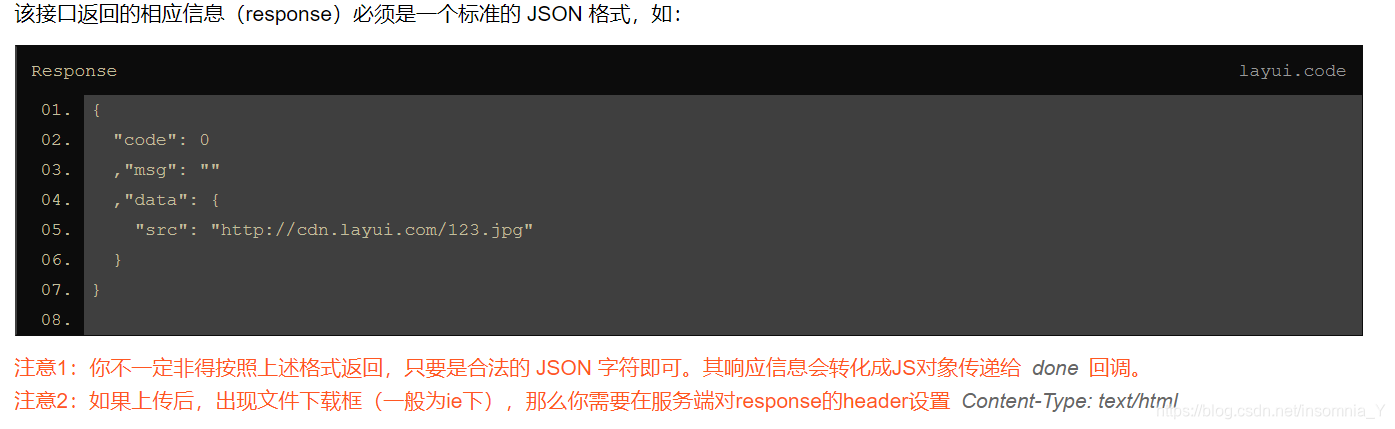
将Excel文件上传到服务中后,再读取Excel文件并填写到一个DateSet中,使用了GetExcelData函数:
private DataSet GetExcelData(string filePath, string fileExtension)
{
    DataSet ds = new DataSet();
    string connStr03 = "Provider=Microsoft.Jet.OLEDB.4.0;Data Source=" + filePath + ";Extended Properties=Excel 8.0;"; ;
    string connStr07 = "Provider=Microsoft.ACE.OLEDB.12.0;Data Source=" + filePath + ";Extended Properties='Excel 12.0;HDR=YES'";
    string queryStr = "SELECT * FROM [Sheet1$]";
    OleDbConnection conn03 = new OleDbConnection(connStr03);
    OleDbConnection conn07 = new OleDbConnection(connStr07);
    if (fileExtension == ".xls")
    {
        OleDbDataAdapter myAdapter = new OleDbDataAdapter(queryStr, conn03);
        myAdapter.Fill(ds);
    }
    else if (fileExtension == ".xlsx")
    {
        OleDbDataAdapter myAdapter = new OleDbDataAdapter(queryStr, conn07);
        myAdapter.Fill(ds);
    }
    return ds;
}
将Excel文件并填写到一个DateSet后,再从DateSet写入到Sql数据库中去,使用了InsertDB函数:
private void InsertDB(DataSet ds)
{
    using (SqlConnection conn = new SqlConnection("Server=.;Database=Arena;User ID=sa;Password=yymm7010212"))
    {
        conn.Open();
        SqlTransaction Tran = conn.BeginTransaction();
        int AddRows = 0;
        try
        {
            SqlCommand comm = new SqlCommand();
            comm.CommandType = CommandType.Text;
            StringBuilder sb = new StringBuilder();
            if (ds.Tables[0].Rows.Count > 0)
            for (int i = 0; i < ds.Tables[0].Rows.Count; i++)
            {
                sb.Append(" insert into Arena.dbo.Performance(PerformanceDate,Team,Sub_Team,UID,Total_Score,Name,Production,Accuracy,WorkLoad,Working_Hour,[Case],Fresh_booking,AMD_booking,Doc,Report,VAS_report,MyIdea,Accept_MyIdea,CE_Story,Best_CE_Story,Thanks_Letter,Special_Contributor_Team,Special_Contributor_EFF,Error_Description) values('");
                sb.Append(ds.Tables[0].Rows[i].ItemArray[0].ToString() + "','");
                sb.Append(ds.Tables[0].Rows[i].ItemArray[1].ToString() + "','");
                sb.Append(ds.Tables[0].Rows[i].ItemArray[2].ToString() + "','");
                sb.Append(ds.Tables[0].Rows[i].ItemArray[3].ToString() + "','");
                sb.Append(ds.Tables[0].Rows[i].ItemArray[4].ToString() + "','");
                sb.Append(ds.Tables[0].Rows[i].ItemArray[5].ToString() + "','");
                sb.Append(ds.Tables[0].Rows[i].ItemArray[6].ToString() + "','");
                sb.Append(ds.Tables[0].Rows[i].ItemArray[7].ToString() + "','");
                sb.Append(ds.Tables[0].Rows[i].ItemArray[8].ToString() + "','");
                sb.Append(ds.Tables[0].Rows[i].ItemArray[9].ToString() + "','");
                sb.Append(ds.Tables[0].Rows[i].ItemArray[10].ToString() + "','");
                sb.Append(ds.Tables[0].Rows[i].ItemArray[11].ToString() + "','");
                sb.Append(ds.Tables[0].Rows[i].ItemArray[12].ToString() + "','");
                sb.Append(ds.Tables[0].Rows[i].ItemArray[13].ToString() + "','");
                sb.Append(ds.Tables[0].Rows[i].ItemArray[14].ToString() + "','");
                sb.Append(ds.Tables[0].Rows[i].ItemArray[15].ToString() + "','");
                sb.Append((ds.Tables[0].Rows[i].ItemArray[16].ToString()).Replace("'", "''").Replace("&", "and") + "','");
                sb.Append((ds.Tables[0].Rows[i].ItemArray[17].ToString()).Replace("'", "''").Replace("&", "and") + "','");
                sb.Append((ds.Tables[0].Rows[i].ItemArray[18].ToString()).Replace("'", "''").Replace("&", "and") + "','");
                sb.Append((ds.Tables[0].Rows[i].ItemArray[19].ToString()).Replace("'", "''").Replace("&", "and") + "','");
                sb.Append((ds.Tables[0].Rows[i].ItemArray[20].ToString()).Replace("'", "''").Replace("&", "and") + "','");
                sb.Append((ds.Tables[0].Rows[i].ItemArray[21].ToString()).Replace("'", "''").Replace("&", "and") + "','");
                sb.Append((ds.Tables[0].Rows[i].ItemArray[22].ToString()).Replace("'", "''").Replace("&", "and") + "','");
                sb.Append((ds.Tables[0].Rows[i].ItemArray[23].ToString()).Replace("'","''").Replace("&", "and") + "')");
            }
            comm.CommandText = sb.ToString();
            comm.Connection = conn;
            comm.Transaction = Tran;
            AddRows += comm.ExecuteNonQuery();
            Tran.Commit();
        }
        catch (Exception ex)
        {
            MessageBox.Show("Upload failed! Please check the network.");
            Tran.Rollback();
        }
    }
}
需要注意的是,如果excel中的字符有特殊字符:英文单引号,和&,则需要特殊处理,否则会插入失败。对于英文单引号,可以替换为"’’", 即两个单引号姐,对于"&"符号,我再百度上查到的结果是是这种处理方法:set pageurl = ‘myjsp page=1’ || ‘&’ || ‘pagesize=10’,但是我自己试了一试并没有成功,所以我这里直接就去掉的这个符号。
总结
使用总体使用的方法,是先将Excel文件上传后将excel中的数据填写到一个DateSet,再将DateSet中的数据写入到SqlServer数据库中去。当然我们可以在上传Excel文件以及excel写入到SqlServer数据中的过程中加一个进度条。同时我使用这种办法其实比较笨,而且速度也一半,但是我上传的excel中的数据不是特别多,每次大概1000条数据左右,所以几秒中就可以完成。如果传入比较多的数据目前大家可以试一试其他方法





 扫一扫
扫一扫


 1598
1598

 被折叠的 条评论
为什么被折叠?
被折叠的 条评论
为什么被折叠?
 到【灌水乐园】发言





