

Python爬取猫眼电影top100榜

该博客讲述了使用Python爬取猫眼电影排名前100的电影详情,包括电影名称、主演及上映时间,并尝试将爬取的数据存储到MySQL数据库中,同时下载电影封面图片到本地目录。然而,部分功能如封面图片保存和数据库存档未完全实现。

1. 爬取TOP100所有电影的信息,(电影名, 主演, 上映时间)
2. 爬取该电影的宣传封面的图片, 保存到本地/mnt/img/目录中;

3. 将获取的信息, 保存到mysql数据库中(电影名, 主演, 上映时间, 封面图片的本地路径)

(部分功能没有实现)

import re

import json
from multiprocessing.pool import Pool
from requests.exceptions import RequestException
import urllib.request
def get_page(url):
    try:
        req = urllib.request.Request(url)
        headers = {'User-agent': 'FireFox/12.0'}
        response = urllib.request.urlopen(req)
        html = response.read().decode('utf-8')
        if html != None:
            return html
        return None
    except RequestException:
        return None
def parse_page(html):
    pattern = re.compile('<dd>.*?board-index.*?>(\d+)</i>.*?data-src="(.*?)".*?name"><a'
                         + '.*?">(.*?)</a>.*?star">(.*?)</p>.*?releasetime">(.*?)</p>'
                         + '.*?integer">(.*?)</i>.*?fraction">(.*?)</i>.*?</dd>', re.S)
    items = re.findall(pattern, html)
    for item in items:
        yield {
            'index': item[0],
            'image': item[1],
            'title': item[2],
            'actor': item[3].strip()[3:],
            'time' : item[4].strip()[5:],
            'score': item[5] + item[6]
        }
def write_to_file(content):
    with open('Movies.txt', 'a', encoding='utf-8') as f:
        f.write(json.dumps(content, ensure_ascii=False) + '\n')
        f.close()
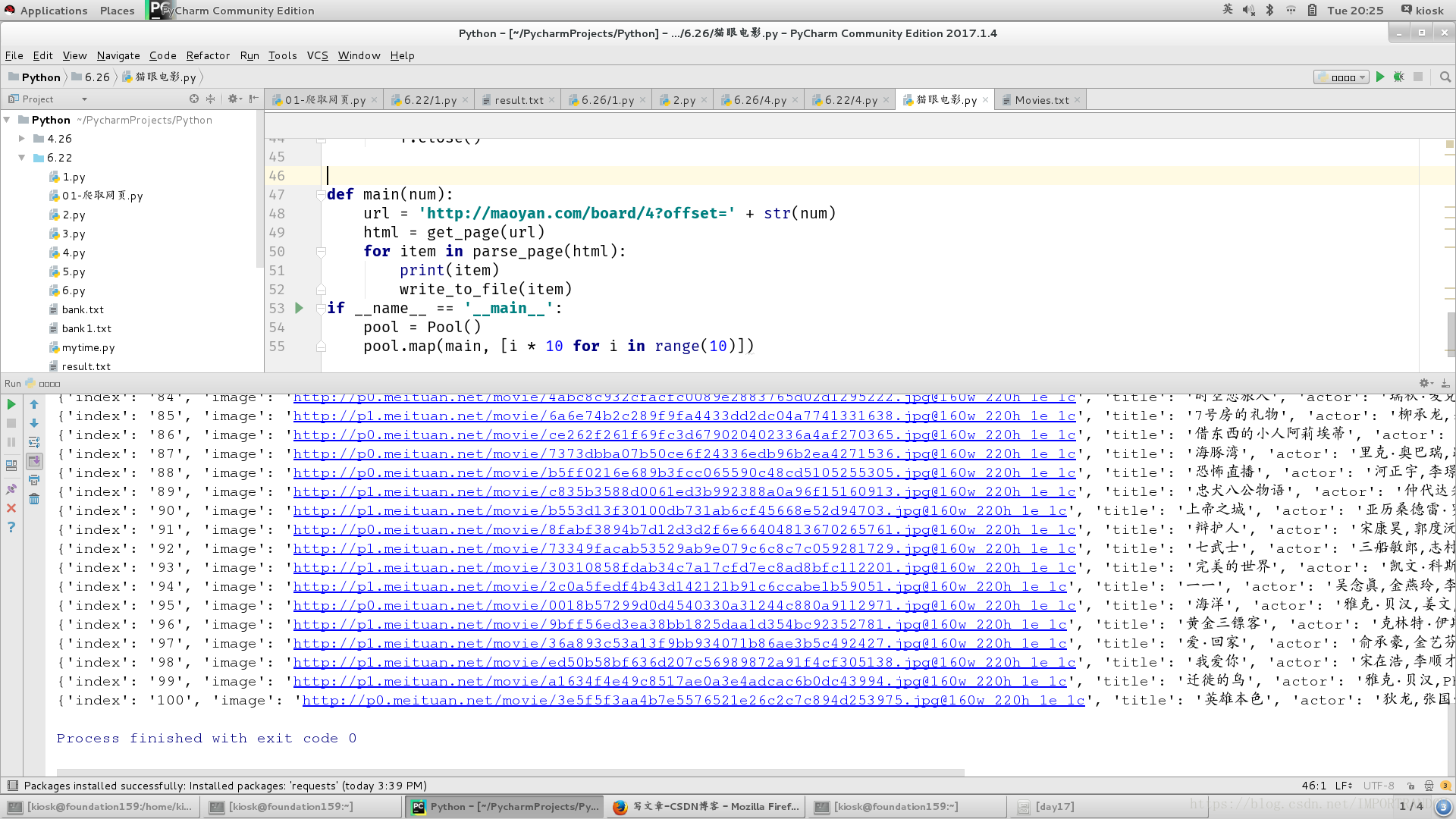
def main(num):
    url = 'http://maoyan.com/board/4?offset=' + str(num)
    html = get_page(url)
    for item in parse_page(html):
        print(item)
        write_to_file(item)
if __name__ == '__main__':
    pool = Pool()

    pool.map(main, [i * 10 for i in range(10)])


### 抓取猫眼电影Top100数据并存入数据库 为了实现这一目标,可以采用`requests`库来获取网页内容,并利用正则表达式或BeautifulSoup解析HTML文档中的所需信息。考虑到猫眼网站可能存在反爬措施,适当引入`selenium`模拟真实浏览器行为有助于绕过某些验证机制[^2]。 #### 准备工作 安装必要的Python包: ```bash pip install requests beautifulsoup4 pymysql selenium ``` 启动Selenium WebDriver(假设使用ChromeDriver),这一步骤对于处理动态加载的内容至关重要[^5]。 #### 获取页面源码 通过设置请求头模仿正常访问者的行为模式,同时加入Cookies以应对可能存在的登录状态校验或其他形式的身份识别。 ```python from selenium import webdriver import time options = webdriver.ChromeOptions() driver = webdriver.Chrome(options=options) url = "https://maoyan.com/board/4" headers = { 'User-Agent': 'Mozilla/5.0 (Windows NT 10.0; Win64; x64)', } cookies_str = '_lxsdk_cuid=xxx;' # 替换为实际获得的有效cookie字符串 driver.get(url) time.sleep(3) # 等待页面完全渲染 for cookie in cookies_str.split(';'): name, value = cookie.strip().split('=', 1) driver.add_cookie({'name': name, 'value': value}) driver.refresh() # 刷新使新添加的cookie生效 html_content = driver.page_source ``` #### 解析与提取数据 运用BeautifulSoup简化DOM树结构遍历操作,定位到包含排名、图片链接、片名、演员阵容、发布日期及评分的具体标签位置[^1]。 ```python from bs4 import BeautifulSoup soup = BeautifulSoup(html_content, 'html.parser') films = [] items = soup.find_all('dd')[:100] for item in items: rank = int(item.select_one('.board-index').text) poster_url = item.img['data-src'] title = item.a.text.strip() actors = item.select_one('.star').text.replace('\n', '').strip()[3:] release_time = item.select_one('.releasetime').text[5:] score = float(item.select_one('.integer').text[:-1]) + \ float(item.select_one('.fraction').text)/10 films.append({ 'rank': rank, 'poster_url': poster_url, 'title': title, 'actors': actors, 'release_time': release_time, 'score': score }) ``` #### 数据入库 建立MySQL连接并将每部电影的信息作为记录写入表内;这里假定已创建好名为`film_top_100`的目标表格[^3]。 ```sql CREATE TABLE IF NOT EXISTS `film_top_100` ( id INT AUTO_INCREMENT PRIMARY KEY, rank INT NOT NULL, poster_url VARCHAR(255), title TEXT CHARACTER SET utf8mb4 COLLATE utf8mb4_unicode_ci, actors TEXT CHARACTER SET utf8mb4 COLLATE utf8mb4_unicode_ci, release_time DATE, score DECIMAL(3, 1) ); ``` 执行批量插入语句前先关闭自动提交功能以便提高效率,在遇到错误时也能方便回滚事务保护已有数据完整性。 ```python import pymysql.cursors connection = pymysql.connect( host='localhost', user='root', password='password', database='movies_db', charset='utf8mb4', cursorclass=pymysql.cursors.DictCursor ) try: with connection.cursor() as cursor: sql = """ INSERT INTO film_top_100(rank, poster_url, title, actors, release_time, score) VALUES (%s, %s, %s, %s, STR_TO_DATE(%s,'%Y-%m-%d'), %s) """ for film in films: try: cursor.execute(sql, tuple(film.values())) except Exception as e: print(e) connection.commit() finally: connection.close() ```
评论
添加红包

请填写红包祝福语或标题

红包个数最小为10个

红包金额最低5元

当前余额3.43前往充值 >
需支付:10.00
成就一亿技术人!
领取后你会自动成为博主和红包主的粉丝 规则
hope_wisdom
发出的红包
实付
使用余额支付
点击重新获取
扫码支付
钱包余额 0

抵扣说明:

1.余额是钱包充值的虚拟货币,按照1:1的比例进行支付金额的抵扣。
2.余额无法直接购买下载,可以购买VIP、付费专栏及课程。

余额充值


