





文章目录
# Kubernetes

https://iothub.org.cn/docs/kubernetes/
https://iothub.org.cn/docs/kubernetes/middleware/postgresql/
一、概述
1.Operator
# awesome-operators
https://github.com/operator-framework/awesome-operators


# 安装
PostgreSQL #2	zalando-incubator/postgres-operator
https://github.com/zalando/postgres-operator


# 官方
PostgreSQL #1	CrunchyData/postgres-operator
https://github.com/CrunchyData/postgres-operator
| App Name | Github | Description |
|---|---|---|
| PostgreSQL #1 | CrunchyData/postgres-operator | PostgreSQL Operator Creates/Configures/Manages PostgreSQL Clusters on Kubernetes |
| PostgreSQL #2 | zalando-incubator/postgres-operator | Create and manage PostgreSQL HA clusters on Kubernetes using Patroni |
2.Helm
Bitnami
https://bitnami.com/
https://github.com/bitnami
https://bitnami.com/stacks
https://github.com/bitnami/charts/tree/master/bitnami
[root@k8s-master ~]# helm search repo postgresql
NAME                  	CHART VERSION	APP VERSION	DESCRIPTION
aliyun/postgresql     	0.9.1        	           	Object-relational database management system (O...
bitnami/postgresql    	10.13.9      	11.14.0    	Chart for PostgreSQL, an object-relational data...
bitnami/postgresql-ha 	8.0.3        	11.14.0    	Chart for PostgreSQL with HA architecture (usin...
aliyun/gcloud-sqlproxy	0.2.3        	           	Google Cloud SQL Proxy
二、基础
1.Operator
# 安装
PostgreSQL #2	zalando-incubator/postgres-operator
https://github.com/zalando/postgres-operator


https://postgres-operator.readthedocs.io/en/latest/

Quickstart
https://github.com/zalando/postgres-operator/blob/master/docs/quickstart.md#deployment-options
# 部署集群


# 1.下载源码
# First, clone the repository and change to the directory
git clone https://github.com/zalando/postgres-operator.git
cd postgres-operator


# 2.安装Operator
# apply the manifests in the following order
kubectl create -f manifests/configmap.yaml  # configuration
kubectl create -f manifests/operator-service-account-rbac.yaml  # identity and permissions
kubectl create -f manifests/postgres-operator.yaml  # deployment
kubectl create -f manifests/api-service.yaml  # operator API to be used by UI


# 3.部署operator UI
# manual deployment
kubectl apply -f ui/manifests/
# or kustomization
kubectl apply -k github.com/zalando/postgres-operator/ui/manifests
# or helm chart
helm install postgres-operator-ui ./charts/postgres-operator-ui


# 4.创建PostgreSQL集群
# create a Postgres cluster
kubectl create -f manifests/minimal-postgres-manifest.yaml
下载zalando/postgres-operator
# git clone https://github.com/zalando/postgres-operator.git


[root@k8s-master operator]# git clone https://github.com/zalando/postgres-operator.git
Cloning into 'postgres-operator'...
remote: Enumerating objects: 22785, done.
remote: Counting objects: 100% (342/342), done.
remote: Compressing objects: 100% (182/182), done.
remote: Total 22785 (delta 198), reused 259 (delta 153), pack-reused 22443
Receiving objects: 100% (22785/22785), 8.71 MiB | 1.68 MiB/s, done.
Resolving deltas: 100% (16287/16287), done.

[root@k8s-master operator]# ll
total 4
drwxr-xr-x 15 root root 4096 Dec  6 12:51 postgres-operator
2.Helm
[root@k8s-master ~]# helm search repo postgresql
NAME                  	CHART VERSION	APP VERSION	DESCRIPTION
bitnami/postgresql    	10.13.9      	11.14.0    	Chart for PostgreSQL, an object-relational data...
bitnami/postgresql-ha 	8.0.3        	11.14.0    	Chart for PostgreSQL with HA architecture (usin...


https://github.com/bitnami/charts/tree/master/bitnami


https://github.com/bitnami/charts/tree/master/bitnami/postgresql
https://bitnami.com/stack/postgresql/helm


https://github.com/bitnami/charts/tree/master/bitnami/postgresql-ha
https://bitnami.com/stack/postgresql-ha/helm
三、实践
1.Operator
# 安装
PostgreSQL #2	zalando-incubator/postgres-operator
https://github.com/zalando/postgres-operator


https://postgres-operator.readthedocs.io/en/latest/


# Quickstart
https://github.com/zalando/postgres-operator/blob/master/docs/quickstart.md#deployment-options
# 部署集群


# 1.下载源码
# First, clone the repository and change to the directory
git clone https://github.com/zalando/postgres-operator.git
cd postgres-operator


# 2.安装Operator
# apply the manifests in the following order
kubectl create -f manifests/configmap.yaml  # configuration
kubectl create -f manifests/operator-service-account-rbac.yaml  # identity and permissions
kubectl create -f manifests/postgres-operator.yaml  # deployment
kubectl create -f manifests/api-service.yaml  # operator API to be used by UI


# 3.部署operator UI
# manual deployment
kubectl apply -f ui/manifests/
# or kustomization
kubectl apply -k github.com/zalando/postgres-operator/ui/manifests
# or helm chart
helm install postgres-operator-ui ./charts/postgres-operator-ui


# 4.创建PostgreSQL集群
# create a Postgres cluster
kubectl create -f manifests/minimal-postgres-manifest.yaml
下载zalando/postgres-operator
# git clone https://github.com/zalando/postgres-operator.git


[root@k8s-master operator]# git clone https://github.com/zalando/postgres-operator.git
Cloning into 'postgres-operator'...
remote: Enumerating objects: 22785, done.
remote: Counting objects: 100% (342/342), done.
remote: Compressing objects: 100% (182/182), done.
remote: Total 22785 (delta 198), reused 259 (delta 153), pack-reused 22443
Receiving objects: 100% (22785/22785), 8.71 MiB | 1.68 MiB/s, done.
Resolving deltas: 100% (16287/16287), done.

[root@k8s-master operator]# ll
total 4
drwxr-xr-x 15 root root 4096 Dec  6 12:51 postgres-operator


[root@k8s-master operator]# cd postgres-operator/
[root@k8s-master postgres-operator]# ll
total 140
-rwxr-xr-x  1 root root   207 Dec  6 12:51 build-ci.sh
drwxr-xr-x  4 root root    59 Dec  6 12:51 charts
drwxr-xr-x  2 root root    21 Dec  6 12:51 cmd
-rw-r--r--  1 root root    93 Dec  6 12:51 CODEOWNERS
-rw-r--r--  1 root root   841 Dec  6 12:51 CONTRIBUTING.md
-rw-r--r--  1 root root  3103 Dec  6 12:51 delivery.yaml
drwxr-xr-x  3 root root    69 Dec  6 12:51 docker
drwxr-xr-x  4 root root   157 Dec  6 12:51 docs
drwxr-xr-x  4 root root   215 Dec  6 12:51 e2e
-rw-r--r--  1 root root   551 Dec  6 12:51 go.mod
-rw-r--r--  1 root root 76016 Dec  6 12:51 go.sum
drwxr-xr-x  2 root root   105 Dec  6 12:51 hack
drwxr-xr-x  3 root root    93 Dec  6 12:51 kubectl-pg
-rw-r--r--  1 root root  1077 Dec  6 12:51 LICENSE
-rw-r--r--  1 root root   200 Dec  6 12:51 MAINTAINERS
-rw-r--r--  1 root root  2805 Dec  6 12:51 Makefile
drwxr-xr-x  2 root root  4096 Dec  6 12:51 manifests
-rw-r--r--  1 root root   520 Dec  6 12:51 mkdocs.yml
drwxr-xr-x  2 root root    22 Dec  6 12:51 mocks
drwxr-xr-x 10 root root   122 Dec  6 12:51 pkg
-rw-r--r--  1 root root  4824 Dec  6 12:51 README.md
-rwxr-xr-x  1 root root  8325 Dec  6 12:51 run_operator_locally.sh
-rw-r--r--  1 root root   100 Dec  6 12:51 SECURITY.md
drwxr-xr-x  5 root root   225 Dec  6 12:51 ui

[root@k8s-master postgres-operator]# cd manifests/
[root@k8s-master manifests]# ll
total 148
-rw-r--r-- 1 root root   192 Dec  6 12:51 api-service.yaml
-rw-r--r-- 1 root root  5856 Dec  6 12:51 complete-postgres-manifest.yaml
-rw-r--r-- 1 root root  5322 Dec  6 12:51 configmap.yaml
-rw-r--r-- 1 root root   243 Dec  6 12:51 custom-team-membership.yaml
-rw-r--r-- 1 root root   209 Dec  6 12:51 e2e-storage-class.yaml
-rw-r--r-- 1 root root   670 Dec  6 12:51 fake-teams-api.yaml
-rw-r--r-- 1 root root   299 Dec  6 12:51 infrastructure-roles-configmap.yaml
-rw-r--r-- 1 root root   303 Dec  6 12:51 infrastructure-roles-new.yaml
-rw-r--r-- 1 root root   723 Dec  6 12:51 infrastructure-roles.yaml
-rw-r--r-- 1 root root   173 Dec  6 12:51 kustomization.yaml
-rw-r--r-- 1 root root   977 Dec  6 12:51 minimal-fake-pooler-deployment.yaml
-rw-r--r-- 1 root root   403 Dec  6 12:51 minimal-postgres-manifest-12.yaml
-rw-r--r-- 1 root root   406 Dec  6 12:51 minimal-postgres-manifest.yaml
-rw-r--r-- 1 root root 20622 Dec  6 12:51 operatorconfiguration.crd.yaml
-rw-r--r-- 1 root root  4456 Dec  6 12:51 operator-service-account-rbac.yaml
-rw-r--r-- 1 root root   275 Dec  6 12:51 platform-credentials.yaml
-rw-r--r-- 1 root root  1368 Dec  6 12:51 postgres-operator.yaml
-rw-r--r-- 1 root root   318 Dec  6 12:51 postgres-pod-priority-class.yaml
-rw-r--r-- 1 root root 21426 Dec  6 12:51 postgresql.crd.yaml
-rw-r--r-- 1 root root  5941 Dec  6 12:51 postgresql-operator-default-configuration.yaml
-rw-r--r-- 1 root root  2017 Dec  6 12:51 postgresteam.crd.yaml
-rw-r--r-- 1 root root   399 Dec  6 12:51 standby-manifest.yaml
-rw-r--r-- 1 root root   987 Dec  6 12:51 user-facing-clusterroles.yaml
1.1.部署PostgreSQL集群
1.1.1.安装Operator
# 安装步骤


# apply the manifests in the following order
kubectl create -f manifests/configmap.yaml  # configuration
kubectl create -f manifests/operator-service-account-rbac.yaml  # identity and permissions
kubectl create -f manifests/postgres-operator.yaml  # deployment
kubectl create -f manifests/api-service.yaml  # operator API to be used by UI
# 创建Operator

[root@k8s-master postgres-operator]# kubectl create -f manifests/configmap.yaml
configmap/postgres-operator created
[root@k8s-master postgres-operator]# kubectl create -f manifests/operator-service-account-rbac.yaml
serviceaccount/postgres-operator created
clusterrole.rbac.authorization.k8s.io/postgres-operator created
clusterrolebinding.rbac.authorization.k8s.io/postgres-operator created
clusterrole.rbac.authorization.k8s.io/postgres-pod created
[root@k8s-master postgres-operator]# kubectl create -f manifests/postgres-operator.yaml
deployment.apps/postgres-operator created
[root@k8s-master postgres-operator]# kubectl create -f manifests/api-service.yaml
service/postgres-operator created


[root@k8s-master ~]# kubectl get all
NAME                                     READY   STATUS             RESTARTS   AGE
pod/postgres-operator-569b58b8c6-dqfj2   0/1     ImagePullBackOff   0          11m

NAME                        TYPE        CLUSTER-IP    EXTERNAL-IP   PORT(S)    AGE
service/kubernetes          ClusterIP   10.96.0.1     <none>        443/TCP    114d
service/postgres-operator   ClusterIP   10.99.200.1   <none>        8080/TCP   11m

NAME                                READY   UP-TO-DATE   AVAILABLE   AGE
deployment.apps/postgres-operator   0/1     1            0           11m

NAME                                           DESIRED   CURRENT   READY   AGE
replicaset.apps/postgres-operator-569b58b8c6   1         1         0       11m


# 安装失败
# 无法下载镜像  docker pull registry.opensource.zalan.do/acid/postgres-operator:v1.7.1
# 通过阿里云镜像服务拉取镜像
# 无法下载镜像  registry.opensource.zalan.do/acid/postgres-operator:v1.7.1
# 通过阿里云镜像服务拉取镜像
# 详细信息参考拉取墙外镜像文档


# 拉取镜像
# docker pull registry.cn-beijing.aliyuncs.com/k8s-middleware/zalando-postgres-operator:[镜像版本号]
docker pull registry.cn-beijing.aliyuncs.com/k8s-middleware/zalando-postgres-operator:v1.7.1


# 打标签
docker tag registry.cn-beijing.aliyuncs.com/k8s-middleware/zalando-postgres-operator:v1.7.1 registry.opensource.zalan.do/acid/postgres-operator:v1.7.1


# postgres-operator正常运行
[root@k8s-master ~]# kubectl get all
NAME                                     READY   STATUS    RESTARTS   AGE
pod/postgres-operator-569b58b8c6-dqfj2   1/1     Running   0          124m

NAME                        TYPE        CLUSTER-IP    EXTERNAL-IP   PORT(S)    AGE
service/kubernetes          ClusterIP   10.96.0.1     <none>        443/TCP    114d
service/postgres-operator   ClusterIP   10.99.200.1   <none>        8080/TCP   124m

NAME                                READY   UP-TO-DATE   AVAILABLE   AGE
deployment.apps/postgres-operator   1/1     1            1           124m

NAME                                           DESIRED   CURRENT   READY   AGE
replicaset.apps/postgres-operator-569b58b8c6   1         1         1       124m
1.1.2.安装Operator UI(略)
本部分未安装
# manual deployment
kubectl apply -f ui/manifests/

# or kustomization
kubectl apply -k github.com/zalando/postgres-operator/ui/manifests
# 创建

[root@k8s-master postgres-operator-1.6.1]# kubectl apply -f ui/manifests/
deployment.apps/postgres-operator-ui created
Warning: networking.k8s.io/v1beta1 Ingress is deprecated in v1.19+, unavailable in v1.22+; use networking.k8s.io/v1 Ingress
ingress.networking.k8s.io/postgres-operator-ui created
service/postgres-operator-ui created
serviceaccount/postgres-operator-ui created
clusterrole.rbac.authorization.k8s.io/postgres-operator-ui created
clusterrolebinding.rbac.authorization.k8s.io/postgres-operator-ui created
error: unable to recognize "ui/manifests/kustomization.yaml": no matches for kind "Kustomization" in version "kustomize.config.k8s.io/v1beta1"


[root@k8s-master postgres-operator-1.6.1]# kubectl apply -k github.com/zalando/postgres-operator/ui/manifests
serviceaccount/postgres-operator-ui unchanged
clusterrole.rbac.authorization.k8s.io/postgres-operator-ui unchanged
clusterrolebinding.rbac.authorization.k8s.io/postgres-operator-ui unchanged
service/postgres-operator-ui unchanged
deployment.apps/postgres-operator-ui configured
ingress.networking.k8s.io/postgres-operator-ui configured


# 下载不下来
[root@k8s-master postgres-operator-1.6.1]# kubectl get pod -l name=postgres-operator-ui
NAME                                    READY   STATUS             RESTARTS   AGE
postgres-operator-ui-6577ddc48c-2wzdc   0/1     ImagePullBackOff   0          4m48s
postgres-operator-ui-6879669844-2j8tz   0/1     ImagePullBackOff   0          4m6s


# 无法下载镜像  registry.opensource.zalan.do/acid/postgres-operator:v1.7.1
# 通过阿里云镜像服务拉取镜像
1.1.3.安装Postgres集群
# create a Postgres cluster
kubectl create -f manifests/minimal-postgres-manifest.yaml

# check the deployed cluster
kubectl get postgresql

# check created database pods
kubectl get pods -l application=spilo -L spilo-role

# check created service resources
kubectl get svc -l application=spilo -L spilo-role
[root@k8s-master postgres-operator]# kubectl create -f manifests/minimal-postgres-manifest-12.yaml
postgresql.acid.zalan.do/acid-upgrade-test created


# 查看
[root@k8s-master ~]# kubectl get postgresql
NAME                TEAM   VERSION   PODS   VOLUME   CPU-REQUEST   MEMORY-REQUEST   AGE   STATUS
acid-upgrade-test   acid   12        2      1Gi                                     36s   Creating


[root@k8s-master ~]# kubectl get svc -l application=spilo -L spilo-role
NAME                     TYPE        CLUSTER-IP      EXTERNAL-IP   PORT(S)    AGE   SPILO-ROLE
acid-upgrade-test        ClusterIP   10.108.89.38    <none>        5432/TCP   92s   master
acid-upgrade-test-repl   ClusterIP   10.107.53.203   <none>        5432/TCP   92s   replica


[root@k8s-master ~]# kubectl get pods -l application=spilo -L spilo-role
NAME                  READY   STATUS    RESTARTS   AGE    SPILO-ROLE
acid-upgrade-test-0   0/1     Pending   0          106s
Volumes:
  pgdata:
    Type:       PersistentVolumeClaim (a reference to a PersistentVolumeClaim in the same namespace)
    ClaimName:  pgdata-acid-minimal-cluster-0
    ReadOnly:   false


# 手动创建pvc
# pgdata-acid-minimal-cluster-0.yaml

apiVersion: v1
kind: PersistentVolumeClaim
metadata:
  name: pgdata-acid-minimal-cluster-0
  namespace: default
spec:
  accessModes:
    - ReadWriteOnce
  storageClassName: rook-ceph-block
  resources:
    requests:
      storage: 10Gi


# 无法下载镜像  registry.opensource.zalan.do/acid/spilo-14:2.1-p3
# 通过阿里云镜像服务拉取镜像


# 拉取镜像
# docker pull registry.cn-beijing.aliyuncs.com/k8s-middleware/zalando-spilo-14:[镜像版本号]
docker pull registry.cn-beijing.aliyuncs.com/k8s-middleware/zalando-spilo-14:2.1-p3


# 打标签
docker tag registry.cn-beijing.aliyuncs.com/k8s-middleware/zalando-postgres-operator:v1.7.1 registry.opensource.zalan.do/acid/postgres-operator:v1.7.1
1.2.测试
# 查看

[root@k8s-master operator]# kubectl get all
NAME                                     READY   STATUS    RESTARTS   AGE
pod/acid-minimal-cluster-0               1/1     Running   0          16h
pod/acid-minimal-cluster-1               1/1     Running   0          15h
pod/postgres-operator-569b58b8c6-dqfj2   1/1     Running   0          18h

NAME                                  TYPE        CLUSTER-IP      EXTERNAL-IP   PORT(S)    AGE
service/acid-minimal-cluster          ClusterIP   10.100.29.145   <none>        5432/TCP   16h
service/acid-minimal-cluster-config   ClusterIP   None            <none>        <none>     15h
service/acid-minimal-cluster-repl     ClusterIP   10.103.33.77    <none>        5432/TCP   16h
service/kubernetes                    ClusterIP   10.96.0.1       <none>        443/TCP    114d
service/postgres-operator             ClusterIP   10.99.200.1     <none>        8080/TCP   18h

NAME                                READY   UP-TO-DATE   AVAILABLE   AGE
deployment.apps/postgres-operator   1/1     1            1           18h

NAME                                           DESIRED   CURRENT   READY   AGE
replicaset.apps/postgres-operator-569b58b8c6   1         1         1       18h

NAME                                    READY   AGE
statefulset.apps/acid-minimal-cluster   2/2     16h

NAME                                            TEAM   VERSION   PODS   VOLUME   CPU-REQUEST   MEMORY-REQUEST   AGE   STATUS
postgresql.acid.zalan.do/acid-minimal-cluster   acid   14        2      1Gi
[root@k8s-master operator]# kubectl get pod -o wide
NAME                                 READY   STATUS    RESTARTS   AGE   IP              NODE        NOMINATED NODE   READINESS GATES
     acid-minimal-cluster-0               1/1     Running   0          16h   10.244.36.105   k8s-node1   <none>           <none>
     acid-minimal-cluster-1               1/1     Running   0          15h   10.244.36.96    k8s-node1   <none>           <none>


[root@k8s-master operator]# kubectl get pod --show-labels
NAME                                 READY   STATUS    RESTARTS   AGE   LABELS


# 主
  acid-minimal-cluster-0               1/1     Running   0          16h   application=spilo,cluster-name=acid-minimal-cluster,controller-revision-hash=acid-minimal-cluster-77b87b69f9,spilo-role=master,statefulset.kubernetes.io/pod-name=acid-minimal-cluster-0,team=acid


# 从
     acid-minimal-cluster-1               1/1     Running   0          15h   application=spilo,cluster-name=acid-minimal-cluster,controller-revision-hash=acid-minimal-cluster-77b87b69f9,spilo-role=replica,statefulset.kubernetes.io/pod-name=acid-minimal-cluster-1,team=acid
# Service

[root@k8s-master operator]# kubectl get svc
NAME                          TYPE        CLUSTER-IP      EXTERNAL-IP   PORT(S)    AGE
acid-minimal-cluster          ClusterIP   10.100.29.145   <none>        5432/TCP   16h
acid-minimal-cluster-config   ClusterIP   None            <none>        <none>     15h
acid-minimal-cluster-repl     ClusterIP   10.103.33.77    <none>        5432/TCP   16h


# 主
[root@k8s-master operator]# kubectl describe svc acid-minimal-cluster
Name:              acid-minimal-cluster
Namespace:         default
Labels:            application=spilo
                   cluster-name=acid-minimal-cluster
                   spilo-role=master
                   team=acid
Annotations:       <none>
Selector:          <none>
Type:              ClusterIP
IP Families:       <none>
IP:                10.100.29.145
IPs:               10.100.29.145
Port:              postgresql  5432/TCP
TargetPort:        5432/TCP
Endpoints:         10.244.36.105:5432
Session Affinity:  None
Events:            <none>


# 从
[root@k8s-master operator]# kubectl describe svc acid-minimal-cluster-repl
Name:              acid-minimal-cluster-repl
Namespace:         default
Labels:            application=spilo
                   cluster-name=acid-minimal-cluster
                   spilo-role=replica
                   team=acid
Annotations:       <none>
Selector:          application=spilo,cluster-name=acid-minimal-cluster,spilo-role=replica
Type:              ClusterIP
IP Families:       <none>
IP:                10.103.33.77
IPs:               10.103.33.77
Port:              postgresql  5432/TCP
TargetPort:        5432/TCP
Endpoints:         10.244.36.96:5432
Session Affinity:  None
Events:            <none>
[root@k8s-master operator]# kubectl exec -it acid-minimal-cluster-0 -- bash

 ____        _ _
/ ___| _ __ (_) | ___
\___ \| '_ \| | |/ _ \
 ___) | |_) | | | (_) |
|____/| .__/|_|_|\___/
      |_|

This container is managed by runit, when stopping/starting services use sv

Examples:

sv stop cron
sv restart patroni

Current status: (sv status /etc/service/*)

run: /etc/service/patroni: (pid 35) 57645s
run: /etc/service/pgqd: (pid 33) 57645s
root@acid-minimal-cluster-0:/home/postgres# ls
etc  pgdata  pgq_ticker.ini  postgres.yml
root@acid-minimal-cluster-0:/home/postgres# cd pgdata/
root@acid-minimal-cluster-0:/home/postgres/pgdata# ls
lost+found  pgroot
1.3.外部访问数据库
1.修改service类型
[root@k8s-master operator]# kubectl get svc
NAME                          TYPE        CLUSTER-IP      EXTERNAL-IP   PORT(S)    AGE
acid-minimal-cluster          ClusterIP   10.100.29.145   <none>        5432/TCP   16h
acid-minimal-cluster-config   ClusterIP   None            <none>        <none>     16h
acid-minimal-cluster-repl     ClusterIP   10.103.33.77    <none>        5432/TCP   16h


# 修改service类型
[root@k8s-master operator]# kubectl edit svc acid-minimal-cluster
service/acid-minimal-cluster edited

[root@k8s-master operator]# kubectl edit svc acid-minimal-cluster-repl
service/acid-minimal-cluster-repl edited

spec:
......
  type: NodePort


[root@k8s-master ~]# kubectl get svc
NAME                          TYPE        CLUSTER-IP      EXTERNAL-IP   PORT(S)          AGE
acid-minimal-cluster          NodePort    10.100.29.145   <none>        5432:30915/TCP   17h
acid-minimal-cluster-config   ClusterIP   None            <none>        <none>           17h
acid-minimal-cluster-repl     NodePort    10.103.33.77    <none>        5432:31573/TCP   17h
# 新建service


# pg-svc-master.yaml

apiVersion: v1
kind: Service
metadata:
  namespace: default
  name: pg-svc-master
  labels:
    spilo-role: master
spec:
  type: NodePort
  ports:
    - port: 5432
      name: pg-svc-master
      targetPort: 5432
  selector:
    spilo-role: master


# pg-svc-replica.yaml

apiVersion: v1
kind: Service
metadata:
  namespace: default
  name: pg-svc-replica
  labels:
    spilo-role: replica
spec:
  type: NodePort
  ports:
    - port: 5432
      name: pg-svc-replica
      targetPort: 5432
  selector:
    spilo-role: replica


[root@k8s-master operator]# kubectl get svc
NAME                          TYPE        CLUSTER-IP       EXTERNAL-IP   PORT(S)          AGE
acid-minimal-cluster          ClusterIP   10.100.29.145    <none>        5432/TCP         18h
acid-minimal-cluster-config   ClusterIP   None             <none>        <none>           17h
acid-minimal-cluster-repl     ClusterIP   10.103.33.77     <none>        5432/TCP         18h
kubernetes                    ClusterIP   10.96.0.1        <none>        443/TCP          114d
pg-svc-master                 NodePort    10.104.70.22     <none>        5432:31669/TCP   2m26s
pg-svc-replica                NodePort    10.105.246.108   <none>        5432:30871/TCP   8s
postgres-operator             ClusterIP   10.99.200.1      <none>        8080/TCP         20h
# 修改主数据库密码 postgres

[root@k8s-master ~]#  kubectl get pod
NAME                                 READY   STATUS    RESTARTS   AGE
acid-minimal-cluster-0               1/1     Running   0          17h
acid-minimal-cluster-1               1/1     Running   0          16h
postgres-operator-569b58b8c6-dqfj2   1/1     Running   0          19h
[root@k8s-master ~]#
[root@k8s-master ~]#
[root@k8s-master ~]# kubectl exec -it acid-minimal-cluster-0 -- bash

 ____        _ _
/ ___| _ __ (_) | ___
\___ \| '_ \| | |/ _ \
 ___) | |_) | | | (_) |
|____/| .__/|_|_|\___/
      |_|

This container is managed by runit, when stopping/starting services use sv

Examples:

sv stop cron
sv restart patroni

Current status: (sv status /etc/service/*)

run: /etc/service/patroni: (pid 35) 60363s
run: /etc/service/pgqd: (pid 33) 60363s
root@acid-minimal-cluster-0:/home/postgres#
root@acid-minimal-cluster-0:/home/postgres#
root@acid-minimal-cluster-0:/home/postgres# su - postgres
postgres@acid-minimal-cluster-0:~$ psql
psql (14.0 (Ubuntu 14.0-1.pgdg18.04+1))
Type "help" for help.

postgres=# ALTER USER postgres with encrypted password 'postgres';
ALTER ROLE
postgres=# \d
                      List of relations
 Schema |          Name           |     Type      |  Owner
--------+-------------------------+---------------+----------
 public | failed_authentication_0 | view          | postgres
 public | failed_authentication_1 | view          | postgres
 public | failed_authentication_2 | view          | postgres
 public | failed_authentication_3 | view          | postgres
 public | failed_authentication_4 | view          | postgres
 public | failed_authentication_5 | view          | postgres
 public | failed_authentication_6 | view          | postgres
 public | failed_authentication_7 | view          | postgres
 public | pg_auth_mon             | view          | postgres
 public | pg_stat_kcache          | view          | postgres
 public | pg_stat_kcache_detail   | view          | postgres
 public | pg_stat_statements      | view          | postgres
 public | pg_stat_statements_info | view          | postgres
 public | postgres_log            | table         | postgres
 public | postgres_log_0          | foreign table | postgres
 public | postgres_log_1          | foreign table | postgres
 public | postgres_log_2          | foreign table | postgres
 public | postgres_log_3          | foreign table | postgres
 public | postgres_log_4          | foreign table | postgres
 public | postgres_log_5          | foreign table | postgres
 public | postgres_log_6          | foreign table | postgres
 public | postgres_log_7          | foreign table | postgres
(22 rows)

postgres=# \du
                                                     List of roles
    Role name    |                         Attributes                         |               Member of
-----------------+------------------------------------------------------------+----------------------------------------
 admin           | Create DB, Cannot login                                    | {bar_owner,zalando,foo_user}
 bar_data_owner  | Cannot login                                               | {bar_data_reader,bar_data_writer}
 bar_data_reader | Cannot login                                               | {}
 bar_data_writer | Cannot login                                               | {bar_data_reader}
 bar_owner       | Cannot login                                               | {bar_reader,bar_writer,bar_data_owner}
 bar_reader      | Cannot login                                               | {}
 bar_writer      | Cannot login                                               | {bar_reader}
 foo_user        |                                                            | {}
 postgres        | Superuser, Create role, Create DB, Replication, Bypass RLS | {}
 robot_zmon      | Cannot login                                               | {}
 standby         | Replication                                                | {}
 zalando         | Superuser, Create DB                                       | {}
 zalandos        | Create DB, Cannot login                                    | {}

postgres=# \l
                                  List of databases
   Name    |   Owner   | Encoding |   Collate   |    Ctype    |   Access privileges
-----------+-----------+----------+-------------+-------------+-----------------------
 bar       | bar_owner | UTF8     | en_US.utf-8 | en_US.utf-8 |
 foo       | zalando   | UTF8     | en_US.utf-8 | en_US.utf-8 |
 postgres  | postgres  | UTF8     | en_US.utf-8 | en_US.utf-8 |
 template0 | postgres  | UTF8     | en_US.utf-8 | en_US.utf-8 | =c/postgres          +
           |           |          |             |             | postgres=CTc/postgres
 template1 | postgres  | UTF8     | en_US.utf-8 | en_US.utf-8 | =c/postgres          +
           |           |          |             |             | postgres=CTc/postgres
(5 rows)

postgres=# \q
postgres@acid-minimal-cluster-0:~$
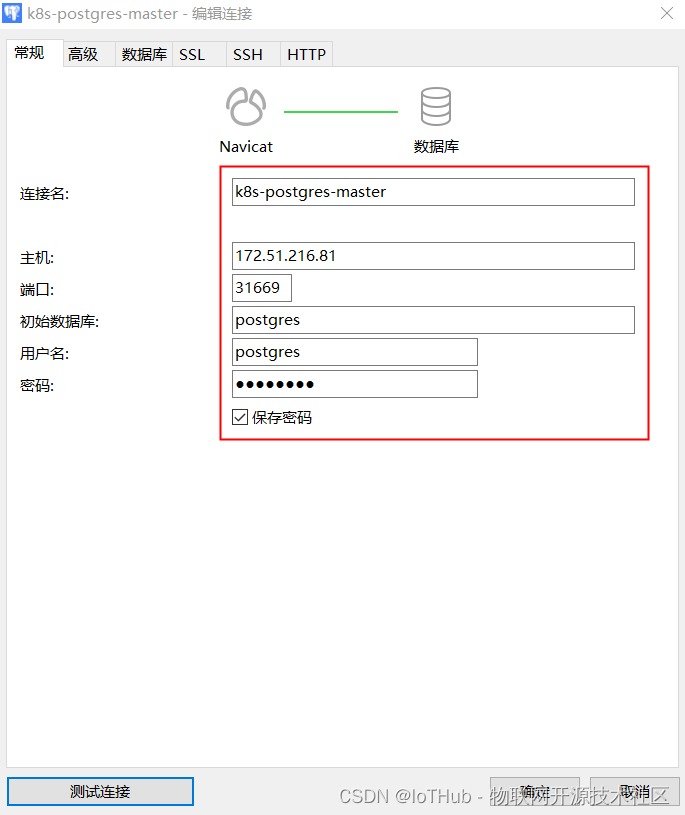
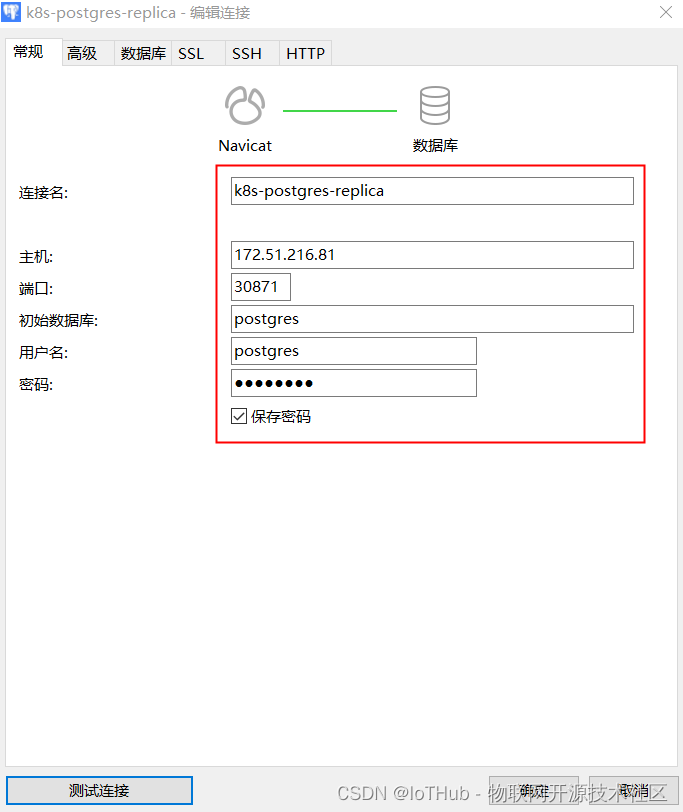
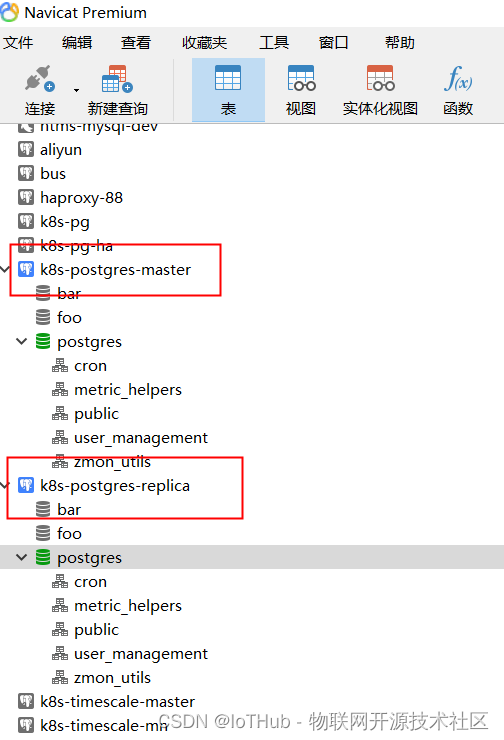
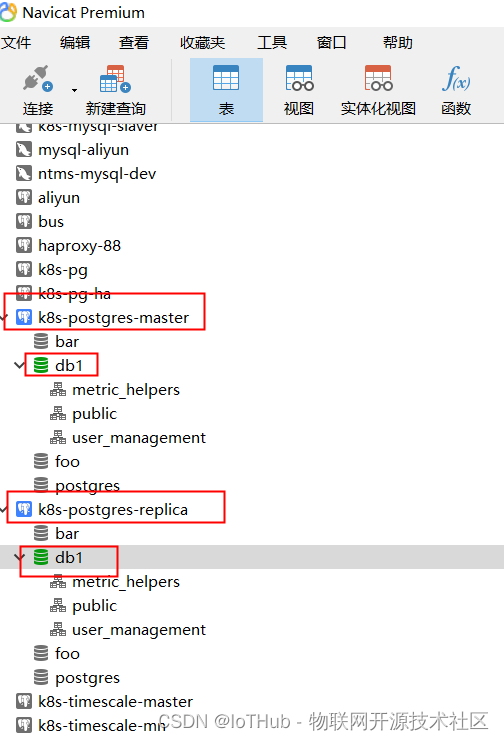
2.访问数据库
# 访问地址


# 主
172.51.216.81
5432:31669
postgres
postgres

# 从
172.51.216.81
5432:30871
postgres
postgres
1.4.总结
# 安装
PostgreSQL #2	zalando-incubator/postgres-operator
https://github.com/zalando/postgres-operator
[root@k8s-master manifests]# kubectl get svc
NAME                          TYPE        CLUSTER-IP       EXTERNAL-IP   PORT(S)          AGE
acid-minimal-cluster          ClusterIP   10.100.29.145    <none>        5432/TCP         18h
acid-minimal-cluster-repl     ClusterIP   10.103.33.77     <none>        5432/TCP         18h

pg-svc-master                 NodePort    10.104.70.22     <none>        5432:31669/TCP   23m
pg-svc-replica                NodePort    10.105.246.108   <none>        5432:30871/TCP   20m


# 主
acid-minimal-cluster          ClusterIP   10.100.29.145    <none>        5432/TCP         18h
# 从
acid-minimal-cluster-repl     ClusterIP   10.103.33.77     <none>        5432/TCP         18h


# 主
acid-minimal-cluster
5432:31669
postgres
postgres

# 从
acid-minimal-cluster-repl
5432:30871
postgres
postgres
# 使用方式

# 搭建的是主从集群
# 应用对主(acid-minimal-cluster)进行读写
1.5.删除集群
# 查看

[root@k8s-master manifests]# kubectl get all
NAME                                     READY   STATUS    RESTARTS   AGE
pod/acid-minimal-cluster-0               1/1     Running   0          18h
pod/acid-minimal-cluster-1               1/1     Running   0          18h
pod/postgres-operator-569b58b8c6-dqfj2   1/1     Running   0          21h

NAME                                  TYPE        CLUSTER-IP       EXTERNAL-IP   PORT(S)          AGE
service/acid-minimal-cluster          ClusterIP   10.100.29.145    <none>        5432/TCP         18h
service/acid-minimal-cluster-config   ClusterIP   None             <none>        <none>           18h
service/acid-minimal-cluster-repl     ClusterIP   10.103.33.77     <none>        5432/TCP         18h
service/pg-svc-master                 NodePort    10.104.70.22     <none>        5432:31669/TCP   27m
service/pg-svc-replica                NodePort    10.105.246.108   <none>        5432:30871/TCP   25m
service/postgres-operator             ClusterIP   10.99.200.1      <none>        8080/TCP         21h

NAME                                READY   UP-TO-DATE   AVAILABLE   AGE
deployment.apps/postgres-operator   1/1     1            1           21h

NAME                                           DESIRED   CURRENT   READY   AGE
replicaset.apps/postgres-operator-569b58b8c6   1         1         1       21h

NAME                                    READY   AGE
statefulset.apps/acid-minimal-cluster   2/2     18h

NAME                                            TEAM   VERSION   PODS   VOLUME   CPU-REQUEST   MEMORY-REQUEST   AGE   STATUS
postgresql.acid.zalan.do/acid-minimal-cluster   acid   14        2      1Gi                                     18h   SyncFailed


[root@k8s-master manifests]# kubectl get pvc
NAME                            STATUS   VOLUME                                     CAPACITY   ACCESS MODES   STORAGECLASS      AGE
pgdata-acid-minimal-cluster-0   Bound    pvc-106afdbb-9db5-41f0-b08a-3861c7c6c13a   10Gi       RWO            rook-ceph-block   18h
pgdata-acid-minimal-cluster-1   Bound    pvc-65cc4e9e-ba73-4012-a65f-10544230b521   10Gi       RWO            rook-ceph-block   18h
# 删除PostgreSQL集群

[root@k8s-master postgres-operator]# kubectl delete -f manifests/minimal-postgres-manifest.yaml
postgresql.acid.zalan.do "acid-minimal-cluster" deleted
[root@k8s-master postgres-operator]# kubectl delete -f manifests/api-service.yaml
service "postgres-operator" deleted
[root@k8s-master postgres-operator]# kubectl delete -f manifests/postgres-operator.yaml
deployment.apps "postgres-operator" deleted
[root@k8s-master postgres-operator]# kubectl delete -f manifests/operator-service-account-rbac.yaml
serviceaccount "postgres-operator" deleted
clusterrole.rbac.authorization.k8s.io "postgres-operator" deleted
clusterrolebinding.rbac.authorization.k8s.io "postgres-operator" deleted
clusterrole.rbac.authorization.k8s.io "postgres-pod" deleted
[root@k8s-master postgres-operator]# kubectl delete -f manifests/configmap.yaml
configmap "postgres-operator" deleted

[root@k8s-master postgres-operator]# kubectl delete pvc pgdata-acid-minimal-cluster-0
persistentvolumeclaim "pgdata-acid-minimal-cluster-0" deleted
[root@k8s-master postgres-operator]# kubectl delete pvc pgdata-acid-minimal-cluster-1
persistentvolumeclaim "pgdata-acid-minimal-cluster-1" deleted
1.6.重新安装(自动分配存储)
1.6.1.安装Operator
# 安装步骤


# apply the manifests in the following order
kubectl create -f manifests/configmap.yaml  # configuration
kubectl create -f manifests/operator-service-account-rbac.yaml  # identity and permissions
kubectl create -f manifests/postgres-operator.yaml  # deployment
kubectl create -f manifests/api-service.yaml  # operator API to be used by UI
# 创建Operator

[root@k8s-master postgres-operator]# kubectl create -f manifests/configmap.yaml
configmap/postgres-operator created
[root@k8s-master postgres-operator]# kubectl create -f manifests/operator-service-account-rbac.yaml
serviceaccount/postgres-operator created
clusterrole.rbac.authorization.k8s.io/postgres-operator created
clusterrolebinding.rbac.authorization.k8s.io/postgres-operator created
clusterrole.rbac.authorization.k8s.io/postgres-pod created
[root@k8s-master postgres-operator]# kubectl create -f manifests/postgres-operator.yaml
deployment.apps/postgres-operator created
[root@k8s-master postgres-operator]# kubectl create -f manifests/api-service.yaml
service/postgres-operator created


[root@k8s-master postgres-operator]# kubectl get all
NAME                                     READY   STATUS    RESTARTS   AGE
pod/postgres-operator-569b58b8c6-6qdlw   1/1     Running   0          53s

NAME                        TYPE        CLUSTER-IP       EXTERNAL-IP   PORT(S)          AGE
service/kubernetes          ClusterIP   10.96.0.1        <none>        443/TCP          114d
service/pg-svc-master       NodePort    10.104.70.22     <none>        5432:31669/TCP   39m
service/pg-svc-replica      NodePort    10.105.246.108   <none>        5432:30871/TCP   36m
service/postgres-operator   ClusterIP   10.98.87.50      <none>        8080/TCP         42s

NAME                                READY   UP-TO-DATE   AVAILABLE   AGE
deployment.apps/postgres-operator   1/1     1            1           53s

NAME                                           DESIRED   CURRENT   READY   AGE
replicaset.apps/postgres-operator-569b58b8c6   1         1         1       53s
1.6.2.修改配置
# vim complete-postgres-manifest.yaml

  volume:
    size: 20Gi
    storageClass: "rook-ceph-block"
1.6.3.安装Postgres集群
# create a Postgres cluster
kubectl create -f manifests/complete-postgres-manifest.yaml

# check the deployed cluster
kubectl get postgresql

# check created database pods
kubectl get pods -l application=spilo -L spilo-role

# check created service resources
kubectl get svc -l application=spilo -L spilo-role
[root@k8s-master postgres-operator]# kubectl create -f manifests/complete-postgres-manifest.yaml
postgresql.acid.zalan.do/acid-test-cluster created


# 查看
[root@k8s-master postgres-operator]# kubectl get all
NAME                                     READY   STATUS    RESTARTS   AGE
pod/acid-test-cluster-0                  1/1     Running   0          80s
pod/acid-test-cluster-1                  1/1     Running   0          41s
pod/postgres-operator-569b58b8c6-6qdlw   1/1     Running   0          10m

NAME                               TYPE        CLUSTER-IP       EXTERNAL-IP   PORT(S)          AGE
service/acid-test-cluster          ClusterIP   10.105.111.206   <none>        5432/TCP         81s
service/acid-test-cluster-config   ClusterIP   None             <none>        <none>           38s
service/acid-test-cluster-repl     ClusterIP   10.103.24.96     <none>        5432/TCP         81s
service/postgres-operator          ClusterIP   10.98.87.50      <none>        8080/TCP         10m

NAME                                READY   UP-TO-DATE   AVAILABLE   AGE
deployment.apps/postgres-operator   1/1     1            1           10m

NAME                                           DESIRED   CURRENT   READY   AGE
replicaset.apps/postgres-operator-569b58b8c6   1         1         1       10m

NAME                                 READY   AGE
statefulset.apps/acid-test-cluster   2/2     81s

NAME                                         TEAM   VERSION   PODS   VOLUME   CPU-REQUEST   MEMORY-REQUEST   AGE   STATUS
postgresql.acid.zalan.do/acid-test-cluster   acid   14        2      20Gi     10m           100Mi            82s   Running


[root@k8s-master postgres-operator]# kubectl get pvc
NAME                         STATUS   VOLUME                                     CAPACITY   ACCESS MODES   STORAGECLASS      AGE
pgdata-acid-test-cluster-0   Bound    pvc-6b5cdb31-d549-4bf7-9742-c7ba5a9f5c37   20Gi       RWO            rook-ceph-block   109s
pgdata-acid-test-cluster-1   Bound    pvc-4bb98bf7-b58e-4368-93f4-7fa2ac2c5f17   20Gi       RWO            rook-ceph-block   70s
1.6.4.外部访问数据库
1.新建service
# 新建service


# pg-svc-master.yaml

apiVersion: v1
kind: Service
metadata:
  namespace: default
  name: pg-svc-master
  labels:
    spilo-role: master
spec:
  type: NodePort
  ports:
    - port: 5432
      name: pg-svc-master
      targetPort: 5432
  selector:
    spilo-role: master


# pg-svc-replica.yaml

apiVersion: v1
kind: Service
metadata:
  namespace: default
  name: pg-svc-replica
  labels:
    spilo-role: replica
spec:
  type: NodePort
  ports:
    - port: 5432
      name: pg-svc-replica
      targetPort: 5432
  selector:
    spilo-role: replica


[root@k8s-master postgres-operator]# kubectl get svc
NAME                       TYPE        CLUSTER-IP       EXTERNAL-IP   PORT(S)          AGE
acid-test-cluster          ClusterIP   10.105.111.206   <none>        5432/TCP         7m54s
acid-test-cluster-config   ClusterIP   None             <none>        <none>           7m11s
acid-test-cluster-repl     ClusterIP   10.103.24.96     <none>        5432/TCP         7m54s

pg-svc-master              NodePort    10.104.70.22     <none>        5432:31669/TCP   55m
pg-svc-replica             NodePort    10.105.246.108   <none>        5432:30871/TCP   52m
# 修改主数据库密码 postgres

[root@k8s-master ~]#  kubectl get pod
NAME                                 READY   STATUS    RESTARTS   AGE
acid-minimal-cluster-0               1/1     Running   0          17h
acid-minimal-cluster-1               1/1     Running   0          16h
postgres-operator-569b58b8c6-dqfj2   1/1     Running   0          19h


[root@k8s-master operator]# kubectl exec -it acid-test-cluster-0 -- bash

 ____        _ _
/ ___| _ __ (_) | ___
\___ \| '_ \| | |/ _ \
 ___) | |_) | | | (_) |
|____/| .__/|_|_|\___/
      |_|

This container is managed by runit, when stopping/starting services use sv

Examples:

sv stop cron
sv restart patroni

Current status: (sv status /etc/service/*)

run: /etc/service/patroni: (pid 33) 552s
run: /etc/service/pgqd: (pid 34) 552s
root@acid-test-cluster-0:/home/postgres# su - postgres
postgres@acid-minimal-cluster-0:~$ psql
psql (14.0 (Ubuntu 14.0-1.pgdg18.04+1))
Type "help" for help.

postgres=# ALTER USER postgres with encrypted password 'postgres';
ALTER ROLE
postgres=# \d
                      List of relations
 Schema |          Name           |     Type      |  Owner
--------+-------------------------+---------------+----------
 public | failed_authentication_0 | view          | postgres
 public | failed_authentication_1 | view          | postgres
 public | failed_authentication_2 | view          | postgres
 public | failed_authentication_3 | view          | postgres
 public | failed_authentication_4 | view          | postgres
 public | failed_authentication_5 | view          | postgres
 public | failed_authentication_6 | view          | postgres
 public | failed_authentication_7 | view          | postgres
 public | pg_auth_mon             | view          | postgres
 public | pg_stat_kcache          | view          | postgres
 public | pg_stat_kcache_detail   | view          | postgres
 public | pg_stat_statements      | view          | postgres
 public | pg_stat_statements_info | view          | postgres
 public | postgres_log            | table         | postgres
 public | postgres_log_0          | foreign table | postgres
 public | postgres_log_1          | foreign table | postgres
 public | postgres_log_2          | foreign table | postgres
 public | postgres_log_3          | foreign table | postgres
 public | postgres_log_4          | foreign table | postgres
 public | postgres_log_5          | foreign table | postgres
 public | postgres_log_6          | foreign table | postgres
 public | postgres_log_7          | foreign table | postgres
(22 rows)

postgres=# \du
                                                     List of roles
    Role name    |                         Attributes                         |               Member of
-----------------+------------------------------------------------------------+----------------------------------------
 admin           | Create DB, Cannot login                                    | {bar_owner,zalando,foo_user}
 bar_data_owner  | Cannot login                                               | {bar_data_reader,bar_data_writer}
 bar_data_reader | Cannot login                                               | {}
 bar_data_writer | Cannot login                                               | {bar_data_reader}
 bar_owner       | Cannot login                                               | {bar_reader,bar_writer,bar_data_owner}
 bar_reader      | Cannot login                                               | {}
 bar_writer      | Cannot login                                               | {bar_reader}
 foo_user        |                                                            | {}
 postgres        | Superuser, Create role, Create DB, Replication, Bypass RLS | {}
 robot_zmon      | Cannot login                                               | {}
 standby         | Replication                                                | {}
 zalando         | Superuser, Create DB                                       | {}
 zalandos        | Create DB, Cannot login                                    | {}

postgres=# \l
                                  List of databases
   Name    |   Owner   | Encoding |   Collate   |    Ctype    |   Access privileges
-----------+-----------+----------+-------------+-------------+-----------------------
 bar       | bar_owner | UTF8     | en_US.utf-8 | en_US.utf-8 |
 foo       | zalando   | UTF8     | en_US.utf-8 | en_US.utf-8 |
 postgres  | postgres  | UTF8     | en_US.utf-8 | en_US.utf-8 |
 template0 | postgres  | UTF8     | en_US.utf-8 | en_US.utf-8 | =c/postgres          +
           |           |          |             |             | postgres=CTc/postgres
 template1 | postgres  | UTF8     | en_US.utf-8 | en_US.utf-8 | =c/postgres          +
           |           |          |             |             | postgres=CTc/postgres
(5 rows)

postgres=# \q
postgres@acid-minimal-cluster-0:~$
2.访问数据库
# 访问地址


# 主
172.51.216.81
5432:31669
postgres
postgres

# 从
172.51.216.81
5432:30871
postgres
postgres
2.Helm
2.1.部署PostgreSQL
# 部署单实例

[root@k8s-master ~]# helm search repo postgresql
NAME                  	CHART VERSION	APP VERSION	DESCRIPTION
bitnami/postgresql    	10.13.9      	11.14.0    	Chart for PostgreSQL, an object-relational data...


https://github.com/bitnami/charts/tree/master/bitnami

https://github.com/bitnami/charts/tree/master/bitnami/postgresql
2.1.1.下载安装包
[root@k8s-master helm]# helm fetch bitnami/postgresql
[root@k8s-master helm]# ll
total 56
-rw-r--r-- 1 root root 53254 Dec  6 16:26 postgresql-10.13.9.tgz
[root@k8s-master helm]# tar -zxf postgresql-10.13.9.tgz
[root@k8s-master helm]# ll
total 56
drwxr-xr-x 6 root root   177 Dec  6 16:26 postgresql
-rw-r--r-- 1 root root 53254 Dec  6 16:26 postgresql-10.13.9.tgz
[root@k8s-master helm]# cd postgresql
[root@k8s-master postgresql]# ll
total 144
-rw-r--r-- 1 root root   220 Nov 29 22:20 Chart.lock
drwxr-xr-x 3 root root    20 Dec  6 16:26 charts
-rw-r--r-- 1 root root   795 Nov 29 22:20 Chart.yaml
drwxr-xr-x 2 root root   101 Dec  6 16:26 ci
drwxr-xr-x 4 root root    71 Dec  6 16:26 files
-rw-r--r-- 1 root root 84623 Nov 29 22:20 README.md
drwxr-xr-x 2 root root  4096 Dec  6 16:26 templates
-rw-r--r-- 1 root root  2464 Nov 29 22:20 values.schema.json
-rw-r--r-- 1 root root 42730 Dec  6 16:46 values.yaml
2.1.2.修改配置
# values.yaml

persistence:
  ## @param persistence.enabled Enable persistence using PVC
  ##
  enabled: true
  ## @param persistence.existingClaim Provide an existing `PersistentVolumeClaim`, the value is evaluated as a template.
  ## If defined, PVC must be created manually before volume will be bound
  ## The value is evaluated as a template, so, for example, the name can depend on .Release or .Chart
  ##
  existingClaim: ""
  ## @param persistence.mountPath The path the volume will be mounted at, useful when using different
  ## PostgreSQL images.
  ##
  mountPath: /bitnami/postgresql
  ## @param persistence.subPath The subdirectory of the volume to mount to
  ## Useful in dev environments and one PV for multiple services
  ##
  subPath: ""
  ## @param persistence.storageClass PVC Storage Class for PostgreSQL volume
  ## If defined, storageClassName: <storageClass>
  ## If set to "-", storageClassName: "", which disables dynamic provisioning
  ## If undefined (the default) or set to null, no storageClassName spec is
  ##   set, choosing the default provisioner.  (gp2 on AWS, standard on
  ##   GKE, AWS & OpenStack)
  ##
  storageClass: "rook-ceph-block"
  ## @param persistence.accessModes PVC Access Mode for PostgreSQL volume
  ##
  accessModes:
    - ReadWriteOnce
  ## @param persistence.size PVC Storage Request for PostgreSQL volume
  ##
  size: 20Gi
  ## @param persistence.annotations Annotations for the PVC
  ##
  annotations: {}
  ## @param persistence.selector Selector to match an existing Persistent Volume (this value is evaluated as a template)
  ## selector:
  ##   matchLabels:
  ##     app: my-app
  selector: {}
## @param updateStrategy.type updateStrategy for PostgreSQL StatefulSet and its reads StatefulSets
## ref: https://kubernetes.io/docs/concepts/workloads/controllers/statefulset/#update-strategies
##


# 修改存储
# 修改内容
storageClass: "rook-ceph-block"
size: 20Gi
2.1.3.安装
[root@k8s-master helm]# helm install my-pg postgresql
NAME: my-pg
LAST DEPLOYED: Mon Dec  6 20:58:19 2021
NAMESPACE: default
STATUS: deployed
REVISION: 1
TEST SUITE: None
NOTES:
CHART NAME: postgresql
CHART VERSION: 10.13.9
APP VERSION: 11.14.0

** Please be patient while the chart is being deployed **

PostgreSQL can be accessed via port 5432 on the following DNS names from within your cluster:

    my-pg-postgresql.default.svc.cluster.local - Read/Write connection

To get the password for "postgres" run:

    export POSTGRES_PASSWORD=$(kubectl get secret --namespace default my-pg-postgresql -o jsonpath="{.data.postgresql-password}" | base64 --decode)

To connect to your database run the following command:

    kubectl run my-pg-postgresql-client --rm --tty -i --restart='Never' --namespace default --image docker.io/bitnami/postgresql:11.14.0-debian-10-r0 --env="PGPASSWORD=$POSTGRES_PASSWORD" --command -- psql --host my-pg-postgresql -U postgres -d postgres -p 5432


To connect to your database from outside the cluster execute the following commands:

    kubectl port-forward --namespace default svc/my-pg-postgresql 5432:5432 &
    PGPASSWORD="$POSTGRES_PASSWORD" psql --host 127.0.0.1 -U postgres -d postgres -p 5432
# 查看
[root@k8s-master helm]# kubectl get all
NAME                     READY   STATUS    RESTARTS   AGE
pod/my-pg-postgresql-0   1/1     Running   0          53s

NAME                                TYPE        CLUSTER-IP      EXTERNAL-IP   PORT(S)    AGE
service/kubernetes                  ClusterIP   10.96.0.1       <none>        443/TCP    111d
service/my-pg-postgresql            ClusterIP   10.110.139.14   <none>        5432/TCP   54s
service/my-pg-postgresql-headless   ClusterIP   None            <none>        5432/TCP   54s

NAME                                READY   AGE
statefulset.apps/my-pg-postgresql   1/1     54s


[root@k8s-master helm]# kubectl get pvc
NAME                      STATUS   VOLUME                                     CAPACITY   ACCESS MODES   STORAGECLASS      AGE
data-my-pg-postgresql-0   Bound    pvc-633f7d51-c04f-40aa-9070-fd5c6381e998   20Gi       RWO            rook-ceph-block   62s
2.1.4.测试
# 测试数据库


# 1.获取密码(用户postgres)
[root@k8s-master helm]# export POSTGRES_PASSWORD=$(kubectl get secret --namespace default my-pg-postgresql -o jsonpath="{.data.postgresql-password}" | base64 --decode)

[root@k8s-master helm]# echo $POSTGRES_PASSWORD
Lpm1dkJUab


# 2.数据库连接信息
my-pg-postgresql.default.svc.cluster.local
5432
postgres
Lpm1dkJUab


# 3.连接数据库
kubectl run my-pg-postgresql-client --rm --tty -i --restart='Never' --namespace default --image docker.io/bitnami/postgresql:11.14.0-debian-10-r0 --env="PGPASSWORD=$POSTGRES_PASSWORD" --command -- psql --host my-pg-postgresql -U postgres -d postgres -p 5432


kubectl port-forward --namespace default svc/my-pg-postgresql 5432:5432 & PGPASSWORD="$POSTGRES_PASSWORD" psql --host 127.0.0.1 -U postgres -d postgres -p 5432
[root@k8s-master helm]# kubectl run my-pg-postgresql-client --rm --tty -i --restart='Never' --namespace default --image docker.io/bitnami/postgresql:11.14.0-debian-10-r0 --env="PGPASSWORD=$POSTGRES_PASSWORD" --command -- psql --host my-pg-postgresql -U postgres -d postgres -p 5432
If you don't see a command prompt, try pressing enter.

kubectl port-forward --namespace default svc/my-pg-postgresql 5432:5432 & PGPASSWORD="$POSTGRES_PASSWORD" psql --host 127.0.0.1 -U postgres -d postgres -p 5432

postgres-# \d
Did not find any relations.
postgres-# \du
                                   List of roles
 Role name |                         Attributes                         | Member of
-----------+------------------------------------------------------------+-----------
 postgres  | Superuser, Create role, Create DB, Replication, Bypass RLS | {}

postgres-# \l
                                  List of databases
   Name    |  Owner   | Encoding |   Collate   |    Ctype    |   Access privileges
-----------+----------+----------+-------------+-------------+-----------------------
 postgres  | postgres | UTF8     | en_US.UTF-8 | en_US.UTF-8 |
 template0 | postgres | UTF8     | en_US.UTF-8 | en_US.UTF-8 | =c/postgres          +
           |          |          |             |             | postgres=CTc/postgres
 template1 | postgres | UTF8     | en_US.UTF-8 | en_US.UTF-8 | =c/postgres          +
           |          |          |             |             | postgres=CTc/postgres
(3 rows)

postgres-# \q

pod "my-pg-postgresql-client" deleted

[root@k8s-master helm]#
# 查看配置


[root@k8s-master helm]# kubectl exec -it my-pg-postgresql-0 -- bash
I have no name!@my-pg-postgresql-0:/$ ls
bin	 boot  docker-entrypoint-initdb.d     etc   lib    media  opt	root  sbin  sys  usr
bitnami  dev   docker-entrypoint-preinitdb.d  home  lib64  mnt	  proc	run   srv   tmp  var
I have no name!@my-pg-postgresql-0:/$ cd bitnami/
I have no name!@my-pg-postgresql-0:/bitnami$ ls
postgresql
I have no name!@my-pg-postgresql-0:/bitnami$ cd postgresql/
I have no name!@my-pg-postgresql-0:/bitnami/postgresql$ ls
data  lost+found
I have no name!@my-pg-postgresql-0:/bitnami/postgresql$ cd data/
I have no name!@my-pg-postgresql-0:/bitnami/postgresql/data$ ls -l
total 88
drwx------ 5 1001 root 4096 Dec  6 08:53 base
drwx------ 2 1001 root 4096 Dec  6 08:54 global
drwx------ 2 1001 root 4096 Dec  6 08:53 pg_commit_ts
drwx------ 2 1001 root 4096 Dec  6 08:53 pg_dynshmem
-rw------- 1 1001 root 1636 Dec  6 08:53 pg_ident.conf
drwx------ 4 1001 root 4096 Dec  6 09:23 pg_logical
drwx------ 4 1001 root 4096 Dec  6 08:53 pg_multixact
drwx------ 2 1001 root 4096 Dec  6 08:53 pg_notify
drwx------ 2 1001 root 4096 Dec  6 08:53 pg_replslot
drwx------ 2 1001 root 4096 Dec  6 08:53 pg_serial
drwx------ 2 1001 root 4096 Dec  6 08:53 pg_snapshots
drwx------ 2 1001 root 4096 Dec  6 08:53 pg_stat
drwx------ 2 1001 root 4096 Dec  6 12:42 pg_stat_tmp
drwx------ 2 1001 root 4096 Dec  6 08:53 pg_subtrans
drwx------ 2 1001 root 4096 Dec  6 08:53 pg_tblspc
drwx------ 2 1001 root 4096 Dec  6 08:53 pg_twophase
-rw------- 1 1001 root    3 Dec  6 08:53 PG_VERSION
drwx------ 3 1001 root 4096 Dec  6 08:53 pg_wal
drwx------ 2 1001 root 4096 Dec  6 08:53 pg_xact
-rw------- 1 1001 root   88 Dec  6 08:53 postgresql.auto.conf
-rw------- 1 1001 root  249 Dec  6 08:53 postmaster.opts
-rw------- 1 1001 root   79 Dec  6 08:53 postmaster.pid
I have no name!@my-pg-postgresql-0:/bitnami/postgresql/data$ exit
exit
[root@k8s-master helm]#
2.1.5.外部访问数据库
# 查看
[root@k8s-master ~]# kubectl get all
NAME                     READY   STATUS    RESTARTS   AGE
pod/my-pg-postgresql-0   1/1     Running   0          14h

NAME                                TYPE        CLUSTER-IP      EXTERNAL-IP   PORT(S)    AGE
service/my-pg-postgresql            ClusterIP   10.110.139.14   <none>        5432/TCP   14h
service/my-pg-postgresql-headless   ClusterIP   None            <none>        5432/TCP   14h

NAME                                READY   AGE
statefulset.apps/my-pg-postgresql   1/1     14h


# 修改service类型
[root@k8s-master ~]# kubectl edit svc my-pg-postgresql
service/my-pg-postgresql edited

spec:
......
  type: NodePort


[root@k8s-master ~]# kubectl get service
NAME                        TYPE        CLUSTER-IP      EXTERNAL-IP   PORT(S)          AGE
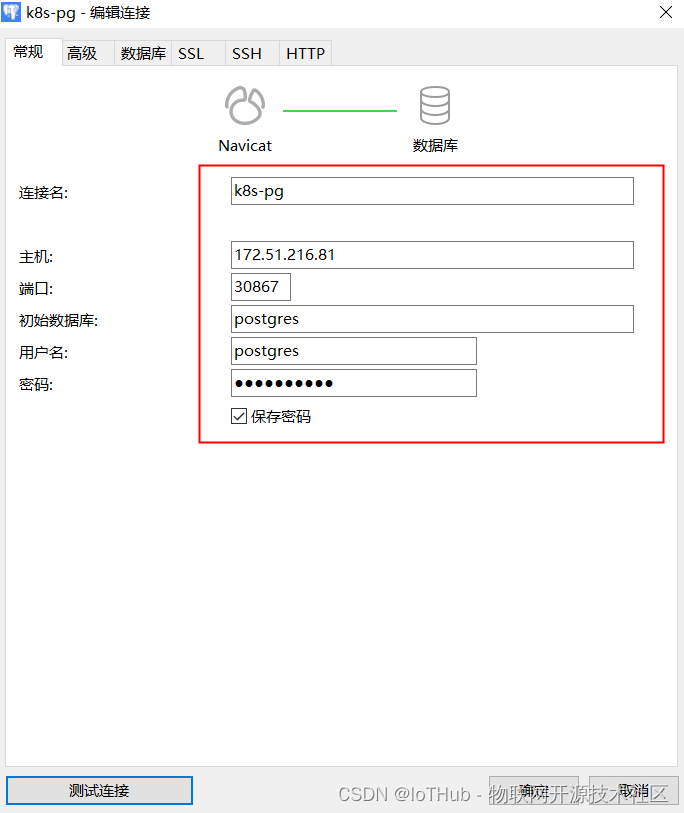
my-pg-postgresql            NodePort    10.110.139.14   <none>        5432:30867/TCP   14h
my-pg-postgresql-headless   ClusterIP   None            <none>        5432/TCP         14h


# 外部访问信息
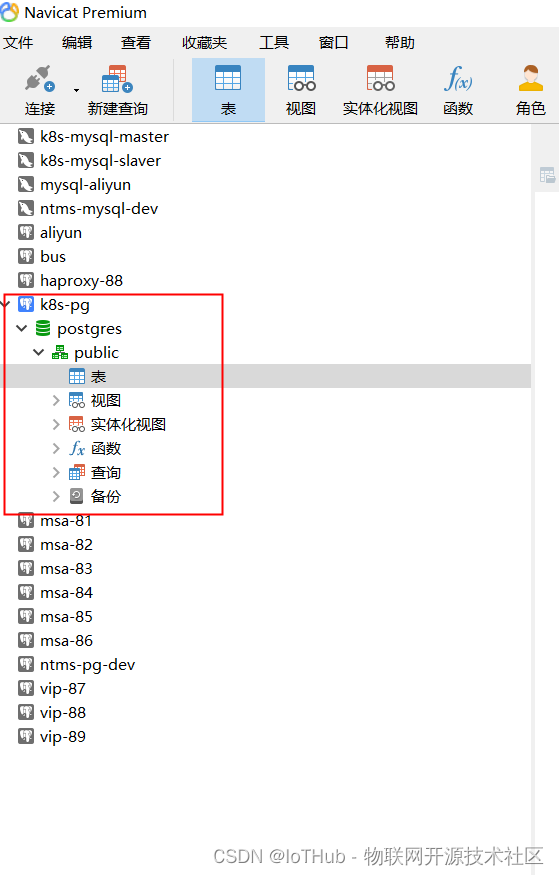
172.51.216.81
30867
postgres
Lpm1dkJUab
2.1.6.删除PostgreSQL
# 查看

[root@k8s-master ~]# helm list
NAME 	NAMESPACE	REVISION	UPDATED                                	STATUS  	CHART             	APP VERSION
my-pg	default  	1       	2021-12-06 20:58:19.693528941 +0800 CST	deployed	postgresql-10.13.9	11.14.0
[root@k8s-master ~]# kubectl get all
NAME                     READY   STATUS    RESTARTS   AGE
pod/my-pg-postgresql-0   1/1     Running   0          14h

NAME                                TYPE        CLUSTER-IP      EXTERNAL-IP   PORT(S)          AGE
service/kubernetes                  ClusterIP   10.96.0.1       <none>        443/TCP          111d
service/my-pg-postgresql            NodePort    10.110.139.14   <none>        5432:30867/TCP   14h
service/my-pg-postgresql-headless   ClusterIP   None            <none>        5432/TCP         14h

NAME                                READY   AGE
statefulset.apps/my-pg-postgresql   1/1     14h
[root@k8s-master ~]# kubectl get pvc
NAME                      STATUS   VOLUME                                     CAPACITY   ACCESS MODES   STORAGECLASS      AGE
data-my-pg-postgresql-0   Bound    pvc-633f7d51-c04f-40aa-9070-fd5c6381e998   20Gi       RWO            rook-ceph-block   14h
# 删除

[root@k8s-master ~]# helm uninstall my-pg
release "my-pg" uninstalled

[root@k8s-master ~]# kubectl delete pvc data-my-pg-postgresql-0
persistentvolumeclaim "data-my-pg-postgresql-0" deleted


# 查看
[root@k8s-master ~]# helm list
NAME	NAMESPACE	REVISION	UPDATED	STATUS	CHART	APP VERSION
[root@k8s-master ~]# kubectl get all
NAME                 TYPE        CLUSTER-IP   EXTERNAL-IP   PORT(S)   AGE
service/kubernetes   ClusterIP   10.96.0.1    <none>        443/TCP   111d
2.2.部署PostgreSQL高可用
[root@k8s-master ~]# helm search repo postgresql
NAME                  	CHART VERSION	APP VERSION	DESCRIPTION
bitnami/postgresql-ha 	8.0.3        	11.14.0    	Chart for PostgreSQL with HA architecture (usin...


https://github.com/bitnami/charts/tree/master/bitnami

https://github.com/bitnami/charts/tree/master/bitnami/postgresql-ha
2.2.1.下载安装包
[root@k8s-master helm]# helm fetch bitnami/postgresql-ha
[root@k8s-master helm]# ll
total 112
-rw-r--r-- 1 root root 54909 Dec  6 21:15 postgresql-ha-8.0.3.tgz
[root@k8s-master helm]# tar -zxf postgresql-ha-8.0.3.tgz
[root@k8s-master helm]# ll
total 112
drwxr-xr-x 5 root root   138 Dec  6 21:15 postgresql-ha
-rw-r--r-- 1 root root 54909 Dec  6 21:15 postgresql-ha-8.0.3.tgz
[root@k8s-master helm]# cd postgresql-ha
[root@k8s-master postgresql-ha]# ll
total 164
-rw-r--r-- 1 root root   220 Nov 30 08:49 Chart.lock
drwxr-xr-x 3 root root    20 Dec  6 21:15 charts
-rw-r--r-- 1 root root   731 Nov 30 08:49 Chart.yaml
drwxr-xr-x 2 root root    67 Dec  6 21:15 ci
-rw-r--r-- 1 root root 97854 Nov 30 08:49 README.md
drwxr-xr-x 4 root root   301 Dec  6 21:15 templates
-rw-r--r-- 1 root root 58220 Nov 30 08:49 values.yaml
2.2.2.修改配置
# values.yaml


persistence:
  ## @param persistence.enabled Enable data persistence
  ##
  enabled: true
  ## @param persistence.existingClaim A manually managed Persistent Volume and Claim
  ## If defined, PVC must be created manually before volume will be bound.
  ## All replicas will share this PVC, using existingClaim with replicas > 1 is only useful in very special use cases.
  ## The value is evaluated as a template.
  ##
  existingClaim: ""
  ## @param persistence.storageClass Persistent Volume Storage Class
  ## If defined, storageClassName: <storageClass>
  ## If set to "-", storageClassName: "", which disables dynamic provisioning
  ## If undefined (the default) or set to null, no storageClassName spec is
  ## set, choosing the default provisioner.
  ##
  storageClass: ""
  ##
  existingClaim: ""
  ## @param persistence.storageClass Persistent Volume Storage Class
  ## If defined, storageClassName: <storageClass>
  ## If set to "-", storageClassName: "", which disables dynamic provisioning
  ## If undefined (the default) or set to null, no storageClassName spec is
  ## set, choosing the default provisioner.
  ##
  storageClass: "rook-ceph-block"
  ## @param persistence.mountPath The path the volume will be mounted at, useful when using different PostgreSQL images.
  ##
  mountPath: /bitnami/postgresql
  ## @param persistence.accessModes List of access modes of data volume
  ##
  accessModes:
    - ReadWriteOnce
  ## @param persistence.size Persistent Volume Claim size
  ##
  size: 30Gi
  ## @param persistence.annotations Persistent Volume Claim annotations
  ##
  annotations: {}
  ## @param persistence.selector Selector to match an existing Persistent Volume (this value is evaluated as a template)
  ## selector:
  ##   matchLabels:
  ##     app: my-app
  ##
  selector: {}

## @section Traffic Exposure parameters
##

## PgPool service parameters
##


# 修改存储
# 修改内容
storageClass: "rook-ceph-block"
size: 30Gi
2.2.3.安装
[root@k8s-master helm]# helm install pg-ha postgresql-ha
NAME: pg-ha
LAST DEPLOYED: Tue Dec  7 11:52:39 2021
NAMESPACE: default
STATUS: deployed
REVISION: 1
TEST SUITE: None
NOTES:
CHART NAME: postgresql-ha
CHART VERSION: 8.0.3
APP VERSION: 11.14.0
** Please be patient while the chart is being deployed **
PostgreSQL can be accessed through Pgpool via port 5432 on the following DNS name from within your cluster:

    pg-ha-postgresql-ha-pgpool.default.svc.cluster.local

Pgpool acts as a load balancer for PostgreSQL and forward read/write connections to the primary node while read-only connections are forwarded to standby nodes.

To get the password for "postgres" run:

    export POSTGRES_PASSWORD=$(kubectl get secret --namespace default pg-ha-postgresql-ha-postgresql -o jsonpath="{.data.postgresql-password}" | base64 --decode)

To get the password for "repmgr" run:

    export REPMGR_PASSWORD=$(kubectl get secret --namespace default pg-ha-postgresql-ha-postgresql -o jsonpath="{.data.repmgr-password}" | base64 --decode)

To connect to your database run the following command:

    kubectl run pg-ha-postgresql-ha-client --rm --tty -i --restart='Never' --namespace default --image docker.io/bitnami/postgresql-repmgr:11.14.0-debian-10-r9 --env="PGPASSWORD=$POSTGRES_PASSWORD"  \
        --command -- psql -h pg-ha-postgresql-ha-pgpool -p 5432 -U postgres -d postgres

To connect to your database from outside the cluster execute the following commands:

    kubectl port-forward --namespace default svc/pg-ha-postgresql-ha-pgpool 5432:5432 &
    psql -h 127.0.0.1 -p 5432 -U postgres -d postgres


# 查看
[root@k8s-master helm]# helm list
NAME 	NAMESPACE	REVISION	UPDATED                                	STATUS  	CHART              	APP VERSION
pg-ha	default  	1       	2021-12-07 11:52:39.764011376 +0800 CST	deployed	postgresql-ha-8.0.3	11.14.0


[root@k8s-master helm]# kubectl get all
NAME                                             READY   STATUS    RESTARTS   AGE
pod/pg-ha-postgresql-ha-pgpool-58d6b8ffd-krm2p   1/1     Running   7          17m
pod/pg-ha-postgresql-ha-postgresql-0             1/1     Running   0          17m
pod/pg-ha-postgresql-ha-postgresql-1             1/1     Running   0          17m

NAME                                              TYPE        CLUSTER-IP      EXTERNAL-IP   PORT(S)    AGE
service/kubernetes                                ClusterIP   10.96.0.1       <none>        443/TCP    111d
service/pg-ha-postgresql-ha-pgpool                ClusterIP   10.100.19.211   <none>        5432/TCP   17m
service/pg-ha-postgresql-ha-postgresql            ClusterIP   10.99.166.15    <none>        5432/TCP   17m
service/pg-ha-postgresql-ha-postgresql-headless   ClusterIP   None            <none>        5432/TCP   17m

NAME                                         READY   UP-TO-DATE   AVAILABLE   AGE
deployment.apps/pg-ha-postgresql-ha-pgpool   1/1     1            1           17m

NAME                                                   DESIRED   CURRENT   READY   AGE
replicaset.apps/pg-ha-postgresql-ha-pgpool-58d6b8ffd   1         1         1       17m

NAME                                              READY   AGE
statefulset.apps/pg-ha-postgresql-ha-postgresql   2/2     17m


[root@k8s-master helm]# kubectl get pvc
NAME                                    STATUS   VOLUME                                     CAPACITY   ACCESS MODES   STORAGECLASS      AGE
data-pg-ha-postgresql-ha-postgresql-0   Bound    pvc-d4bfd3a8-40f9-4363-ba53-04fa2d22ba9c   30Gi       RWO            rook-ceph-block   9m47s
data-pg-ha-postgresql-ha-postgresql-1   Bound    pvc-ffaf16b4-d0c7-45aa-a230-c672b28430c8   30Gi       RWO            rook-ceph-block   9m47s
2.2.4.测试
# 1.获取密码
[root@k8s-master helm]#  export POSTGRES_PASSWORD=$(kubectl get secret --namespace default pg-ha-postgresql-ha-postgresql -o jsonpath="{.data.postgresql-password}" | base64 --decode)

[root@k8s-master helm]# echo $POSTGRES_PASSWORD
uO1mS2faTv

[root@k8s-master helm]#  export REPMGR_PASSWORD=$(kubectl get secret --namespace default pg-ha-postgresql-ha-postgresql -o jsonpath="{.data.repmgr-password}" | base64 --decode)

[root@k8s-master helm]# echo $REPMGR_PASSWORD
RbXc0qhaLS


# 2.数据库连接信息
pg-ha-postgresql-ha-pgpool.default.svc.cluster.local
172.51.216.81
5432:31975
postgres
uO1mS2faTv


# 测试失败
kubectl run pg-ha-postgresql-ha-client --rm --tty -i --restart='Never' --namespace default --image docker.io/bitnami/postgresql-repmgr:11.14.0-debian-10-r9 --env="PGPASSWORD=$POSTGRES_PASSWORD" --command -- psql -h pg-ha-postgresql-ha-pgpool -p 5432 -U postgres -d postgres


kubectl port-forward --namespace default svc/pg-ha-postgresql-ha-pgpool 5432:5432 & psql -h 127.0.0.1 -p 5432 -U postgres -d postgres
2.2.5.外部访问数据库
# 查看
[root@k8s-master ~]# kubectl get all
NAME                     READY   STATUS    RESTARTS   AGE
pod/my-pg-postgresql-0   1/1     Running   0          14h

NAME                                TYPE        CLUSTER-IP      EXTERNAL-IP   PORT(S)    AGE
service/my-pg-postgresql            ClusterIP   10.110.139.14   <none>        5432/TCP   14h
service/my-pg-postgresql-headless   ClusterIP   None            <none>        5432/TCP   14h

NAME                                READY   AGE
statefulset.apps/my-pg-postgresql   1/1     14h


# 修改service类型
[root@k8s-master ~]# kubectl edit svc my-pg-postgresql
service/my-pg-postgresql edited

spec:
......
  type: NodePort


[root@k8s-master ~]# kubectl get service
NAME                        TYPE        CLUSTER-IP      EXTERNAL-IP   PORT(S)          AGE
my-pg-postgresql            NodePort    10.110.139.14   <none>        5432:30867/TCP   14h
my-pg-postgresql-headless   ClusterIP   None            <none>        5432/TCP         14h


# 外部访问信息
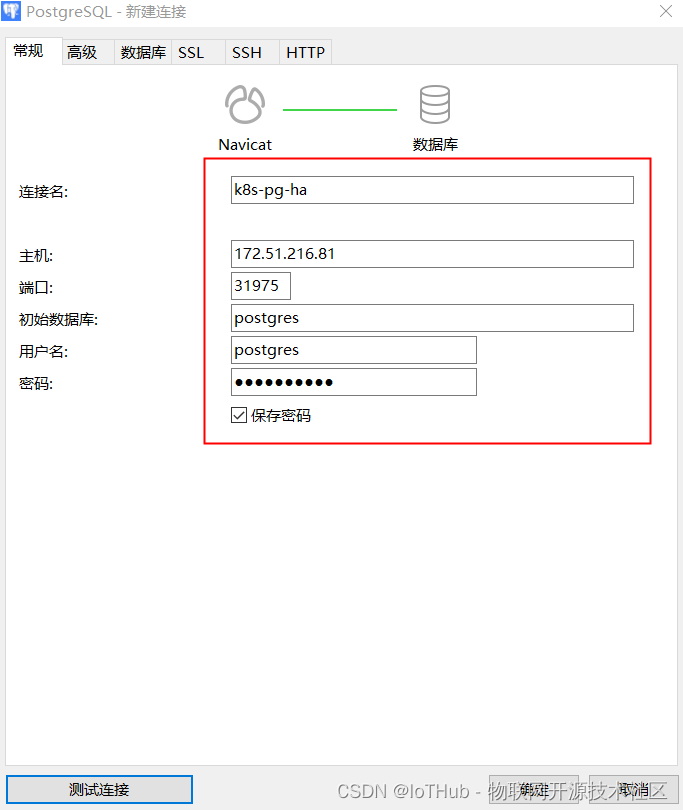
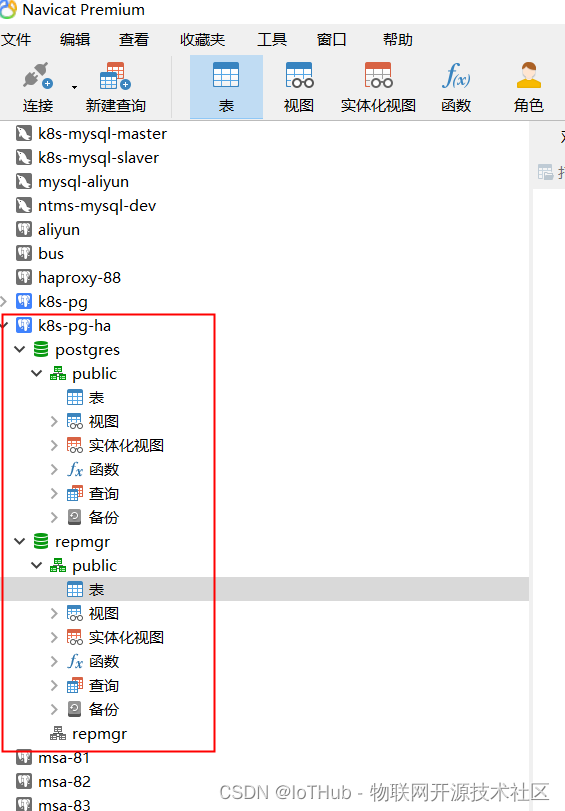
172.51.216.81
5432:31975
postgres
uO1mS2faTv
2.2.6.删除PostgreSQL
# 查看


[root@k8s-master helm]# helm list
NAME 	NAMESPACE	REVISION	UPDATED                                	STATUS  	CHART              	APP VERSION
pg-ha	default  	1       	2021-12-07 14:13:53.011661498 +0800 CST	deployed	postgresql-ha-8.0.3	11.14.0


[root@k8s-master helm]# kubectl get all
NAME                                             READY   STATUS    RESTARTS   AGE
pod/pg-ha-postgresql-ha-pgpool-58d6b8ffd-ts9r5   0/1     Running   2          7m17s
pod/pg-ha-postgresql-ha-postgresql-0             1/1     Running   0          47m
pod/pg-ha-postgresql-ha-postgresql-1             1/1     Running   2          47m

NAME                                              TYPE        CLUSTER-IP      EXTERNAL-IP   PORT(S)          AGE
service/kubernetes                                ClusterIP   10.96.0.1       <none>        443/TCP          112d
service/pg-ha-postgresql-ha-pgpool                NodePort    10.100.152.6    <none>        5432:31975/TCP   47m
service/pg-ha-postgresql-ha-postgresql            ClusterIP   10.101.87.151   <none>        5432/TCP         47m
service/pg-ha-postgresql-ha-postgresql-headless   ClusterIP   None            <none>        5432/TCP         47m

NAME                                         READY   UP-TO-DATE   AVAILABLE   AGE
deployment.apps/pg-ha-postgresql-ha-pgpool   0/1     1            0           47m

NAME                                                   DESIRED   CURRENT   READY   AGE
replicaset.apps/pg-ha-postgresql-ha-pgpool-58d6b8ffd   1         1         0       47m

NAME                                              READY   AGE
statefulset.apps/pg-ha-postgresql-ha-postgresql   2/2     47m


[root@k8s-master helm]# kubectl get pvc
NAME                                    STATUS   VOLUME                                     CAPACITY   ACCESS MODES   STORAGECLASS      AGE
data-pg-ha-postgresql-ha-postgresql-0   Bound    pvc-5c8afbe9-9e3a-45a0-ad88-61138ada60a5   30Gi       RWO            rook-ceph-block   47m
data-pg-ha-postgresql-ha-postgresql-1   Bound    pvc-433efae5-1f45-4c39-8af0-d52c2dee2fdf   30Gi       RWO            rook-ceph-block   47m
# 删除
[root@k8s-master helm]# helm delete pg-ha
release "pg-ha" uninstalled

[root@k8s-master ~]# kubectl delete pvc data-pg-ha-postgresql-ha-postgresql-0
persistentvolumeclaim "data-pg-ha-postgresql-ha-postgresql-0" deleted
[root@k8s-master ~]# kubectl delete pvc data-pg-ha-postgresql-ha-postgresql-1
persistentvolumeclaim "data-pg-ha-postgresql-ha-postgresql-1" deleted


[root@k8s-master ~]# helm list
NAME	NAMESPACE	REVISION	UPDATED	STATUS	CHART	APP VERSION
[root@k8s-master ~]# kubectl get all
NAME                 TYPE        CLUSTER-IP   EXTERNAL-IP   PORT(S)   AGE
service/kubernetes   ClusterIP   10.96.0.1    <none>        443/TCP   112d
# Kubernetes

https://iothub.org.cn/docs/kubernetes/
https://iothub.org.cn/docs/kubernetes/middleware/postgresql/





 扫一扫
扫一扫


 806
806

 被折叠的 条评论
为什么被折叠?
被折叠的 条评论
为什么被折叠?
 到【灌水乐园】发言





