




通过C#操作IE的基础方法网上好多示例,这里只总结一下我这几天的研究成果及自己写的示例Demo。
总结(如有不正确的地方请批评指正):
- 在引用COM组件的时候,出现了无法嵌入互操作类型“……”。选中项目中引入的dll,鼠标右键,选择属性,把“嵌入互操作类型”设置为False。
- Win7系统引用生成时报错,找不到包装管理器好像是,然后提示32位64位什么的,用regsvr32也不能注册那两个dll,提示找不到入口点,也有人说用RegAsm.exe注册,微酷也不行,最后将mshtml的dll注册到GAC好了
- 有的电脑用 new SHDocVw.InternetExplorer(); 创建新IE实例会失败,没找到原因,临时两种方法解决,用Process.Start(“iexplore.exe”)打开或让用户自己打开。
- 如果在一个IE窗口中打开新卡片页,并且新卡片页的地址是“新卡片页(about:Tabs)”或“空白页(about:blank)”,那么在第一次加载完网页后ie实例会触发OnQuit事件,并且在ie_DocumentComplete事件中的URL参数也不是实际加载的,而是about:blank空白页,所以也取不到ie.Document。(暂时没有找到好的解决方案,临时判断一下如果加载网页前的地址是“新卡片页”或“空白页”,则先加载一个其它的页面:ie.LocationURL.Contains(“about:”){ie.Navigate(“http://127.0.0.1“);Thread.Sleep(3000);},但注意,加载这个网页后进程休眠3秒钟,否则第二次取ie后再用的时候可能刚才的OnQuit还没执行,造成第二次取ie成功后可能仍会被ie=null。太快了也会造成“请求的资源在使用中”异常。
- 判断网页是否加载完成可以通过ie.DocumentComplete += ie_DocumentComplete;
- object o = null;ie.Navigate(textBox1.Text + i, ref o, ref o, ref o, ref o); //要带后面的4个参数,否则好像不会触发ie_DocumentComplete;
- 解析获取到的网页可用:HtmlAgilityPack+Fizzler
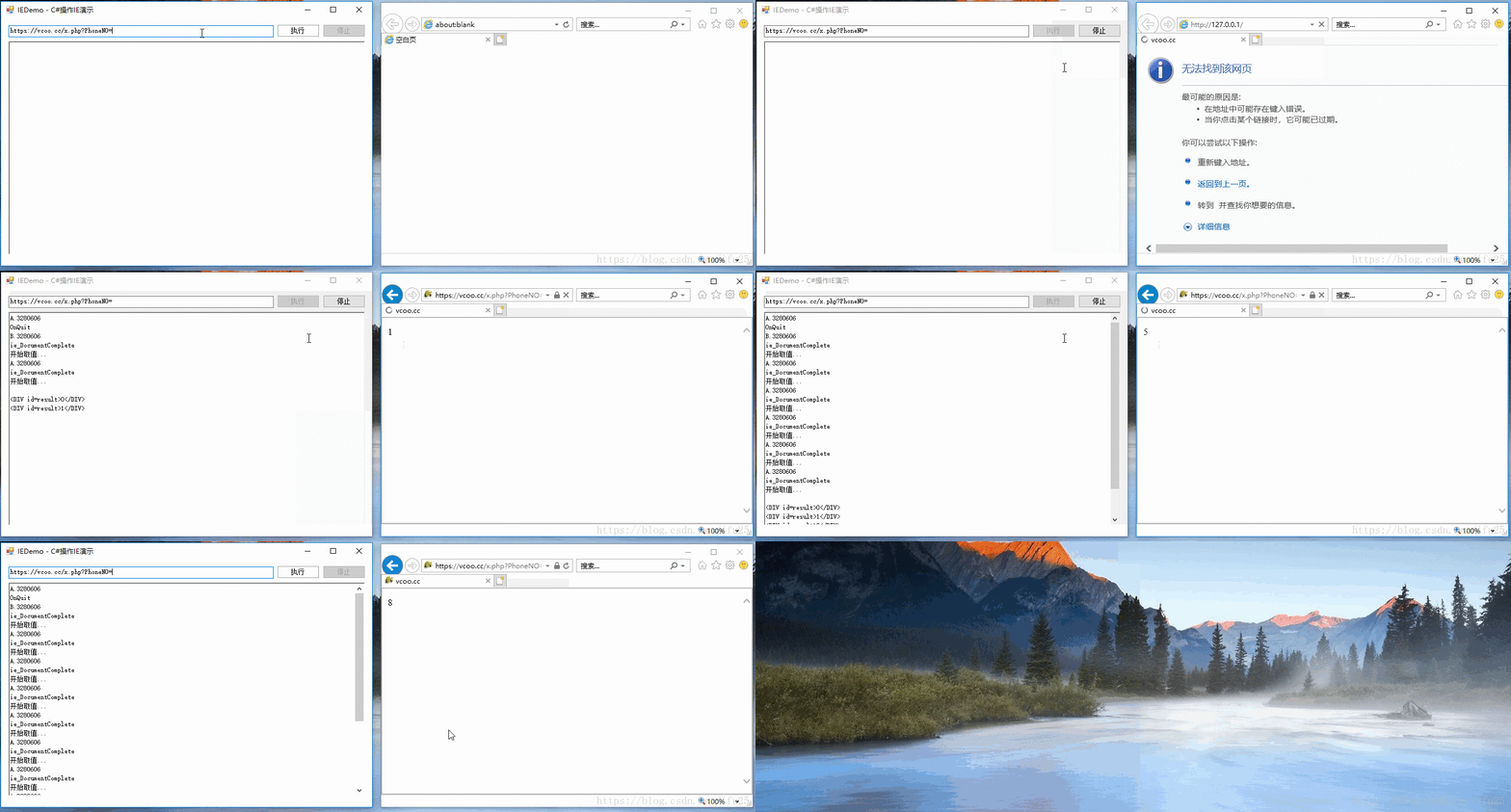
演示图
核心代码
using System;
using System.Text;
using System.Threading;
using System.Windows.Forms;
using mshtml;

namespace IEDemo
{
    /// <summary>
    /// 名称:C#操作IE
    /// <para>作者:ifu25</para>
    /// <para>日期:2018/07/04</para>
    /// <para>扣扣:263499118</para>
    /// <para>博客:https://blog.youkuaiyun.com/ifu25</para>
    /// </summary>
    public partial class FormDemo : Form
    {
        /// <summary>
        /// 网页是否正在加载中,ie_DocumentComplete触发时设置为true
        /// </summary>
        bool isLoading = false;

        /// <summary>
        /// 是否请求停止,用点击停止按钮发出停止请求
        /// </summary>
        bool isRequestStop = false;

        SHDocVw.ShellWindows shellWindows;
        SHDocVw.InternetExplorer ie;

        /// <summary>
        /// 日志变量1
        /// </summary>
        StringBuilder sb1 = new StringBuilder();

        /// <summary>
        /// 日志变量2
        /// </summary>
        StringBuilder sb2 = new StringBuilder();

        public FormDemo()
        {
            InitializeComponent();

            this.FormClosing += FormDemo_FormClosing;
        }

        private void FormDemo_FormClosing(object sender, FormClosingEventArgs e)
        {
            //if (ie != null) ie.Quit();
            //ie = null;
        }

        private void FormDemo_Load(object sender, EventArgs e)
        {
            btnStop.Enabled = false;
            btnStop.EnabledChanged += BtnStop_EnabledChanged;
        }

        private void btnStart_Click(object sender, EventArgs e)
        {
            sb1.Clear();
            sb2.Clear();

            object o = null;

            isRequestStop = false;
            btnStop.Enabled = true;
            btnStop.Text = "停止";

            for (int i = 0; i < 10; i++)
            {
                //获取IE实例
                if (GetIE() == null) { ShowMsg("请打开IE"); btnStop.Enabled = false; return; }
                Log("A." + ie.HWND.ToString());

                /**
                 * IE的地址是“新卡片页(about:Tabs)”或“空白页(about:blank)”时,
                 * 在第一次加载完网页后ie实例会触发OnQuit事件,
                 * 并且在ie_DocumentComplete事件中的URL参数也不是实际加载的,而是about:blank空白页,
                 * 并且也取不到ie.Document,所以强制加载一个有效网页。
                 **/
                if (ie.LocationURL.Contains("about:"))
                {
                    isLoading = true;
                    ie.Navigate("http://127.0.0.1"); //这里加载完后会自动触发OnQuit

                    //IE存在并且没有被请求停止并且仍在加载中时,等待本次加载完毕才执行后面的代码
                    while (ie != null && !isRequestStop && isLoading)
                    {
                        Application.DoEvents();
                    }

                    if (isRequestStop)
                    {
                        btnStop.Text = "停止";
                        ShowMsg("任务被终止!");
                        return;
                    }

                    Thread.Sleep(3000); //进程休眠3秒钟,保证上面ie事务处理完成,否则后面容易造成“资源正在使用中”异常,或下面取到ie后又被赋值成null

                    //上面的ie会在加载完成后自动Quit,仍未找到原因,这里重新获取IE实例
                    if (GetIE() == null) { ShowMsg("请打开IE"); btnStop.Enabled = false; return; }
                    Log("B." + ie.HWND.ToString());
                }

                isLoading = true;
                ie.Navigate(textBox1.Text + i, ref o, ref o, ref o, ref o); //要带后面的4个参数,否则好像不会触发ie_DocumentComplete;
                //演示中用到的服务端页面x.php:<div id="result"><?php echo $_GET["PhoneNO"]?></div>

                //IE存在并且没有被请求停止并且仍在加载中时,等待本次加载完毕才执行后面的代码
                while (ie != null && !isRequestStop && isLoading)
                {
                    Application.DoEvents();
                }

                if (isRequestStop)
                {
                    btnStop.Text = "停止";
                    ShowMsg("任务被终止!");
                    return;
                }

                //加载过程中IE被关闭则报错
                if (ie == null) { ShowMsg("运行期间请不要关闭IE"); btnStop.Enabled = false; return; }

                Log("开始取值...");
                try
                {
                    HTMLDocument doc = ie.Document as HTMLDocument;
                    var html = doc.body.innerHTML;
                    sb2.Append("\n" + html);
                }
                catch (Exception ex)
                {
                    btnStop.Enabled = false;
                    ShowMsg(ex.Message);
                    return;
                }

                //界面赋值
                richTextBox1.Text = sb1.ToString();
                richTextBox1.Text += sb2.ToString();
            }

            btnStop.Enabled = false;
            ShowMsg("恭喜!全部处理完成!");
        }

        private void btnStop_Click(object sender, EventArgs e)
        {
            isRequestStop = true;
            btnStop.Text = "停止中";
            btnStop.Enabled = false;
        }

        private void BtnStop_EnabledChanged(object sender, EventArgs e)
        {
            btnStart.Enabled = !btnStop.Enabled;
        }

        /// <summary>
        /// IE加载网页完成时触发(只是文档内容,不包括引用的图片脚本等)
        /// </summary>
        private void ie_DocumentComplete(object pDisp, ref object URL)
        {
            Log("ie_DocumentComplete");
            isLoading = false;
        }

        /// <summary>
        /// IE退出,特殊的当卡片页为about:Tabs或about:blank时第一次加载网页后会触发OnQuit
        /// </summary>
        private void ie_OnQuit()
        {
            Log("OnQuit");
            ie = null;
        }

        /// <summary>
        /// 获取已打开的最后一个IE
        /// </summary>
        public SHDocVw.InternetExplorer GetIE()
        {
            //ie = new SHDocVw.InternetExplorer(); //有可能会异常,所以不建议用这种方式,可以用Process.Start("iexplore.exe")打开或让用户自己打开,然后查找到最近打开的IE窗口

            //if (ie != null) { return ie; } //这里如果是在同一个IE窗口中取到的是非第1个Tab页时会有问题,加载网页完成后会触发OnQuit,所以需要每次都清空ie并重新获取
            ie = null;

            //获得所有IE进程,因为windows下资源窗口使用IE内核,所以不光是我们通常指的IE浏览器,它还包括你打开“我的电脑”这样的窗口
            shellWindows = new SHDocVw.ShellWindowsClass();
            int windowsCount = shellWindows.Count;
            if (windowsCount == 0) { return null; }

            //倒序查询,即最后一次打开的IE窗口
            for (int i = windowsCount - 1; i >= 0; i--)
            {
                SHDocVw.InternetExplorer win = (SHDocVw.InternetExplorer)shellWindows.Item(i);
                if (win == null) continue;
                if (!string.Equals(System.IO.Path.GetFileName(win.FullName), "iexplore.exe", StringComparison.CurrentCultureIgnoreCase)) continue;

                ie = win;

                try
                {
                    //注册网页加载完成事件
                    ie.DocumentComplete -= ie_DocumentComplete;
                    ie.DocumentComplete += ie_DocumentComplete;

                    //注册IE关闭事件,IE退出后释放变量,否则IE退出后虽然变量ie不为null但无法访问其数据
                    //并且如果是用户直接关闭了ie,如果不设置为null, Application.DoEvents()会一直执行
                    ie.OnQuit -= ie_OnQuit;
                    ie.OnQuit += ie_OnQuit;
                }
                catch
                {
                    return null;
                }

                return ie;
            }

            return null;
        }

        /// <summary>
        /// 消息提示
        /// </summary>
        private void ShowMsg(string msg)
        {
            MessageBox.Show(msg, "系统提示", MessageBoxButtons.OK, MessageBoxIcon.Information);
        }

        /// <summary>
        /// 记录日志
        /// </summary>
        private void Log(string info)
        {
            sb1.Append(info + "\n");
        }
    }
}





 扫一扫
扫一扫


 被折叠的 条评论
为什么被折叠?
被折叠的 条评论
为什么被折叠?
 到【灌水乐园】发言





