


 文章讲述了在从JavaWeb转向Android开发时,使用jdbc连接数据库时遇到的问题。由于Android设备的localhost不同于电脑,所以将URL中的localhost改为10.0.2.2才能正确连接到电脑上的本地数据库。此外,还需在AndroidManifest.xml中添加INTERNET权限来允许网络连接。文章提供了一个示例的DBUtil类以及jar包的下载链接。
1.最重要的写在前面连接url
正常从javaweb转过来的第一印象连接数据库会使用以下url
private static String url = "jdbc:mysql://localhost:3306/school?characterEncoding=utf-8";
或者将 localhost 改成 127.0.0.1 这些都会导致明明测试类运行的时候可以正常访问数据库数据,但是到手机运行环境的时候却报错!
常见报错提醒是 Connection中的createStatement()方法调用时出现空指针异常
这是因为Android手机的localhost本地默认位置不是电脑,而是手机本身。这时候应该要将url改成以下
private static String url = "jdbc:mysql://10.0.2.2/school?characterEncoding=utf-8";
localhost改成10.0.2.2 这样访问的才是电脑本地的数据库。
以下放一段抄其他大佬的jdbcUtil
public class DBUtil {

    //连接配置
    private static String diver = "com.mysql.jdbc.Driver";

    private static String url = "jdbc:mysql://10.0.2.2/school?characterEncoding=utf-8";

    private static String user = "root";//用户名
    private static String password = "123456";//密码

    /*
     * 连接数据库
     * */
    public static Connection getConn() {
        Connection conn = null;
        try {
            Class.forName(diver);
            conn = (Connection) DriverManager.getConnection(url, user, password);//获取连接
            //TODO 这里的日志如果不注释就会报错
//            Log.e("getConn", "连接成功");
        } catch (ClassNotFoundException e) {
            Log.e("getConn", e.getMessage(), e);
            e.printStackTrace();
        } catch (SQLException e) {
            Log.e("getConn", e.getMessage(), e);
            e.printStackTrace();
        }
        return conn;
    }

    public static void close(Statement state, Connection conn) {
        if (state != null) {
            try {
                state.close();
            } catch (SQLException e) {
                e.printStackTrace();
            }
        }

        if (conn != null) {
            try {
                conn.close();
            } catch (SQLException e) {
                e.printStackTrace();
            }
        }
    }

    public static void close(ResultSet rs, Statement state, Connection conn) {
        if (rs != null) {
            try {
                rs.close();
            } catch (SQLException e) {
                e.printStackTrace();
            }
        }

        if (state != null) {
            try {
                state.close();
            } catch (SQLException e) {
                e.printStackTrace();
            }
        }

        if (conn != null) {
            try {
                conn.close();
            } catch (SQLException e) {
                e.printStackTrace();
            }
        }
    }

}
2.AndroidManifest.xml配置数据库连接
关于AndroidManifes.xml我也不太懂,感觉像是一种说明,没有这个说明就是默认禁止的行为。
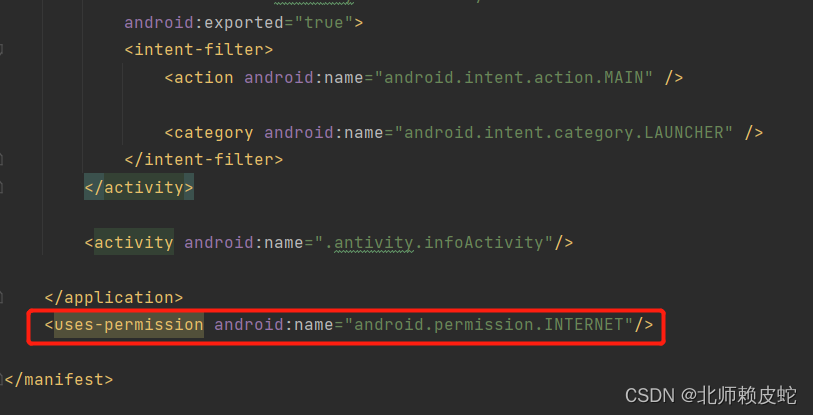
连接数据库要在配置文件中加上这一句。
<uses-permission android:name="android.permission.INTERNET"/>
3.测试环境
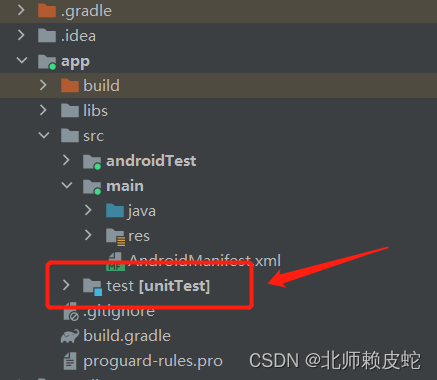
test测试有些包是默认没有的加载的,如果要加载到测试环境当中要在build.gradle中说明。
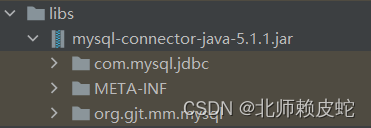
5.连接Mysql所需要的jar包
这个提供的jar包是5.1.1的,需要的酌情下载
链接:https://pan.baidu.com/s/18Y52qE9_-gqdqQNwrSqFcg
提取码:1145





 扫一扫
扫一扫


 1万+
1万+


 到【灌水乐园】发言



