



 本文介绍了如何在Spring MVC中利用注解实现方便的校验功能,包括依赖包引入、实体类验证注解、构建控制器进行字段校验,以及在添加或提交修改时进行字段验证的使用场景。详细解释了如何在不同类型的字段上应用校验规则,并通过实例展示了错误处理机制。
spring mVC提供了很方便的校验,如下: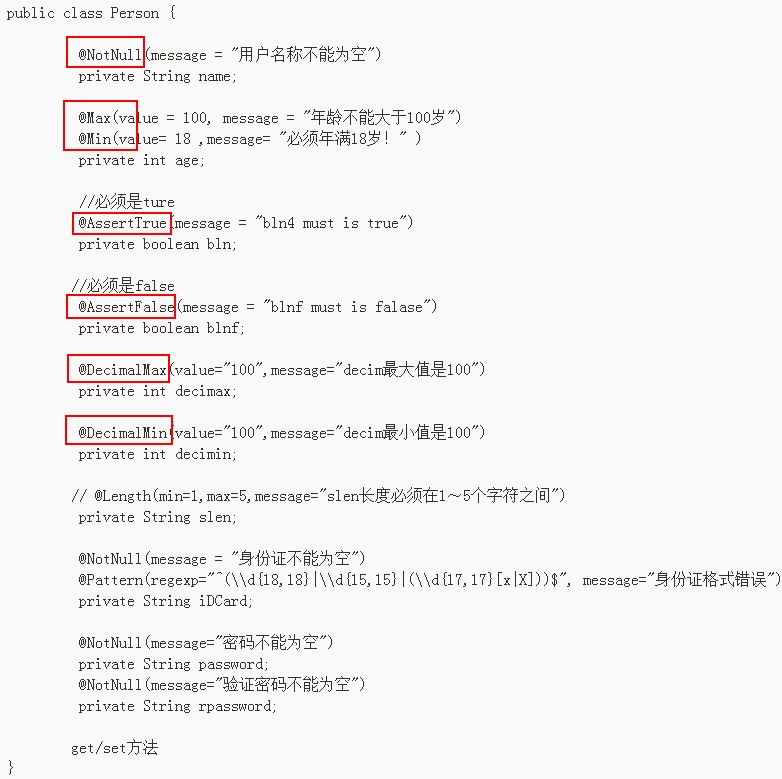
(1)依赖包:
validation-api.jar
hibernate-validator.jar
通过maven引入
	<dependency>
			<groupId>javax.validation</groupId>
			<artifactId>validation-api</artifactId>
			<version>1.1.0.Final</version>
		</dependency>
		<dependency>
			<groupId>org.hibernate</groupId>
			<artifactId>hibernate-validator</artifactId>
			<version>5.1.2.Final</version>
		</dependency>
(2)要验证的实体类
import javax.validation.constraints.AssertFalse;
import javax.validation.constraints.AssertTrue;
import javax.validation.constraints.DecimalMax;
import javax.validation.constraints.DecimalMin;
import javax.validation.constraints.Max;
import javax.validation.constraints.Min;
import javax.validation.constraints.NotNull;
import javax.validation.constraints.Pattern;
public class Person {

	 @NotNull(message = "用户名称不能为空")
	 private String name;

	 @Max(value = 100, message = "年龄不能大于100岁")
	 @Min(value= 18 ,message= "必须年满18岁!" )
	 private int age;

	 //必须是ture
	 @AssertTrue(message = "bln4 must is true")
	 private boolean bln;

        //必须是false
	 @AssertFalse(message = "blnf must is falase")
	 private boolean blnf;

	 @DecimalMax(value="100",message="decim最大值是100")
	 private int decimax;

	 @DecimalMin(value="100",message="decim最小值是100")
	 private int decimin;

	// @Length(min=1,max=5,message="slen长度必须在1~5个字符之间")
	 private String slen;

	 @NotNull(message = "身份证不能为空")
         @Pattern(regexp="^(\\d{18,18}|\\d{15,15}|(\\d{17,17}[x|X]))$", message="身份证格式错误")
	 private String iDCard;

	 @NotNull(message="密码不能为空")
	 private String password;
	 @NotNull(message="验证密码不能为空")
	 private String rpassword;

        get/set方法
}(3)构建controller如下
@Controller
public class SpringValidatorTest {
	@RequestMapping("/validator/springtest")
	public void  springte(@Valid Person person,BindingResult result){
		if(result.hasErrors()){
			List<ObjectError>  list = result.getAllErrors();
			for(ObjectError error: list){
				//System.out.println(error.getObjectName());
				//System.out.println(error.getArguments()[0]);
				System.out.println(error.getDefaultMessage());//验证信息
			}

		}

	}
}
(4)使用场景:添加或提交修改时进行字段的校验
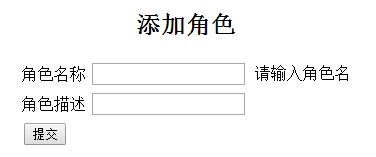
登录:

注意:BindingResult一定要紧跟在实体类的后面,否则报错:
HTTP Status 400 -
type Status report
message
description The request sent by the client was syntactically incorrect.
Apache Tomcat/7.0.53
错误的代码:
@RequestMapping(value = "/add",method=RequestMethod.POST)
	public String addSaveNews(@Valid RoleLevel roleLevel, Model model, BindingResult binding) {
		if(binding.hasErrors()){
			model.addAttribute(roleLevel);
			return jspFolder+"/add";
		}
		saveCommon(roleLevel, model);
		return redirectViewAll;
}正确的代码:
@RequestMapping(value = "/add",method=RequestMethod.POST)
	public String addSaveNews(@Valid RoleLevel roleLevel, BindingResult binding, Model model) {
		if(binding.hasErrors()){
			model.addAttribute(roleLevel);
			return jspFolder+"/add";
		}
		saveCommon(roleLevel, model);
		return redirectViewAll;
	}
官方资料
Constraints in Bean Validation are expressed via Java annotations. In this section you will learn how to enhance an object model with these annotations. There are the following three types of bean constraints:
-
field constraints
-
property constraints
-
class constraints
Note
Not all constraints can be placed on all of these levels. In fact, none of the default constraints defined by Bean Validation can be placed at class level. Thejava.lang.annotation.Target annotation in the constraint annotation itself determines on which elements a constraint can be placed. See Chapter 6, Creating custom constraints for more information.
Constraints can be expressed by annotating a field of a class. Example 2.1, “Field-level constraints”shows a field level configuration example:
Example 2.1. Field-level constraints
package org.hibernate.validator.referenceguide.chapter02.fieldlevel;

public class Car {

    @NotNull
    private String manufacturer;

    @AssertTrue
    private boolean isRegistered;

    public Car(String manufacturer, boolean isRegistered) {
        this.manufacturer = manufacturer;
        this.isRegistered = isRegistered;
    }

    //getters and setters...
}
When using field-level constraints field access strategy is used to access the value to be validated. This means the validation engine directly accesses the instance variable and does not invoke the property accessor method even if such an accessor exists.
Constraints can be applied to fields of any access type (public, private etc.). Constraints on static fields are not supported, though.
Tip
When validating byte code enhanced objects property level constraints should be used, because the byte code enhancing library won't be able to determine a field access via reflection.
If your model class adheres to the JavaBeans standard, it is also possible to annotate the properties of a bean class instead of its fields. Example 2.2, “Property-level constraints” uses the same entity as inExample 2.1, “Field-level constraints”, however, property level constraints are used.
Example 2.2. Property-level constraints
package org.hibernate.validator.referenceguide.chapter02.propertylevel;

public class Car {

    private String manufacturer;

    private boolean isRegistered;

    public Car(String manufacturer, boolean isRegistered) {
        this.manufacturer = manufacturer;
        this.isRegistered = isRegistered;
    }

    @NotNull
    public String getManufacturer() {
        return manufacturer;
    }

    public void setManufacturer(String manufacturer) {
        this.manufacturer = manufacturer;
    }

    @AssertTrue
    public boolean isRegistered() {
        return isRegistered;
    }

    public void setRegistered(boolean isRegistered) {
        this.isRegistered = isRegistered;
    }
}
Note
The property's getter method has to be annotated, not its setter. That way also read-only properties can be constrained which have no setter method.
When using property level constraints property access strategy is used to access the value to be validated, i.e. the validation engine accesses the state via the property accessor method.
Tip
It is recommended to stick either to field or property annotations within one class. It is not recommended to annotate a field and the accompanying getter method as this would cause the field to be validated twice.
Last but not least, a constraint can also be placed on the class level. In this case not a single property is subject of the validation but the complete object. Class-level constraints are useful if the validation depends on a correlation between several properties of an object.
The Car class in Example 2.3, “Class-level constraint” has the two attributes seatCount and passengersand it should be ensured that the list of passengers has not more entries than seats are available. For that purpose the @ValidPassengerCount constraint is added on the class level. The validator of that constraint has access to the complete Car object, allowing to compare the numbers of seats and passengers.
Refer to Section 6.2, “Class-level constraints” to learn in detail how to implement this custom constraint.
Example 2.3. Class-level constraint
package org.hibernate.validator.referenceguide.chapter02.classlevel;

@ValidPassengerCount
public class Car {

    private int seatCount;

    private List<Person> passengers;

    //...
}
参考:http://docs.jboss.org/hibernate/stable/validator/reference/en-US/html/
http://www.yunmasoft.com
http://blog.youkuaiyun.com/xpsharp/article/details/9366865





 扫一扫
扫一扫


 1470
1470

 被折叠的 条评论
为什么被折叠?
被折叠的 条评论
为什么被折叠?
 到【灌水乐园】发言





