


HTML篇
1. Element Table 实现跨页选择行
- 关键属性 row-key,reserve-selection
<el-table
	 ref="multipleTable
     row-key="humanID"
     :data="data"
     @selection-change="handleSelectionChange">
	<el-table-column type="selection" reserve-selection></el-table-column>
</el-table>
- 注意:若多选后进行删除操作,需要调clearSelection 方法清空已选行
this.$refs.multipleTable.clearSelection()
2. 如何禁止中文输入过程中会触发input和keyup等事件
- 核心监听事件:compositionstart和compositionend
- 代码实现:
// 拼音输入中标识
var inputFlag = true;
$("#inputId").on('compositionstart', function(){
	inputFlag = false;
});
$("#inputId").on('compositionend', function(){
	inputFlag = true;
});
$("#inputId").on('input', function(){
	if(inputFlag){
		var text = $("#inputId").val();
		$("#inputId").val(text);
	}
});
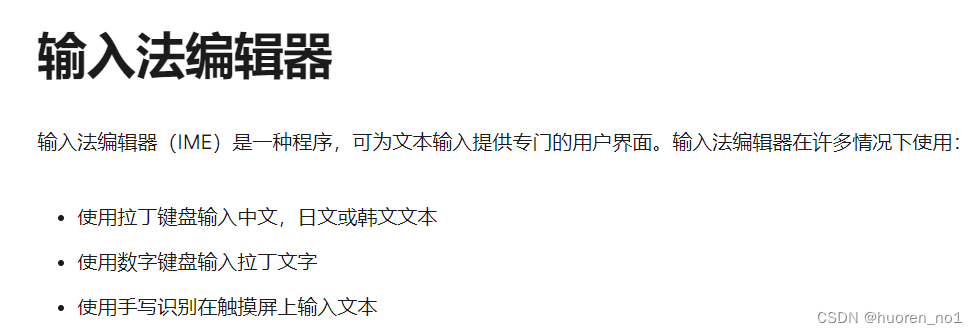
- compositionstart (MDN)
文本合成系统如 input method editor(即输入法编辑器)开始新的输入合成时会触发 compositionstart 事件
CSS篇
1. CSS实现替换文本
<div class="context">我是小可爱</div>

/* font-size + :after */
.context{
    font-size: 0;
}
.context:after{
    content: '小可爱是我';
    font-size: 16px;
}
参考:CSS实现替换文本
2. 引入字体文件
- 将字体文件(
.tff、.otf等格式)放在项目的静态文件目录中,如static - 新建
font.css文件自定义字体@font-face { font-family: "DINCondensed-Bold"; src: url('./DINCondensed-Bold.ttf'); font-weight: normal; font-style: normal; } - 在
app.js中引入font.css文件
3. 自定义checkbox样式
- 方法一:修改默认样式
appearance: none;需设置属性 appearance 属性值为 none 来清除默认样式
input[type=checkbox] {
	 -webkit-appearance: none;
	 -moz-appearance: none;
     appearance: none;
     width: 16px;
     height: 16px;
     background: #FFFFFF;
     border: 1px solid #DDE1EB;
     border-radius: 2px;
}
实现效果:
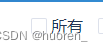
注意事项:勾选状态样式也会变化
- 方法二:隐藏原样式,使用伪元素重写新样式
input[type="checkbox"] {
     visibility: hidden;
 }

 input[type="checkbox"]::before {
     content: "";
     visibility: visible;
     display: inline-block;
     width: 22px;
     height: 22px;
     margin-top: 5px;
     background: #e6effa;
     border: 1px solid #0E5DE14E;
     border-radius: 4px;
 }

 input[type="checkbox"]:checked::before {
     content: "\2713";
     visibility: visible;
     display: inline-block;
     width: 22px;
     height: 22px;
     line-height: 22px;
     text-align: center;
     background: #3388FF;
     color: #f0f6fb;
     font-size: 16px;
     font-weight: bold;
     border-radius: 4px;
 }

 &-label {
     margin-left: 21px;
     font-family: MicrosoftYaHei;
     font-size: 20px;
     color: rgba(45,45,49,0.60);
     letter-spacing: 0.5px;
 }
<input id="checkbox" type="checkbox" :value="rememberred">
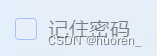
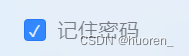
<label for="checkbox" class="login-box-check-label">记住密码</label>
-
实现效果
4. a-tree 设置 default-expand-all无效解决方法
// a-tree 中加tree-data length 大于0 , 再启用该属性
<a-tree
    v-if="treeData && treeData.length > 0"
    v-model:checkedKeys="checkedKeys"
    default-expand-all
    :tree-data="treeData"
></div>
5. px不转rem
使用flexible和postcss-px2rem可以帮我们自动把px转换为rem,但是有些场景不需要转换为rem的话,可以在css样式后面加上
/*no*/
6. input:before input:after伪元素无效(select check radio同理)
input 不是容器,故没有伪元素类
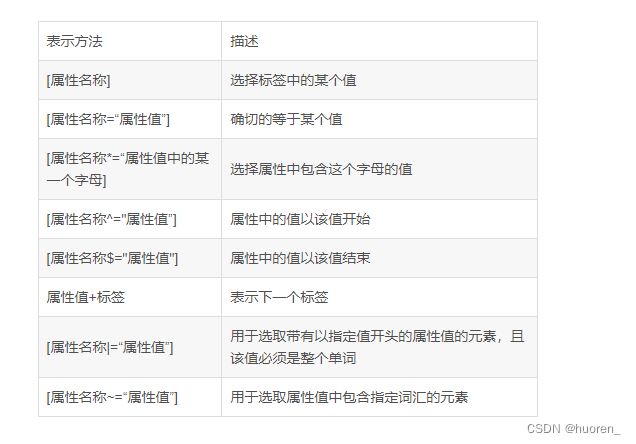
7. css 选择器指定属性名称用法
8. 控制网页双击是否可选中文本复制
* {
	/* 火狐 */
    -moz-user-select: none;
    /* Safari 和 欧朋 */
    -webkit-user-select: none;
    /* IE10+ and Edge */
    -ms-user-select: none;
    /* Standard syntax 标准语法(谷歌) */
    user-select: none;
}
// 参考链接:https://juejin.cn/post/6990329776862920734
user-select: auto; // 文本可双击选中复制
9. 深度选择器
JS篇
1. 重新认识 switch
switch 需要使用break来终止代码,否则代码会继续往下执行
var d=new Date().getDay();
switch (d){
	case 0:x="今天是星期日";
	case 1:x="今天是星期一";
	case 2:x="今天是星期二";
		break;
    case 3:x="今天是星期三";
	case 4:x="今天是星期四";
	case 5:x="今天是星期五";
	    break;
	case 6:x="今天是星期六";
	break;
}
console.log(x)
// 以上代码会导致周日/一/二,x 结果均为 "今天是星期二"
2. oneline code
- Shuffle an array
const shuffle = (arr) => {
	arr
		.map(x => {sort: Math.random(), value: x})
		.sort((a, b) => a.sort -b.sort)
		.map(y => y.value)
}

// example
shuffle([1, 2, 3, 4, 5, 6, 7, 8, 9, 10]); // [9, 1, 10, 6, 8, 5, 2, 3, 7, 4]
- Remove falsy values from array
const removeFalsy = (arr) => arr.filter(Boolean);
// Boolean 为布尔值的对象包装器(函数)

// example
removeFalsy([0, 'a string', '', NaN, true, 5, undefined, 'another string', false]);
// ['a string', true, 5, 'another string']
- Swap the rows and columns of a matrix
其它
1. antd-vue a-select 使用v-model赋值之后无法选择其它option
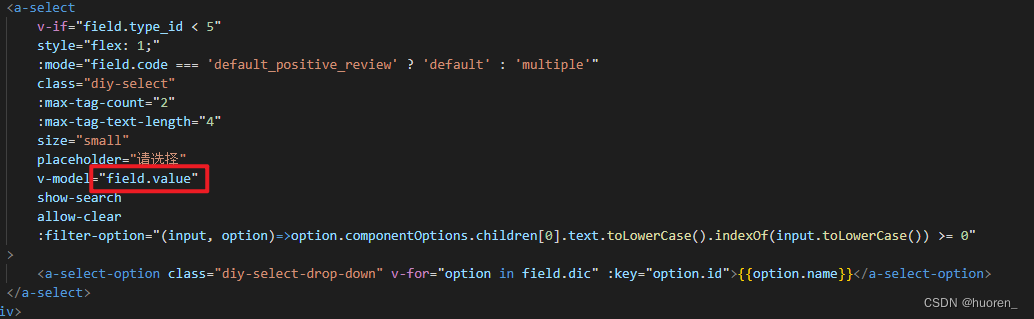
问题原因:初始化field时,value属性不存在
解决方法:value属性初始值undefined
2. 数组中对象元素赋值后,页面不更新
问题原因:vue不能检测通过数组索引值,直接修改一个数组项
解决方法:使用 vm.$set(vm.items,indexOfItem,newValue) 更新数组数据,实现页面即时响应
3. 动态背景图设置不生效解决方法
- url 拼接 require 路径
const icon = 'url(' + require('@/assets/images/icon.png') + ')',
<div :style="{backgroundImage: icon}"></div>
4. vue中内嵌iframe的src更新页面未刷新问题
- 问题原因:src 带有 hash 值(#)时,src 改变 iframe 页面不刷新
- 解决方法
- 方案1:iframe 增加 key属性绑定为随机值
- 方法2:src赋值时在hash值前增加随机数或时间参数
// # 前面无其他参数 const url = `https://xxx域名xxx/?${new Date().getTime()}#/test/?id=666`; // # 前面有其他参数 const url = `https://xxx域名xxx/?embed=true&${new Date().getTime()}#/test/?id=666`; - 方案3:监听 src属性变化,手动reload(不建议)
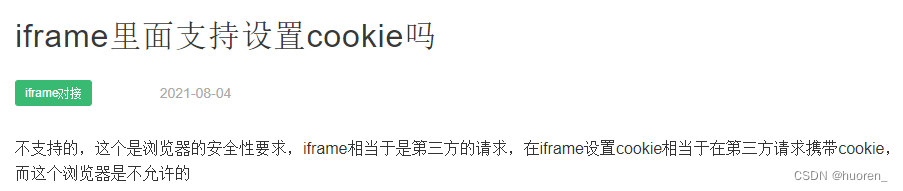
5. iframe 不支持 cookie
6. nginx 命令
- 指定配置文件
start nginx.exe -c conf/nginx-v14.conf - 关闭所有nginx进程
taskkill /IM nginx.exe /F





 扫一扫
扫一扫


 413
413

 被折叠的 条评论
为什么被折叠?
被折叠的 条评论
为什么被折叠?
 到【灌水乐园】发言





