bug:刷机卡Logo界面,adb shell 报- exec '/system/bin/sh' failed: No such file or directory (2) -

bug:卡刷,- exec '/system/bin/sh' failed: No such file or directory (2) - 卡刷遇到此问题,可能得做些修改,用adb sideload 完全可以成功,但放到/sdcard 下,这种方式卡在logo界面了,,, - exec '/system/bin/sh' failed: No such file or directory (2) - ,,,待解决,有事,,,, adb push mksh /system/bin failed to copy 'm... 阅读详情

可能的问题:

1.update.zip 问题

2.recovery 问题


换!


有可能是不该取消cache.img的生成,不科学啊,,,那我换了img可能就可以。但为什么我换成adb sideload方式就可以的呢?到底有什么区别,是什么导致的sdcard方式卡在第一界面?


有可能是recovery 有问题,

symlink /sbin/busybox /system/bin/sh
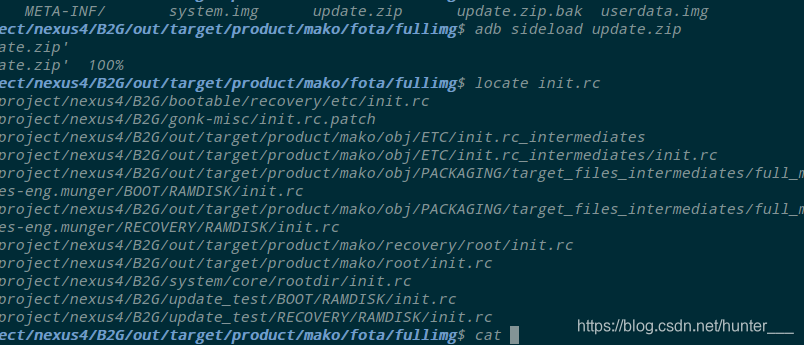
原因分析:

有可能是recovery的原因,因为每次进入recovery都发现 /system 没有 mount ,

mount之后重启还是进不去。


munger:~/project/nexus4/B2G/out/target/product/mako/fota/fullimg$ adb shell
~ # cd cache/
lost+found/  recovery/
~ # cd cache/recovery/
/cache/recovery # ls
last_install  last_log.1    last_log.3    last_log.6    last_log.9
last_kmsg     last_log.10   last_log.4    last_log.7    log
last_log      last_log.2    last_log.5    last_log.8
/cache/recovery # 


adb sideload 进去的不用在rc下选mount /system也同样可以进去系统,郁闷。。。

排除zip有问题的可能性。

发生了什么。


看cache 下的Log发现:

cache里面的log:

刷分区的时候:

minzip: zlib inflate call failed (zerr=-3)

解压失败是这个意思?为什么?


有说是文件不完整,,,

zlib压缩库解压失败的问题


cache log:minzip: zlib inflate call failed (zerr=-3)

Flashing partition /boot
Flashing partition /data
minzip: zlib inflate call failed (zerr=-3)
Flashing partition /system
minzip: zlib inflate call failed (zerr=-5)
minzip: Can't extract entry to file.
script succeeded: result was [1.0]
Install from sdcard complete.


不对,,,应该是zip包的问题,之前用-full卡刷的 update.zip可以正常刷成功啊,那肯定是update.zip的问题了,醉了,绕半天,

用-fullimg就不行。

也不对,fullimg 的update.zip 用sideload 可以正常升级,包到底是有问题还是没问题,,矛盾,,,


-full 的log:


-fullimg 的卡刷Log


sizeload 的log:

root@mako:/cache/recovery # cat log                                            
I:using /data/media for /sdcard.
No files found.


Sideload started ...
Now send the package you want to apply
to the device with "adb sideload <filename>"...

sideload_service invoked
adbd exiting after successful sideload
E:listen on USB
E:userid is 2000
E:Event loop starting
I:sideload process finished
I:sideload thread finished
Restarting adbd...
Finding update package...
I:Update location: /tmp/update.zip
Opening update package...
Installing update...
Starting B2G FOTA: fullimg
Checking device
Device is compatible
Flashing partition /boot
Flashing partition /data
minzip: Size mismatch on inflated file (1894776832 vs -1)
minzip: Can't extract entry to file.
Flashing partition /system
script succeeded: result was [1.0]Rebooting...
I:using /data/media for /sdcard/0/clockworkmod/.recovery_version.
mkdir: can't create directory '/sdcard/0/': I/O error
root@mako:/cache/recovery # 


卡刷 Log:

/cache/recovery # cat log 
__bionic_open_tzdata: couldn't find any tzdata when looking for localtime!
__bionic_open_tzdata: couldn't find any tzdata when looking for GMT!
__bionic_open_tzdata: couldn't find any tzdata when looking for posixrules!
Starting recovery on Fri Apr 26 09:03:23 2019

framebuffer: fd 4 (768 x 1280)
ClockworkMod Recovery v6.0.4.7
recovery filesystem table
=========================
  0 /system ext4 /dev/block/platform/msm_sdcc.1/by-name/system 0
  1 /cache ext4 /dev/block/platform/msm_sdcc.1/by-name/cache 0
  2 /data ext4 /dev/block/platform/msm_sdcc.1/by-name/userdata 0
  3 /persist ext4 /dev/block/platform/msm_sdcc.1/by-name/persist 0
  4 /firmware vfat /dev/block/platform/msm_sdcc.1/by-name/modem 0
  5 /boot emmc /dev/block/platform/msm_sdcc.1/by-name/boot 0
  6 /recovery emmc /dev/block/platform/msm_sdcc.1/by-name/recovery 0
  7 /misc emmc /dev/block/platform/msm_sdcc.1/by-name/misc 0
  8 /radio emmc /dev/block/platform/msm_sdcc.1/by-name/modem 0
  9 /sbl1 emmc /dev/block/platform/msm_sdcc.1/by-name/sbl1 0
  10 /sbl2 emmc /dev/block/platform/msm_sdcc.1/by-name/sbl2 0
  11 /sbl3 emmc /dev/block/platform/msm_sdcc.1/by-name/sbl3 0
  12 /tz emmc /dev/block/platform/msm_sdcc.1/by-name/tz 0
  13 /rpm emmc /dev/block/platform/msm_sdcc.1/by-name/rpm 0
  14 /aboot emmc /dev/block/platform/msm_sdcc.1/by-name/aboot 0
  15 /tmp ramdisk ramdisk 0

W:Unable to get recovery.fstab info for /datadata during fstab generation!
W:Unable to get recovery.fstab info for /emmc during fstab generation!
W:Unable to get recovery.fstab info for /sdcard during fstab generation!
W:Unable to get recovery.fstab info for /sd-ext during fstab generation!
W:Unable to get recovery.fstab info for /external_sd during fstab generation!
I:Completed outputting fstab.
I:Connected to Vold..
I:200 0 Volumes listed.
I:Processing arguments.
I:Checking arguments.
I:device_recovery_start()
Command: "/sbin/recovery"

af.resampler.quality=4
ro.cm.device=mako
ro.cm.display.version=11-20140125-UNOFFICIAL-mako
ro.cm.version=11-20140125-UNOFFICIAL-mako
ro.qc.sensors.wl_dis=true
ro.sf.lc

解决“/usr/bin/ No such file or directory“错误的方法 当遇到"/usr/bin/ No such file or directory"错误时,首先确保指定的文件或目录存在,并且路径设置正确。然后,检查文件或目录的权限以及软链接的有效性。当在编程过程中遇到"/usr/bin/ No such file or directory"错误时,这表明系统无法找到指定的文件或目录。在这种情况下,你需要找到正确的路径或恢复文件。确保"/usr/bin/"路径在环境变量中正确地列出。解决"/usr/bin/ No such file or directory"错误的方法。 阅读详情

相关推荐

Docker进入容器报:exec failed: unable to start container process: exec: “/bin/bash“ 解决

将 /bin/bash 换成 /bin/sh 执行方式,成功。制作镜像时使用了精简版,只装了sh命令,未安装bash。

hkl_Forever的博客 5905

使用mmdetection快速复现计算机视觉顶会论文

使用mmdetection中支持的算法运行自定义数据集

m0_56896669的博客 2422

深入了解AES_GCM算法

常见的对称加密算法,在解密过程中无法确认密钥是否正确的。这就意味着,密文可以用任何密钥执行解密运算,得到一组疑似密文;由于不知道密钥是否正确,故也不能确定解密出来的明文数据是否正确。因此,需要在对称加密算法上增加一层验证机制,常见思路为使用加密算法进行加密保证机密性,使用摘要算法计算MAC保证完整性和真实性,这就涉及到摘要计算和加密计算的前后顺序和参与计算的数据、密钥等,使用起来略微麻烦。

huaqianzkh的专栏 4190

国土变更调查中六类拓扑错误的成因分析与高效修复实践

本文深入分析了国土变更调查中六类拓扑错误的成因,包括边界不一致和不规则图形等常见问题,并提出了高效的自动化修复实践。通过智能咬合算法、引力-斥力平衡模型等核心技术,显著提升了修复效率,节省人工质检时间70%。文章还分享了实战中的避坑指南和黄金法则,为相关从业人员提供了宝贵经验。

weixin_29202213的博客 359

未来智能家居解决方案:AI应用架构师的前沿探索

当你加班到深夜回家时,门锁自动识别你的脚步声解锁,玄关灯渐亮成你最爱的暖光,空调早已调到25℃(你夏天的习惯温度),音箱播放着最近循环的爵士乐,茶几上的智能水壶烧好了温水——这不是科幻电影,而是未来智能家居的日常。如何让“冰冷的设备”变成“懂你的伙伴”。我们将深入探讨五大前沿技术(边缘AI、多模态融合、联邦学习、数字孪生、个性化推荐)的底层原理,用“家里的小管家”“邻居互相学习”等生活化比喻简化复杂概念,结合代码示例与架构图还原实现流程,并通过智能卧室、智能厨房等真实案例展示落地路径。

AI天才研究院 1411

从零构建物联网监控系统:STM32+迪文屏+WiFi模组的实战解析

本文详细解析了基于STM32微控制器、迪文串口屏和WiFi模组构建物联网监控系统的完整方案。从硬件选型、系统架构设计到数据交互实现,提供了包括迪文屏GUI开发、STM32通信协议、低功耗优化等实战经验,帮助开发者快速掌握物联网监控系统的核心技术。

docker7nomad的博客 730

C/C++基础讲解(四十三)之图形篇之绘制直线、圆、圆弧、 椭圆

程序主要是基于Visual studio 2019进行编译完成了,有兴趣的小伙伴可以自己安装下Visual studio 2019,网上有现成的教程,当然了,如果有问题,也可以和我联系,这里我们主要讲解些源码实例,不多说了,言归正传。 C语言,做为学习其他语言的基础语言,其重要性就不言而喻了.下面我将和大家一起来学习探讨C语言的相关奥秘。 实例1:绘制直线 实例2:绘制圆 实例2:绘制圆弧 实例2:绘制椭圆

hnjzfwy的博客 1235

高数15种常见特殊曲线:星形线、心形线、摆线、对数螺线、双曲螺线、阿基米德螺线、伯努利双纽线、三叶玫瑰线、四叶玫瑰线、六叶玫瑰线、三次抛物线、半立方抛物线、箕舌线、蔓叶线、笛卡儿叶形线、概率曲线

4.1 对数螺线(等角螺线、生长螺线)三叶玫瑰线、四叶玫瑰线、六叶玫瑰线。​7.2 半立方抛物线(尼尔曲线)10.笛卡儿叶形线(茉莉花瓣曲线)常考选择题、填空题,大题也涉及。​4.2 双曲螺线(倒数螺线)11.阿基米德螺线(等速螺线)3.摆线(圆滚线、旋轮线)5.双纽线(伯努利双纽线)1.星形线(四尖瓣线)2.心形线(心脏线)..................

刘鑫磊 1万+

RK3399平台开发系列讲解(内核入门篇)1.2、如何高效的阅读Linux内核设备驱动

内核开发在很大程度上并不是重新造“轮子”的过程,而是深入理解并尽量复用现有的内核设计框架,然后参照相似的功能模块去添加或改写某项需要的功能。在对内核整体框架以及某些子系统融会贯通以后,我们才有可能站在巨人的肩膀上去改进框架本身,实现自主创新。如果过分强调不必要的“自主创新”,可能会让内核的可维护性变差,最终结果反而得不偿失。 那么此次就分享就围绕如何高效的阅读内核驱动代码:

内核笔记 7341

lwip-2.0.3

lwip是瑞典计算机科学院(SICS)的Adam Dunkels 开发的一个小型开源的TCP/IP协议栈。实现的重点是在保持TCP协议主要功能的基础上减少对RAM 的占用。

ET2012新版免狗免安装绿色软件

ET2012新版免狗免安祖昂绿色软件。,新界面,新视觉,

ssm框架搭建

这个是一个在idea上成功跑起来的ssm框架项目,保存在这里方便以后使用直接下载

深度学习工具包 DeepLearningToolbox

深度学习工具包Deprecation notice.-----This toolbox is outdated and no longer maintained.There are much better tools available for deep learning than this toolbox, e.g. [Theano](http://deeplearning.net/software/theano/), [torch](http://torch.ch/) or [tensorflow](http://www.tensorflow.org/)I would suggest you use one of the tools mentioned above rather than use this toolbox.Best, Rasmus.DeepLearnToolbox================A Matlab toolbox for Deep Learning.Deep Learning is a new subfield of machine learning that focuses on learning deep hierarchical models of data.It is inspired by the human brain's apparent deep (layered, hierarchical) architecture.A good overview of the theory of Deep Learning theory is[Learning Deep Architectures for AI](http://www.iro.umontreal.ca/~bengioy/papers/ftml_book.pdf)For a more informal introduction, see the following videos by Geoffrey Hinton and Andrew Ng.* [The Next Generation of Neural Networks](http://www.youtube.com/watch?v=AyzOUbkUf3M) (Hinton, 2007)* [Recent Developments in Deep Learning](http://www.youtube.com/watch?v=VdIURAu1-aU) (Hinton, 2010)* [Unsupervised Feature Learning and Deep Learning](http://www.youtube.com/watch?v=ZmNOAtZIgIk) (Ng, 2011)If you use this toolbox in your research please cite [Prediction as a candidate for learning deep hierarchical models of data](http://www2.imm.dtu.dk/pubdb/views/publication_details.php?id=6284)```@MASTERSTHESIS\{IMM2012-06284, author = "R. B. Palm", title = "Prediction as a candidate for learning deep hierarchical models of data", year = "2012",}```Contact: rasmusbergpalm at gmail dot comDirectories included in the toolbox-----------------------------------`NN/` - A library for Feedforward Backpropagation Neural Networks`CNN/` - A library for Convolutional Neural Networks`DBN/` - A library for Deep Belief Networks`SAE/` - A library for Stacked Auto-Encoders`CAE/` - A library for Convolutional Auto-Encoders`util/` - Utility functions used by the libraries`data/` - Data used by the examples`tests/` - unit tests to verify toolbox is workingFor references on each library check REFS.mdSetup-----1. Download.2. addpath(genpath('DeepLearnToolbox'));Example: Deep Belief Network---------------------```matlabfunction test_example_DBNload mnist_uint8;train_x = double(train_x) / 255;test_x = double(test_x) / 255;train_y = double(train_y);test_y = double(test_y);%% ex1 train a 100 hidden unit RBM and visualize its weightsrand('state',0)dbn.sizes = [100];opts.numepochs = 1;opts.batchsize = 100;opts.momentum = 0;opts.alpha = 1;dbn = dbnsetup(dbn, train_x, opts);dbn = dbntrain(dbn, train_x, opts);figure; visualize(dbn.rbm{1}.W'); % Visualize the RBM weights%% ex2 train a 100-100 hidden unit DBN and use its weights to initialize a NNrand('state',0)%train dbndbn.sizes = [100 100];opts.numepochs = 1;opts.batchsize = 100;opts.momentum = 0;opts.alpha = 1;dbn = dbnsetup(dbn, train_x, opts);dbn = dbntrain(dbn, train_x, opts);%unfold dbn to nnnn = dbnunfoldtonn(dbn, 10);nn.activation_function = 'sigm';%train nnopts.numepochs = 1;opts.batchsize = 100;nn = nntrain(nn, train_x, train_y, opts);[er, bad] = nntest(nn, test_x, test_y);assert(er < 0.10, 'Too big error');```Example: Stacked Auto-Encoders---------------------```matlabfunction test_example_SAEload mnist_uint8;train_x = double(train_x)/255;test_x = double(test_x)/255;train_y = double(train_y);test_y = double(test_y);%% ex1 train a 100 hidden unit SDAE and use it to initialize a FFNN% Setup and train a stacked denoising autoencoder (SDAE)rand('state',0)sae = saesetup([784 100]);sae.ae{1}.activation_function = 'sigm';sae.ae{1}.learningRate = 1;sae.ae{1}.inputZeroMaskedFraction = 0.5;opts.numepochs = 1;opts.batchsize = 100;sae = saetrain(sae, train_x, opts);visualize(sae.ae{1}.W{1}(:,2:end)')% Use the SDAE to initialize a FFNNnn = nnsetup([784 100 10]);nn.activation_function = 'sigm';nn.learningRate = 1;nn.W{1} = sae.ae{1}.W{1};% Train the FFNNopts.numepochs = 1;opts.batchsize = 100;nn = nntrain(nn, train_x, train_y, opts);[er, bad] = nntest(nn, test_x, test_y);assert(er < 0.16, 'Too big error');```Example: Convolutional Neural Nets---------------------```matlabfunction test_example_CNNload mnist_uint8;train_x = double(reshape(train_x',28,28,60000))/255;test_x = double(reshape(test_x',28,28,10000))/255;train_y = double(train_y');test_y = double(test_y');%% ex1 Train a 6c-2s-12c-2s Convolutional neural network %will run 1 epoch in about 200 second and get around 11% error. %With 100 epochs you'll get around 1.2% errorrand('state',0)cnn.layers = { struct('type', 'i') %input layer struct('type', 'c', 'outputmaps', 6, 'kernelsize', 5) %convolution layer struct('type', 's', 'scale', 2) %sub sampling layer struct('type', 'c', 'outputmaps', 12, 'kernelsize', 5) %convolution layer struct('type', 's', 'scale', 2) %subsampling layer};cnn = cnnsetup(cnn, train_x, train_y);opts.alpha = 1;opts.batchsize = 50;opts.numepochs = 1;cnn = cnntrain(cnn, train_x, train_y, opts);[er, bad] = cnntest(cnn, test_x, test_y);%plot mean squared errorfigure; plot(cnn.rL);assert(er<0.12, 'Too big error');```Example: Neural Networks---------------------```matlabfunction test_example_NNload mnist_uint8;train_x = double(train_x) / 255;test_x = double(test_x) / 255;train_y = double(train_y);test_y = double(test_y);% normalize[train_x, mu, sigma] = zscore(train_x);test_x = normalize(test_x, mu, sigma);%% ex1 vanilla neural netrand('state',0)nn = nnsetup([784 100 10]);opts.numepochs = 1; % Number of full sweeps through dataopts.batchsize = 100; % Take a mean gradient step over this many samples[nn, L] = nntrain(nn, train_x, train_y, opts);[er, bad] = nntest(nn, test_x, test_y);assert(er < 0.08, 'Too big error');%% ex2 neural net with L2 weight decayrand('state',0)nn = nnsetup([784 100 10]);nn.weightPenaltyL2 = 1e-4; % L2 weight decayopts.numepochs = 1; % Number of full sweeps through dataopts.batchsize = 100; % Take a mean gradient step over this many samplesnn = nntrain(nn, train_x, train_y, opts);[er, bad] = nntest(nn, test_x, test_y);assert(er < 0.1, 'Too big error');%% ex3 neural net with dropoutrand('state',0)nn = nnsetup([784 100 10]);nn.dropoutFraction = 0.5; % Dropout fraction opts.numepochs = 1; % Number of full sweeps through dataopts.batchsize = 100; % Take a mean gradient step over this many samplesnn = nntrain(nn, train_x, train_y, opts);[er, bad] = nntest(nn, test_x, test_y);assert(er < 0.1, 'Too big error');%% ex4 neural net with sigmoid activation functionrand('state',0)nn = nnsetup([784 100 10]);nn.activation_function = 'sigm'; % Sigmoid activation functionnn.learningRate = 1; % Sigm require a lower learning rateopts.numepochs = 1; % Number of full sweeps through dataopts.batchsize = 100; % Take a mean gradient step over this many samplesnn = nntrain(nn, train_x, train_y, opts);[er, bad] = nntest(nn, test_x, test_y);assert(er < 0.1, 'Too big error');%% ex5 plotting functionalityrand('state',0)nn = nnsetup([784 20 10]);opts.numepochs = 5; % Number of full sweeps through datann.output = 'softmax'; % use softmax outputopts.batchsize = 1000; % Take a mean gradient step over this many samplesopts.plot = 1; % enable plottingnn = nntrain(nn, train_x, train_y, opts);[er, bad] = nntest(nn, test_x, test_y);assert(er < 0.1, 'Too big error');%% ex6 neural net with sigmoid activation and plotting of validation and training error% split training data into training and validation datavx = train_x(1:10000,:);tx = train_x(10001:end,:);vy = train_y(1:10000,:);ty = train_y(10001:end,:);rand('state',0)nn = nnsetup([784 20 10]); nn.output = 'softmax'; % use softmax outputopts.numepochs = 5; % Number of full sweeps through dataopts.batchsize = 1000; % Take a mean gradient step over this many samplesopts.plot = 1; % enable plottingnn = nntrain(nn, tx, ty, opts, vx, vy); % nntrain takes validation set as last two arguments (optionally)[er, bad] = nntest(nn, test_x, test_y);assert(er < 0.1, 'Too big error');```[![Bitdeli Badge](https://d2weczhvl823v0.cloudfront.net/rasmusbergpalm/deeplearntoolbox/trend.png)](https://bitdeli.com/free "Bitdeli Badge")

上一篇: bug:卡刷,- exec '/system/bin/sh' failed: No such file or directory (2) -
下一篇: 器:ubuntu16.04调整分区大小gparted,fdisk
nedwons
博客等级 码龄9年 311粉丝 572原创
评论
成就一亿技术人!
拼手气红包6.0元
还能输入1000个字符
 
 条评论被折叠 查看
添加红包

请填写红包祝福语或标题

个

红包个数最小为10个

元

红包金额最低5元

当前余额3.43元 前往充值 >
需支付:10.00元
成就一亿技术人!
领取后你会自动成为博主和红包主的粉丝 规则
hope_wisdom
发出的红包
实付元
使用余额支付
点击重新获取
扫码支付
钱包余额 0

抵扣说明:

1.余额是钱包充值的虚拟货币,按照1:1的比例进行支付金额的抵扣。
2.余额无法直接购买下载,可以购买VIP、付费专栏及课程。

余额充值