





 本文详细介绍Java中Properties类的使用方法,包括如何存储、读取和遍历配置文件数据,以及如何处理文件路径和过滤器。适用于需要管理和操作配置文件的Java开发者。
1、File路径分隔符、文件名称分隔符
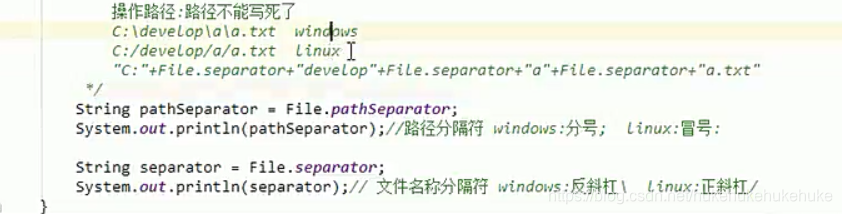
2、路径

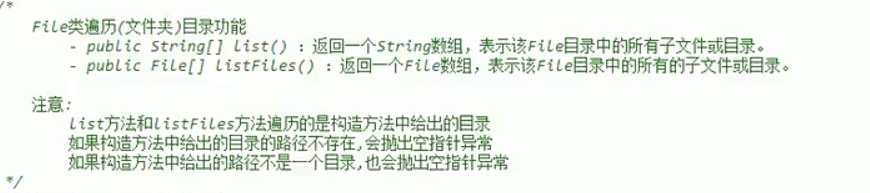
3、File文件的遍历
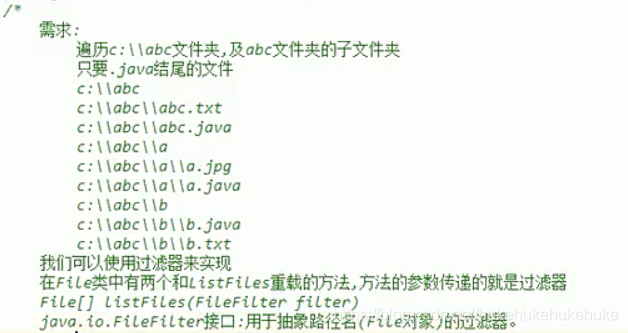
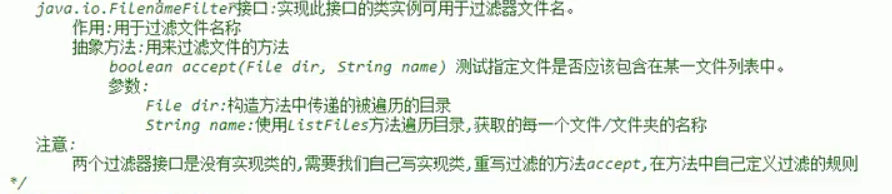
4、FilrFilter过滤器
5、Properties
package com.hu.yan;

import java.io.FileNotFoundException;
import java.io.FileOutputStream;
import java.io.FileReader;
import java.io.FileWriter;
import java.io.IOException;
import java.util.Properties;
import java.util.Set;

/**
 * Properties是唯一一个IO流有关的集合
 *
 * Properties集合是一个双列集合,key和value默认都是字符串
 *
 */
public class PropertiesTest {

	public static void main(String[] args) throws Exception {
		showo1();
		show02();
		show03();
	}

	private static void show03() throws Exception, IOException {
		Properties properties = new Properties();
		properties.load(new FileReader("文件地址"));
		Set<String> set = properties.stringPropertyNames();
		for(String key : set) {
			String value = (String) properties.get(key);
			System.out.println(value);
		}
	}

	private static void show02() throws IOException {
		Properties properties = new Properties();
		properties.setProperty("张三", "168");
		properties.setProperty("张三2", "168");
		properties.setProperty("张三3", "168");
		FileWriter fw = new FileWriter("写入到哪儿的地址");
		properties.store(fw,"save data");
		fw.close();
		//字节流不可写中文乱码 字符流可以
		properties.store(new FileOutputStream("文件名字"), "");

	}

	//使用Properties集合存储数据,遍历取出Properties集合中的数据
	private static void showo1() {
	 //创建一个Properties集合对象
		Properties properties = new Properties();
		properties.setProperty("张三", "168");
		properties.setProperty("张三2", "168");
		properties.setProperty("张三3", "168");

	//取出集合中的键
		Set<String> set = properties.stringPropertyNames();
		for(String key : set) {
			String value = properties.getProperty(key);
			System.out.println(value);
		}
	}
}





 扫一扫
扫一扫


 被折叠的 条评论
为什么被折叠?
被折叠的 条评论
为什么被折叠?
 到【灌水乐园】发言





