



Windows下将nginx配置为【服务】
下载windows版nginx
到官网中下载nginx,http://nginx.org/en/download.html
选择windows版就行,本文安装目录 D:\tools\nginx-1.17.10
借助Windows Service Wrapper小程序
- 添加服务 需要借助**“Windows Service Wrapper”**小工具下载地址:https://repo.jenkins-ci.org/releases/com/sun/winsw/winsw/2.9.0/winsw-2.9.0-bin.exe(本文使用)
- 将“winsw-2.9.0-bin.exe”改名为 nginx-service.exe
- 添加配置文件:
nginx-service.xml
<?xml version="1.0" encoding="UTF-8" ?>
<service>
    <id>nginx</id>
    <name>Nginx Service 1.8.0</name>
    <description>High Performance Nginx Service</description>
    <logpath>D:\tools\nginx-1.17.10\logs</logpath>
    <log mode="roll-by-size">
        <sizeThreshold>10240</sizeThreshold>
        <keepFiles>8</keepFiles>
    </log>
	<!--
    OPTION: stopparentprocessfirst
    If set, WinSW will terminate the parent process before stopping the children.
    Default value: false
  -->
	<stopparentprocessfirst>true</stopparentprocessfirst>
    <executable>D:\tools\nginx-1.17.10\nginx.exe</executable>
    <startarguments>-p D:\tools\nginx-1.17.10</startarguments>
    <stopexecutable>D:\tools\nginx-1.17.10\nginx.exe -s stop</stopexecutable>
	<stoparguments>-p D:\tools\nginx-1.17.10</stoparguments>
</service>
nginx-service.exe.config
- 执行添加nginx为服务
D:
cd tools\nginx-1.17.10
nginx-service.exe install
安装完成:
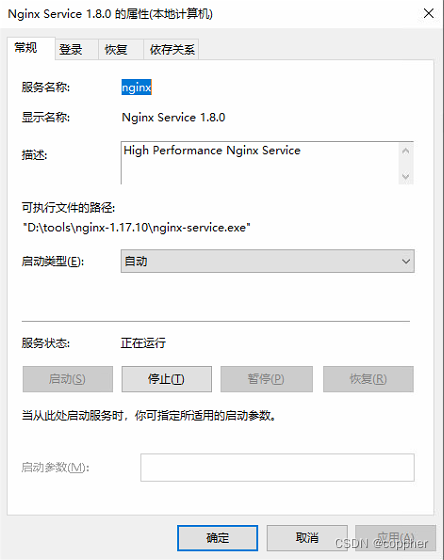
*卸载服务命令: sc delete 服务名 *
注:查阅相关资料时,发现网上,很多文档都是互抄,缺少 第 1、2步导致安装不上,信息缺失,特此记录下。若不是被环境限制,也不会考虑用windows安装nginx ^ - ^ - -






 扫一扫
扫一扫


 3491
3491

 被折叠的 条评论
为什么被折叠?
被折叠的 条评论
为什么被折叠?
 到【灌水乐园】发言





