



 本文详细介绍了如何在三台服务器间进行PostgreSQL的主从复制,包括master节点的设置(创建复制用户、配置postgresql.conf和pg_hba.conf),slave节点的数据同步和配置调整,以及主库和从库的验证过程。
环境准备:
三台服务器之间建立免密登录,参考链接:
资源:
192.168.200.57(mater)
192.168.200.58(slave)
192.168.200.59(slave)
一、master节点(正常搭建):
1、创建复制用户:
su postgres
/pgsoft/pgsql/bin/psql
CREATE ROLE replica login replication encrypted password 'replica';
[root@localhost pg_log]# su postgres
[postgres@localhost pg_log]$ /pgsoft/pgsql/bin/psql
Password for user postgres:
psql (12.0)
Type "help" for help.
postgres=# CREATE ROLE replica login replication encrypted password 'replica';
CREATE ROLE
postgres=#2、修改配置文件(postgresql.conf文件中直接添加):
vi /pgsoft/pgsql/data/postgresql.conf
wal_level = replica
max_wal_senders = 3                 #Slave库的节点数  ,从节点数若为2,此值则为3
hot_standby = on
#wal_keep_segments=64
max_connections=1000
idle_in_transaction_session_timeout=20000 #超时自动查杀空闲事务
3、修改pg_hba.conf文件(直接在文件中添加,根据实际情况修改成自己slave节点的ip):
vi /pgsoft/pgsql/data/pg_hba.conf
host    replication     replica 192.168.200.58/24       password
host    replication     replica 192.168.200.59/24       password

host    all     all     127.0.0.1/32    trust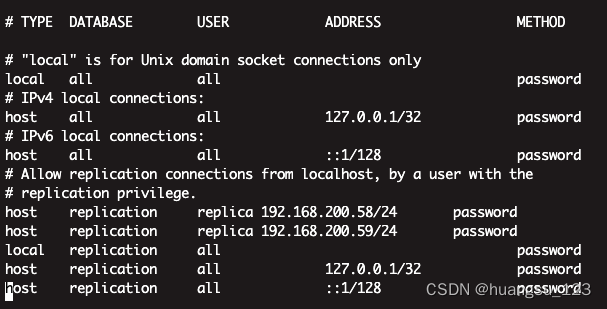
4、进入postgres,重启服务:
su postgres
/pgsoft/pgsql/bin/pg_ctl restart -D /pgsoft/pgsql/data/
二、slave节点(只创建data数据文件夹,不启动服务):
1、进入postgres,执行下列命令同步:
su postgres
/pgsoft/pgsql/bin/pg_basebackup -h 192.168.200.57 -p 5432 -U replica  -D /pgsoft/pgsql/data/ -F p#输入的replica账户的密码
2、修改配置文件postgresql.conf(直接在文件中添加即可):
vi /pgsoft/pgsql/data/postgresql.conf
recovery_target_timeline = 'latest'
primary_conninfo = 'host=192.168.200.57 port=5432 user=replica password=replica'
max_standby_streaming_delay = 30s
wal_receiver_status_interval = 10s
hot_standby_feedback = on
3、创建standby.signal文件,不然启动的时候报错(pg12之前直接在配置文件中添加standby_mode = 'on'语句即可):
vi /pgsoft/pgsql/data/standby.signal
standby_mode = on
4、启动服务:
/pgsoft/pgsql/bin/pg_ctl start -D /pgsoft/pgsql/data/[postgres@localhost pgsoft]$ /pgsoft/pgsql/bin/postmaster -D /pgsoft/pgsql/data/
2023-11-03 15:46:14.678 CSTFATAL: data directory "/pgsoft/pgsql/data" has invalid permissions
2023-11-03 15:46:14.678 CSTDETAIL: Permissions should be u=rwx (0700) or u=rwx,g=rx (0750).报data目录权限问题,授权:
chmod 0750 /pgsoft/pgsql/*[postgres@localhost pgsoft]$ /pgsoft/pgsql/bin/pg_ctl start -D /pgsoft/pgsql/data/
waiting for server to start....2023-11-03 15:47:37.757 CSTLOG: starting PostgreSQL 12.0 on x86_64-pc-linux-gnu, compiled by gcc (GCC) 4.8.5 20150623 (Red Hat 4.8.5-44), 64-bit
2023-11-03 15:47:37.758 CSTLOG: listening on IPv4 address "0.0.0.0", port 5432
2023-11-03 15:47:37.758 CSTLOG: listening on IPv6 address "::", port 5432
2023-11-03 15:47:37.759 CSTLOG: listening on Unix socket "/tmp/.s.PGSQL.5432"
2023-11-03 15:47:37.771 CSTLOG: redirecting log output to logging collector process
2023-11-03 15:47:37.771 CSTHINT: Future log output will appear in directory "pg_log".
done
server started三、验证主从复制:
主库:
1、在主库(master)上创建新数据库和新用户:
su postgres
#创建test数据库:
/pgsoft/pgsql/bin/createdb test
#创建user_test用户
create user user_test with password 'test123';
#封装:
./createuser -P user_test
[root@localhost ~]# su postgres
[postgres@localhost root]$ /pgsoft/pgsql/bin/createdb test
Password:
[postgres@localhost root]$ /pgsoft/pgsql/bin/psql
Password for user postgres:
psql (12.0)
Type "help" for help.
postgres=# create user user_test with password 'test123';
CREATE ROLE
postgres=# ./createuser -P user_test
postgres-#2、使用新创建的用户,登录数据库,新增表,并添加数据:
/pgsoft/pgsql/bin/psql test -U user_test
create table tm_1(id serial,name varchar(10),primary key(id));
insert into tm_1(name)values('aa'),('bb');
[postgres@localhost pgsql]$ /pgsoft/pgsql/bin/psql test -U user_test
Password for user user_test:
psql (12.0)
Type "help" for help.
^
test=> create table tm_1(id serial,name varchar(10),primary key(id));
CREATE TABLE
test=> insert into tm_1(name)values('aa'),('bb');
INSERT 0 2
test=> select * from tm_1;
id | name
----+------
1 | aa
2 | bb
(2 rows)
test=>从库:
1、使用postgres用户登录数据库,查看当前存在的所有用户:
\du
postgres=# \du
                                   List of roles
 Role name |                         Attributes                         | Member of
-----------+------------------------------------------------------------+-----------
 postgres  | Superuser, Create role, Create DB, Replication, Bypass RLS | {}
 replica   | Replication                                                | {}
 user_test |                                                            | {}
2、用user_test登录数据库,查看是否存在新增的:
/pgsoft/pgsql/bin/psql test -U user_test
select table_name  from information_schema.tables where table_schema ='public' and table_catalog ='test';
[postgres@localhost root]$ /pgsoft/pgsql/bin/psql test -U user_test
Password for user user_test:
psql (12.0)
Type "help" for help.

test=> select table_name  from information_schema.tables where table_schema ='public' and table_catalog ='test';
 table_name
------------
 tm_1
(1 row)

test=> select * from tm_1;
 id | name
----+------
  1 | aa
  2 | bb
(2 rows)





 扫一扫
扫一扫


 4654
4654

 被折叠的 条评论
为什么被折叠?
被折叠的 条评论
为什么被折叠?
 到【灌水乐园】发言





