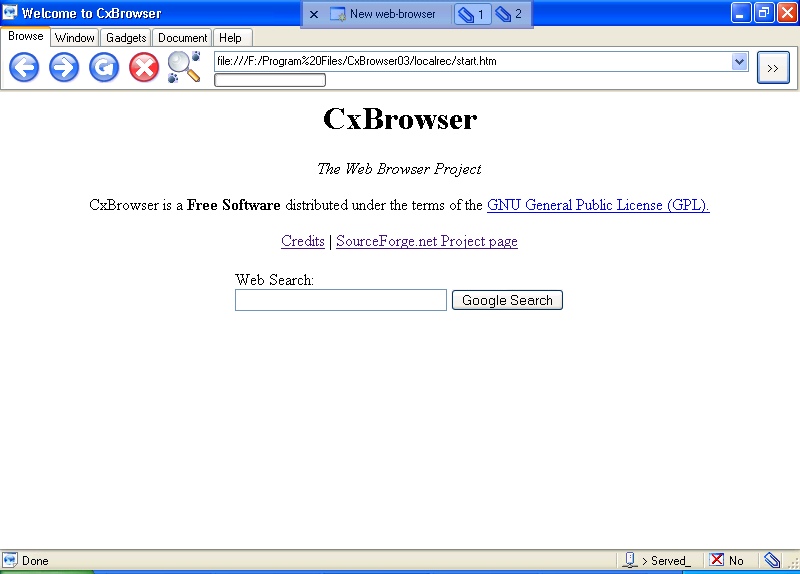
CxBrowser, the open source / experimental web browser.

CxBrowser是一款完全用C#编写的、基于Mozilla ActiveX控件的开源免费Web浏览器。它允许在虚拟桌面组织窗口,并遵循GNU/通用公共许可证。此项目展示了如何在SharpDevelop 2.1中使用ActiveX控件,提供实验性的用户界面,并利用Gecko渲染引擎的速度和标准合规性。尽管存在一些限制,如过时的安全补丁和某些组件的老旧,但CxBrowser0.4当前是稳定版本。


     http://cxbrowser.sourceforge.net/ 


¿What is CxBrowser?

CxBrowser is an open source and free Web Browser implement under Mozilla Activex Control component. It is written entirely in C#, and organize windows on virtual desks. CxBrowser is distributed under GNU/General Public License.

Goals:

  • Mozilla Activex Control is a standard ActiveX component and can be used from any development environment which supports ActiveX. The project demonstrates the use of Activex control in SharpDevelop 2.1, the open source IDE for .NET Framework under GNU Lesser General Public Licence.
  • Provide an experimental User Interface: Organize widows in virtual desks.
  • The project is an example to make a custom web browser.
  • Exploit the speed and standards compliance of the Gecko rendering engine.
  • No more nasty IE license - read it?.

CxBrowser 0.3 loading SourceForge.net Proyect PageStatus of the project

  • Release 0.3 is stable version.
  • Release 0.4 is the end of project and development tasks.
  • 10 Ago 2007: CxBrowser 0.4 ready, but beta version.

Disclaimer

There are, in CxBrowser, parts and software components (Mozilla Activex Control - Gecko, Mozilla dependences 1.5) written in the year 2000-2005 and slow changes.  This web browser is not enable for productive use because this project is not updated frequently with security patch from Mozilla and Activex vulnerabilities reported.

Download

CxBrowser is free, however, if you think it is useful and want to support its development, then make a donation. Note: In case you want to sponsor a feature, then contact us.

Support This Project

Additional Software You Need to Install (Prerequisite)

  • CxBrowser 0.4 require
  • CxBrowser 0.3 require
  • CxBrowser 0.3 support
  • For Developers: Download SharpDevelop, The open source IDE for .NET Framework.

Screenshots

CxBrowser 0.4 (Current version)

More screenshots

CxBrowser 0.3:

Working under SharpDevelop, (spanish):

Developers

  • Miguel A. Cruz Condor [miguelcrux @ gmail.com] ->Author, proyect maintainer.
  • Alexis Damian Grabiel [aldamgra @ hotmail.com] ->Test & code cleaning.
  • Paul Collantes Laura [quenaspaul @ hotmail.com] -> Heavy Test.
  • José L. Ruiz Candiotti [blinki_pinky @ hotmail.com] ->Smart Test.

Collaborators & Sponsor:

  • Richard Garcia Condor [] -> Colaborator.
  • Edwin Marco Gomez Salinas [edwinmarco @ gmail.com] ->Colaborador, Sponsor.

Links:

为了实现抖音博主新作品批量监控下载,精简以下代码import datetime import json import os import random import re import time import webbrowser from time import sleep from urllib import parse from loguru import logger from configobj import ConfigObj import execjs import requests from selenium.webdriver.chrome.service import Service from selenium.webdriver.common.by import By from win10toast import ToastNotifier requests.packages.urllib3.disable_warnings() from selenium import webdriver from bs4 import BeautifulSoup # import Util # 指定浏览器打开网页 firefoxPath = r"C:\Program Files\Mozilla Firefox\firefox.exe" webbrowser.register('firefox', None, webbrowser.BackgroundBrowser(firefoxPath)) # 浏览器设置 option = webdriver.ChromeOptions() # 以最高权限运行 option.add_argument('--no-sandbox') # 开发者模式的开关,设置一下,打开浏览器就不会识别为自动化测试工具了 option.add_experimental_option('excludeSwitches', ['enable-automation']) option.add_argument('--ignore-certificate-errors') option.add_argument('--ignore-ssl-errors') # # 指定缓存位置 # option.add_argument(r'--disk-cache-dir=G:\python项目\凌风抖音监控还原\cache') # option.add_argument(r'--user-data-dir=G:\python项目\凌风抖音监控还原\cache') # 处理SSL证书错误问题 option.add_argument('--ignore-certificate-errors') option.add_argument('--ignore-ssl-errors') # 忽略无用的日志 option.add_experimental_option("excludeSwitches", ['enable-automation', 'enable-logging']) option.add_argument('--no-sandbox') # 给予root执行权限 s = Service('chromedriver.exe') tplt = "{0:{3}^22}\t{1:^8}\t{2:^8}" today = str(datetime.date.today()) video_save_lv = f"D:\\监控视频下载\\{today}" if not os.path.exists(video_save_lv): os.mkdir(video_save_lv) def get_secUid(): """ 登录获取UID :return: """ global headers browser = webdriver.Chrome(service=s, options=option) url = 'https://www.douyin.com/user/self' # cookie 登录 if os.path.exists("cookies.txt"): # 从9828_cookies.txt文件读取cookies with open("cookies.txt") as f2: cookies = json.loads(f2.read()) # 使用cookies登录 browser.get(url) for cook in cookies: browser.add_cookie(cook) # 刷新页面 browser.refresh() while True: sleep(5) if "用户名" in browser.title: break else: browser.get(url) user_input = input("登录:") # 获取cookie cookies = browser.get_cookies() print(cookies) with open("cookies.txt", "w") as f: f.write(json.dumps(cookies)) # 存储header供requests使用 headers = {'user-agent': "Mozilla/5.0 (Windows NT 10.0; Win64; x64; rv:109.0) Gecko/20100101 Firefox/116.0"} cookies = browser.get_cookies() cookie_string = '' for cookie in cookies: cookie_string = cookie_string + cookie['name'] + '=' + cookie['value'] + ';' headers['cookie'] = cookie_string headers['referer'] = "https://www.xxx.com/user/self?showTab=record" headers['TE'] = "trailers" headers['Sec-Fetch-Dest'] = "empty" headers['Sec-Fetch-Mode'] = "cors" headers['Sec-Fetch-Site'] = "same-origin" headers['Host'] = "www.douyin.com" # 获取 secUid, uid, 关注数量 res = re.findall('<script id="RENDER_DATA" type="application/json">(.*?)</script>', browser.page_source)[0] res = requests.utils.unquote(res) secUid = json.loads(res)['app']['user']['info']['secUid'] uid = str(json.loads(res)['app']['user']['info']['uid']) followingCount = json.loads(res)['app']['user']['info']['followingCount'] logger.info(f"secUid:{secUid}, uid: {uid} 关注博主:{followingCount}") # print(secUid) browser.quit() return (secUid, followingCount, uid, headers)
09-18
【完美复现】面向配电网韧性提升的移动储能预布局与动态调度策略【IEEE33节点】(Matlab代码实现)内容概要:本文介绍了基于IEEE33节点的配电网韧性提升方法,重点研究了移动储能系统的预布局与动态调度策略。通过Matlab代码实现,提出了一种结合预配置和动态调度的两阶段优化模型,旨在应对电网故障或极端事件时快速恢复供电能力。文中采用了多种智能优化算法(如PSO、MPSO、TACPSO、SOA、GA等)进行对比分析,验证所提策略的有效性和优越性。研究不仅关注移动储能单元的初始部署位置,还深入探讨其在故障发生后的动态路径规划与电力支援过程,从而全面提升配电网的韧性水平。; 适合人群:具备电力系统基础知识和Matlab编程能力的研究生、科研人员及从事智能电网、能源系统优化等相关领域的工程技术人员。; 使用场景及目标:①用于科研复现,特别是IEEE顶刊或SCI一区论文中关于配电网韧性、应急电源调度的研究;②支撑电力系统在灾害或故障条件下的恢复力优化设计,提升实际电网应对突发事件的能力;③为移动储能系统在智能配电网中的应用提供理论依据和技术支持。; 阅读建议:建议读者结合提供的Matlab代码逐模块分析,重点关注目标函数建模、约束条件设置以及智能算法的实现细节。同时推荐参考文中提及的MPS预配置与动态调度上下两部分,系统掌握完整的技术路线,并可通过替换不同算法或测试系统进一步拓展研究。
评论
添加红包

请填写红包祝福语或标题

红包个数最小为10个

红包金额最低5元

当前余额3.43前往充值 >
需支付:10.00
成就一亿技术人!
领取后你会自动成为博主和红包主的粉丝 规则
hope_wisdom
发出的红包
实付
使用余额支付
点击重新获取
扫码支付
钱包余额 0

抵扣说明:

1.余额是钱包充值的虚拟货币,按照1:1的比例进行支付金额的抵扣。
2.余额无法直接购买下载,可以购买VIP、付费专栏及课程。

余额充值