



 在开发中,有时需将数据库数据导出为Excel表格。博客介绍了实现此操作的方法,包含前端js代码和后台代码。
开发过程中,我们有时候会要求把数据库的数据导出来,导成Excel的表格形式,所以我们就可以有如下的操作:
1.前端js
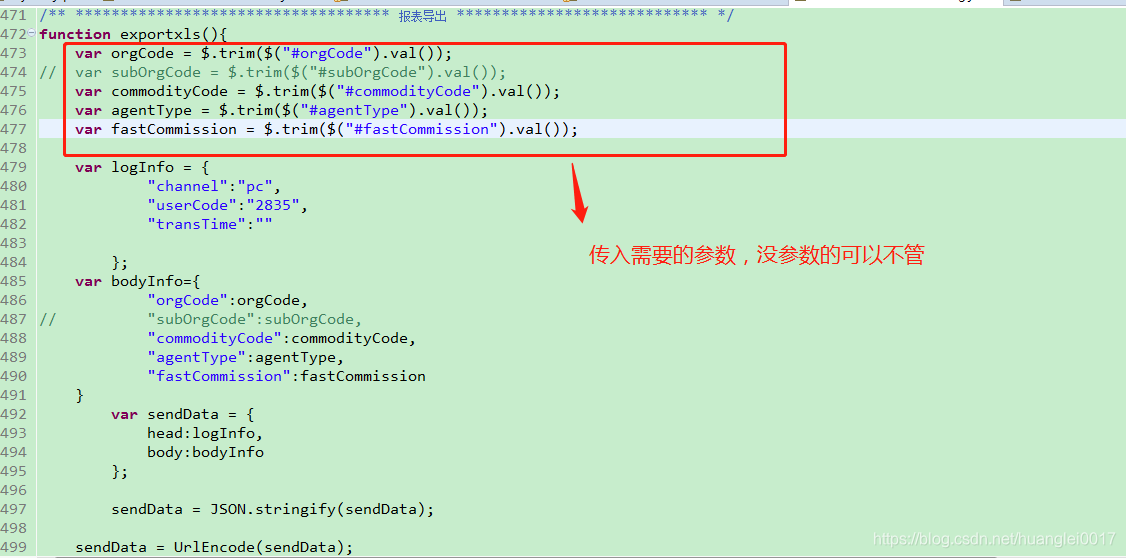
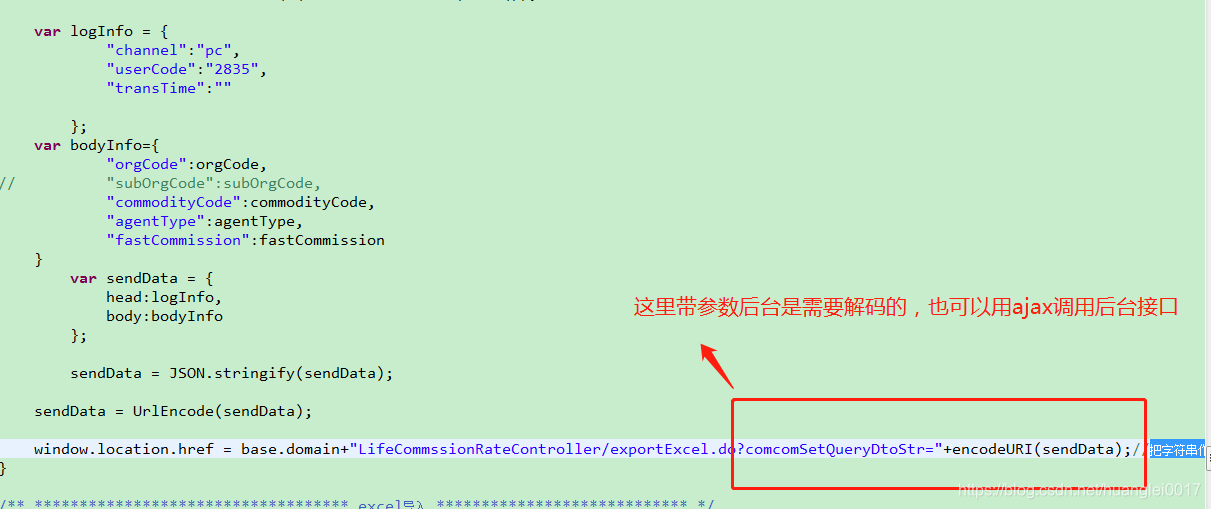 代码:
代码:
/** *********************************** 报表导出 **************************** */
function exportxls(){
	var orgCode = $.trim($("#orgCode").val());
//	var subOrgCode = $.trim($("#subOrgCode").val());
	var commodityCode = $.trim($("#commodityCode").val());
	var agentType = $.trim($("#agentType").val());
	var fastCommission = $.trim($("#fastCommission").val());

	var logInfo = {
			"channel":"pc",
			"userCode":"2835",
			"transTime":""

		};
	var bodyInfo={
			"orgCode":orgCode,
//			"subOrgCode":subOrgCode,
			"commodityCode":commodityCode,
			"agentType":agentType,
			"fastCommission":fastCommission
	}
		var sendData = {
			head:logInfo,
			body:bodyInfo
		};

		sendData = JSON.stringify(sendData);

	sendData = UrlEncode(sendData);

	window.location.href = base.domain+"LifeCommssionRateController/exportExcel.do?comcomSetQueryDtoStr="+encodeURI(sendData);//把字符串作为 URI 进行编码,因为存在中文,所以需要编码两次
}
2.后台代码
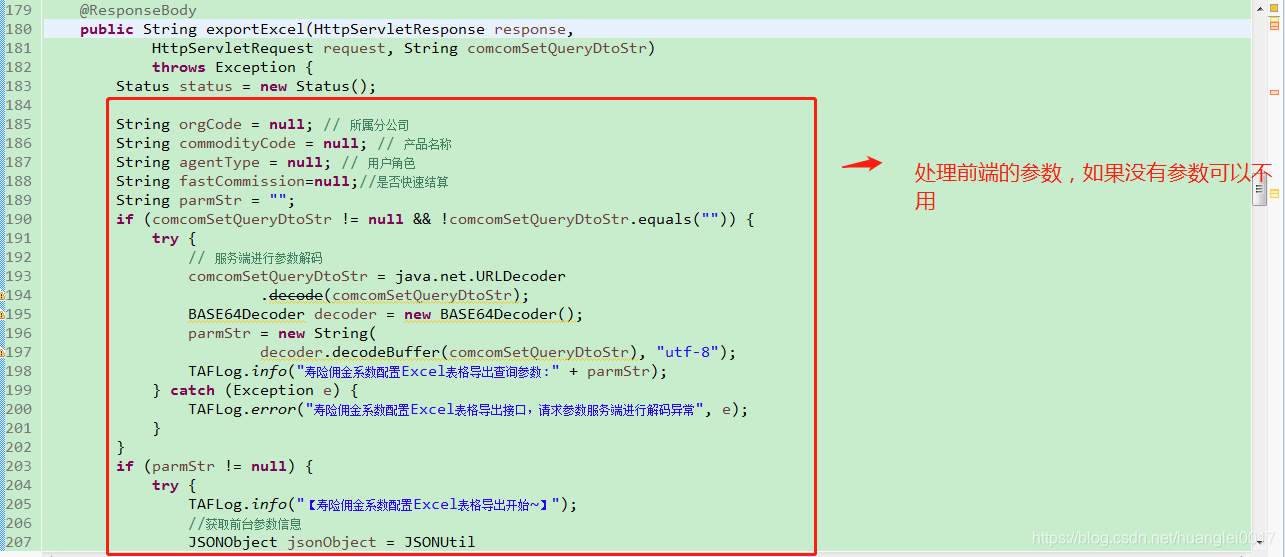
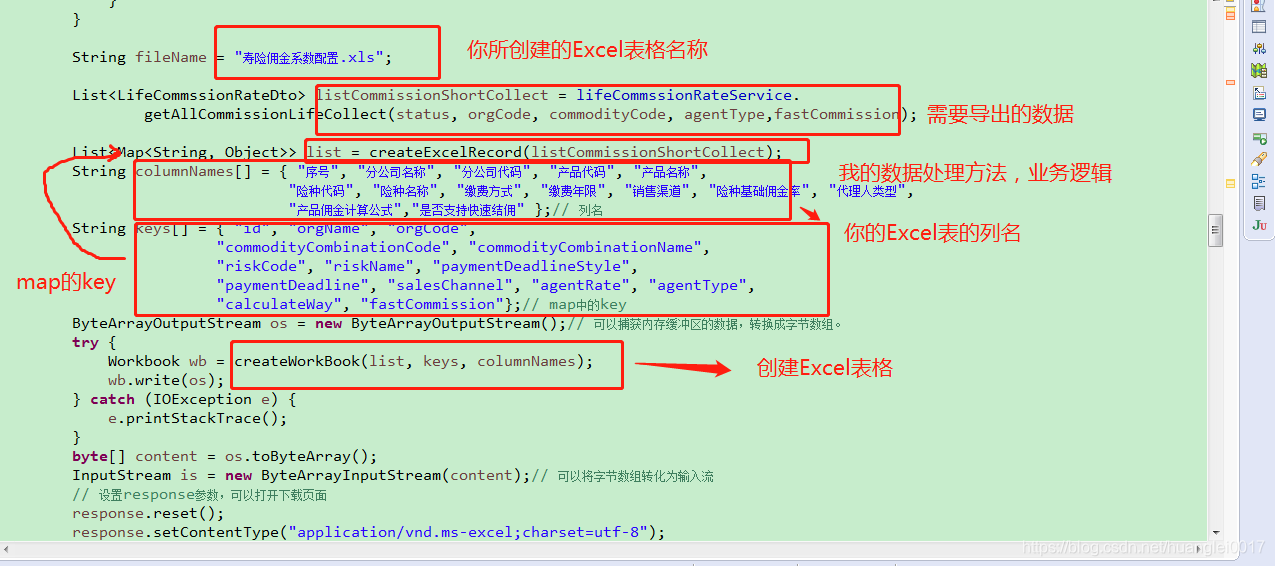
代码:
/**
	 * 【方法功能描述】寿险佣金系数配置Excel表格导出
	 *
	 * @author huanglei
	 * @date 2018-09-06
	 * @param response
	 * @param request
	 * @param comcomSetQueryDtoStr
	 * @return
	 * @throws Exception
	 */
	@RequestMapping(value = "/exportExcel")
	@ResponseBody
	public String exportExcel(HttpServletResponse response,
			HttpServletRequest request, String comcomSetQueryDtoStr)
			throws Exception {
		Status status = new Status();

		String orgCode = null; // 所属分公司
		String commodityCode = null; // 产品名称
		String agentType = null; // 用户角色
		String fastCommission=null;//是否快速结算
		String parmStr = "";
		if (comcomSetQueryDtoStr != null && !comcomSetQueryDtoStr.equals("")) {
			try {
				// 服务端进行参数解码
				comcomSetQueryDtoStr = java.net.URLDecoder
						.decode(comcomSetQueryDtoStr);
				BASE64Decoder decoder = new BASE64Decoder();
				parmStr = new String(
						decoder.decodeBuffer(comcomSetQueryDtoStr), "utf-8");
				TAFLog.info("寿险佣金系数配置Excel表格导出查询参数:" + parmStr);
			} catch (Exception e) {
				TAFLog.error("寿险佣金系数配置Excel表格导出接口,请求参数服务端进行解码异常", e);
			}
		}
		if (parmStr != null) {
			try {
				TAFLog.info("【寿险佣金系数配置Excel表格导出开始~】");
				//获取前台参数信息
				JSONObject jsonObject = JSONUtil
						.parseStringToJSONObject(parmStr);
				orgCode = (String) jsonObject.getJSONObject("body").get("orgCode"); // 所属分公司
				commodityCode = (String) jsonObject.getJSONObject("body").get("commodityCode"); // 产品名称
				agentType = (String) jsonObject.getJSONObject("body").get("agentType"); // 用户角色
				fastCommission = (String) jsonObject.getJSONObject("body").get("fastCommission"); // 用户角色

//				commissionRateDto = (CommissionRateDto) JSONObject.toBean(
//						jsonObject.getJSONObject("body"),
//						CommissionRateDto.class);
			} catch (Exception e) {
				status.setStatusCode("000001");
				status.setStatusMessage("查询异常");
				TAFLog.error("寿险佣金系数配置Excel表格导出请求异常", e);
			}
		}

		String fileName = "寿险佣金系数配置.xls";

		List<LifeCommssionRateDto> listCommissionShortCollect = lifeCommssionRateService.
				getAllCommissionLifeCollect(status, orgCode, commodityCode, agentType,fastCommission);

		List<Map<String, Object>> list = createExcelRecord(listCommissionShortCollect);
		String columnNames[] = { "序号", "分公司名称", "分公司代码", "产品代码", "产品名称",
								"险种代码", "险种名称", "缴费方式", "缴费年限", "销售渠道", "险种基础佣金率", "代理人类型",
								"产品佣金计算公式","是否支持快速结佣" };// 列名
		String keys[] = { "id", "orgName", "orgCode",
						"commodityCombinationCode", "commodityCombinationName",
						"riskCode", "riskName", "paymentDeadlineStyle",
						"paymentDeadline", "salesChannel", "agentRate", "agentType",
						"calculateWay", "fastCommission"};// map中的key
		ByteArrayOutputStream os = new ByteArrayOutputStream();// 可以捕获内存缓冲区的数据,转换成字节数组。
		try {
			Workbook wb = createWorkBook(list, keys, columnNames);
			wb.write(os);
		} catch (IOException e) {
			e.printStackTrace();
		}
		byte[] content = os.toByteArray();
		InputStream is = new ByteArrayInputStream(content);// 可以将字节数组转化为输入流
		// 设置response参数,可以打开下载页面
		response.reset();
		response.setContentType("application/vnd.ms-excel;charset=utf-8");
		response.setHeader("Content-Disposition", "attachment;filename="
				+ new String(java.net.URLEncoder.encode((fileName), "UTF-8")));
		ServletOutputStream out = response.getOutputStream();
		BufferedInputStream bis = null;
		BufferedOutputStream bos = null;
		try {
			bis = new BufferedInputStream(is);
			bos = new BufferedOutputStream(out);
			byte[] buff = new byte[2048];
			int bytesRead;
			// Simple read/write loop.
			while (-1 != (bytesRead = bis.read(buff, 0, buff.length))) {
				bos.write(buff, 0, bytesRead);
			}
			bos.flush();
		} catch (final IOException e) {
			throw e;
		} finally {
			if (bis != null)
				bis.close();
			if (bos != null)
				bos.close();
			if (out != null)
				out.close();
		}
		TAFLog.info("【结束~】");
		// }
		// else{
		// TAFLog.info("权限失效,请重新登录!");
		// response.setContentType("text/html;charset:utf-8;");
		// response.setCharacterEncoding("utf-8");
		// response.getWriter().print("<script>alert('权限失效,请重新登录!');history.go(-1);</script>");
		// }
		return null;
	}

	/**
	 * 【方法功能描述】寿险佣金Excel表格导出
	 *
	 * @author huanglei
	 * @date 2018-09-06
	 * @param listCommissionShortCollect
	 * @return
	 */
	private List<Map<String, Object>> createExcelRecord(
			List<LifeCommssionRateDto> listCommissionShortCollect) {
		List<Map<String, Object>> listmap = new ArrayList<Map<String, Object>>();
		Map<String, Object> map = new HashMap<String, Object>();
		map.put("sheetName", "sheet1");
		listmap.add(map);
		int index = 0;
		for (LifeCommssionRateDto lifeCommssionRateDto : listCommissionShortCollect) {
			index++;

//			"序号", "分公司名称", "分公司代码", "产品代码", "产品名称",
//			"险种代码", "险种名称", "缴费方式", "缴费年限", "销售渠道",
//			"险种基础佣金率", "代理人类型", "产品佣金计算公式"

			// "id","orgName","orgCode","commodityCombinationCode","commodityCombinationName",
			// "riskCode","riskName","paymentDeadlineStyle","paymentDeadline","salesChannel",
			// "agentRate","agentType","calculateWay"
			Map<String, Object> mapValue = new HashMap<String, Object>();
			mapValue.put("id", index);
			mapValue.put("orgName", lifeCommssionRateDto.getCollect().getOrgName());
			mapValue.put("orgCode", lifeCommssionRateDto.getCollect().getOrgCode());
			mapValue.put("commodityCombinationCode", lifeCommssionRateDto.getCollect().getCommodityCombinationCode());
			mapValue.put("commodityCombinationName", lifeCommssionRateDto.getCollect().getCommodityCombinationName());
			mapValue.put("riskCode",lifeCommssionRateDto.getCollect().getRiskCode());
			mapValue.put("riskName",lifeCommssionRateDto.getCollect().getRiskName());
			String paymentDeadlineStyle = lifeCommssionRateDto.getPaymentDeadline();
			if("1年".equals(paymentDeadlineStyle)){
				paymentDeadlineStyle="趸交";
			}else{
				paymentDeadlineStyle="期交";
			}
			mapValue.put("paymentDeadlineStyle", paymentDeadlineStyle);
			mapValue.put("paymentDeadline", lifeCommssionRateDto.getPaymentDeadline());
			String salesChannel = lifeCommssionRateDto.getCollect().getSalesChannel();
			if ("01".equals(salesChannel)) {
				salesChannel = "天安佰盈";
			}
			mapValue.put("salesChannel", salesChannel);
			BigDecimal agentRate = lifeCommssionRateDto.getCollect().getAgentRate();
			if (agentRate != null) {
				agentRate = agentRate.setScale(0, BigDecimal.ROUND_HALF_UP);
			}
			mapValue.put("agentRate", agentRate);
			String agentType = lifeCommssionRateDto.getCollect().getAgentType();
			// 用户类型:02-代理人;03-客户经理;04-同道内勤;05-团队人员;06-2k代理人',
			if ("99".equals(agentType)) {
				agentType = "全部";
			} else if ("02".equals(agentType)) {
				agentType = "代理人";
			} else if ("03".equals(agentType)) {
				agentType = "客户经理";
			} else if ("04".equals(agentType)) {
				agentType = "内勤";
			} else if ("05".equals(agentType)) {
				agentType = "团队";
			}
			/*else if ("06".equals(agentType)) {
				agentType = "2k代理人";
			}*/
			mapValue.put("agentType", agentType);
			String calculateWay = "";
			if ("1".equals(lifeCommssionRateDto.getCollect().getCalculateWay())) {
				calculateWay = "总保费*代理人佣金率";
			} else if ("2".equals(lifeCommssionRateDto.getCollect().getCalculateWay())) {
				calculateWay = "总保费/1.06*代理人佣金率";
			}
			mapValue.put("calculateWay", calculateWay);

			String fastCommission=lifeCommssionRateDto.getCollect().getFastCommission();
			if("1".equals(fastCommission)){
				fastCommission="快速结佣";
			}
			else if("0".equals(fastCommission)){
				fastCommission="非快速结佣";

			}
			else{
				fastCommission="";
			}
			mapValue.put("fastCommission", fastCommission);
			listmap.add(mapValue);
		}
		return listmap;
	}

	/**
	 * 创建excel文档,
	 *
	 * @param list
	 *            数据
	 * @param keys
	 *            list中map的key数组集合
	 * @param columnNames
	 *            excel的列名
	 * */
	public Workbook createWorkBook(List<Map<String, Object>> list,
			String[] keys, String columnNames[]) {
		// 创建excel工作簿
		Workbook wb = new HSSFWorkbook();
		// 创建第一个sheet(页),并命名
		Sheet sheet = wb.createSheet(list.get(0).get("sheetName").toString());
		// 手动设置列宽。第一个参数表示要为第几列设;,第二个参数表示列的宽度,n为列高的像素数。
		for (int i = 0; i < keys.length; i++) {
			sheet.setColumnWidth((short) i, (short) (35.7 * 200));
		}

		// 创建两种单元格格式
		CellStyle cs = wb.createCellStyle();
		CellStyle cs2 = wb.createCellStyle();

		// 创建两种字体
		Font f = wb.createFont();
		Font f2 = wb.createFont();

		// 创建第一种字体样式(用于列名)
		f.setFontHeightInPoints((short) 10);
		f.setColor(IndexedColors.BLACK.getIndex());
		f.setBoldweight(Font.BOLDWEIGHT_BOLD);

		// 创建第二种字体样式(用于值)
		f2.setFontHeightInPoints((short) 10);
		f2.setColor(IndexedColors.BLACK.getIndex());

		// 设置第一种单元格的样式(用于列名)
		cs.setFont(f);
		cs.setBorderLeft(CellStyle.BORDER_THIN);
		cs.setBorderRight(CellStyle.BORDER_THIN);
		cs.setBorderTop(CellStyle.BORDER_THIN);
		cs.setBorderBottom(CellStyle.BORDER_THIN);
		cs.setAlignment(CellStyle.ALIGN_CENTER);
		cs.setFillForegroundColor(IndexedColors.SKY_BLUE.getIndex());
		cs.setFillPattern(HSSFCellStyle.SOLID_FOREGROUND);
		// 设置第二种单元格的样式(用于值)
		cs2.setFont(f2);
		cs2.setBorderLeft(CellStyle.BORDER_THIN);
		cs2.setBorderRight(CellStyle.BORDER_THIN);
		cs2.setBorderTop(CellStyle.BORDER_THIN);
		cs2.setBorderBottom(CellStyle.BORDER_THIN);
		cs2.setAlignment(CellStyle.ALIGN_CENTER);
		// 创建第一行
		Row row = sheet.createRow((short) 0);
		// 设置列名
		for (int i = 0; i < columnNames.length; i++) {
			Cell cell = row.createCell(i);
			cell.setCellValue(columnNames[i]);
			cell.setCellStyle(cs);
		}
		// 设置每行每列的值
		for (short i = 1; i <= list.size(); i++) {
            // Row 行,Cell 方格 , Row 和 Cell 都是从0开始计数的
            // 创建一行,在页sheet上
            Row row1 = sheet.createRow((short) i);
            // 在row行上创建一个方格
            for (short j = 0; j < keys.length; j++) {
                Cell cell = row1.createCell(j);
                cell.setCellValue(list.get(i-1).get(keys[j]) == null ? " " : list.get(i-1).get(keys[j]) .toString());
                cell.setCellStyle(cs2);
            }
        }

		return wb;
	}





 扫一扫
扫一扫


 1479
1479


 到【灌水乐园】发言



